1. ഉൽപ്പന്നം കഴിഞ്ഞുview
The iFlight Albatross 5.8GHz FPV Antenna is designed for use with FPV goggles and drones, providing reliable signal transmission and reception. This package includes two Albatross 5.8GHz 150mm antennas, available in various connector types and polarizations to suit different FPV setups.

Figure 1.1: Two iFlight Albatross 5.8GHz FPV Antennas. These antennas are designed for optimal performance in the 5.8GHz frequency band, commonly used in FPV systems.
പ്രധാന സവിശേഷതകൾ:
- ഫ്രീക്വൻസി റേഞ്ച്: 5000-6000MHz
- നേട്ടം: 3dBi
- Axial Ratio: 0.7
- Cable Type: RG141
- അളവുകൾ: 16*150 മിമി
- Interface Options: RHCP SMA, RHCP RP-SMA, LHCP RP-SMA
- Polarization: RHCP/LHCP
- SWR: ≤1.5 (ON 5.8GHz)
2. സജ്ജീകരണവും ഇൻസ്റ്റാളേഷനും
Proper installation of your iFlight Albatross antenna is crucial for optimal performance. Ensure that the antenna's connector type matches the port on your FPV goggles or drone's video transmitter (VTX).
2.1 Identifying Connector Types
The Albatross antenna is available with RHCP SMA, RHCP RP-SMA, or LHCP RP-SMA interfaces. Verify the connector type of your antenna and device before attempting to connect.
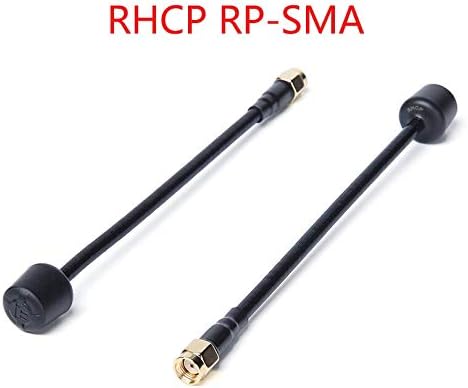
Figure 2.1: Albatross Antennas with RHCP RP-SMA and SMA Male Connectors. It is important to match the antenna's connector to the corresponding port on your FPV equipment.
2.2 ആൻ്റിന ബന്ധിപ്പിക്കുന്നു
- Carefully align the antenna's connector with the corresponding port on your FPV goggles (e.g., Fatshark EV200D) or drone's VTX.
- Gently screw the antenna onto the port. Do not overtighten, as this can damage the connector. Hand-tightening is usually sufficient.
- Ensure the connection is secure to prevent signal loss during operation.

Figure 2.2: Antenna Connected to FPV Goggles. The antenna should be securely attached to the video receiver (VRX) port on your goggles for clear video reception.
2.3 Polarization Matching
For best signal quality, ensure that the polarization of your transmitting antenna (on the drone) matches the polarization of your receiving antenna (on the goggles). Both should be either Right-Hand Circularly Polarized (RHCP) or Left-Hand Circularly Polarized (LHCP).
3. പ്രവർത്തന മാർഗ്ഗനിർദ്ദേശങ്ങൾ
The iFlight Albatross antenna is designed for 5.8GHz FPV systems. Adhere to the following guidelines for optimal performance:
- ഫ്രീക്വൻസി ശ്രേണി: Operate within the 5000-6000MHz frequency range for which the antenna is optimized.
- വീക്ഷണരേഖ: Maintain a clear line of sight between your drone's transmitting antenna and your FPV goggles' receiving antenna for the strongest signal.
- ആൻ്റിന ഓറിയൻ്റേഷൻ: While circular polarization reduces multipath interference, orienting your antennas generally towards each other can improve signal strength, especially at longer distances.
- തടസ്സങ്ങൾ ഒഴിവാക്കുക: Physical obstructions like trees, buildings, or dense foliage can significantly degrade signal quality.
4. പരിപാലനവും പരിചരണവും
To ensure the longevity and consistent performance of your iFlight Albatross antennas, follow these maintenance tips:
- ക്ലീൻ കണക്ടറുകൾ: Periodically inspect and clean the gold-plated connectors to remove any dirt, dust, or corrosion. Use a soft, dry cloth or a cotton swab with isopropyl alcohol if necessary.
- വളയുന്നത് ഒഴിവാക്കുക: While the antenna cable is flexible (RG141), avoid sharp bends or excessive force that could damage the internal wiring or the connector joint.
- സംഭരണം: Store antennas in a clean, dry environment away from extreme temperatures and direct sunlight when not in use.
- ശാരീരിക പരിശോധന: Regularly check the antenna for any signs of physical damage, such as frayed cables, bent connectors, or cracks in the housing.

Figure 4.1: Flexible Design of Albatross Antennas. While flexible, avoid extreme bending to prevent internal damage.
5. പ്രശ്നപരിഹാരം
If you experience issues with your iFlight Albatross antenna, consider the following troubleshooting steps:
- Poor Signal/Video Breakup:
- Ensure both transmitting and receiving antennas have matching polarization (RHCP to RHCP, LHCP to LHCP).
- Check all connections for tightness and cleanliness. A loose or dirty connection can significantly degrade signal.
- Verify that your FPV system is operating on the correct frequency channel.
- Reduce distance to the drone or move to an area with fewer obstructions.
- Inspect antennas for physical damage. Even minor damage can affect performance.
- Antenna Not Fitting:
- Confirm that you have the correct connector type (SMA vs. RP-SMA) for your device. SMA and RP-SMA connectors are similar but not interchangeable.
6 സ്പെസിഫിക്കേഷനുകൾ
Detailed technical specifications for the iFlight Albatross 5.8GHz FPV Antenna:
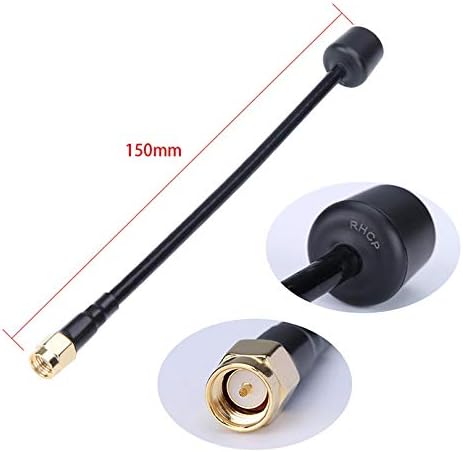
Figure 6.1: Antenna Dimensions and Connector Detail. The 150mm length provides flexibility in mounting, and the robust connector ensures a reliable link.
| ആട്രിബ്യൂട്ട് | മൂല്യം |
|---|---|
| മോഡൽ | Albatross 5.8GHz FPV Antenna |
| ഫ്രീക്വൻസി റേഞ്ച് | 5000-6000MHz |
| നേട്ടം | 3 ദിബി |
| അച്ചുതണ്ട് അനുപാതം | 0.7 |
| കേബിൾ തരം | RG141 |
| ഭാരം | 10.9g (per antenna) |
| അളവ് | 16*150 മി.മീ |
| ഇൻ്റർഫേസ് ഓപ്ഷനുകൾ | RHCP SMA, RHCP RP-SMA, LHCP RP-SMA |
| ധ്രുവീകരണം | RHCP/LHCP |
| SWR | ≤1.5 (ON 5.8GHz) |
| പാക്കേജ് അളവുകൾ | 6.2 x 1.1 x 0.39 ഇഞ്ച് |
| ഇനത്തിന്റെ ഭാരം (പാക്കേജ്) | 1.12 ഔൺസ് |
| നിർമ്മാതാവ് | iFlight |
| മോഡൽ നമ്പർ | MC36557-9-2 |
| ആദ്യ തീയതി ലഭ്യമാണ് | ഓഗസ്റ്റ് 7, 2020 |
| ഇനങ്ങളുടെ എണ്ണം | 2 (Antennas) |
7. വാറൻ്റിയും പിന്തുണയും
Specific warranty information for the iFlight Albatross 5.8GHz FPV Antenna is not provided in this manual. For details regarding warranty coverage, terms, and conditions, please refer to the official iFlight webസൈറ്റിൽ പ്രവേശിക്കുക അല്ലെങ്കിൽ അവരുടെ ഉപഭോക്തൃ പിന്തുണയുമായി നേരിട്ട് ബന്ധപ്പെടുക.
For technical support, product inquiries, or assistance with troubleshooting beyond the scope of this manual, please visit the iFlight Store on Amazon or the official iFlight support channels.


