1. ആമുഖം
വാങ്ങിയതിന് നന്ദി.asing the Muse M-885 DBT Micro System. This comprehensive user manual provides detailed instructions for the setup, operation, and maintenance of your new audio system. The M-885 DBT is a versatile micro system featuring a Bluetooth speaker, LCD screen, DAB+ and FM PLL radio, CD player, alarm clock, sleep function, and various audio controls including treble, bass, and volume. It also includes 2 USB ports, an auxiliary input, AUX-IN cable, 2 RCA jacks, a remote control, antenna, and an AC adapter. Please read this manual thoroughly before using the device to ensure proper and safe operation.
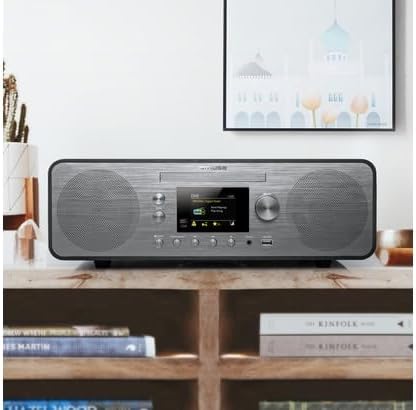
Figure 1.1: The Muse M-885 DBT Micro System placed on a wooden shelf in a home environment.
2 സുരക്ഷാ വിവരങ്ങൾ
സുരക്ഷിതമായ പ്രവർത്തനം ഉറപ്പാക്കുന്നതിനും കേടുപാടുകൾ തടയുന്നതിനും, ദയവായി ഇനിപ്പറയുന്ന സുരക്ഷാ മുൻകരുതലുകൾ പാലിക്കുക:
- തീയോ വൈദ്യുതാഘാതമോ തടയാൻ യൂണിറ്റ് മഴയിലോ ഈർപ്പത്തിലോ തുറന്നുകാട്ടരുത്.
- വെന്റിലേഷൻ തുറസ്സുകളൊന്നും തടയരുത്. നിർമ്മാതാവിന്റെ നിർദ്ദേശങ്ങൾക്കനുസൃതമായി ഇൻസ്റ്റാൾ ചെയ്യുക.
- റേഡിയറുകൾ, ഹീറ്റ് രജിസ്റ്ററുകൾ, സ്റ്റൗകൾ, അല്ലെങ്കിൽ മറ്റ് ഉപകരണങ്ങൾ (ഉൾപ്പെടെ) പോലെയുള്ള താപ സ്രോതസ്സുകൾക്ക് സമീപം ഇൻസ്റ്റാൾ ചെയ്യരുത്. ampലൈഫയറുകൾ) ചൂട് ഉത്പാദിപ്പിക്കുന്നത്.
- പ്രത്യേകിച്ച് പ്ലഗുകൾ, കൺവീനിയൻസ് റെസെപ്റ്റക്കിളുകൾ, ഉപകരണത്തിൽ നിന്ന് പുറത്തുകടക്കുന്ന ഇടം എന്നിവയിൽ നടക്കുകയോ നുള്ളുകയോ ചെയ്യുന്നതിൽ നിന്ന് പവർ കോർഡ് സംരക്ഷിക്കുക.
- നിർമ്മാതാവ് വ്യക്തമാക്കിയ അറ്റാച്ച്മെൻ്റുകൾ/ആക്സസറികൾ മാത്രം ഉപയോഗിക്കുക.
- മിന്നൽ കൊടുങ്കാറ്റുകളുടെ സമയത്തോ ദീർഘനേരം ഉപയോഗിക്കാത്ത സമയത്തോ ഈ ഉപകരണം അൺപ്ലഗ് ചെയ്യുക.
- എല്ലാ സേവനങ്ങളും യോഗ്യതയുള്ള സേവന ഉദ്യോഗസ്ഥർക്ക് റഫർ ചെയ്യുക. പവർ സപ്ലൈ കോർഡ് അല്ലെങ്കിൽ പ്ലഗ് കേടാകുക, ദ്രാവകം ഒഴുകുകയോ ഉപകരണങ്ങൾ ഉപകരണത്തിലേക്ക് വീഴുകയോ ചെയ്യുക, ഉപകരണം മഴയോ ഈർപ്പമോ സമ്പർക്കം പുലർത്തുക, സാധാരണയായി പ്രവർത്തിക്കാത്തത് എന്നിങ്ങനെയുള്ള ഏതെങ്കിലും വിധത്തിൽ ഉപകരണത്തിന് കേടുപാടുകൾ സംഭവിക്കുമ്പോൾ സേവനം ആവശ്യമാണ്. , അല്ലെങ്കിൽ ഉപേക്ഷിച്ചു.
3. പാക്കേജ് ഉള്ളടക്കം
താഴെ ലിസ്റ്റ് ചെയ്തിരിക്കുന്ന എല്ലാ ഇനങ്ങളും പാക്കേജിൽ ഉണ്ടെന്ന് ഉറപ്പാക്കുക:
- Muse M-885 DBT Micro System Unit
- റിമോട്ട് കൺട്രോൾ
- എസി പവർ അഡാപ്റ്റർ
- FM/DAB+ Antenna Cable (75-Ohm)
- AUX-IN Cable (3.5 mm)
- ഉപയോക്തൃ മാനുവൽ (ഈ പ്രമാണം)

Figure 3.1: Main unit with CD tray open and included accessories: remote control, power adapter, and antenna cable.
4. ഉൽപ്പന്നം കഴിഞ്ഞുview
The Muse M-885 DBT Micro System is designed for a rich audio experience with multiple connectivity options.

Figure 4.1: Front panel of the Muse M-885 DBT, highlighting the central display, control knobs, buttons, and stereo speakers.
പ്രധാന സവിശേഷതകൾ:
- DAB+/FM PLL Radio: Enjoy high-quality digital and analog radio broadcasts with 20 FM and 20 DAB preset stations.
- സിഡി പ്ലെയർ: Play your entire CD collection effortlessly.
- ബ്ലൂടൂത്ത് കണക്റ്റിവിറ്റി: Stream audio wirelessly from your mobile devices (smartphones, tablets, laptops).
- യുഎസ്ബി പ്ലേബാക്ക്: Two USB ports for playing MP3 fileയുഎസ്ബി ഡ്രൈവുകളിൽ നിന്നുള്ള എസ്.
- സഹായ ഇൻപുട്ട്: Connect external audio devices via the 3.5mm AUX-IN jack.
- LCD ഡിസ്പ്ലേ: Clear 2.8-inch LCD/TFT display for easy navigation and information.
- Alarm Clock & Sleep Function: Integrated alarm and sleep timer for convenience.
- ഓഡിയോ നിയന്ത്രണങ്ങൾ: Adjustable Bass & Treble, Loudness Control, and Preset EQ options.
- ഔട്ട്പുട്ട് പവർ: 80 Watts for powerful stereo sound.
- Real Wood Casing: Features an elegant real wood housing.

Figure 4.2: Visual representation of key features such as Bluetooth streaming, real wood casing, strong bass with passive membrane, and PLL radio with 20 FM + 20 DAB presets.

Figure 4.3: Dimensional drawing of the Muse M-885 DBT, showing length (420mm), height (139mm), and depth (212mm).
5. സജ്ജീകരണം
5.1 അൺപാക്കിംഗും പ്ലേസ്മെന്റും
- പാക്കേജിംഗിൽ നിന്ന് യൂണിറ്റും എല്ലാ അനുബന്ധ ഉപകരണങ്ങളും ശ്രദ്ധാപൂർവ്വം നീക്കം ചെയ്യുക.
- Place the micro system on a stable, flat surface, away from direct sunlight, heat sources, and moisture. Ensure adequate ventilation around the unit.
5.2 ആൻ്റിന ബന്ധിപ്പിക്കുന്നു
For optimal DAB+ and FM radio reception, connect the supplied antenna cable to the "ANTENNA" jack on the rear of the unit. Extend the antenna fully and position it for the best signal.
5.3 പവർ കണക്ഷൻ
- Connect the AC power adapter to the "DC IN" jack on the rear of the micro system.
- Plug the other end of the power adapter into a standard wall outlet (AC 100-240V, 50/60Hz).
- യൂണിറ്റ് സ്റ്റാൻഡ്ബൈ മോഡിൽ പ്രവേശിക്കും.
5.4 റിമോട്ട് കൺട്രോൾ ബാറ്ററി ഇൻസ്റ്റലേഷൻ
റിമോട്ട് കൺട്രോളിന് 2 x AA ബാറ്ററികൾ ആവശ്യമാണ് (ഉൾപ്പെടുത്തിയിട്ടില്ല).
- വിദൂര നിയന്ത്രണത്തിന്റെ പിൻഭാഗത്ത് ബാറ്ററി കമ്പാർട്ട്മെന്റ് കവർ തുറക്കുക.
- Insert the 2 AA batteries, ensuring correct polarity (+ and -).
- ബാറ്ററി കമ്പാർട്ട്മെൻ്റ് കവർ അടയ്ക്കുക.
6. പ്രവർത്തന നിർദ്ദേശങ്ങൾ
6.1 പവർ ഓൺ/ഓഫ്
അമർത്തുക പവർ button on the front panel or remote control to turn the unit on or off (standby mode).
6.2 ഉറവിട തിരഞ്ഞെടുപ്പ്
അമർത്തുക ഉറവിടം button repeatedly on the front panel or remote control to cycle through available modes: DAB+, FM, CD, USB, Bluetooth, AUX.
6.3 വോളിയം നിയന്ത്രണം
തിരിക്കുക വോളിയം മുൻ പാനലിലെ നോബ് അല്ലെങ്കിൽ ഉപയോഗിക്കുക VOL + / VOL- വോളിയം ലെവൽ ക്രമീകരിക്കുന്നതിന് റിമോട്ട് കൺട്രോളിലെ ബട്ടണുകൾ.
6.4 DAB+ Radio Operation
- Select DAB+ mode using the ഉറവിടം ബട്ടൺ.
- The unit will automatically scan for available DAB+ stations upon first use.
- ഉപയോഗിക്കുക പ്രീസെറ്റ്/സ്കാൻ ബട്ടണുകൾ അല്ലെങ്കിൽ തിരഞ്ഞെടുക്കുക knob to navigate through the station list.
- അമർത്തുക തിരഞ്ഞെടുക്കുക നിങ്ങളുടെ സ്റ്റേഷൻ തിരഞ്ഞെടുപ്പ് സ്ഥിരീകരിക്കാൻ.
- ഒരു പ്രീസെറ്റ് സംരക്ഷിക്കാൻ: അമർത്തിപ്പിടിക്കുക പ്രീസെറ്റ് ബട്ടൺ, ഉപയോഗിക്കുക തിരഞ്ഞെടുക്കുക knob to choose a preset number, then press തിരഞ്ഞെടുക്കുക സംരക്ഷിക്കാൻ വീണ്ടും.
6.5 എഫ്എം റേഡിയോ പ്രവർത്തനം
- ഉപയോഗിച്ച് FM മോഡ് തിരഞ്ഞെടുക്കുക ഉറവിടം ബട്ടൺ.
- അമർത്തിപ്പിടിക്കുക പ്രീസെറ്റ്/സ്കാൻ ലഭ്യമായ എഫ്എം സ്റ്റേഷനുകൾ സ്വയമേവ സ്കാൻ ചെയ്യാനും സംരക്ഷിക്കാനും ബട്ടൺ.
- ഉപയോഗിക്കുക പ്രീസെറ്റ്/സ്കാൻ ബട്ടണുകൾ അല്ലെങ്കിൽ തിരഞ്ഞെടുക്കുക knob to navigate through saved presets or manually tune.
- ഒരു പ്രീസെറ്റ് സംരക്ഷിക്കാൻ: അമർത്തിപ്പിടിക്കുക പ്രീസെറ്റ് ബട്ടൺ, ഉപയോഗിക്കുക തിരഞ്ഞെടുക്കുക knob to choose a preset number, then press തിരഞ്ഞെടുക്കുക സംരക്ഷിക്കാൻ വീണ്ടും.
6.6 സിഡി പ്ലേബാക്ക്
- ഉപയോഗിച്ച് സിഡി മോഡ് തിരഞ്ഞെടുക്കുക ഉറവിടം ബട്ടൺ.
- Gently insert a CD into the CD slot with the label side facing up. The CD will load automatically.
- ഉപയോഗിക്കുക പ്ലേ/താൽക്കാലികമായി നിർത്തുക, നിർത്തുക, SKIP FORWARD/BACKWARD പ്ലേബാക്ക് നിയന്ത്രിക്കുന്നതിനുള്ള ബട്ടണുകൾ.
6.7 യുഎസ്ബി പ്ലേബാക്ക്
- Insert a USB flash drive into one of the USB ports on the front panel.
- ഉപയോഗിച്ച് USB മോഡ് തിരഞ്ഞെടുക്കുക ഉറവിടം ബട്ടൺ.
- The unit will automatically detect and begin playing compatible MP3 files.
- പ്ലേബാക്ക് നിയന്ത്രണ ബട്ടണുകൾ ഉപയോഗിക്കുക (പ്ലേ/താൽക്കാലികമായി നിർത്തുക, നിർത്തുക, SKIP FORWARD/BACKWARD) to manage your music.
6.8 ബ്ലൂടൂത്ത് ജോടിയാക്കലും പ്ലേബാക്കും
- ഉപയോഗിച്ച് ബ്ലൂടൂത്ത് മോഡ് തിരഞ്ഞെടുക്കുക ഉറവിടം button. The display will show "PAIRING" or "BLUETOOTH".
- നിങ്ങളുടെ മൊബൈൽ ഉപകരണത്തിൽ (സ്മാർട്ട്ഫോൺ, ടാബ്ലെറ്റ് മുതലായവ) ബ്ലൂടൂത്ത് പ്രവർത്തനക്ഷമമാക്കി ലഭ്യമായ ഉപകരണങ്ങൾക്കായി തിരയുക.
- Select "M-885 DBT" from the list of devices. Once paired, the unit will confirm the connection.
- Start playing music on your connected device. Audio will stream wirelessly to the micro system.
6.9 ഓക്സ്-ഇൻ കണക്ഷൻ
- Connect one end of the supplied 3.5mm AUX-IN cable to the ഓക്സ് ഇൻ jack on the front panel of the micro system.
- Connect the other end of the cable to the headphone jack or audio output of your external audio device.
- ഉപയോഗിച്ച് AUX മോഡ് തിരഞ്ഞെടുക്കുക ഉറവിടം ബട്ടൺ.
- നിങ്ങളുടെ ബാഹ്യ ഉപകരണത്തിൽ നിന്ന് ഓഡിയോ പ്ലേ ചെയ്യുക.
6.10 Alarm Clock and Sleep Function
Refer to the detailed instructions in the full manual for setting the alarm time, alarm source (radio/CD/USB), and activating the sleep timer. These functions are typically accessed via the അലാറം ഒപ്പം ഉറങ്ങുക buttons on the remote control or through the system menu.
6.11 Audio Settings (EQ, Bass, Treble, Loudness)
Access the audio settings through the മെനു button on the front panel or remote control. You can adjust:
- പ്രീസെറ്റ് EQ: Select from various equalizer presets (e.g., Flat, Rock, Pop, Jazz, Classic).
- ബാസ്/ട്രെബിൾ: Manually adjust bass and treble levels to your preference.
- Loudness Control: Enhance bass and treble at low volume levels.
7. പരിപാലനം
7.1 യൂണിറ്റ് വൃത്തിയാക്കൽ
- വൃത്തിയാക്കുന്നതിന് മുമ്പ് എല്ലായ്പ്പോഴും പവർ ഔട്ട്ലെറ്റിൽ നിന്ന് യൂണിറ്റ് അൺപ്ലഗ് ചെയ്യുക.
- പുറംഭാഗങ്ങൾ തുടയ്ക്കാൻ മൃദുവായതും ഉണങ്ങിയതുമായ തുണി ഉപയോഗിക്കുക.
- അബ്രാസീവ് ക്ലീനറുകൾ, മെഴുക് അല്ലെങ്കിൽ ലായകങ്ങൾ എന്നിവ ഉപയോഗിക്കരുത്, കാരണം അവ ഫിനിഷിന് കേടുവരുത്തും.
7.2 സിഡി ലെൻസ് കെയർ
To ensure optimal CD playback, avoid touching the CD lens. If the lens becomes dirty, use a specialized CD lens cleaner disc.
7.3 സംഭരണം
യൂണിറ്റ് ദീർഘനേരം ഉപയോഗിക്കുന്നില്ലെങ്കിൽ, പവർ ഔട്ട്ലെറ്റിൽ നിന്ന് അത് അൺപ്ലഗ് ചെയ്ത് തണുത്തതും വരണ്ടതുമായ സ്ഥലത്ത് സൂക്ഷിക്കുക.
8. പ്രശ്നപരിഹാരം
ഉപഭോക്തൃ പിന്തുണയുമായി ബന്ധപ്പെടുന്നതിന് മുമ്പ്, പൊതുവായ പ്രശ്നങ്ങളും അവയുടെ പരിഹാരങ്ങളും അറിയാൻ ദയവായി ഇനിപ്പറയുന്ന പട്ടിക പരിശോധിക്കുക.
| പ്രശ്നം | സാധ്യമായ കാരണം | പരിഹാരം |
|---|---|---|
| ശക്തിയില്ല | പവർ കോർഡ് സുരക്ഷിതമായി ബന്ധിപ്പിച്ചിട്ടില്ല. | പവർ കോർഡ് യൂണിറ്റിലേക്കും വാൾ ഔട്ട്ലെറ്റിലേക്കും ദൃഢമായി പ്ലഗ് ചെയ്തിട്ടുണ്ടെന്ന് ഉറപ്പാക്കുക. |
| ശബ്ദമില്ല | ശബ്ദം വളരെ കുറവാണ് അല്ലെങ്കിൽ മ്യൂട്ടുചെയ്തിരിക്കുന്നു. തെറ്റായ ഉറവിടം തിരഞ്ഞെടുത്തു. | Increase volume. Press the SOURCE button to select the correct input. |
| മോശം റേഡിയോ സ്വീകരണം | Antenna not properly connected or positioned. Interference from other devices. | Adjust the antenna position. Move the unit away from other electronic devices. |
| സിഡി പ്ലേ ചെയ്യുന്നില്ല | CD inserted incorrectly or dirty/scratched. | Re-insert CD with label side up. Clean the CD. Try another CD. |
| ബ്ലൂടൂത്ത് ജോടിയാക്കൽ പരാജയപ്പെടുന്നു | Bluetooth not enabled on device. Unit not in pairing mode. Device too far. | Ensure Bluetooth is on and unit is in pairing mode. Move device closer (within 10m). |
| USB പ്ലേബാക്ക് പ്രശ്നങ്ങൾ | USB ഡ്രൈവ് ശരിയായി ഫോർമാറ്റ് ചെയ്തിട്ടില്ല അല്ലെങ്കിൽ പിന്തുണയ്ക്കുന്നില്ല. file തരം. | Ensure USB drive is FAT32 formatted and contains MP3 files. Try another USB drive. |
9 സ്പെസിഫിക്കേഷനുകൾ
| ഫീച്ചർ | വിവരണം |
|---|---|
| മോഡൽ നമ്പർ | എം-885 ഡിബിടി |
| ബ്രാൻഡ് | മ്യൂസ് |
| നിറം | ഇരുണ്ട ചാരനിറം |
| കണക്റ്റിവിറ്റി | ബ്ലൂടൂത്ത്, ഓക്സിലറി (3.5 എംഎം), യുഎസ്ബി |
| അനുയോജ്യമായ ഉപകരണങ്ങൾ | ലാപ്ടോപ്പ്, സ്മാർട്ട്ഫോൺ, ടാബ്ലെറ്റ് |
| പവർ ഉറവിടം | Wired Electric (AC Power Adapter) |
| ഔട്ട്പുട്ട് പവർ | 80 വാട്ട്സ് |
| സ്പീക്കർ തരം | സ്റ്റീരിയോ |
| അളവുകൾ (L x W x H) | 42 x 21.2 x 13.9 സെ.മീ (16.5 x 8.3 x 5.5 ഇഞ്ച്) |
| ഇനത്തിൻ്റെ ഭാരം | 3.5 കിലോഗ്രാം (7.7 പൗണ്ട്) |
| റിമോട്ട് കൺട്രോൾ ബാറ്ററികൾ | 2 x AA (Alkaline, not included) |
| മാതൃരാജ്യം | ചൈന |
10. വാറൻ്റിയും പിന്തുണയും
For warranty information and technical support, please refer to the warranty card included with your product or visit the official MUSE webസൈറ്റ്. ഏതെങ്കിലും വാറന്റി ക്ലെയിമുകൾക്ക് വാങ്ങിയതിന്റെ തെളിവായി നിങ്ങളുടെ വാങ്ങൽ രസീത് സൂക്ഷിക്കുക.
നിർമ്മാതാവ്: മ്യൂസ്
സ്പെയർ പാർട്സുകളുടെ ലഭ്യത: വിവരങ്ങൾ ലഭ്യമല്ല.
Software updates guaranteed until: വിവരങ്ങൾ ലഭ്യമല്ല.
Note: Product specifications and design are subject to change without prior notice for improvement.


