1. ആമുഖം
The Poly Trio C60 is a smart conference phone designed to facilitate clear and effective communication in any meeting space. This manual provides comprehensive instructions for setting up, operating, maintaining, and troubleshooting your Trio C60 to ensure optimal performance and a seamless conferencing experience.
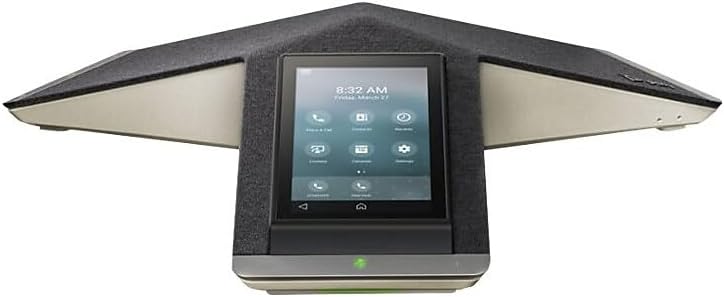
ചിത്രം 1: മുൻഭാഗം view of the Poly Trio C60 IP Conference Phone, showcasing its 5-inch color touch display.
Key features include premium audio with full-duplex capabilities, automatic gain control, echo and reverb cancellation, and Poly NoiseBlockAI for eliminating background noise. It offers flexible connectivity options including USB, Bluetooth, and IP, and is certified for Microsoft Teams, Zoom, and other collaboration platforms.
2. ബോക്സിൽ എന്താണുള്ളത്?
പാക്കേജിൽ എല്ലാ ഘടകങ്ങളും ഉണ്ടെന്ന് ഉറപ്പാക്കുക:
- Poly Trio C60 conference phone
- 25 ft network cable CAT 5e
- ഷീറ്റ് സജ്ജമാക്കുക
3. സജ്ജീകരണ നിർദ്ദേശങ്ങൾ
Follow these steps to set up your Poly Trio C60 conference phone:
- പവർ കണക്ഷൻ: Connect the power source to the phone. The Poly Trio C60 is powered by a corded electric connection.
- നെറ്റ്വർക്ക് കണക്ഷൻ: Connect the provided 25 ft CAT 5e network cable to the phone's network port and to your network switch or router. The device supports WiFi 2.4-5GHz for audio conference calling, offering flexible deployment.
- പ്രാരംഭ ബൂട്ട്-അപ്പ്: The phone will power on automatically. Allow it to boot up and connect to the network. The 5-inch color touch display will show the boot progress.
- കോൺഫിഗറേഷൻ: Follow the on-screen prompts on the touch display to complete the initial configuration, including network settings, time zone, and platform integration (e.g., Microsoft Teams, Zoom).

ചിത്രം 2: കോണാകൃതിയിലുള്ളത് view of the Poly Trio C60, highlighting its sleek design and integrated display.

ചിത്രം 3: മുകളിൽ നിന്ന് താഴേക്ക് view of the Poly Trio C60, showing its Y-shaped design and port locations.
For advanced setup or specific platform integrations, refer to the detailed guides available on the Poly support webസൈറ്റ്.
4. പ്രവർത്തന നിർദ്ദേശങ്ങൾ
The Poly Trio C60 is designed for intuitive operation. Here are common functions:
- Joining Meetings: Utilize the one-touch join feature directly from the 5-inch color touch display. The phone supports Outlook calendar integration for simplified scheduling and meeting access.
- കോളുകൾ ചെയ്യുന്നു: Use the single keypad dialer on the touch display to initiate calls.
- ഓഡിയോ നിലവാരം: The phone features premium audio with full-duplex capabilities, ensuring natural conversations. Automatic gain control adjusts microphone sensitivity, and echo and reverb cancellation enhance clarity.
- ശബ്ദം കുറയ്ക്കൽ: Poly NoiseBlockAI actively eliminates non-speech background noise, providing distraction-free meetings.
- കണക്റ്റിവിറ്റി: Connect to multiple SIP and UC-cloud services simultaneously. The phone supports USB, Bluetooth, or IP connectivity for mobile devices and other peripherals.
- മൈക്രോസോഫ്റ്റ് ടീമുകളുടെ സംയോജനം: The Trio C60 offers built-in native Microsoft Teams integration and is Microsoft Teams certified for a seamless experience.
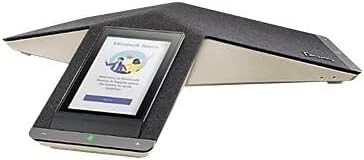
Figure 4: The Poly Trio C60 display showing the Microsoft Teams interface, ready for a meeting.
For larger conference rooms, optional expansion microphones (sold separately) can be connected, or multiple Trio C60 systems can be daisy-chained together to extend audio coverage.

Figure 5: The Poly Trio C60 in a typical meeting room environment, demonstrating its compact footprint.
5. പരിപാലനം
Proper maintenance ensures the longevity and optimal performance of your Poly Trio C60.
- വൃത്തിയാക്കൽ: Use a soft, dry, lint-free cloth to clean the exterior surfaces of the phone and the touch display. Do not use abrasive cleaners, waxes, or solvents.
- വെൻ്റിലേഷൻ: വെന്റിലേഷൻ തുറസ്സുകൾ അടഞ്ഞിട്ടില്ലെന്ന് ഉറപ്പാക്കുക.
- പരിസ്ഥിതി വ്യവസ്ഥകൾ: Operate the device within recommended temperature and humidity ranges. Avoid exposing the device to extreme temperatures, direct sunlight, or excessive moisture.
6. പ്രശ്നപരിഹാരം
This section addresses common issues you might encounter with your Poly Trio C60.
| പ്രശ്നം | സാധ്യമായ കാരണം | പരിഹാരം |
|---|---|---|
| ഫോൺ പവർ ഓൺ ആകുന്നില്ല. | No power connection or faulty power adapter. | Ensure the power cable is securely connected to the phone and a working power outlet. Verify the power adapter is functioning correctly. |
| നെറ്റ്വർക്ക് കണക്ഷനില്ല. | Network cable disconnected, incorrect network settings, or network issue. | Check the Ethernet cable connection. Verify network settings on the phone's display. Restart your network equipment (router/switch). If using Wi-Fi, ensure correct credentials are entered. |
| മോശം ഓഡിയോ നിലവാരം (എക്കോ, സ്റ്റാറ്റിക്). | Improper microphone placement, environmental noise, or network latency. | Ensure the phone is centrally located in the meeting space. Verify Poly NoiseBlockAI is enabled. Check network connection stability. |
| Cannot join meetings. | Incorrect platform configuration or network access issues. | Verify that the phone is correctly configured for your collaboration platform (e.g., Microsoft Teams, Zoom). Check network connectivity to the platform's servers. |
| Device unresponsive / requires reset. | Software glitch or configuration issue. | Perform a soft reboot by disconnecting and reconnecting power. If issues persist, a factory reset may be necessary (consult Poly support documentation for specific steps, as this will erase all configurations). |
7 സ്പെസിഫിക്കേഷനുകൾ
Detailed technical specifications for the Poly Trio C60 IP Conference Phone:
| മോഡൽ നമ്പർ | 2200-86240-019 |
| ബ്രാൻഡ് | Poly (formerly Plantronics) |
| ഉൽപ്പന്ന അളവുകൾ (L x W x H) | 19 x 13.15 x 5 ഇഞ്ച് |
| ഇനത്തിൻ്റെ ഭാരം | 5.14 പൗണ്ട് |
| നിറം | കറുപ്പ് |
| പ്രദർശിപ്പിക്കുക | 5-inch Color Touch Display (Visible screen diagonal: 13 cm) |
| പവർ ഉറവിടം | കോർഡഡ് ഇലക്ട്രിക് |
| ഡയലർ തരം | Single Keypad (on touch display) |
| കോൺഫറൻസ് കോൾ ശേഷി | 5-വഴി |
| ഫോൺ സ്റ്റാൻഡ്ബൈ സമയം | 72 മണിക്കൂർ |
| കണക്റ്റിവിറ്റി | Ethernet (CAT 5e), Wi-Fi (2.4-5GHz), USB, Bluetooth, IP |
| സർട്ടിഫിക്കേഷനുകൾ | മൈക്രോസോഫ്റ്റ് ടീമുകൾ സാക്ഷ്യപ്പെടുത്തി |
8. വാറൻ്റിയും പിന്തുണയും
For warranty information, technical support, and additional resources, please visit the official Poly support website. You can find detailed documentation, FAQs, and contact information for customer service.
നിർമ്മാതാവ്: പോളി
ഏറ്റവും കാലികമായ പിന്തുണാ വിവരങ്ങൾക്ക്, ദയവായി സന്ദർശിക്കുക www.poly.com/support (പോളി.കോം).


