ആമുഖം
The Maxcom Smartwatch FW37 Argon is a robustly designed smartwatch featuring a large dial, engineered to monitor your sports activities and health metrics. It provides detailed information accessible directly from the device, including advanced sports equipment like GPS, AGPS, compass, and barometer. This package includes three interchangeable straps in black, green, and blue, with the watch itself in black.
Key features include sleep monitoring, calorie counter, pedometer, distance tracking, blood oxygen saturation, heart rate monitoring, sedentary reminders, and water resistance (IP67). It also offers 11 sports modes, call and message notifications, and a customizable display with various watch faces. The device is compatible with iPhone Health app.

Image: The Maxcom Smartwatch FW37 Argon, showcasing its main display and robust design.
പാക്കേജ് ഉള്ളടക്കം
- Maxcom Smartwatch FW37 Argon (Black)
- കറുത്ത സ്ട്രാപ്പ്
- ഗ്രീൻ സ്ട്രാപ്പ്
- Blue Strap
- ചാർജിംഗ് കേബിൾ
- ഉപയോക്തൃ മാനുവൽ

Image: The Maxcom Smartwatch FW37 Argon shown with its three included straps: black, green, and blue.
സജ്ജമാക്കുക
1 ഉപകരണം ചാർജ് ചെയ്യുന്നു
Before first use, fully charge your smartwatch. Connect the charging cable to the charging port on the back of the watch and plug the other end into a USB power adapter (not included) or a computer's USB port.
- ഒരു പൂർണ്ണ ചാർജ് സാധാരണയായി ഏകദേശം 2 മണിക്കൂർ എടുക്കും.
- The battery life is up to 7 days with normal use and 10 hours with continuous GPS usage.
2. പവർ ഓൺ/ഓഫ്
To power on, press and hold the side button until the screen lights up. To power off, navigate to the settings menu on the watch, select 'Power Off', and confirm.
3 ആപ്പ് ഇൻസ്റ്റാൾ ചെയ്യുന്നു
Download the companion app from your smartphone's app store (e.g., Google Play Store for Android or Apple App Store for iOS). ഇതിനായി തിരയുക "Maxcom Smartwatch" or refer to the QR code in the quick start guide (if provided).
4. നിങ്ങളുടെ സ്മാർട്ട്ഫോണുമായി ജോടിയാക്കൽ
- നിങ്ങളുടെ സ്മാർട്ട്ഫോണിൽ ബ്ലൂടൂത്ത് പ്രവർത്തനക്ഷമമാക്കിയിട്ടുണ്ടെന്ന് ഉറപ്പാക്കുക.
- Open the Maxcom Smartwatch app.
- Follow the in-app instructions to search for and connect to your FW37 Argon smartwatch.
- നിങ്ങളുടെ വാച്ചിലും സ്മാർട്ട്ഫോണിലും ജോടിയാക്കൽ അഭ്യർത്ഥന സ്ഥിരീകരിക്കുക.

Image: The Maxcom Smartwatch FW37 Argon displaying its settings menu, which includes options for connectivity and power.
പ്രവർത്തന നിർദ്ദേശങ്ങൾ
നാവിഗേഷൻ
- ടച്ച് സ്ക്രീൻ: Swipe left/right, up/down to navigate through menus and screens. Tap to select.
- സൈഡ് ബട്ടൺ: ഹോം സ്ക്രീനിലേക്ക് മടങ്ങാൻ അമർത്തുക അല്ലെങ്കിൽ ഉപകരണം ഉണർത്തുക.
പ്രധാന സവിശേഷതകളും പ്രവർത്തനങ്ങളും
The FW37 Argon offers a wide range of functions to support your health and fitness goals:
- GPS & AGPS: For rapid positioning and accurate tracking during outdoor activities.
- ഹൃദയമിടിപ്പ് നിരീക്ഷണം: നിങ്ങളുടെ ഹൃദയമിടിപ്പ് തുടർച്ചയായി ട്രാക്ക് ചെയ്യുന്നു.
- രക്തത്തിലെ ഓക്സിജൻ സാച്ചുറേഷൻ (SpO2): നിങ്ങളുടെ രക്തത്തിലെ ഓക്സിജന്റെ അളവ് അളക്കുന്നു.
- Pedometer & Calorie Counter: Tracks steps taken and calories burned.
- സ്ലീപ്പ് മോണിറ്റർ: നിങ്ങളുടെ ഉറക്ക രീതികൾ വിശകലനം ചെയ്യുന്നു.
- Barometer & Compass: Provides environmental data and navigation assistance.
- സ്പോർട്സ് മോഡുകൾ: 11 dedicated sports modes for various activities.
- അറിയിപ്പുകൾ: Receive alerts for calls, messages, and social media directly on your watch.
- റിമോട്ട് ക്യാമറ കൺട്രോൾ: Control your smartphone's camera from your watch.
- മ്യൂസിക് പ്ലെയർ നിയന്ത്രണം: നിങ്ങളുടെ സ്മാർട്ട്ഫോണിൽ സംഗീത പ്ലേബാക്ക് നിയന്ത്രിക്കുക.
- Alarms, Stopwatch, Timer, Calculator: Utility functions for daily use.

Image: An illustration showing the various features of the Maxcom Smartwatch FW37 Argon, including GPS, water resistance, compass, barometer, heart rate monitor, SpO2, blood pressure, sedentary reminder, sport tracking, pedometer, calorie counter, sleep monitor, call/message notifications, and social media alerts.

Image: Four different display screens of the Maxcom Smartwatch FW37 Argon, showcasing various watch faces and data displays such as step count, heart rate, atmospheric pressure, distance, and activity tracking.
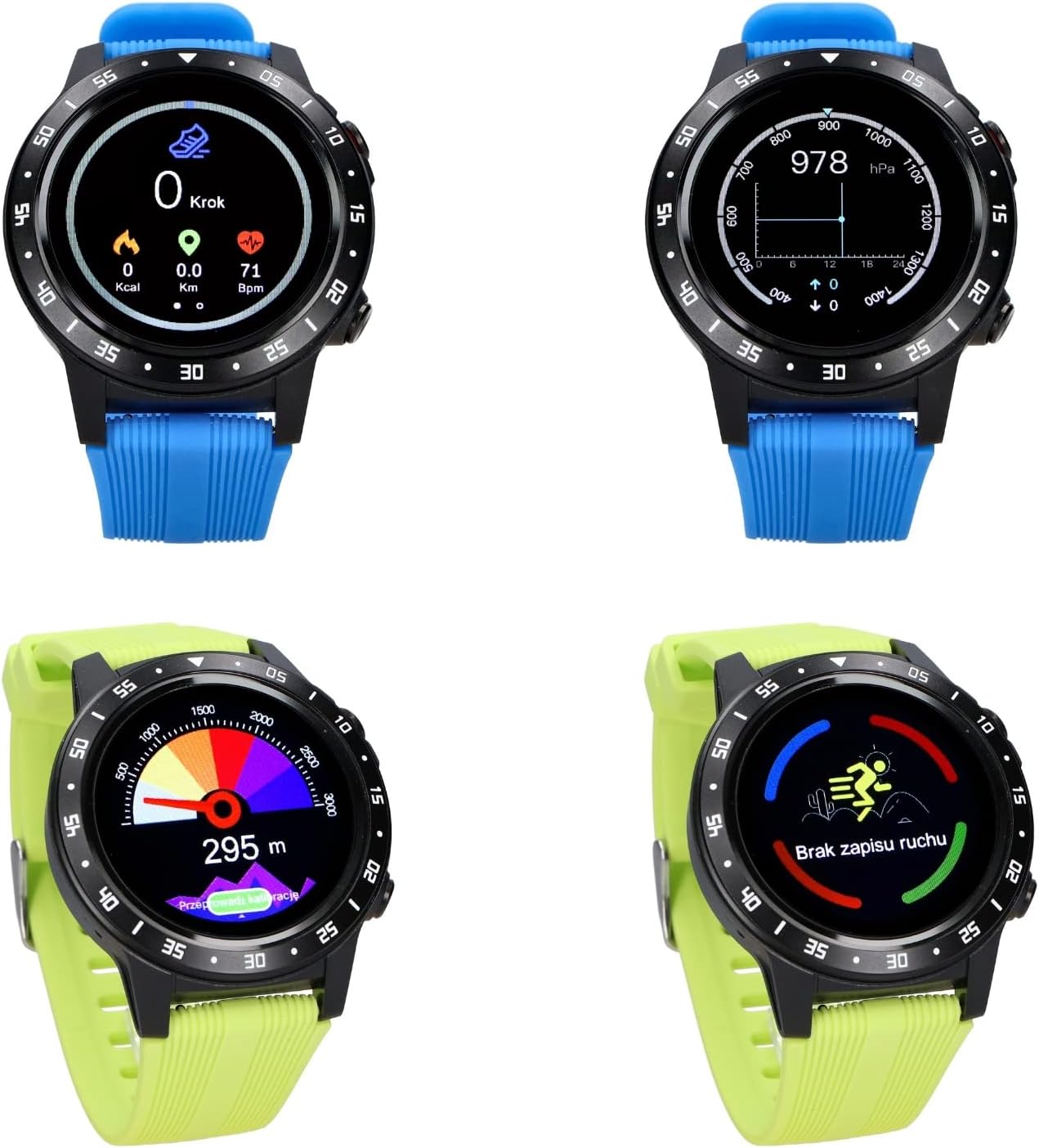
Image: The Maxcom Smartwatch FW37 Argon being used on a wrist, demonstrating its practical application during activities.
മെയിൻ്റനൻസ്
നിങ്ങളുടെ സ്മാർട്ട് വാച്ച് വൃത്തിയാക്കുന്നു
Regularly clean your smartwatch and straps to prevent skin irritation and maintain device functionality.
- Wipe the screen and body with a soft, lint-free cloth. If necessary, slightly dampവെള്ളം കൊണ്ട് തുണി.
- For silicone straps, wash with mild soap and water, then rinse thoroughly and dry completely before reattaching to the watch.
- കഠിനമായ രാസവസ്തുക്കൾ, അബ്രസീവ് ക്ലീനറുകൾ, അല്ലെങ്കിൽ ലായകങ്ങൾ എന്നിവ ഉപയോഗിക്കുന്നത് ഒഴിവാക്കുക.
ജല പ്രതിരോധം (IP67)
The FW37 Argon is IP67 water-resistant, meaning it is protected from dust and can withstand immersion in water up to 1 meter for up to 30 minutes. It is suitable for daily use, such as hand washing or rain exposure. It is not recommended for swimming, diving, or high-pressure water activities.
സംഭരണം
When not in use for extended periods, store the smartwatch in a cool, dry place away from direct sunlight and extreme temperatures. Ensure the battery is partially charged (around 50%) before storage to prolong battery life.
ട്രബിൾഷൂട്ടിംഗ്
| പ്രശ്നം | സാധ്യമായ കാരണം | പരിഹാരം |
|---|---|---|
| വാച്ച് ഓണാകുന്നില്ല. | കുറഞ്ഞ ബാറ്ററി. | കുറഞ്ഞത് 30 മിനിറ്റെങ്കിലും വാച്ച് ചാർജ് ചെയ്യുക. |
| സ്മാർട്ട്ഫോണുമായി ജോടിയാക്കാൻ കഴിയില്ല. | Bluetooth off; app issue; watch not discoverable. | Ensure Bluetooth is on. Restart both watch and phone. Reinstall the app. |
| കൃത്യമല്ലാത്ത ഹൃദയമിടിപ്പ്/SpO2 റീഡിംഗുകൾ. | Watch too loose/tight; sensor dirty; movement during measurement. | Ensure watch is snug but comfortable. Clean the sensor. Remain still during measurement. |
| GPS not connecting quickly. | Poor satellite signal; first-time use. | Move to an open outdoor area. AGPS data may need to update via the app. |
| അറിയിപ്പുകൾ ദൃശ്യമാകുന്നില്ല. | App permissions; Bluetooth disconnected; notification settings. | Check app notification permissions on your phone. Ensure watch is connected. Verify notification settings within the Maxcom app. |
സ്പെസിഫിക്കേഷനുകൾ
| ഫീച്ചർ | വിശദാംശങ്ങൾ |
|---|---|
| മോഡലിൻ്റെ പേര് | FW37 Argon |
| മോഡൽ നമ്പർ | 3T40046 |
| ബ്രാൻഡ് | മാക്സ്കോം |
| പ്രദർശിപ്പിക്കുക | 1.3" IPS Color Touch Screen |
| ഓപ്പറേറ്റിംഗ് സിസ്റ്റം | Sailfish OS |
| കണക്റ്റിവിറ്റി | GPS, Bluetooth |
| സെൻസറുകൾ | GPS, AGPS, Compass, Barometer, Heart Rate Monitor, SpO2 Sensor, Pedometer |
| ജല പ്രതിരോധം | IP67 |
| ബാറ്ററി തരം | ലിഥിയം-അയൺ |
| ബാറ്ററി ലൈഫ് | Up to 7 days (normal use), 10 hours (continuous GPS) |
| അനുയോജ്യമായ ഉപകരണങ്ങൾ | സ്മാർട്ട്ഫോണുകൾ (iOS, Android) |
| നിറം | Black (watch body), Black/Green/Blue (straps) |
വാറൻ്റിയും പിന്തുണയും
Maxcom products are designed for reliability and performance. For warranty information and technical support, please refer to the official Maxcom webസൈറ്റ് അല്ലെങ്കിൽ അവരുടെ ഉപഭോക്തൃ സേവനവുമായി ബന്ധപ്പെടുക.
- വാറൻ്റി: Please refer to your purchase receipt or the official Maxcom webനിർദ്ദിഷ്ട വാറന്റി നിബന്ധനകൾക്കും ദൈർഘ്യത്തിനുമുള്ള സൈറ്റ്.
- ഉപഭോക്തൃ പിന്തുണ: For technical assistance, troubleshooting, or service inquiries, visit the Maxcom support page or contact their customer service hotline. Contact details can typically be found on the manufacturer's official webസൈറ്റ്.
വാറൻ്റി ക്ലെയിമുകൾക്കായി നിങ്ങളുടെ വാങ്ങിയതിൻ്റെ തെളിവ് സൂക്ഷിക്കുക.


