1. ആമുഖം
The Suntek HC-801LTE is a high-performance 24-megapixel 4G trail camera designed for surveillance, hunting, and wildlife observation. It features advanced capabilities such as 4G MMS transmission, Wi-Fi connectivity, rapid 0.3-second trigger speed, a 120-degree wide-angle lens, and robust night vision up to 65 feet. This manual provides comprehensive instructions for setting up, operating, and maintaining your camera to ensure optimal performance.

ചിത്രം 1: മുൻഭാഗം view of the Suntek HC-801LTE 4G Trail Camera with its external antenna.
2. പാക്കേജ് ഉള്ളടക്കം
അൺബോക്സിംഗ് ചെയ്യുമ്പോൾ എല്ലാ ഇനങ്ങളും ഉണ്ടെന്ന് ഉറപ്പാക്കാൻ പാക്കേജ് ഉള്ളടക്കങ്ങൾ പരിശോധിക്കുക:
- Suntek HC-801LTE Trail Camera
- 4 ജി ആന്റിന
- USB കേബിൾ
- മൗണ്ടിംഗ് സ്ട്രാപ്പ്
- ഉപയോക്തൃ മാനുവൽ (ഈ പ്രമാണം)

Figure 2: Included accessories with the HC-801LTE camera.
3. സജ്ജീകരണം
3.1 ബാറ്ററി ഇൻസ്റ്റാളേഷൻ
The HC-801LTE camera requires 8 AA batteries for operation. Open the battery compartment located at the bottom of the camera. Insert the batteries according to the polarity indicators (+/-) inside the compartment. Ensure the compartment cover is securely closed to maintain waterproofing.
3.2 സിം കാർഡും മൈക്രോ എസ്ഡി കാർഡും ഇൻസ്റ്റാൾ ചെയ്യൽ
For 4G functionality and image/video storage, a compatible SIM card and a Micro SD card (up to 32GB, Class 10 recommended) are required. Locate the SIM card slot and Micro SD card slot inside the camera, typically behind the display panel. Insert the SIM card with the metal contacts facing down and the Micro SD card until it clicks into place.

Figure 3: Internal layout of the camera, highlighting the display, control buttons, and card slots.
3.3 ആന്റിന അറ്റാച്ച്മെന്റ്
Screw the provided 4G antenna firmly into the antenna port located at the top of the camera. Ensure it is tightened to establish a stable cellular connection.
3.4 ക്യാമറ മൗണ്ടിംഗ്
Use the included mounting strap to secure the camera to a tree or pole. Ensure the camera is positioned at an appropriate height and angle to capture the desired area. The camera is waterproof, making it suitable for outdoor use.
4. ക്യാമറ പ്രവർത്തിപ്പിക്കുക
4.1 പവറിംഗ് ഓണും മോഡ് തിരഞ്ഞെടുപ്പും
After installing batteries and cards, open the camera and locate the മോഡ് സ്വിച്ച് (refer to Figure 3). Slide the switch to the "SETUP" position to enter the setup menu. To power off, slide the switch to "OFF". To begin recording based on your settings, slide the switch to "ON".
4.2 മെനു നാവിഗേഷനും ക്രമീകരണങ്ങളും
In "SETUP" mode, use the സജ്ജീകരണ ബട്ടണുകൾ (refer to Figure 3) to navigate the menu on the കളർ ഡിസ്പ്ലേ സ്ക്രീൻ. You can configure various settings including:
- മോഡ്: Select between Photo, Video, or Photo+Video.
- റെസലൂഷൻ: Set photo resolution (up to 24MP) and video resolution (1080p).
- PIR സംവേദനക്ഷമത: Adjust the sensitivity of the Passive Infrared (PIR) sensor for motion detection.
- ട്രിഗർ ഇടവേള: Define the delay between consecutive triggers.
- സമയം സെന്റ്amp: തീയതിയും സമയവും പ്രവർത്തനക്ഷമമാക്കുക അല്ലെങ്കിൽ പ്രവർത്തനരഹിതമാക്കുകamps on images/videos.
- MMS/SMTP Settings: Configure settings for sending images via MMS or email over the 4G network.
4.3 പ്രവർത്തനത്തിലെ പ്രധാന സവിശേഷതകൾ
The HC-801LTE camera is equipped with features for effective monitoring:
- ഫാസ്റ്റ് ട്രിഗർ വേഗത: Captures events quickly with a 0.3-second trigger speed.
- വിശാലമായ Viewഇൻ ആംഗിൾ: ഒരു 120-ഡിഗ്രി viewing angle ensures a broad coverage area.
- രാത്രി കാഴ്ച: Integrated infrared LEDs provide clear images and videos in low-light conditions up to 65 feet.
- 4G MMS/Email Transmission: Send captured images directly to your phone via MMS or email, allowing for remote monitoring.

Figure 4: Illustration of the camera's trigger speed, wide angle, and night vision capabilities.
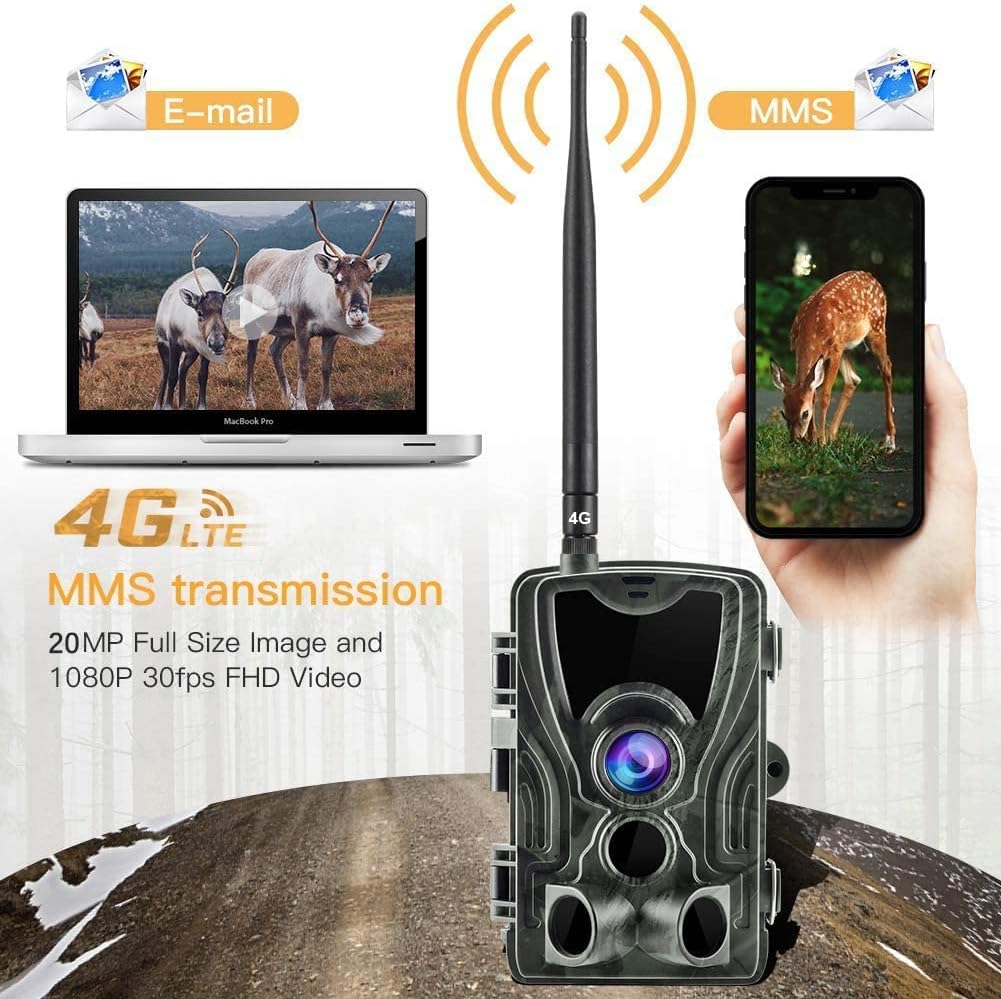
Figure 5: The camera's ability to transmit images via 4G LTE to email or MMS.
5. പരിപാലനം
പതിവ് അറ്റകുറ്റപ്പണികൾ നിങ്ങളുടെ ക്യാമറയുടെ ദീർഘായുസ്സും മികച്ച പ്രകടനവും ഉറപ്പാക്കുന്നു:
- വൃത്തിയാക്കൽ: Gently wipe the lens and the camera body with a soft, dry cloth. Avoid abrasive cleaners or solvents.
- ബാറ്ററി മാറ്റിസ്ഥാപിക്കൽ: Replace all 8 AA batteries when the low battery indicator appears or performance degrades.
- SD കാർഡ് മാനേജുമെന്റ്: Periodically format the Micro SD card to prevent data corruption and ensure sufficient storage space. Back up important fileഫോർമാറ്റ് ചെയ്യുന്നതിന് മുമ്പ് എസ്.
- ഫേംവെയർ അപ്ഡേറ്റുകൾ: നിർമ്മാതാവ് പരിശോധിക്കുക website for any available firmware updates. Follow the instructions carefully to update the camera's software.
6. പ്രശ്നപരിഹാരം
If you encounter issues with your HC-801LTE camera, refer to the following common problems and solutions:
| പ്രശ്നം | സാധ്യമായ കാരണം | പരിഹാരം |
|---|---|---|
| ക്യാമറ പവർ ഓൺ ചെയ്യുന്നില്ല. | Low or dead batteries; incorrect battery polarity; mode switch in "OFF" position. | Replace batteries; ensure correct polarity; slide mode switch to "SETUP" or "ON". |
| No images/videos captured. | PIR sensitivity too low; SD card full or corrupted; incorrect time settings; camera not in "ON" mode. | Increase PIR sensitivity; format/replace SD card; set correct time; ensure camera is in "ON" mode. |
| MMS/Email transmission fails. | No network signal; incorrect SIM card settings; incorrect MMS/SMTP settings; insufficient SIM card balance. | Check network signal strength; verify SIM card is active and has data/SMS plan; reconfigure MMS/SMTP settings; recharge SIM card. |
| രാത്രിയിൽ ചിത്രത്തിന്റെ ഗുണനിലവാരം മോശമാണ്. | Objects too far; IR LEDs obstructed; low battery. | Ensure target is within 65ft night vision range; clear any obstructions; replace batteries. |
7 സ്പെസിഫിക്കേഷനുകൾ
| ഫീച്ചർ | വിശദാംശങ്ങൾ |
|---|---|
| മോഡൽ | HC-801LTE (810) |
| ചിത്ര മിഴിവ് | 24 മെഗാപിക്സലുകൾ വരെ |
| വീഡിയോ റെസല്യൂഷൻ | 1080p |
| ട്രിഗർ വേഗത | 0.3 സെക്കൻഡ് |
| Viewing ആംഗിൾ | 120 ഡിഗ്രി |
| നൈറ്റ് വിഷൻ റേഞ്ച് | 65 അടി വരെ (20 മീറ്റർ) |
| കണക്റ്റിവിറ്റി | 4G (Cellular Network), Wi-Fi |
| സംഭരണം | മൈക്രോ SD കാർഡ് (32GB വരെ) |
| പവർ ഉറവിടം | 8x AA Batteries (external power port available) |
| ജല പ്രതിരോധം | വാട്ടർപ്രൂഫ് |
| അളവുകൾ (L x W x H) | 16.5 x 12 x 11 സെ.മീ (ഏകദേശം 6.5 x 4.7 x 4.3 ഇഞ്ച്) |
| ഭാരം | 550 ഗ്രാം (ഏകദേശം 1.2 പൗണ്ട്) |
| മെറ്റീരിയൽ | ലോഹം |
8. വാറൻ്റിയും പിന്തുണയും
Suntek products are manufactured to high quality standards. For warranty information, please refer to the warranty card included with your purchase or visit the official Suntek website. If you require technical assistance or have questions not covered in this manual, please contact Suntek customer support through their official channels.


