ആമുഖം
This manual provides essential information for the setup, operation, and maintenance of your Korg Volca Sample 2 Digital Sample Sequencer Drum Machine. Please read this manual thoroughly to ensure proper use and to maximize the potential of your instrument.
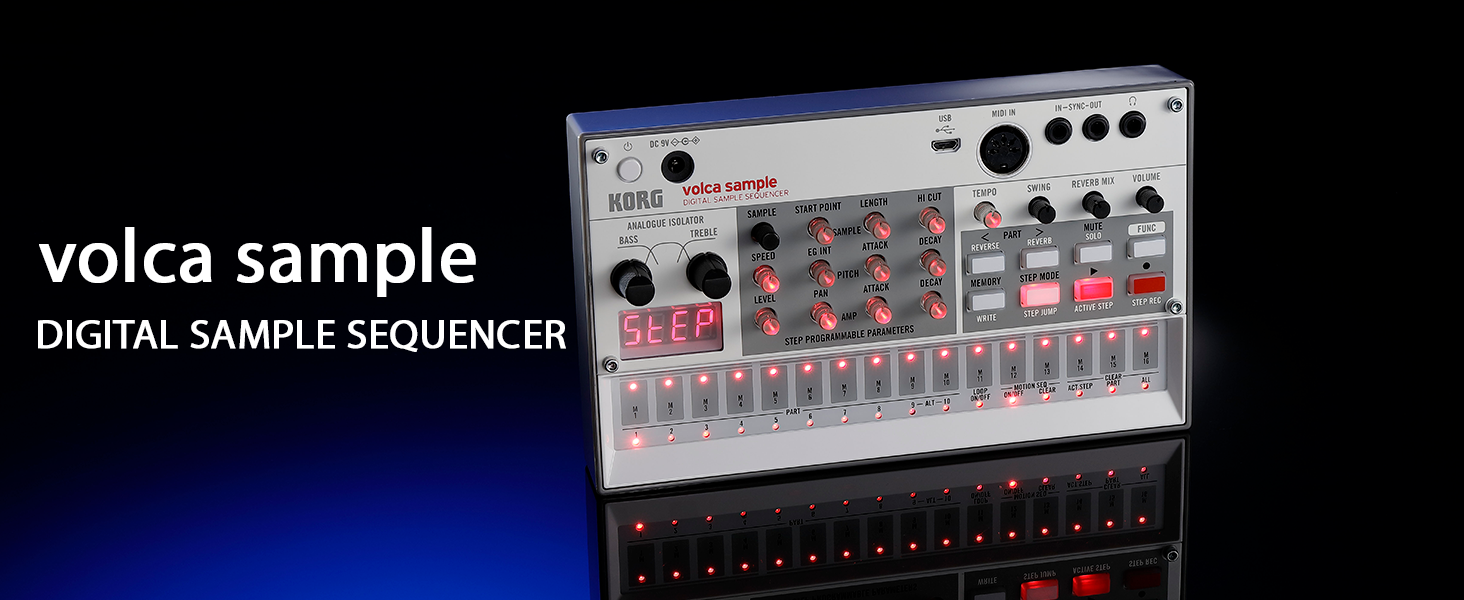
ചിത്രം: മുൻഭാഗം view of the Korg Volca Sample 2, highlighting its digital sample sequencer capabilities.
പാക്കേജ് ഉള്ളടക്കം
താഴെ ലിസ്റ്റ് ചെയ്തിരിക്കുന്ന എല്ലാ ഇനങ്ങളും നിങ്ങളുടെ പാക്കേജിൽ ഉൾപ്പെടുത്തിയിട്ടുണ്ടെന്ന് ഉറപ്പാക്കുക:
- Korg Volca Sample 2 Unit
- പവർ അഡാപ്റ്റർ
- USB കേബിൾ
- Sample library (pre-loaded or accessible via software)
- 6 AAA ബാറ്ററികൾ (ഉൾപ്പെട്ടിരിക്കുന്നു)
സജ്ജമാക്കുക
1. യൂണിറ്റിന് ശക്തി നൽകുന്നു
The Volca Sample 2 can be powered using either the included AC adapter or 6 AAA batteries.
- എ സി അഡാപ്റ്റർ: Connect the power adapter to the DC 9V input on the unit and then to a wall outlet.
- ബാറ്ററികൾ: Open the battery compartment on the underside of the unit and insert 6 AAA batteries, ensuring correct polarity.
2. പ്രാരംഭ കണക്ഷനുകൾ
Before operation, connect your Volca Sample 2 to an audio output device (headphones or speakers) and optionally to other equipment.
- ഓഡിയോ ഔട്ട്പുട്ട്: Connect headphones to the 3.5mm headphone jack or connect the unit's audio output to an ampലൈഫയർ അല്ലെങ്കിൽ മിക്സർ.
- MIDI ഇൻപുട്ട്: Use a MIDI cable to connect the MIDI IN port to a MIDI controller or sequencer for external control.
- സമന്വയിപ്പിക്കുക/പുറത്തിറങ്ങുക: Use 3.5mm mono cables to synchronize with other Volca units or compatible devices.
- USB കണക്റ്റിവിറ്റി: Connect the micro USB port to a computer for sample management using the dedicated Librarian software.

Image: Close-up of the rear panel of the Volca Sample 2, showing the DC 9V input, USB port, MIDI IN, IN-SYNC-OUT, and headphone jack.
പ്രവർത്തന നിർദ്ദേശങ്ങൾ
1. Basic Sample Playback
The Volca Sample 2 features 100 pre-loaded samples. To play a sampLe:
- അമർത്തുക കളിക്കുക button to start the sequencer.
- Press any of the 16 step keys to trigger the corresponding sample.
- ക്രമീകരിക്കുക വോളിയം മൊത്തത്തിലുള്ള ഔട്ട്പുട്ട് ലെവൽ നിയന്ത്രിക്കുന്നതിനുള്ള നോബ്.
2. Sequencing and Pattern Creation
The 16-step sequencer allows for intuitive pattern creation.
- Step Recording: അമർത്തുക STEP REC to enter step recording mode. Press step keys to input notes.
- Real-time Recording: അമർത്തുക REC while the sequencer is playing to record your performance in real-time.
- Pattern Chain Mode: Link multiple patterns together to create longer sequences. Refer to the full manual for detailed instructions on chaining patterns.
- ചലന ക്രമം: Record knob movements to automate parameter changes over time.

Image: A user adjusting controls on the Volca Sample 2, which is connected to other Korg Volca series instruments, demonstrating its integration into a larger setup.
3. എസ്ample Management with Librarian Software
The Volca Sample 2 features double the memory of previous models and includes dedicated Librarian software for Mac and PC.
- Download the Korg Volca Sample 2 Librarian software from the official Korg webസൈറ്റ്.
- Connect the Volca Sample 2 to your computer via the micro USB port.
- Use the Librarian software to import your own samples, organize existing samples, and manage patterns.

Image: The Volca Sample 2 connected via USB to a laptop displaying the Korg Librarian software interface, used for managing sampലെസുകളും പാറ്റേണുകളും.
4. Sound Shaping
Utilize the onboard effects and parameters to sculpt your sound.
- Digital Reverb: ക്രമീകരിക്കുക റിവെർബ് മിക്സ് knob to add spatial depth to your sampലെസ്.
- Analogue Isolator: ഉപയോഗിക്കുക ബാസ്സ് ഒപ്പം ട്രെബിൾ knobs to cut or boost low and high frequencies.
- Sample Parameters: Adjust parameters such as വേഗത, പിച്ച്, ആക്രമണം, ഒപ്പം ക്ഷയം ഓരോ സെample part.
മെയിൻ്റനൻസ്
1. വൃത്തിയാക്കൽ
To maintain the appearance and functionality of your unit:
- മൃദുവായതും ഉണങ്ങിയതുമായ തുണി ഉപയോഗിച്ച് പുറംഭാഗം തുടയ്ക്കുക.
- Avoid using abrasive cleaners, solvents, or waxes.
2. ബാറ്ററി മാറ്റിസ്ഥാപിക്കൽ
When the battery indicator is low or the unit behaves erratically, replace all 6 AAA batteries simultaneously. Do not mix old and new batteries or different types of batteries.
ട്രബിൾഷൂട്ടിംഗ്
If you encounter issues with your Volca Sample 2, refer to the following common solutions:
- ശക്തിയില്ല: Ensure the AC adapter is securely connected or that fresh batteries are correctly installed.
- ശബ്ദമില്ല: Check headphone/audio cable connections. Verify the വോളിയം knob is turned up. Ensure no parts are muted.
- Sequencer Not Playing: സ്ഥിരീകരിക്കുക കളിക്കുക button is pressed. Check ടെമ്പോ ക്രമീകരണം.
- USB കണക്റ്റിവിറ്റി പ്രശ്നങ്ങൾ: Ensure the USB cable is properly connected and the Librarian software is running. Try a different USB port or cable.
For further assistance, visit the official Korg support website or consult the comprehensive online manual.
സ്പെസിഫിക്കേഷനുകൾ
| മോഡലിൻ്റെ പേര് | VOLCA SAMPLE2 |
| അളവുകൾ (L x W x H) | 7.6 x 4.49 x 1.69 ഇഞ്ച് (193 x 114 x 43 മിമി) |
| ഭാരം | 13.1 ഔൺസ് (372 ഗ്രാം) |
| പവർ ഉറവിടം | 6 AAA batteries or AC adapter (DC 9V) |
| ബാറ്ററി തരം | ആൽക്കലൈൻ |
| ഹാർഡ്വെയർ ഇന്റർഫേസ് | 3.5mm Audio, Micro USB Type B, MIDI IN, Sync In/Out |
| ബോഡി മെറ്റീരിയൽ | ബാസ് വുഡ് |
| ഉൾപ്പെടുത്തിയ ഘടകങ്ങൾ | Power adapter, USB cable, Sample library, 6 AAA batteries |
വാറൻ്റിയും പിന്തുണയും
KORG products are manufactured to high-quality standards. For warranty information and customer support, please refer to the documentation included with your purchase or visit the official KORG webസൈറ്റ്.
നിർമ്മാതാവ്: KORG
ഓൺലൈൻ പിന്തുണ: www.korg.com/us/support/


