ആമുഖം
വാങ്ങിയതിന് നന്ദി.asing the EARISE M15 Karaoke Machine. This portable PA loudspeaker system is designed to provide high-quality audio for various entertainment and public address needs. Featuring powerful sound output, versatile connectivity options, and vibrant LED lights, the M15 is perfect for parties, gatherings, and karaoke sessions. Please read this manual thoroughly before operating the device to ensure proper use and to maximize its lifespan.
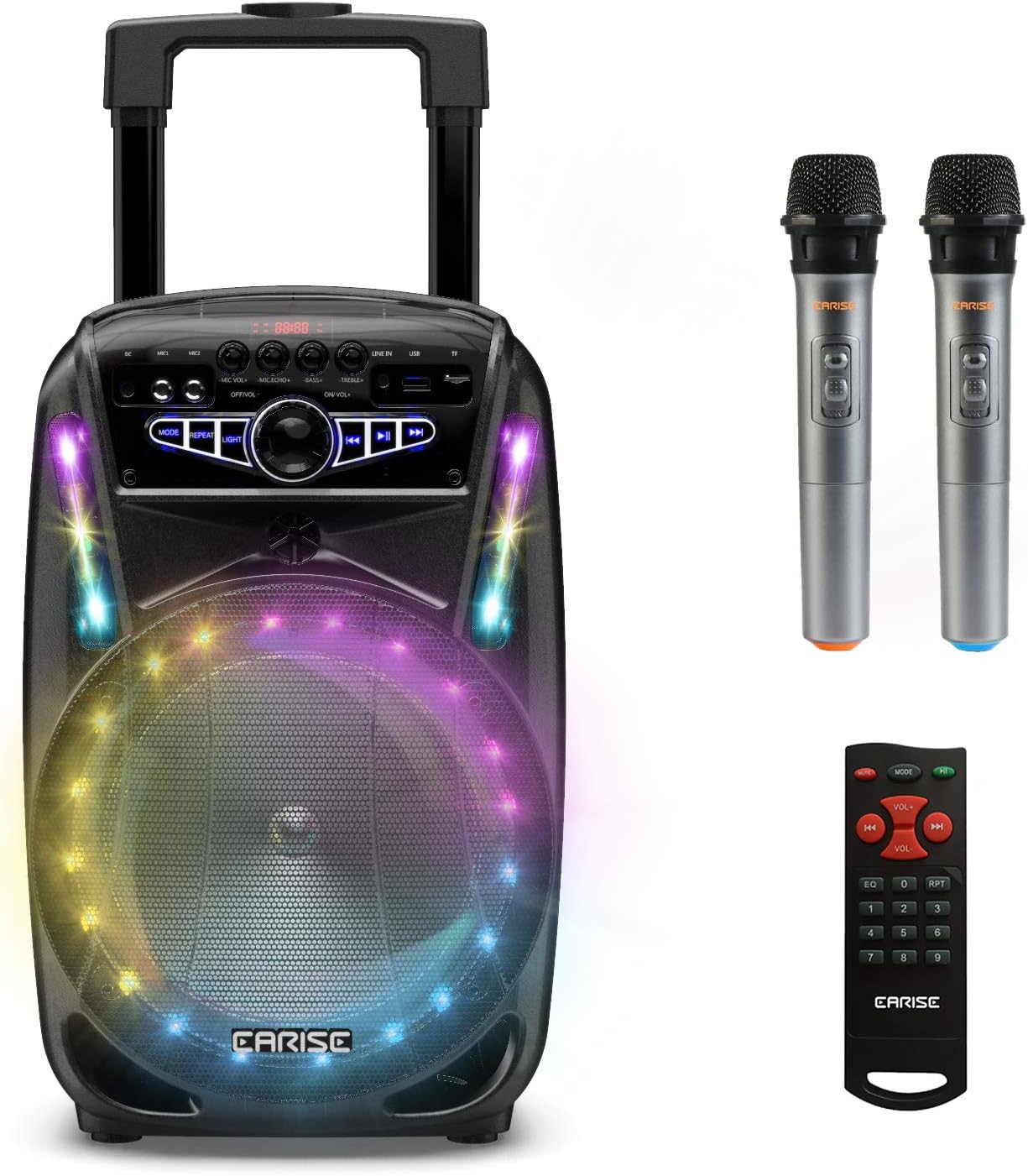
Image: The EARISE M15 Karaoke Machine, a black portable speaker with colorful LED lights on the front, shown with two wireless microphones and a remote control.
ബോക്സിൽ എന്താണുള്ളത്
Please check the contents of your package to ensure all items are present and in good condition.
- 1 x M15 ട്രോളി PA സിസ്റ്റം
- 2 x വയർലെസ് മൈക്രോഫോണുകൾ (ബാറ്ററികൾ ഉൾപ്പെടുത്തിയിട്ടില്ല)
- 1 x റിമോട്ട് കൺട്രോൾ
- 1 x പവർ കോർഡ്
- 1 x ഓക്സ് കേബിൾ
- 1 x ഉപയോക്തൃ മാനുവൽ (ഈ പ്രമാണം)

Image: A visual representation of the package contents, showing the M15 speaker, two wireless microphones, a remote control, an AUX cable, and a charging cable.
സജ്ജീകരണ ഗൈഡ്
1. യൂണിറ്റ് ചാർജ് ചെയ്യുന്നു
Before first use, fully charge the M15 Karaoke Machine. The built-in 3600mAh 7.4V Lithium rechargeable battery provides portability. A full recharge takes approximately 3 hours.
- Connect the included power cord to the DC Charging Port (6) on the back of the unit.
- Plug the other end of the power cord into a standard AC 100-240V power outlet.
- The charging indicator light will illuminate. Once fully charged, the light may change color or turn off depending on the unit's design.
2. മൈക്രോഫോൺ ബാറ്ററികൾ ഇൻസ്റ്റാൾ ചെയ്യുന്നു
The wireless microphones require batteries (not included). Open the battery compartment of each microphone and insert the required batteries, ensuring correct polarity.
3. പ്രാരംഭ പവർ ഓൺ
Locate the Power On/Off switch (15) on the control panel. Turn the switch to the "ON" position to power on the unit.
പ്രവർത്തന നിർദ്ദേശങ്ങൾ
നിയന്ത്രണ പാനൽ ഓവർview
Familiarize yourself with the control panel for optimal operation.

Image: Close-up of the M15's control panel, highlighting various buttons and ports with corresponding numbers for easy identification.
- ഡിസ്പ്ലേ സ്ക്രീൻ: Shows current mode, track number, and other information.
- മൈക്രോഫോൺ വോളിയം: ബന്ധിപ്പിച്ചിരിക്കുന്ന മൈക്രോഫോണുകളുടെ ശബ്ദം ക്രമീകരിക്കുന്നു.
- മൈക്രോഫോൺ എക്കോ: മൈക്രോഫോണുകളുടെ എക്കോ ഇഫക്റ്റ് നിയന്ത്രിക്കുന്നു.
- ബാസ്: ഓഡിയോ ഔട്ട്പുട്ടിന്റെ ബാസ് ലെവൽ ക്രമീകരിക്കുന്നു.
- ട്രെബിൾ: ഓഡിയോ ഔട്ട്പുട്ടിന്റെ ട്രെബിൾ ലെവൽ ക്രമീകരിക്കുന്നു.
- ഡിസി ചാർജിംഗ് പോർട്ട്: For connecting the power adapter to charge the unit.
- Mic 1 Port: വയർഡ് മൈക്രോഫോണിനുള്ള ഇൻപുട്ട്.
- Mic 2 Port: Input for a second wired microphone.
- Line In Port (AUX): AUX കേബിൾ വഴി ബാഹ്യ ഓഡിയോ ഉപകരണങ്ങൾ ബന്ധിപ്പിക്കുന്നതിന്.
- USB ഫ്ലാഷ് ഡ്രൈവ് സ്ലോട്ട്: ഓഡിയോ പ്ലേ ചെയ്യുന്നതിന് fileഒരു USB ഡ്രൈവിൽ നിന്നുള്ള എസ്.
- TF/SD Card Slot: ഓഡിയോ പ്ലേ ചെയ്യുന്നതിന് files from a TF or SD card.
- മോഡ്: Switches between Bluetooth, USB, TF, AUX, and FM Radio modes.
- ആവർത്തിക്കുക: നിലവിലെ ട്രാക്ക് അല്ലെങ്കിൽ പ്ലേലിസ്റ്റ് ആവർത്തിക്കുന്നു.
- വെളിച്ചം: Toggles or changes the LED light patterns.
- Power On/Off, Master Volume: Turns the unit on/off and adjusts the overall volume.
- മുമ്പത്തെ ട്രാക്ക്: മുമ്പത്തെ ട്രാക്കിലേക്ക് പോകുന്നു.
- പ്ലേ/താൽക്കാലികമായി നിർത്തുക: Plays or pauses the current track.
- അടുത്ത ട്രാക്ക്: അടുത്ത ട്രാക്കിലേക്ക് പോകുക.
1. ബ്ലൂടൂത്ത് ജോടിയാക്കൽ
Connect your smartphone, tablet, or other Bluetooth-enabled device to the M15 for wireless audio streaming.
- Power on the M15 unit.
- അമർത്തുക മോഡ് button (12) until "Bluetooth" or "BT" appears on the Display Screen (1).
- Enable Bluetooth on your device and search for "EARISE M15" in the list of available devices.
- Select "EARISE M15" to pair. A confirmation sound will indicate successful pairing.
- You can now play audio from your device through the M15.

Image: A person sitting outdoors, connecting their smartphone to the EARISE M15 speaker via Bluetooth, indicated by the Bluetooth logo.
2. USB/TF കാർഡ് പ്ലേബാക്ക്
ഓഡിയോ പ്ലേ ചെയ്യുക files directly from a USB flash drive or TF/SD card.
- Insert a USB flash drive into the USB Flash Drive Slot (10) or a TF/SD card into the TF/SD Card Slot (11).
- The unit should automatically switch to USB or TF mode and begin playing compatible audio files. ഇല്ലെങ്കിൽ, അമർത്തുക മോഡ് button (12) to select the correct mode.
- ഉപയോഗിക്കുക മുമ്പത്തെ ട്രാക്ക് (16), പ്ലേ/താൽക്കാലികമായി നിർത്തുക (17), കൂടാതെ അടുത്ത ട്രാക്ക് (18) buttons to control playback.
3. AUX ഇൻപുട്ട്
Connect external audio devices that do not have Bluetooth capability using the AUX cable.
- Connect one end of the included AUX cable to the Line In Port (9) on the M15.
- Connect the other end of the AUX cable to the audio output jack of your external device (e.g., MP3 player, laptop).
- അമർത്തുക മോഡ് button (12) until "AUX" or "LINE" appears on the Display Screen (1).
- നിങ്ങളുടെ ബാഹ്യ ഉപകരണത്തിൽ നിന്ന് പ്ലേബാക്ക് നിയന്ത്രിക്കുക.
4. മൈക്രോഫോൺ ഉപയോഗം
The M15 supports up to two wireless microphones and two wired microphones simultaneously for karaoke fun.
- വയർലെസ് മൈക്രോഫോണുകൾ: Turn on the wireless microphones. They should automatically connect to the M15.
- Wired Microphones: Plug wired microphones into Mic 1 Port (7) or Mic 2 Port (8).
- Adjust the Microphone Volume (2) and Microphone Echo (3) knobs to achieve desired sound effects.

Image: A group of people enjoying karaoke, with the EARISE M15 speaker providing sound and multiple microphones in use, demonstrating its multi-user capability.
5. എൽഇഡി ലൈറ്റുകൾ
Enhance your party atmosphere with the M15's colorful LED disco lights.
- അമർത്തുക വെളിച്ചം button (14) to toggle the LED lights on/off or to cycle through different light patterns.

Image: The EARISE M15 speaker with its front-facing LED lights glowing in multiple colors, creating a vibrant visual effect.
6. റിമോട്ട് കൺട്രോൾ ഉപയോഗം
The included remote control provides convenient operation from a distance.
- റിമോട്ട് കൺട്രോളിൽ പ്രവർത്തിക്കുന്ന ബാറ്ററികളുണ്ടെന്ന് ഉറപ്പാക്കുക.
- Point the remote control towards the front of the M15 unit.
- Use the buttons on the remote to control volume, mode, track selection, EQ, and other functions.
മെയിൻ്റനൻസ്
Proper maintenance will ensure the longevity and optimal performance of your EARISE M15 Karaoke Machine.
- വൃത്തിയാക്കൽ: Use a soft, dry cloth to wipe the exterior of the unit. Do not use abrasive cleaners, waxes, or solvents as they may damage the finish.
- ബാറ്ററി കെയർ: To prolong battery life, avoid fully discharging the battery frequently. If storing the unit for an extended period, charge it to about 50% every few months.
- സംഭരണം: നേരിട്ടുള്ള സൂര്യപ്രകാശം, തീവ്രമായ താപനില, ഉയർന്ന ഈർപ്പം എന്നിവയിൽ നിന്ന് മാറി തണുത്തതും വരണ്ടതുമായ സ്ഥലത്ത് യൂണിറ്റ് സൂക്ഷിക്കുക.
- കൈകാര്യം ചെയ്യൽ: While the unit is portable with wheels and a handle, avoid dropping or subjecting it to strong impacts.

Image: A person demonstrating the portability of the EARISE M15 by pulling it with its retractable handle and built-in wheels.
ട്രബിൾഷൂട്ടിംഗ്
If you encounter issues with your M15, please refer to the following common problems and solutions.
| പ്രശ്നം | സാധ്യമായ കാരണം | പരിഹാരം |
|---|---|---|
| ഒരു പവറും / യൂണിറ്റും ഓണാകുന്നില്ല. | ബാറ്ററി തീർന്നു. പവർ കോർഡ് ശരിയായി ബന്ധിപ്പിച്ചിട്ടില്ല. | യൂണിറ്റ് പൂർണ്ണമായും ചാർജ് ചെയ്യുക. Ensure power cord is securely connected to both the unit and the power outlet. |
| സ്പീക്കറിൽ നിന്ന് ശബ്ദമില്ല. | വോളിയം വളരെ കുറവാണ്. തെറ്റായ മോഡ് തിരഞ്ഞെടുത്തു. External device volume is low. | Increase the Master Volume (15). അമർത്തുക മോഡ് button (12) to select the correct input source (Bluetooth, USB, AUX). Increase volume on the connected external device. |
| മൈക്രോഫോൺ പ്രവർത്തിക്കുന്നില്ല. | Microphone batteries are dead or incorrectly inserted. Microphone volume is too low. Wireless microphone not paired. | Replace microphone batteries, ensuring correct polarity. Increase Microphone Volume (2). Ensure wireless microphones are turned on and within range. |
| ബ്ലൂടൂത്ത് ജോടിയാക്കൽ പരാജയപ്പെട്ടു. | M15 is not in Bluetooth mode. Device is too far from M15. Bluetooth on device is off. | അമർത്തുക മോഡ് button (12) to select Bluetooth mode. Move your device closer to the M15. നിങ്ങളുടെ ഉപകരണത്തിൽ ബ്ലൂടൂത്ത് പ്രവർത്തനക്ഷമമാക്കുക. |
| USB/TF കാർഡ് പ്ലേ ചെയ്യുന്നില്ല. | തെറ്റാണ് file ഫോർമാറ്റ്. Card/drive not inserted correctly. Unit not in USB/TF mode. | ഓഡിയോ ഉറപ്പാക്കുക fileകൾ അനുയോജ്യമായ ഫോർമാറ്റിലാണ് (ഉദാ. MP3). Re-insert the USB drive or TF card firmly. അമർത്തുക മോഡ് button (12) to select USB or TF mode. |
സ്പെസിഫിക്കേഷനുകൾ
Detailed technical specifications for the EARISE M15 Karaoke Machine.
| ഫീച്ചർ | സ്പെസിഫിക്കേഷൻ |
|---|---|
| മോഡൽ | M15 |
| പവർ ഔട്ട്പുട്ട് | 400W പരമാവധി. |
| R.Frequency | 90Hz-20KHz |
| ലി-അയൺ ബാറ്ററി | 3.7V / 2600mAh (Built-in) |
| ഡ്രൈവ് യൂണിറ്റ് | 8" 4Ω*1 + 1" tweeter*1 |
| എസ്/എൻ അനുപാതം | ≥60dB |
| വൈദ്യുതി വിതരണം | എസി 100-240V |
| ഉൽപ്പന്ന അളവുകൾ (L x W x H) | 27.94 x 25.4 x 40.64 സെ.മീ (11 x 10.4 x 16.3 ഇഞ്ച്) |
| ഇനത്തിൻ്റെ ഭാരം | 4.08 കി.ഗ്രാം |
| കണക്റ്റിവിറ്റി ടെക്നോളജി | ബ്ലൂടൂത്ത്, യുഎസ്ബി, ഓക്സ് |
| അനുയോജ്യമായ ഉപകരണങ്ങൾ | ലാപ്ടോപ്പ്, സ്മാർട്ട്ഫോൺ |

Image: A diagram illustrating the physical dimensions of the EARISE M15 speaker, showing its height, width, and depth.
വാറൻ്റിയും പിന്തുണയും
For warranty information or technical support, please refer to the contact details provided with your purchase documentation or visit the official EARISE webസൈറ്റ്. ഏതെങ്കിലും വാറന്റി ക്ലെയിമുകൾക്ക് വാങ്ങിയതിന്റെ തെളിവായി നിങ്ങളുടെ വാങ്ങൽ രസീത് സൂക്ഷിക്കുക.


