ആമുഖം
This manual provides essential information for the safe and effective use of your Juice BoomPRO Portable Bluetooth Speaker. Please read this manual thoroughly before using the product and retain it for future reference.
The Juice BoomPRO is a universal portable Bluetooth speaker designed to deliver immersive 360-degree sound. It features a 10W output, IPX5 splashproof rating, up to 15 hours of playtime, and a 10m Bluetooth range. It is compatible with smartphones, tablets, and MP3 devices.
പ്രധാനപ്പെട്ട സുരക്ഷാ വിവരങ്ങൾ
- സ്പീക്കറിനെ തീവ്രമായ താപനിലയിലോ നേരിട്ടുള്ള സൂര്യപ്രകാശത്തിലോ തുറന്നുകാട്ടരുത്.
- Do not immerse the speaker in water, despite its splashproof rating.
- കുട്ടികളിൽ നിന്ന് അകന്നു നിൽക്കുക.
- നൽകിയിരിക്കുന്ന ചാർജിംഗ് കേബിൾ മാത്രം ഉപയോഗിക്കുക.
- സ്പീക്കർ ഡിസ്അസംബ്ലിംഗ് ചെയ്യാനോ പരിഷ്ക്കരിക്കാനോ ശ്രമിക്കരുത്.
- പ്രാദേശിക ചട്ടങ്ങൾക്കനുസൃതമായി ഉൽപ്പന്നം ഉത്തരവാദിത്തത്തോടെ വിനിയോഗിക്കുക.
പാക്കേജ് ഉള്ളടക്കം
എല്ലാ ഇനങ്ങളും നിലവിലുണ്ടോ എന്ന് ദയവായി പരിശോധിക്കുക:
- Juice BoomPRO Bluetooth Speaker
- ചാർജിംഗ് കേബിൾ
- ഉപയോക്തൃ മാനുവൽ (ഈ പ്രമാണം)
 Image: The Juice BoomPRO speaker along with its charging cable and user manual, as typically found in the product packaging.
ഉൽപ്പന്നം കഴിഞ്ഞുview
Familiarize yourself with the various parts of your Juice BoomPRO speaker.
ചിത്രം: മുകളിൽ view of the Juice BoomPRO speaker, highlighting the control panel with buttons for play/pause, power/mode, volume up, and volume down.

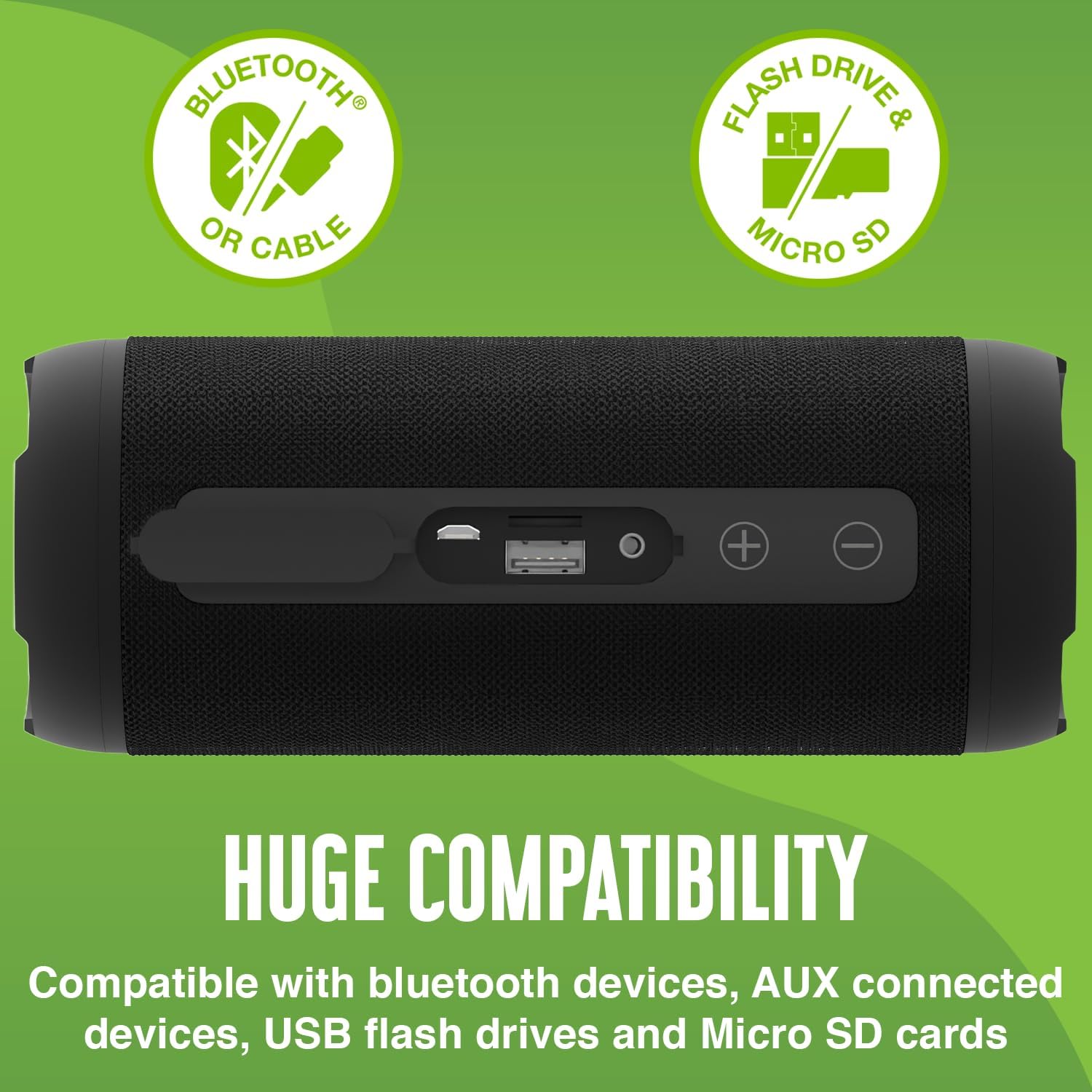
ചിത്രം: വശം view of the Juice BoomPRO speaker, showing the covered port section which includes the charging port, USB port, and AUX input.
നിയന്ത്രണങ്ങളും തുറമുഖങ്ങളും
| ഘടകം | ഫംഗ്ഷൻ |
|---|---|
| പവർ/മോഡ് ബട്ടൺ | Press and hold to power on/off. Short press to switch between Bluetooth, AUX, USB, and Micro SD modes. |
| പ്ലേ ചെയ്യുക/താൽക്കാലികമായി നിർത്തുക ബട്ടൺ | ഓഡിയോ പ്ലേ ചെയ്യാനോ താൽക്കാലികമായി നിർത്താനോ അമർത്തുക. |
| വോളിയം കൂട്ടുക (+) | വോളിയം കൂട്ടാൻ അമർത്തുക. |
| വോളിയം താഴേക്ക് (-) | വോളിയം കുറയ്ക്കാൻ അമർത്തുക. |
| ചാർജിംഗ് പോർട്ട് (മൈക്രോ USB) | Connect the charging cable to power the device. |
| USB പോർട്ട് | ഓഡിയോ പ്ലേബാക്കിനായി ഒരു യുഎസ്ബി ഫ്ലാഷ് ഡ്രൈവ് ഇടുക. |
| മൈക്രോ എസ്ഡി കാർഡ് സ്ലോട്ട് | ഓഡിയോ പ്ലേബാക്കിനായി ഒരു മൈക്രോ എസ്ഡി കാർഡ് ഇടുക. |
| AUX ഇൻപുട്ട് | ഒരു 3.5mm ഓഡിയോ കേബിൾ ഉപയോഗിച്ച് ബാഹ്യ ഓഡിയോ ഉപകരണങ്ങൾ ബന്ധിപ്പിക്കുക. |
സജ്ജമാക്കുക
സ്പീക്കറെ കുറ്റപ്പെടുത്തുന്നു
- Connect the provided charging cable to the Micro USB port on the speaker.
- കേബിളിന്റെ മറ്റേ അറ്റം ഒരു USB പവർ അഡാപ്റ്ററുമായി (ഉൾപ്പെടുത്തിയിട്ടില്ല) അല്ലെങ്കിൽ ഒരു കമ്പ്യൂട്ടറിന്റെ USB പോർട്ടുമായി ബന്ധിപ്പിക്കുക.
- ചാർജിംഗ് ഇൻഡിക്കേറ്റർ ലൈറ്റ് പ്രകാശിക്കും. പൂർണ്ണമായി ചാർജ്ജ് ചെയ്തുകഴിഞ്ഞാൽ അത് ഓഫാകും അല്ലെങ്കിൽ നിറം മാറും.
- ഒരു ഫുൾ ചാർജ് 15 മണിക്കൂർ വരെ പ്ലേടൈം നൽകുന്നു.
ബ്ലൂടൂത്ത് ജോടിയാക്കൽ
- സ്പീക്കർ ചാർജ് ചെയ്തിട്ടുണ്ടെന്നും പവർ ഓണാക്കിയിട്ടുണ്ടെന്നും ഉറപ്പാക്കുക.
- സ്പീക്കർ സ്വയമേവ ബ്ലൂടൂത്ത് ജോടിയാക്കൽ മോഡിലേക്ക് പ്രവേശിക്കും, ഇത് ഒരു മിന്നുന്ന LED ലൈറ്റ് വഴി സൂചിപ്പിക്കപ്പെടും.
- നിങ്ങളുടെ ഉപകരണത്തിൽ (സ്മാർട്ട്ഫോൺ, ടാബ്ലെറ്റ് മുതലായവ), ബ്ലൂടൂത്ത് പ്രവർത്തനക്ഷമമാക്കി ലഭ്യമായ ഉപകരണങ്ങൾക്കായി തിരയുക.
- Select "Juice BoomPRO" from the list of devices.
- Once paired, the LED light will stop flashing and remain solid. You can now play audio wirelessly.
- സ്പീക്കറിന് 10 മീറ്റർ വരെ ബ്ലൂടൂത്ത് ശ്രേണിയുണ്ട്.
പ്രവർത്തന നിർദ്ദേശങ്ങൾ
ഓഡിയോ പ്ലേ ചെയ്യുന്നു
After successful Bluetooth pairing, you can play music from your connected device. Use the Play/Pause button on the speaker or your device to control playback.
സ്വിച്ചിംഗ് മോഡുകൾ
Short press the Power/Mode button to cycle through available input modes: Bluetooth, AUX, USB, and Micro SD.
വോളിയം നിയന്ത്രണം
Press the Volume Up (+) button to increase the volume and the Volume Down (-) button to decrease it.
AUX ഇൻപുട്ട് ഉപയോഗിക്കുന്നു
Connect a 3.5mm audio cable (not included) from your external audio device to the AUX input port on the speaker. The speaker will automatically switch to AUX mode.
Using USB/Micro SD
Insert a USB flash drive or a Micro SD card containing audio files into the respective port. The speaker will automatically switch to the corresponding mode and begin playback.
 Image: A person relaxing outdoors, listening to music from the Juice BoomPRO speaker, demonstrating its portability and outdoor use.
മെയിൻ്റനൻസ്
വൃത്തിയാക്കൽ
മൃദുവായതും ഉണങ്ങിയതുമായ തുണി ഉപയോഗിച്ച് സ്പീക്കർ തുടയ്ക്കുക. അബ്രാസീവ് ക്ലീനറുകളോ ലായകങ്ങളോ ഉപയോഗിക്കരുത്.
സംഭരണം
നേരിട്ടുള്ള സൂര്യപ്രകാശത്തിൽ നിന്നും കടുത്ത താപനിലയിൽ നിന്നും മാറി തണുത്തതും വരണ്ടതുമായ സ്ഥലത്ത് സ്പീക്കർ സൂക്ഷിക്കുക.
ബാറ്ററി കെയർ
- ബാറ്ററി ലൈഫ് വർദ്ധിപ്പിക്കുന്നതിന്, ആദ്യ ഉപയോഗത്തിന് മുമ്പ് സ്പീക്കർ പൂർണ്ണമായും ചാർജ് ചെയ്യുക.
- സ്പീക്കർ കൂടുതൽ നേരം ഉപയോഗിക്കാൻ കഴിയുന്നില്ലെങ്കിൽ, മൂന്ന് മാസത്തിലൊരിക്കലെങ്കിലും അത് ചാർജ് ചെയ്യുക.
ട്രബിൾഷൂട്ടിംഗ്
| പ്രശ്നം | പരിഹാരം |
|---|---|
| സ്പീക്കർ പവർ ഓൺ ചെയ്യുന്നില്ല. | Ensure the speaker is charged. Press and hold the Power/Mode button for a few seconds. |
| ബ്ലൂടൂത്ത് വഴി ജോടിയാക്കാൻ കഴിയില്ല. | Ensure Bluetooth is enabled on your device and the speaker is in pairing mode. Move the speaker closer to your device. Forget "Juice BoomPRO" from your device's Bluetooth list and try pairing again. |
| ശബ്ദമില്ല. | Check the volume levels on both the speaker and your connected device. Ensure the correct input mode is selected (Bluetooth, AUX, USB, Micro SD). |
| മോശം ശബ്ദ നിലവാരം. | Move the speaker closer to your Bluetooth device to avoid interference. Ensure audio files are not corrupted if playing from USB/Micro SD. |
| ബാറ്ററി ലൈഫ് പ്രതീക്ഷിച്ചതിലും ചെറുതാണ്. | Ensure the speaker is fully charged. High volume levels can reduce playtime. |
സ്പെസിഫിക്കേഷനുകൾ
- മോഡൽ: JUI-SPKER-BOOMPRO-ECO-BLK
- ബ്രാൻഡ്: ജ്യൂസ്
- കണക്റ്റിവിറ്റി: ബ്ലൂടൂത്ത്
- സ്പീക്കർ ഔട്ട്പുട്ട്: 10 വാട്ട്സ്
- ഓഡിയോ putട്ട്പുട്ട് മോഡ്: സ്റ്റീരിയോ
- കളിസമയം: 15 മണിക്കൂർ വരെ
- ബ്ലൂടൂത്ത് ശ്രേണി: 10 മീറ്റർ വരെ
- ജല പ്രതിരോധം: IPX5 (സ്പ്ലാഷ് പ്രൂഫ്)
- അളവുകൾ: 8 x 19.1 x 13.2 സെ.മീ
- ഭാരം: 520 ഗ്രാം
- മെറ്റീരിയൽ: പ്ലാസ്റ്റിക്
- അനുയോജ്യത: Bluetooth devices, non-Bluetooth devices (via AUX), USB flash drives, Micro SD cards
വാറൻ്റിയും പിന്തുണയും
The Juice BoomPRO speaker comes with a 1-year guarantee. For warranty claims or technical support, please contact Juice customer service.
For more information, visit the official Juice webസൈറ്റ്: www.juice.co.uk
 Image: The Juice BoomPRO speaker displayed with a prominent "1 Year Guarantee" text, indicating product assurance.


