1. ആമുഖം
This manual provides essential information for the installation, operation, and maintenance of your Hama Smart Home WiFi Radiator Thermostat (Model 00176592). This intelligent thermostatic head is designed to modernize your heating system, allowing for precise temperature control and energy savings. It operates as an extension unit and requires a Hama Smart Home heating control hub (e.g., from Hama Kit 00176592) for full functionality and Wi-Fi connectivity.

Image 1.1: Hama Smart Home WiFi Radiator Thermostat with digital display.
2 സുരക്ഷാ വിവരങ്ങൾ
- ഇൻസ്റ്റാളേഷനും ഉപയോഗത്തിനും മുമ്പ് ഈ നിർദ്ദേശ മാനുവൽ ശ്രദ്ധാപൂർവ്വം വായിക്കുക.
- ഭാവി റഫറൻസിനായി ഈ മാനുവൽ സുരക്ഷിതമായ സ്ഥലത്ത് സൂക്ഷിക്കുക.
- ഉപകരണം ഇൻഡോർ ഉപയോഗത്തിന് മാത്രമുള്ളതാണ്.
- ഉപകരണത്തിൽ ഈർപ്പം, തീവ്രമായ താപനില, നേരിട്ടുള്ള സൂര്യപ്രകാശം എന്നിവ ഏൽക്കരുത്.
- ഉപകരണം തുറക്കുകയോ പരിഷ്കരിക്കുകയോ ചെയ്യരുത്. യോഗ്യതയുള്ള ഉദ്യോഗസ്ഥർ മാത്രമേ അറ്റകുറ്റപ്പണികൾ നടത്താവൂ.
- ശ്വാസംമുട്ടൽ സാധ്യതയുള്ളതിനാൽ പാക്കേജിംഗ് വസ്തുക്കൾ കുട്ടികളിൽ നിന്ന് അകറ്റി നിർത്തുക.
- Batteries must be inserted with correct polarity. Do not mix old and new batteries, or batteries of different types.
- ഉപയോഗിച്ച ബാറ്ററികൾ പ്രാദേശിക ചട്ടങ്ങൾക്കനുസൃതമായി നീക്കം ചെയ്യുക.
3. പാക്കേജ് ഉള്ളടക്കം
എല്ലാ ഇനങ്ങളും നിലവിലുണ്ടെന്നും കേടുപാടുകൾ സംഭവിച്ചിട്ടില്ലെന്നും ദയവായി പരിശോധിക്കുക:
- 1 Hama Smart Home Radiator Thermostat
- 2 AA Mignon Batteries
- 1 Adapter Kit (for Danfoss RA, RAV, Caleffi, Giacomini valves)
- 1 Quick User Manual
Note: This thermostat functions as an extension unit and requires a Hama Smart Home heating control hub (e.g., from Hama Kit 00176592) for network connection and full smart features.
4. സജ്ജീകരണവും ഇൻസ്റ്റാളേഷനും
4.1. ബാറ്ററികൾ ചേർക്കുന്നു
- തെർമോസ്റ്റാറ്റിൽ നിന്ന് ബാറ്ററി കവർ നീക്കം ചെയ്യുക.
- Insert the two AA Mignon batteries, ensuring correct polarity (+/-).
- ബാറ്ററി കവർ മാറ്റിസ്ഥാപിക്കുക.
4.2. Physical Installation on Radiator
The Hama Smart Home Radiator Thermostat is designed for easy replacement of existing thermostatic radiator valves. It includes an adapter kit to ensure compatibility with most common radiator valves.
- Turn your existing thermostatic head to the highest setting or remove it completely.
- If necessary, select the appropriate adapter from the provided kit (Danfoss RA, RAV, Caleffi, Giacomini) for your radiator valve.
- Mount the Hama Smart Home Radiator Thermostat onto the valve. Ensure it is securely fastened.

Image 4.1: Close-up of the thermostat installed on a radiator valve.
4.3. Pairing with Hama Smart Home Hub
This thermostat communicates via Zigbee with a Hama Smart Home hub, which then connects to your Wi-Fi network. Follow the instructions provided with your Hama Smart Home hub to add new devices.
- Ensure your Hama Smart Home hub is powered on and connected to your Wi-Fi network.
- Open the Hama Smart Home app on your smartphone or tablet.
- Follow the app's instructions to add a new device. This typically involves putting the hub into pairing mode and then activating the pairing mode on the radiator thermostat (refer to the thermostat's quick start guide for specific button presses).
- Once paired, the thermostat will appear in your Hama Smart Home app.
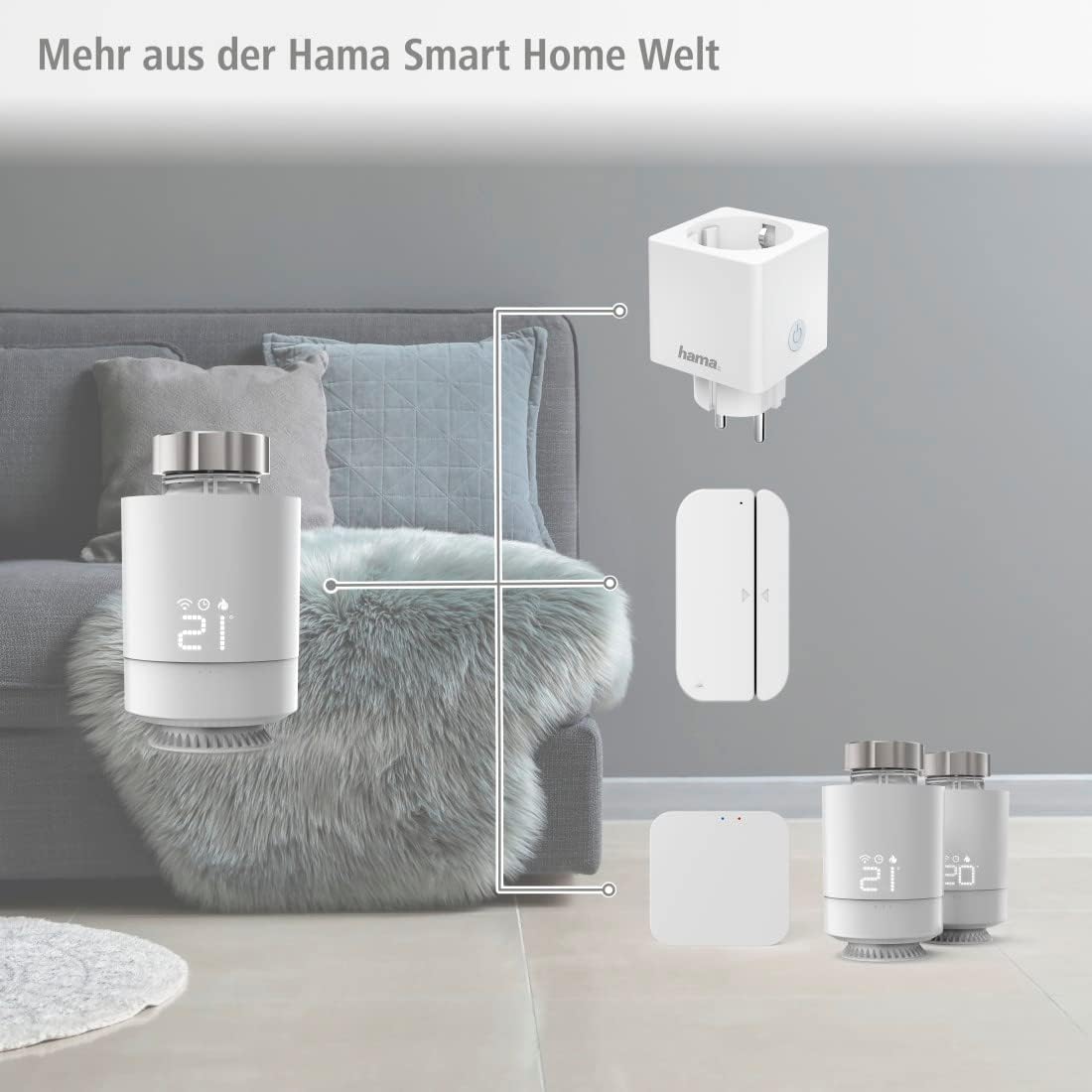
Image 4.2: The Hama Smart Home ecosystem, illustrating how the thermostat connects via a hub.
5. തെർമോസ്റ്റാറ്റ് പ്രവർത്തിപ്പിക്കൽ
5.1. മാനുവൽ നിയന്ത്രണം
You can adjust the temperature directly on the thermostat using the rotary knob. The current temperature will be displayed on the digital screen.
5.2. ആപ്പ് നിയന്ത്രണം
The Hama Smart Home app allows comprehensive control and programming of your radiator thermostat from anywhere.
- Current Temperature Display: View നിലവിലെ മുറിയിലെ താപനില.
- താപനില ക്രമീകരണം: Set your desired target temperature.
- ഷെഡ്യൂളിംഗ്: Program individual heating cycles for different times of the day and days of the week to optimize comfort and energy usage.
- ഔട്ട്ഡോർ മോഡ്: Activate a specific mode when you are away from home.
- വിൻഡോ ഡിറ്റക്ഷൻ: The thermostat can detect open windows and temporarily reduce heating to save energy.

Image 5.1: Controlling the thermostat via the Hama Smart Home app.

Image 5.2: Programming heating schedules in the Hama Smart Home app.
5.3. ശബ്ദ നിയന്ത്രണം
The Hama Smart Home WiFi Radiator Thermostat is compatible with popular voice assistants, allowing you to control your heating with voice commands.
- ആമസോൺ അലക്സ: Enable the 'Hama Smart Home' skill in the Alexa app and link your Hama Smart Home account.
- Google അസിസ്റ്റൻ്റ്: Activate the 'Hama Smart Home' service in the Google Home app and link your Hama Smart Home account.
- Apple Siri (Shortcuts): Utilize Siri Shortcuts for quick voice commands.

Image 5.3: Voice control compatibility with major smart home platforms.
6. പരിപാലനം
6.1. വൃത്തിയാക്കൽ
ഉപകരണം ചെറുതായി d ഉപയോഗിച്ച് മാത്രം വൃത്തിയാക്കുകamp, ലിന്റ് രഹിത തുണി. ആക്രമണാത്മക ക്ലീനിംഗ് ഏജന്റുകൾ ഉപയോഗിക്കരുത്.
6.2. ബാറ്ററി മാറ്റിസ്ഥാപിക്കൽ
When the battery level is low, an indicator will typically appear on the thermostat's display and/or in the Hama Smart Home app. Replace both AA batteries promptly to ensure continuous operation.
6.3. Limescale Protection
The thermostat features a limescale protection function, which periodically moves the valve to prevent calcification, ensuring long-term functionality.
7. പ്രശ്നപരിഹാരം
| പ്രശ്നം | സാധ്യമായ കാരണം | പരിഹാരം |
|---|---|---|
| തെർമോസ്റ്റാറ്റ് പ്രതികരിക്കുന്നില്ല | Low batteries; not paired with hub; hub offline. | Replace batteries; re-pair with hub; check hub's power and Wi-Fi connection. |
| തെറ്റായ താപനില വായന | Thermostat too close to heat source/draft; internal sensor calibration. | Ensure proper placement; check app for calibration options if available. |
| Cannot control via app | Hub not connected to Wi-Fi; app not updated; thermostat not paired. | Verify hub's Wi-Fi connection; update Hama Smart Home app; re-pair thermostat. |
| ശബ്ദ നിയന്ത്രണം പ്രവർത്തിക്കുന്നില്ല | Skill/service not enabled; accounts not linked; incorrect commands. | Enable Hama Smart Home skill/service; link accounts; use correct voice commands. |
8 സ്പെസിഫിക്കേഷനുകൾ
| ഫീച്ചർ | വിശദാംശങ്ങൾ |
|---|---|
| ബ്രാൻഡ് | ഹമാ |
| മോഡൽ നമ്പർ | 00176592 |
| നിറം | വെള്ള |
| അളവുകൾ (L x W x H) | 13 x 9 x 8 സെ.മീ |
| ഇനത്തിൻ്റെ ഭാരം | 100 ഗ്രാം |
| മെറ്റീരിയൽ | പ്ലാസ്റ്റിക് |
| വൈദ്യുതി വിതരണം | 2 x AA Mignon Batteries (included) |
| സിഗ്നൽ ട്രാൻസ്മിഷൻ | Zigbee (to Hama Smart Home Hub) |
| Connectivity (via Hub) | വൈഫൈ |
| താപനില ക്രമീകരണ ശ്രേണി | +5 ° C മുതൽ + 30 ° C വരെ |
| വോയ്സ് കൺട്രോൾ കോംപാറ്റിബിലിറ്റി | Amazon Alexa, Google Home, Apple Siri (Shortcuts) |
| പ്രത്യേക സവിശേഷതകൾ | Temperature Display, Programmable, Frost Protection, Limescale Protection, Window Detection |
| സിസ്റ്റം ആവശ്യകതകൾ | Android 6.0 അല്ലെങ്കിൽ ഉയർന്നത്, iOS 11.0 അല്ലെങ്കിൽ ഉയർന്നത് |
| Compatible Adapters | Caleffi, Danfoss RA, Danfoss RAV, Giacomini |
9. വാറൻ്റിയും പിന്തുണയും
9.1. വാറൻ്റി വിവരങ്ങൾ
Hama GmbH & Co KG provides a manufacturer's warranty for this product. Please refer to the warranty card included with your product or visit the official Hama webനിങ്ങളുടെ പ്രദേശത്തിന് പ്രത്യേകമായുള്ള വിശദമായ വാറന്റി നിബന്ധനകൾക്കും വ്യവസ്ഥകൾക്കും സൈറ്റ് സന്ദർശിക്കുക.
9.2. ഉപഭോക്തൃ പിന്തുണ
For technical support, troubleshooting assistance, or inquiries regarding your Hama Smart Home WiFi Radiator Thermostat, please contact Hama customer service. Contact details can typically be found on the official Hama webസൈറ്റ് (www.hama.com) or in the product packaging.


