1. ആമുഖം
This manual provides instructions for the XR15 Voice Control Remote, designed for use with Xfinity and Comcast X1, Xi6, Xi5, and XG2 systems. The remote allows users to control their television and compatible TV box, offering features such as voice commands, backlit keypad, and direct access to accessibility options.

Image 1.1: The XR15 Voice Control Remote, a replacement remote for Xfinity Comcast systems.
2. പാക്കേജ് ഉള്ളടക്കം
പാക്കേജിൽ എല്ലാ ഇനങ്ങളും ഉണ്ടെന്ന് ഉറപ്പാക്കുക:
- 1 x XR15 Voice Control Remote
- 2 x AA ബാറ്ററികൾ
- 1 x User's Guide (this document)
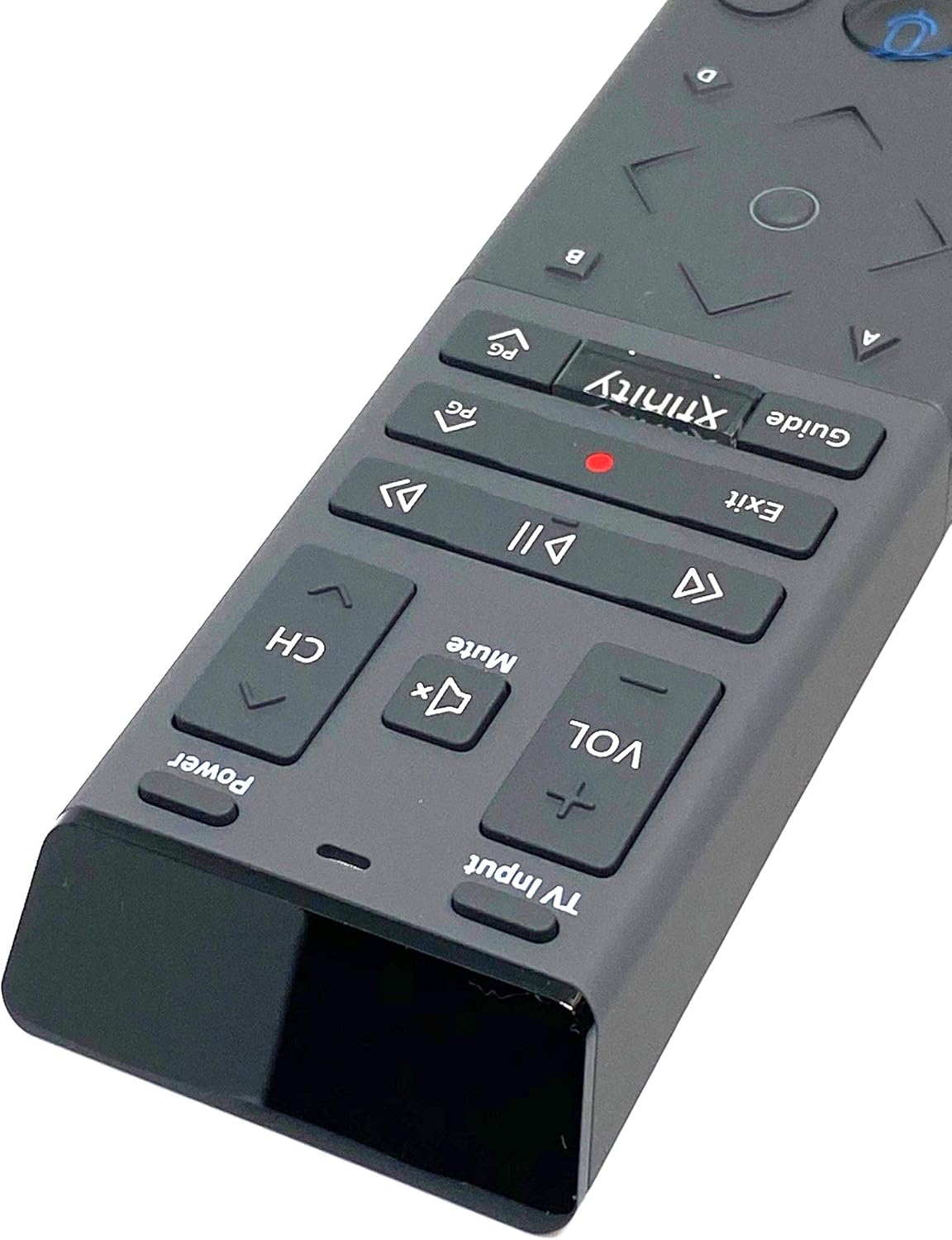
Image 2.1: The XR15 Voice Control Remote as received in its protective packaging.
3 പ്രധാന സവിശേഷതകൾ
The XR15 Voice Control Remote offers several advanced features for an enhanced user experience:
- ശബ്ദ നിയന്ത്രണം: Use voice commands to change channels, search for content, and get recommendations.
- ബാക്ക്ലൈറ്റ് കീപാഡ്: Buttons illuminate for visibility in low-light conditions.
- Aim Anywhere Feature: Operates without needing to point directly at the device.
- യാന്ത്രിക ജോടിയാക്കൽ: Simplifies the setup process with compatible devices.
- പ്രവേശനക്ഷമത സവിശേഷതകൾ: Quick access to Closed Captioning, video description, and voice guidance.
- TV Input Control: Manage TV power and input settings.
4. സജ്ജീകരണം
4.1 ബാറ്ററി ഇൻസ്റ്റാളേഷൻ
To power your remote, install the two AA batteries provided:
- റിമോട്ടിന്റെ പിൻഭാഗത്ത് ബാറ്ററി കമ്പാർട്ട്മെന്റ് കണ്ടെത്തുക.
- തുറക്കാൻ ബാറ്ററി കവർ താഴേക്ക് സ്ലൈഡ് ചെയ്യുക.
- രണ്ട് AA ബാറ്ററികൾ ഇടുക, പോസിറ്റീവ് (+) ഉം നെഗറ്റീവ് (-) ടെർമിനലുകളും കമ്പാർട്ടുമെന്റിനുള്ളിലെ സൂചകങ്ങളുമായി ശരിയായി വിന്യസിക്കുന്നുണ്ടെന്ന് ഉറപ്പാക്കുക.
- സുരക്ഷിതമായി ക്ലിക്കുചെയ്യുന്നത് വരെ ബാറ്ററി കവർ തിരികെ സ്ഥലത്തേക്ക് സ്ലൈഡ് ചെയ്യുക.

ചിത്രം 4.1: പിൻഭാഗം view of the XR15 remote, highlighting the battery compartment area.
4.2 Pairing Instructions
The XR15 remote can be paired with your Xfinity X1 TV Box and television for full functionality. Follow these steps:
- Pairing with X1 TV Box:
- നിങ്ങളുടെ ടിവി ബോക്സ് ഓണാക്കിയിട്ടുണ്ടെന്ന് ഉറപ്പാക്കുക.
- Point the remote at the TV Box.
- അമർത്തിപ്പിടിക്കുക എക്സ്ഫിനിറ്റി ബട്ടൺ ഒപ്പം വിവരം (i) button simultaneously for five seconds until the status light on the remote changes from red to green.
- ജോടിയാക്കൽ പ്രക്രിയ പൂർത്തിയാക്കാൻ ഓൺ-സ്ക്രീൻ നിർദ്ദേശങ്ങൾ പാലിക്കുക.
- Pairing with Television (for TV Power and Volume):
- After pairing with the TV Box, the remote may automatically attempt to pair with your TV.
- If not, or if it fails, press and hold the സജ്ജമാക്കുക button (usually a small, recessed button on the side or back, or a combination of buttons like എക്സ്ഫിനിറ്റി ഒപ്പം നിശബ്ദമാക്കുക) until the status light turns green.
- Enter the TV brand code. Refer to your TV's user manual for specific codes if the Xfinity codes do not work.
- പരീക്ഷിക്കുക ശക്തി ഒപ്പം വോളിയം buttons. If they work, the pairing is successful.
5. പ്രവർത്തന നിർദ്ദേശങ്ങൾ
The XR15 remote features a clear layout for intuitive control. Below is a guide to its primary buttons and their functions:

ചിത്രം 5.1: ക്ലോസ്-അപ്പ് view of the upper section of the XR15 remote, showing TV Input, Volume, Mute, Power, and Channel buttons.
5.1 ബട്ടൺ പ്രവർത്തനങ്ങൾ
| ബട്ടൺ | ഫംഗ്ഷൻ |
|---|---|
| ശക്തി | Turns the TV and compatible TV Box on or off. |
| ടിവി ഇൻപുട്ട് | Cycles through available TV input sources. |
| VOL + / VOL- | വോളിയം കൂട്ടുകയോ കുറയ്ക്കുകയോ ചെയ്യുന്നു. |
| നിശബ്ദമാക്കുക | Turns sound off or on. |
| CH+ / CH- | Selects the next or previous channel. |
| പ്ലേ ചെയ്യുക/താൽക്കാലികമായി നിർത്തുക (►▮▮) | Plays or pauses live TV, Xfinity On Demand, or DVR content. |
| എഫ്എഫ് (►►) | Fast forwards Xfinity On Demand or DVR content. |
| Rew (◄◄) | Rewinds Xfinity On Demand or DVR content. |
| പുറത്ത് | Exits on-screen guides; stops and exits Xfinity On Demand and DVR content. Returns to "Live" point during live TV replay. |
| Record (Red Dot) | Records the current program. |
| എക്സ്ഫിനിറ്റി | Displays the main menu of the guide, providing access to DVR and Xfinity On Demand. |
| വഴികാട്ടി | Displays TV listings. |
| ശബ്ദ നിയന്ത്രണം (മൈക്രോഫോൺ ഐക്കൺ) | Activates voice command functionality. Press and speak into the remote. |
| Directional Pad (Up, Down, Left, Right, OK) | മെനുകളിലൂടെ നാവിഗേറ്റ് ചെയ്ത് ഓപ്ഷനുകൾ തിരഞ്ഞെടുക്കുന്നു. |
| വിവരം (i) | നിലവിലുള്ള പ്രോഗ്രാമിനെക്കുറിച്ചോ തിരഞ്ഞെടുത്ത ഇനത്തെക്കുറിച്ചോ ഉള്ള വിവരങ്ങൾ പ്രദർശിപ്പിക്കുന്നു. |
| നമ്പർ പാഡ് (0-9) | ചാനൽ നമ്പറുകളോ മറ്റ് സംഖ്യാ ഇൻപുട്ടുകളോ നേരിട്ട് നൽകുന്നു. |

ചിത്രം 5.2: ക്ലോസ്-അപ്പ് view of the lower section of the XR15 remote, featuring the voice control button, directional pad, and numeric keypad.
6. പരിപാലനം
To ensure the longevity and optimal performance of your XR15 Voice Control Remote, follow these maintenance guidelines:
- വൃത്തിയാക്കൽ: മൃദുവായതും ഉണങ്ങിയതുമായ തുണി ഉപയോഗിച്ച് റിമോട്ട് തുടയ്ക്കുക. കഠിനമായ അഴുക്കിന്, ചെറുതായി dampവെള്ളം അല്ലെങ്കിൽ നേരിയതും ഉരച്ചിലുകൾ ഇല്ലാത്തതുമായ ഒരു ക്ലീനർ ഉപയോഗിച്ച് തുണി തുടയ്ക്കുക. അമിതമായ ഈർപ്പം ഒഴിവാക്കുക.
- ബാറ്ററി മാറ്റിസ്ഥാപിക്കൽ: Replace batteries when the remote's performance degrades or the status LED indicates low power. Always use new AA batteries and dispose of old batteries responsibly.
- സംഭരണം: നേരിട്ടുള്ള സൂര്യപ്രകാശത്തിൽ നിന്നും കടുത്ത താപനിലയിൽ നിന്നും മാറി തണുത്തതും വരണ്ടതുമായ സ്ഥലത്ത് റിമോട്ട് സൂക്ഷിക്കുക.
- തുള്ളികൾ ഒഴിവാക്കുക: തുള്ളികൾ ആന്തരിക ഘടകങ്ങളെ നശിപ്പിക്കുമെന്നതിനാൽ, ശാരീരിക ആഘാതത്തിൽ നിന്ന് റിമോട്ടിനെ സംരക്ഷിക്കുക.
7. പ്രശ്നപരിഹാരം
If you encounter issues with your XR15 Voice Control Remote, refer to the following common problems and solutions:
- റിമോട്ട് പ്രതികരിക്കുന്നില്ല:
- ബാറ്ററി ഓറിയന്റേഷൻ പരിശോധിച്ച് അവ പുതിയതാണെന്ന് ഉറപ്പാക്കുക.
- Verify the remote is paired correctly with your X1 TV Box and TV (refer to Section 4.2).
- Ensure there are no obstructions between the remote and the TV Box/TV.
- വോയ്സ് കമാൻഡുകൾ പ്രവർത്തിക്കുന്നില്ല:
- Ensure the remote is paired for voice control (refer to Section 4.2).
- Speak clearly and directly into the microphone.
- Check your Xfinity X1 system settings for voice control activation.
- TV Power/Volume Not Working:
- Confirm the remote is programmed with the correct TV code (refer to Section 4.2).
- Try re-programming the TV code, potentially using codes from your TV's original manual.
- പ്രകാശം പരത്താത്ത ബാക്ക്ലൈറ്റ്:
- The backlight activates when the remote is moved or a button is pressed. If it doesn't, check batteries.
- Ensure the remote is not in a power-saving mode if such an option exists in your Xfinity settings.
8 സ്പെസിഫിക്കേഷനുകൾ
| ഫീച്ചർ | വിശദാംശങ്ങൾ |
|---|---|
| മോഡൽ നമ്പർ | XR15 |
| ബ്രാൻഡ് | കേബിൾ |
| ഉൽപ്പന്ന അളവുകൾ | 12 x 3 x 1 ഇഞ്ച് |
| ഇനത്തിൻ്റെ ഭാരം | 5.9 ഔൺസ് |
| ബാറ്ററികൾ ആവശ്യമാണ് | 2 AA ബാറ്ററികൾ |
| പ്രത്യേക സവിശേഷതകൾ | Backlit, Voice Search |
| പിന്തുണയ്ക്കുന്ന ഉപകരണങ്ങളുടെ പരമാവധി എണ്ണം | 1 (TV Box + TV) |
| അനുയോജ്യമായ ഉപകരണങ്ങൾ | Set Top Box, Television (Xfinity X1, Xi6, Xi5, XG2) |
| കണക്റ്റിവിറ്റി ടെക്നോളജി | റേഡിയോ ഫ്രീക്വൻസി (RF) |
| ആദ്യ തീയതി ലഭ്യമാണ് | സെപ്റ്റംബർ 7, 2020 |
9. വാറൻ്റിയും പിന്തുണയും
For warranty information or technical support, please refer to the documentation provided by your service provider (Xfinity/Comcast) or contact the product manufacturer directly. Keep your purchase receipt for warranty claims.