പ്രധാനപ്പെട്ട സുരക്ഷാ നിർദ്ദേശങ്ങൾ
മുന്നറിയിപ്പ്: എല്ലാ സുരക്ഷാ മുന്നറിയിപ്പുകളും നിർദ്ദേശങ്ങളും വായിക്കുക. മുന്നറിയിപ്പുകളും നിർദ്ദേശങ്ങളും പാലിക്കുന്നതിൽ പരാജയപ്പെടുന്നത് വൈദ്യുത ആഘാതം, തീ, കൂടാതെ/അല്ലെങ്കിൽ ഗുരുതരമായ പരിക്കിന് കാരണമായേക്കാം.
- Always wear eye protection when operating the blower.
- നനഞ്ഞ കാലാവസ്ഥയിലോ മഴയിലോ ബ്ലോവർ പ്രവർത്തിപ്പിക്കരുത്.
- Keep children and bystanders away while operating the blower.
- ബ്ലോവർ നോസൽ ആളുകളുടെയോ മൃഗങ്ങളുടെയോ നേരെ ചൂണ്ടരുത്.
- Ensure the blower tube is securely attached before operation.
- Use only WORX PowerShare 20V batteries and chargers with this tool.
- എന്തെങ്കിലും ക്രമീകരണങ്ങൾ വരുത്തുന്നതിനോ, ആക്സസറികൾ മാറ്റുന്നതിനോ, ഉപകരണം സൂക്ഷിക്കുന്നതിനോ മുമ്പ് ബാറ്ററി പായ്ക്ക് നീക്കം ചെയ്യുക.
- Store the blower indoors in a dry, secure place out of reach of children.
ഉൽപ്പന്നം കഴിഞ്ഞുview
The WORX WX094.9 is a lightweight and compact 20V Max cordless blower designed for various light-duty cleaning tasks. It features a powerful air speed and a 3-speed variable control system for versatile use.
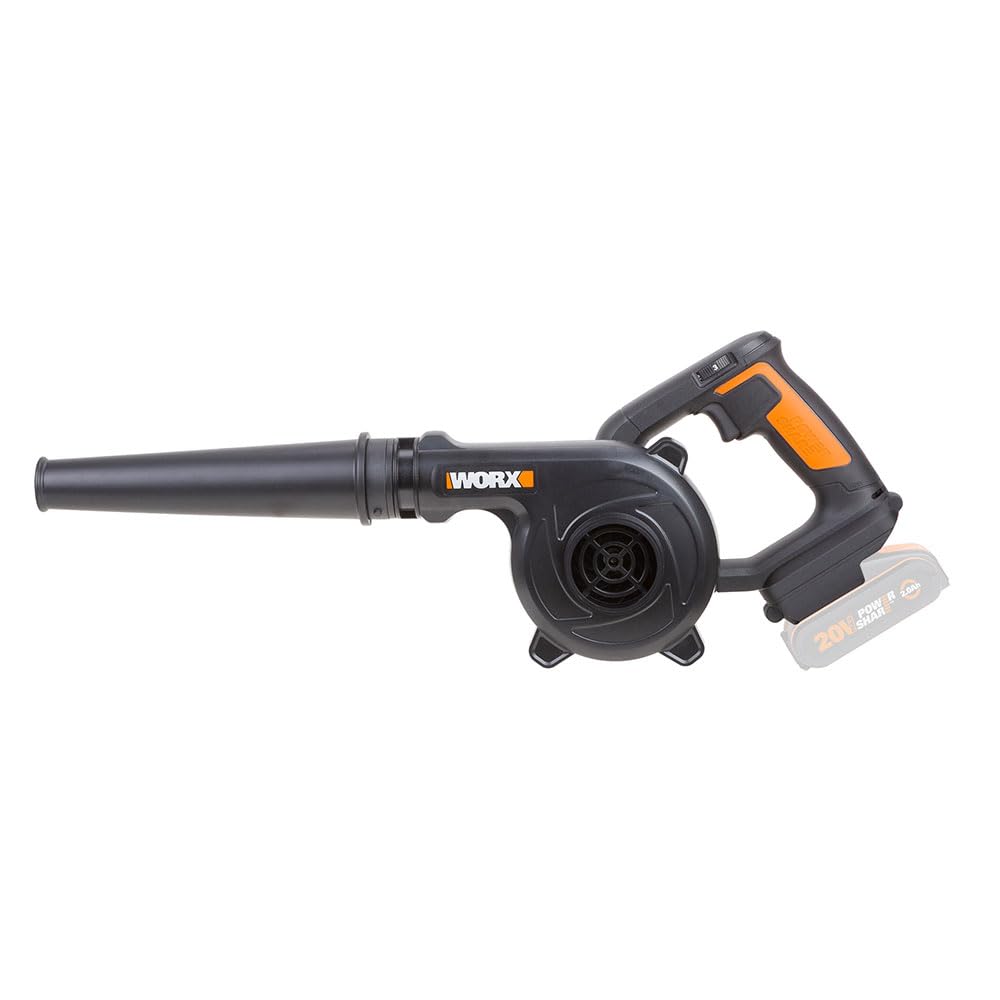
Figure 1: WORX WX094.9 20V Max Lightweight Blower with a compatible 20V PowerShare battery installed. This image shows the overall design of the blower, including the handle, motor housing, and blower tube.
ഘടകങ്ങൾ:
- Blower Unit (Motor Housing and Handle)
- ബ്ലോവർ ട്യൂബ്
- വേരിയബിൾ സ്പീഡ് സ്വിച്ച്
- Battery Release Button (Battery not included)
- Battery Port (Battery not included)
സജ്ജമാക്കുക
1. Attaching the Blower Tube
- Align the blower tube with the outlet on the main blower unit.
- Push the tube firmly onto the outlet until it clicks into place, ensuring it is securely fastened.
2. Installing the Battery Pack (Battery and Charger Not Included)
This blower is part of the WORX PowerShare platform and requires a compatible 20V Max WORX PowerShare battery and charger, which are sold separately.
- ഉപയോഗിക്കുന്നതിന് മുമ്പ് ബാറ്ററി പാക്ക് പൂർണ്ണമായി ചാർജ്ജ് ചെയ്തിട്ടുണ്ടെന്ന് ഉറപ്പാക്കുക.
- Slide the charged battery pack into the battery port on the blower until it locks securely into place. You should hear a click.
- ബാറ്ററി നീക്കം ചെയ്യാൻ, ബാറ്ററി റിലീസ് ബട്ടൺ അമർത്തി ബാറ്ററി പായ്ക്ക് പുറത്തേക്ക് സ്ലൈഡ് ചെയ്യുക.
പ്രവർത്തന നിർദ്ദേശങ്ങൾ
1. ബ്ലോവർ ആരംഭിക്കുകയും നിർത്തുകയും ചെയ്യുക
- To start the blower, slide the variable speed switch to the desired speed setting (1, 2, or 3).
- To stop the blower, slide the variable speed switch to the "0" (off) position.
2. വേരിയബിൾ സ്പീഡ് കൺട്രോൾ
The blower features a 3-speed system to match the power output to the task:
- വേഗത 1: Low power, ideal for delicate tasks or extending battery life.
- വേഗത 2: Medium power, suitable for general cleaning.
- വേഗത 3: High power (up to 260 km/h), for stubborn debris or larger areas.

Figure 2: The WORX WX094.9 blower in action, effectively clearing sawdust and debris from a workbench surface. This demonstrates its utility for workshop cleanups.
3. Recommended Applications
- Clearing sawdust and debris from workshops and workbenches.
- Blowing leaves and light debris from patios, porches, and driveways.
- Cleaning grass clippings from lawnmowers and other garden tools.
- Drying surfaces or blowing water from vehicles (use caution).

Figure 3: A user demonstrating the WORX WX094.9 blower's ability to clear grass clippings from a lawnmower, highlighting its versatility for garden tool maintenance.
മെയിൻ്റനൻസ്
പതിവ് അറ്റകുറ്റപ്പണികൾ മികച്ച പ്രകടനം ഉറപ്പാക്കുകയും നിങ്ങളുടെ ബ്ലോവറിന്റെ ആയുസ്സ് വർദ്ധിപ്പിക്കുകയും ചെയ്യുന്നു.
1. Cleaning the Blower
- വൃത്തിയാക്കുന്നതിന് മുമ്പ് എപ്പോഴും ബാറ്ററി പാക്ക് നീക്കം ചെയ്യുക.
- പരസ്യം ഉപയോഗിച്ച് ബ്ലോവറിൻ്റെ പുറംഭാഗം തുടയ്ക്കുകamp തുണി. ശക്തമായ ഡിറ്റർജൻ്റുകളും ലായകങ്ങളും ഉപയോഗിക്കരുത്.
- Clear any debris from the air intake vents and the blower tube.
- Do not immerse the blower in water.
2. Battery Care (for compatible PowerShare batteries)
- നേരിട്ടുള്ള സൂര്യപ്രകാശത്തിൽ നിന്നും ഉയർന്ന താപനിലയിൽ നിന്നും അകലെ തണുത്തതും വരണ്ടതുമായ സ്ഥലത്ത് ബാറ്ററികൾ സൂക്ഷിക്കുക.
- ബാറ്ററികൾ ഡിസ്ചാർജ് ചെയ്ത അവസ്ഥയിൽ കൂടുതൽ നേരം സൂക്ഷിക്കരുത്.
- Refer to your WORX PowerShare battery and charger manual for specific care instructions.
3. സംഭരണം
- Remove the battery pack before storing the blower.
- Store the blower in a dry, well-ventilated area, protected from moisture and dust.
- കുട്ടികൾക്കും അനധികൃത വ്യക്തികൾക്കും എത്താൻ പറ്റാത്ത വിധത്തിൽ സൂക്ഷിക്കുക.
ട്രബിൾഷൂട്ടിംഗ്
| പ്രശ്നം | സാധ്യമായ കാരണം | പരിഹാരം |
|---|---|---|
| ബ്ലോവർ സ്റ്റാർട്ടാകുന്നില്ല. | Battery not installed correctly. Battery discharged. Faulty battery. | Ensure battery is fully inserted and locked. Charge battery. Try a different charged battery. |
| കുറഞ്ഞ എയർ ഔട്ട്പുട്ട്. | Air intake or blower tube obstructed. Battery low. | Clear any obstructions from intake vents and tube. Charge battery. |
| പ്രവർത്തന സമയത്ത് ബ്ലോവർ നിർത്തുന്നു. | ബാറ്ററി അമിതമായി ചൂടായി അല്ലെങ്കിൽ ഡിസ്ചാർജ് ചെയ്തു. ഓവർലോഡ് സംരക്ഷണം സജീവമാക്കി. | ബാറ്ററി തണുക്കാൻ അനുവദിക്കുക, വീണ്ടും ചാർജ് ചെയ്യുക. ബ്ലോവറിലെ ലോഡ് കുറയ്ക്കുക. |
If you encounter issues not listed here or if solutions do not resolve the problem, contact WORX customer support.
സ്പെസിഫിക്കേഷനുകൾ
| മോഡൽ നമ്പർ | WX094.9 |
| ബ്രാൻഡ് | WORX |
| പവർ ഉറവിടം | Battery Powered (20V Max PowerShare) |
| വാല്യംtage | 20 വോൾട്ട് |
| എയർ സ്പീഡ് | മണിക്കൂറിൽ 260 കി.മീ |
| എയർ വോളിയം | 1.6 / 2.2 / 2.8 m³/min (variable) |
| ഇനത്തിൻ്റെ ഭാരം | 1.5 കി.ഗ്രാം (3.3 പൗണ്ട്) |
| ഉൽപ്പന്ന അളവുകൾ (L x W x H) | 5.91" x 3.15" x 8.27" |
| ഉൾപ്പെടുത്തിയ ഘടകങ്ങൾ | (1) ബ്ലോവർ ട്യൂബ് |
വാറൻ്റി വിവരങ്ങൾ
WORX products are manufactured to high-quality standards and are guaranteed against manufacturing defects. For specific warranty terms and conditions, please refer to the warranty card included with your product or visit the official WORX webവാറന്റി ക്ലെയിമുകൾക്കുള്ള വാങ്ങലിന്റെ തെളിവായി നിങ്ങളുടെ വാങ്ങൽ രസീത് സൂക്ഷിക്കുക.
ഉപഭോക്തൃ പിന്തുണ
For technical assistance, spare parts, or warranty inquiries, please contact WORX customer support:
- Webസൈറ്റ്: www.worx.com
- Refer to the product packaging or the WORX website for regional contact information (phone numbers, email).
When contacting support, please have your model number (WX094.9) and purchase date available.