ആമുഖം
This manual provides comprehensive instructions for the SENGBIRCH Bluetooth Keyboard Case, designed for the iPad Air 4 (2020) and iPad Pro 11 (1st & 2nd Generation). It covers essential information regarding product setup, operation, maintenance, and troubleshooting to ensure optimal use of your device.
പാക്കേജ് ഉള്ളടക്കം
താഴെ ലിസ്റ്റ് ചെയ്തിരിക്കുന്ന എല്ലാ ഇനങ്ങളും നിങ്ങളുടെ പാക്കേജിൽ ഉൾപ്പെടുത്തിയിട്ടുണ്ടെന്ന് ദയവായി പരിശോധിക്കുക:
- 1 x SENGBIRCH iPad Air 4 / iPad Pro 11 Protective Case
- 1 x Backlit Bluetooth Keyboard (QWERTZ Layout)
- 1 x USB ചാർജിംഗ് കേബിൾ
- 1 x ഉപയോക്തൃ മാനുവൽ
അനുയോജ്യത
ഈ കീബോർഡ് കേസ് താഴെ പറയുന്ന ഐപാഡ് മോഡലുകൾക്ക് അനുയോജ്യമാണ്:
- iPad Air 4 2020: Models A2316, A2324, A2325, A2072
- iPad Pro 11 1st Generation: Models A1980, A1934, A2013, A1979
- iPad Pro 11 2nd Generation: Models A2228, A2068, A2230, A2231
The Bluetooth keyboard also supports various operating systems including iOS, Windows, and Android, allowing for versatile use with other devices.
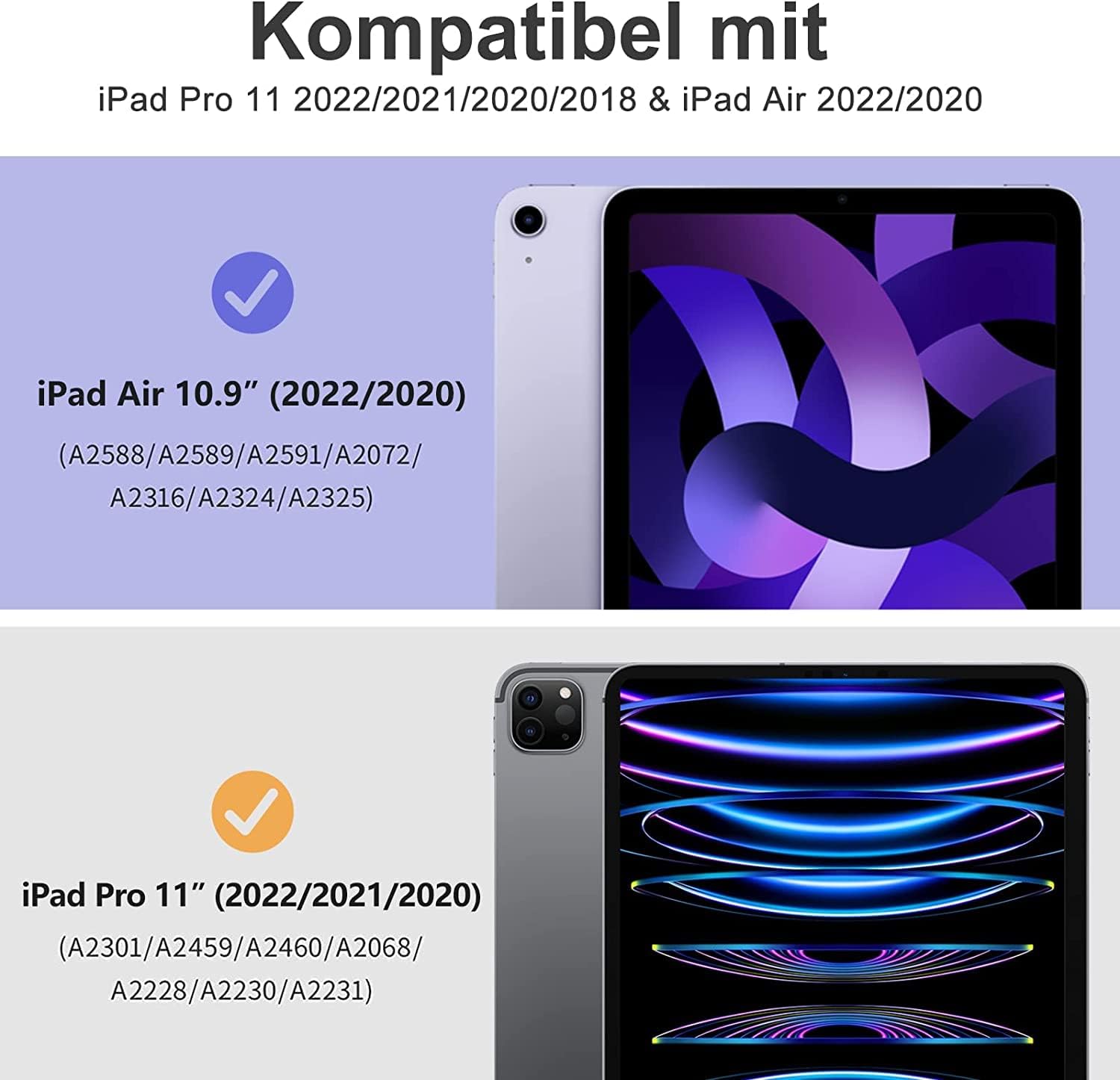
Image: Compatibility chart showing supported iPad Air 10.9 (2022/2020) and iPad Pro 11 (2022/2021/2020) models with their respective model numbers.
സജ്ജീകരണ നിർദ്ദേശങ്ങൾ
1. കീബോർഡ് ചാർജ് ചെയ്യുന്നു
Before initial use, fully charge the Bluetooth keyboard using the provided USB charging cable. Connect the cable to the keyboard's charging port and a suitable USB power source. The charging indicator light will illuminate during charging and turn off when fully charged.
2. Pairing the Bluetooth Keyboard
- Ensure the keyboard is fully charged and powered on. The Bluetooth indicator light will briefly flash.
- " അമർത്തിപ്പിടിക്കുകബന്ധിപ്പിക്കുക" button on the keyboard to activate Bluetooth pairing mode. The Bluetooth indicator light will start flashing, indicating it is discoverable.
- നിങ്ങളുടെ iPad-ൽ, പോകുക ക്രമീകരണങ്ങൾ > ബ്ലൂടൂത്ത്. Turn on Bluetooth.
- Your iPad will search for available devices. Select "ബ്ലൂടൂത്ത് 3.0 കീബോർഡ്" from the list of devices to complete the pairing process.
- Once paired, the Bluetooth indicator light on the keyboard will turn off.

Image: Illustration of the magnetic detachable Bluetooth keyboard, showing its compatibility with various devices (tablet, laptop, iPad, phone, PC) and the location of the 'Connect' button for pairing.
3. Setting Keyboard Language (German QWERTZ)
To ensure correct key input for the German QWERTZ layout, perform the following step after successful Bluetooth pairing:
- On the keyboard, simultaneously press and hold the "Ctrl" key and the "സ്ഥലം" key. This action switches the keyboard to the German layout, allowing special characters like Ä, Ö, Ü, and correct Y/Z mapping.
പ്രവർത്തന നിർദ്ദേശങ്ങൾ
1. ക്രമീകരിക്കൽ Viewing കോണുകൾ
The protective case features multiple internal grooves that allow you to adjust your iPad to various viewing angles. Simply position your iPad into the desired groove for comfortable typing, viewing, അല്ലെങ്കിൽ ഡ്രോയിംഗ്.

Image: A group of people collaborating, with one person using an iPad in the SENGBIRCH keyboard case, demonstrating an adjustable viewing angle for productivity.
2. ബാക്ക്ലൈറ്റ് നിയന്ത്രണം
The keyboard features a backlit design with multiple colors and brightness levels. Use the dedicated backlight key (often depicted as a light bulb icon) to cycle through different colors and adjust brightness. Refer to the keyboard layout image for the exact key location.
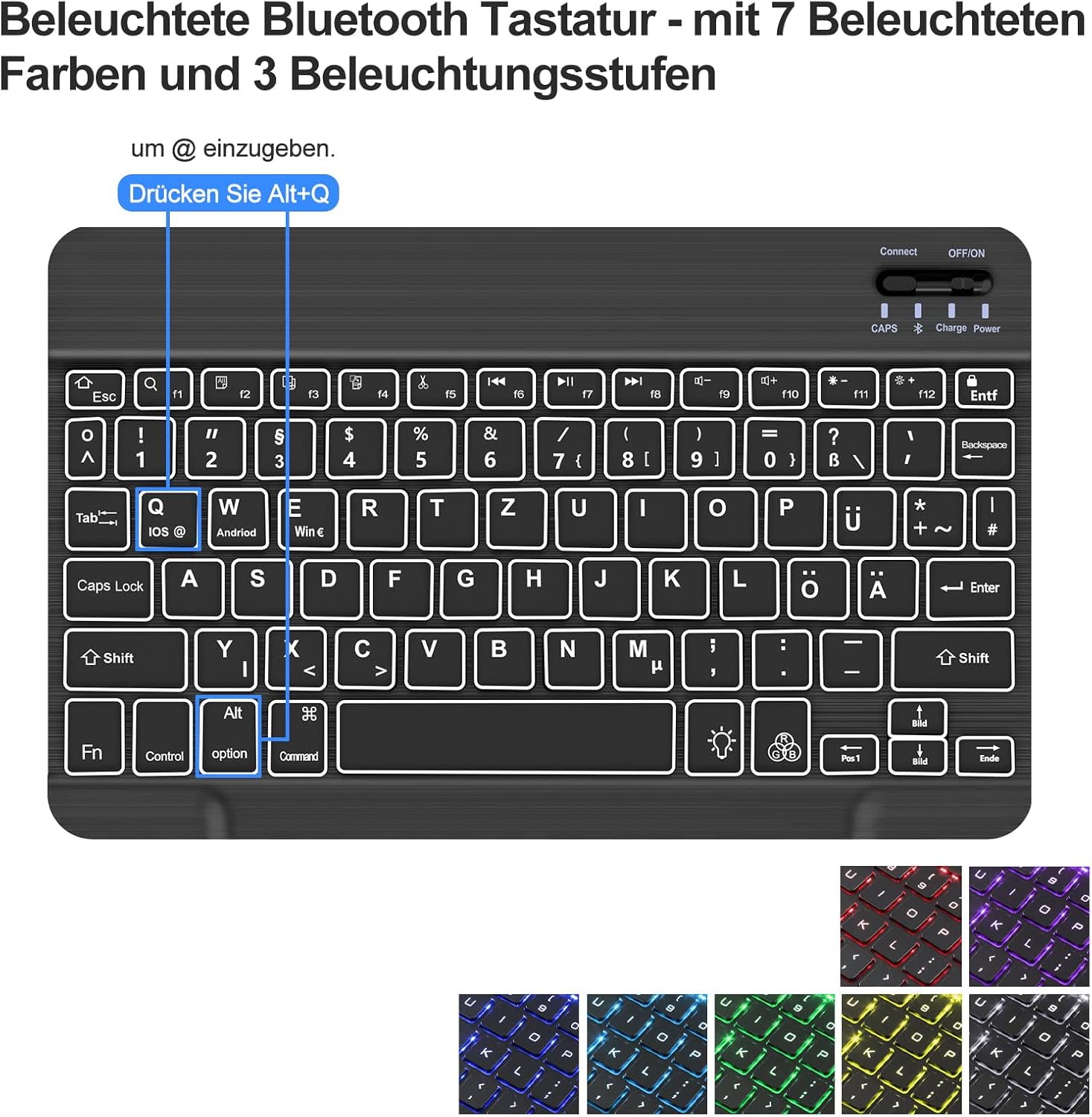
ചിത്രം: വിശദമായത് view of the backlit Bluetooth keyboard, highlighting the keys for backlight control and showing examples of 7 different backlight colors and 3 brightness levels.
3. Keyboard Layout and Special Keys
The keyboard features a QWERTZ layout. Familiarize yourself with the function keys and special character combinations. For example, to type the "@" symbol, press Alt + Q.

ചിത്രം: ഓവർഹെഡ് view of the SENGBIRCH keyboard case with an iPad inserted, showing the full QWERTZ keyboard layout and its backlit keys.
മെയിൻ്റനൻസ്
To ensure the longevity and performance of your SENGBIRCH Keyboard Case, follow these maintenance guidelines:
- വൃത്തിയാക്കൽ: ഒരു സോഫ്റ്റ് ഉപയോഗിക്കുക, ഡിamp കേസിന്റെയും കീബോർഡിന്റെയും പുറംഭാഗം തുടയ്ക്കാൻ തുണി ഉപയോഗിക്കുക. കഠിനമായ രാസവസ്തുക്കളോ ഉരച്ചിലുകളോ ഉള്ള വസ്തുക്കൾ ഒഴിവാക്കുക.
- സംഭരണം: When not in use, store the keyboard case in a cool, dry place away from direct sunlight and extreme temperatures.
- സംരക്ഷണം: The case is designed to protect your iPad from bumps, scratches, and minor spills. However, avoid dropping the device from significant heights or exposing it to excessive moisture.
- Keyboard Care: Do not force keys or attempt to remove them. Keep the keyboard free from dust and debris.
ട്രബിൾഷൂട്ടിംഗ്
കീബോർഡ് ബ്ലൂടൂത്ത് വഴി കണക്റ്റുചെയ്യുന്നില്ല
- ബാറ്ററി പരിശോധിക്കുക: Ensure the keyboard is fully charged. Low battery can prevent successful pairing.
- Re-enable Bluetooth: Turn off and then turn on Bluetooth on your iPad and the keyboard.
- ഉപകരണം മറക്കുക: If previously paired, go to your iPad's Bluetooth settings, select "Bluetooth 3.0 Keyboard", and choose "Forget This Device". Then, repeat the pairing steps.
- ഉപകരണങ്ങൾ പുനരാരംഭിക്കുക: Restart both your iPad and the keyboard, then attempt pairing again.
Incorrect Key Output (e.g., Y/Z swapped, missing Ä, Ö, Ü)
- This typically indicates an incorrect keyboard language setting. After pairing, press and hold "Ctrl + സ്പേസ്" on the keyboard to switch to the German QWERTZ layout.
- Also, ensure your iPad's software keyboard settings are configured for German if you frequently switch between physical and on-screen keyboards.
Keyboard Backlight Not Working
- ബാറ്ററി പരിശോധിക്കുക: Ensure the keyboard has sufficient charge. Backlight functionality may be limited or disabled on low battery.
- Backlight Key: Press the backlight key (light bulb icon) to cycle through colors and brightness levels. Ensure it's not set to off.
സ്പെസിഫിക്കേഷനുകൾ
| ഫീച്ചർ | വിശദാംശങ്ങൾ |
|---|---|
| ബ്രാൻഡ് | സെൻജിർച്ച് |
| മോഡൽ നമ്പർ | SE-032 |
| അനുയോജ്യമായ ഉപകരണങ്ങൾ | iPad Air 4, iPad Pro 11 (1st & 2nd Gen) |
| കണക്റ്റിവിറ്റി തരം | ബ്ലൂടൂത്ത് |
| Keyboard Language & Layout | German (QWERTZ) |
| ബാക്ക്ലൈറ്റ് | Yes (7 colors, 3 brightness levels) |
| റീചാർജ് ചെയ്യാവുന്ന ബാറ്ററി | Yes (Lithium-ion) |
| ഉൽപ്പന്ന അളവുകൾ (LxWxH) | 27.9 x 20.9 x 3 സെ.മീ |
| ഇനത്തിൻ്റെ ഭാരം | 660 ഗ്രാം |
വാറൻ്റിയും പിന്തുണയും
SENGBIRCH provides online customer service for product inquiries and support. If you encounter any issues or have questions regarding your keyboard case, please contact us via email. Refer to your purchase documentation for specific warranty details and contact information.
For assistance, please reach out to our customer support team. We are committed to providing timely and helpful solutions.


