ആമുഖം
Thank you for choosing the Kingslim D1 Pro 2K Dash Cam. This device is designed to provide comprehensive recording of your driving environment, both front and inside the cabin, ensuring enhanced safety and evidence collection. Featuring dual Sony sensors for clear night vision, it is an ideal solution for various users, including professional drivers and families.

Figure 1: Kingslim D1 Pro Dash Cam with its mobile application interface and GPS tracking capabilities.
ഉൾപ്പെടുത്തിയ ഘടകങ്ങൾ
പാക്കേജിൽ എല്ലാ ഘടകങ്ങളും ഉണ്ടെന്ന് ദയവായി പരിശോധിക്കുക:
- ബ്രാക്കറ്റ്
- Camera Body (Kingslim D1 Pro Dash Cam)
- ഇൻസ്റ്റലേഷൻ ടൂൾ
- Internal Battery (pre-installed)
- ദ്രുത ഗൈഡ്

Figure 2: Detailed diagram of the Kingslim D1 Pro Dash Cam highlighting its key components and features.
സജ്ജീകരണ ഗൈഡ്
1. ഡാഷ് കാം മൌണ്ട് ചെയ്യുന്നു
- ഡാഷ് ക്യാം സ്ഥാപിക്കാൻ ഉദ്ദേശിക്കുന്ന വിൻഡ്ഷീൽഡ് ഭാഗം വൃത്തിയാക്കുക.
- സക്ഷൻ മൗണ്ട് ഡാഷ് കാമിൽ ഘടിപ്പിക്കുക.
- സക്ഷൻ കപ്പ് വിൻഡ്ഷീൽഡിനെതിരെ ശക്തമായി അമർത്തി ലിവർ ഫ്ലിപ്പുചെയ്ത് സുരക്ഷിതമാക്കുക. ക്യാമറയ്ക്ക് ക്ലിയർ ലൈൻ ഉണ്ടെന്ന് ഉറപ്പാക്കുക. view of the road and the cabin.
2. എസ്ഡി കാർഡ് ഇൻസ്റ്റാളേഷൻ
- The Kingslim D1 Pro supports up to 128GB SD cards. A Class 10 or higher speed rating is recommended.
- Insert the SD card into the designated slot on the dash cam until it clicks into place.
- Format the SD card via the dash cam's settings menu before first use to ensure optimal performance.

Figure 3: Illustration of SD card insertion into the Kingslim D1 Pro Dash Cam, highlighting its storage capacity.
3. പവർ കണക്ഷൻ
- Connect the provided car charger to the dash cam's mini-USB power port.
- കാർ ചാർജറിന്റെ മറ്റേ അറ്റം നിങ്ങളുടെ വാഹനത്തിന്റെ സിഗരറ്റ് ലൈറ്റർ സോക്കറ്റിൽ പ്ലഗ് ചെയ്യുക.
- വാഹനത്തിന്റെ ഇഗ്നിഷൻ ഓണാക്കുമ്പോൾ ഡാഷ്ക്യാം യാന്ത്രികമായി ഓണാകുകയും റെക്കോർഡിംഗ് ആരംഭിക്കുകയും ചെയ്യും.
4. Wi-Fi & App Control Setup
- Download the free Kingslim app from the App Store (iOS) or Google Play Store (Android).
- On the dash cam, enable Wi-Fi from the settings menu.
- On your smartphone, connect to the dash cam's Wi-Fi network (SSID and password will be displayed on the dash cam screen).
- Open the Kingslim app to view തത്സമയംtage, പ്ലേബാക്ക് റെക്കോർഡിംഗുകൾ, ഡൗൺലോഡ് files, കൂടാതെ ക്രമീകരണങ്ങൾ ക്രമീകരിക്കുക.

Figure 4: The Kingslim D1 Pro's built-in Wi-Fi and GPS features, enabling app control and easy sharing of recordings.
ഡാഷ് ക്യാം പ്രവർത്തിപ്പിക്കുന്നു
1. Dual Recording Capabilities
- The D1 Pro captures crystal-clear footage with a 4K front-facing camera and a 1080p cabin-facing camera.
- Both cameras feature a 170-degree wide angle, ensuring comprehensive coverage.
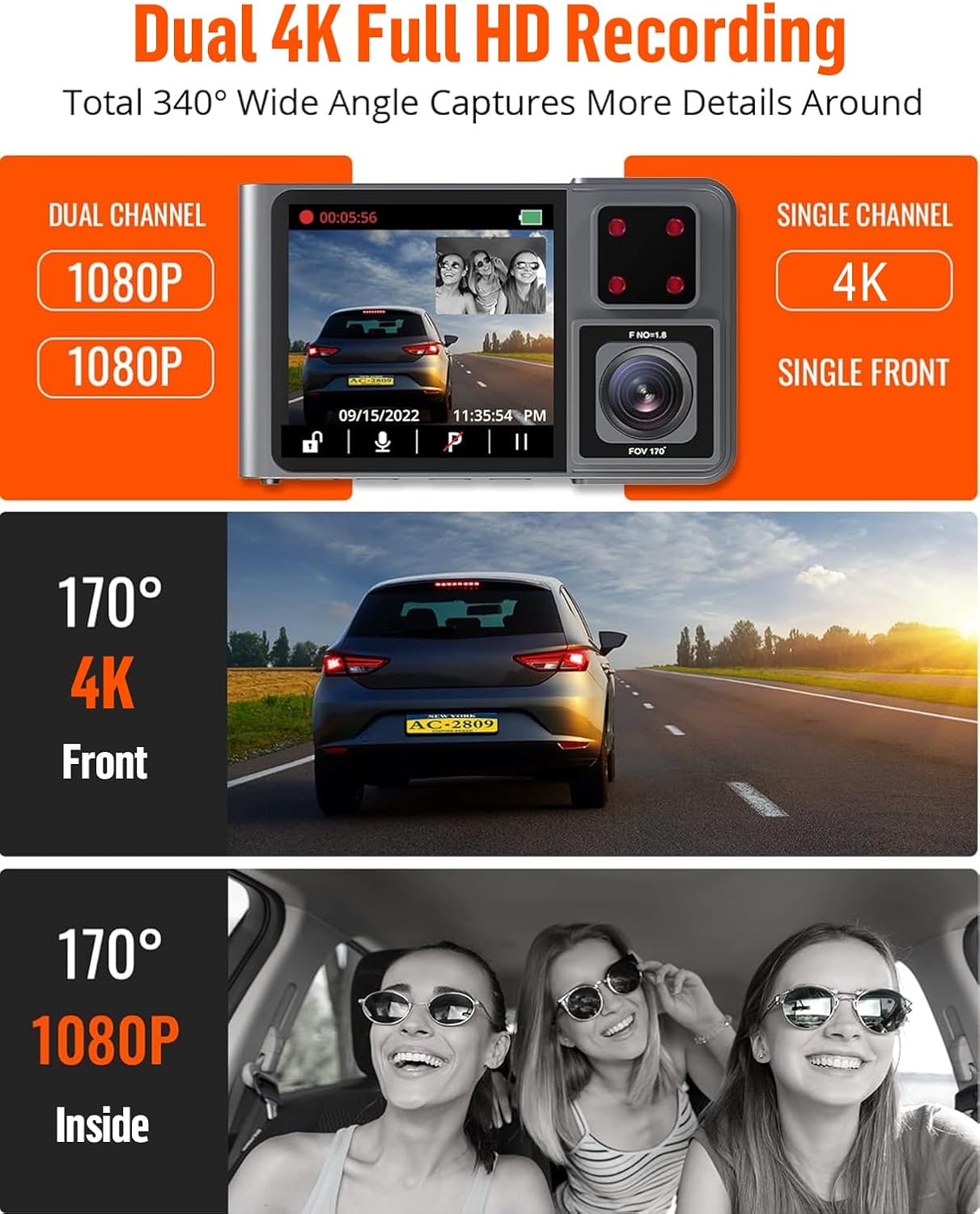
Figure 5: The Kingslim D1 Pro offers dual 1080p recording for front and interior, or single 4K recording for the front, with wide-angle views.
2. ലൂപ്പ് റെക്കോർഡിംഗ്
- The dash cam records video in continuous loops. When the SD card is full, the oldest unlocked files will be automatically overwritten.
- This ensures continuous recording without manual intervention.
3. G-Sensor (Emergency Video Lock)
- The built-in G-sensor automatically detects sudden shakes or collisions.
- Upon detection, the current video footage is automatically locked and saved to prevent it from being overwritten by loop recording. This preserves crucial evidence.

Figure 6: The Kingslim D1 Pro's G-sensor automatically locks emergency video footage, and its 24-hour parking monitor provides continuous security.
4. 24-മണിക്കൂർ പാർക്കിംഗ് മോണിറ്റർ
- With the parking monitor feature enabled, the dash cam will automatically record a 20-second video if any collision or impact is detected while the vehicle is parked.
- This feature requires a continuous power supply or the dash cam's internal battery.

Figure 7: The 24-hour parking monitor provides continuous surveillance, recording incidents like impacts or theft attempts while parked.
5. Super Night Vision
- Equipped with advanced firmware and dual Sony sensors, the D1 Pro captures detailed footage കുറഞ്ഞ വെളിച്ചത്തിൽ പോലും.
- This ensures reliable evidence during nighttime drives.

Figure 8: The Kingslim D1 Pro's Super Night Vision, powered by dual Sony sensors, ensures clear recordings in low-light and backlit environments.
6 ജിപിഎസ് ട്രാക്കിംഗ്
- The included GPS module records accurate driving location, speed, and route.
- ഈ ഡാറ്റ ആകാം viewed directly on Google Maps via the Kingslim app or dedicated PC player, aiding in journey analysis.
മെയിൻ്റനൻസ്
- വൃത്തിയാക്കൽ: Use a soft, dry cloth to clean the dash cam lens and body. Avoid using abrasive cleaners or solvents.
- SD കാർഡ് കെയർ: Regularly format the SD card (once a month is recommended) to maintain optimal performance and prevent data corruption. Back up any important videos before formatting.
- താപനില: Avoid exposing the dash cam to extreme temperatures for prolonged periods, as this can affect battery life and component integrity.
ട്രബിൾഷൂട്ടിംഗ്
| പ്രശ്നം | സാധ്യമായ പരിഹാരം |
|---|---|
| ഡാഷ് ക്യാം പവർ ഓൺ ചെയ്യുന്നില്ല. |
|
| റെക്കോർഡിംഗ് അപ്രതീക്ഷിതമായി നിലയ്ക്കുന്നു. |
|
| വൈഫൈ കണക്ഷൻ പ്രശ്നങ്ങൾ. |
|
| രാത്രിയിൽ വീഡിയോ നിലവാരം മോശമാണ്. |
|
സ്പെസിഫിക്കേഷനുകൾ
| ഫീച്ചർ | വിശദാംശങ്ങൾ |
|---|---|
| ഉൽപ്പന്ന അളവുകൾ | 6.85 x 5.16 x 2.6 ഇഞ്ച് |
| ഇനത്തിൻ്റെ ഭാരം | 14 ഔൺസ് |
| മോഡലിൻ്റെ പേര് | ഡി 1 പ്രോ |
| ബാറ്ററികൾ | 1 ലിഥിയം അയോൺ ബാറ്ററികൾ ആവശ്യമാണ് (ഉൾപ്പെടുത്തിയിരിക്കുന്നു) |
| കണക്റ്റിവിറ്റി ടെക്നോളജി | വൈഫൈ |
| പ്രത്യേക സവിശേഷതകൾ | 2K dash cam front and inside, Built-In GPS, Loop Recording, Parking Monitor, Wi-Fi APP Control |
| വീഡിയോ ക്യാപ്ചർ റെസല്യൂഷൻ | 2K (Front), 1080P (Inside) |
| മൗണ്ടിംഗ് തരം | സക്ഷൻ മൗണ്ട് |
| നിറം | ചാരനിറം |
| പരമാവധി SD കാർഡ് ശേഷി | 128 ജിബി |
വാറൻ്റി വിവരങ്ങൾ
The Kingslim D1 Pro Dash Cam comes with a 2 വർഷത്തെ വാറൻ്റി from the date of purchase. This warranty covers manufacturing defects and malfunctions under normal use. Please retain your proof of purchase for warranty claims. For detailed terms and conditions, refer to the official Kingslim webസൈറ്റ് അല്ലെങ്കിൽ ഉപഭോക്തൃ പിന്തുണയുമായി ബന്ധപ്പെടുക.
ഉപഭോക്തൃ പിന്തുണ
For any questions, technical assistance, or warranty claims, please contact Kingslim customer support through the following channels:
- ഉദ്യോഗസ്ഥൻ Webസൈറ്റ്: Visit the Kingslim official website for FAQs, software updates, and contact forms.
- ഇമെയിൽ പിന്തുണ: Refer to your Quick Guide or the Kingslim webസമർപ്പിത പിന്തുണ ഇമെയിൽ വിലാസത്തിനായുള്ള സൈറ്റ്.
We are committed to providing excellent service and support for your Kingslim product.


