ആമുഖം
This user manual provides detailed instructions for the installation, operation, and maintenance of your Maxto M3 Bluetooth Motorcycle Helmet Intercom. Please read this manual thoroughly before using the device to ensure proper functionality and safety. The Maxto M3 is designed to provide seamless communication and entertainment while riding, suitable for various helmet types.
ഉൽപ്പന്നം കഴിഞ്ഞുview
The Maxto M3 is a dedicated Bluetooth intercom system for motorcycle helmets, offering enhanced communication and multimedia features. Key features include:
- Dedicated Bluetooth intercom for motorcycle helmets.
- 2-in-1 microphone suitable for various helmet types (full-face, open-face, half-face, flip-up, 3/4 helmets).
- Designed for quick installation and transfer between multiple helmets.

ചിത്രം: മുൻഭാഗം view of the Maxto M3 Bluetooth intercom unit, showcasing its sleek black design with a blue illuminated ring on the right side and a camera lens on the left.
പാക്കേജ് ഉള്ളടക്കം
അൺബോക്സിംഗ് ചെയ്യുമ്പോൾ എല്ലാ ഘടകങ്ങളും ഉണ്ടെന്ന് ഉറപ്പാക്കാൻ പാക്കേജ് ഉള്ളടക്കങ്ങൾ പരിശോധിക്കുക:
- Maxto M3 Bluetooth Intercom Unit
- 2-in-1 Microphone (boom mic and soft wire mic)
- Helmet Speakers (pair)
- യുഎസ്ബി ചാർജിംഗ് കേബിൾ
- Mounting Clip (for helmet edge)
- Adhesive Mount (for flat helmet surfaces)
- Velcro Pads for Speakers and Microphone
- Hex Key (for clip installation)
- ഉപയോക്തൃ മാനുവൽ

Image: All components included in the Maxto M3 package, laid out on a white surface. This includes the main unit, speakers, microphones, various mounting options, and cables.
ഘടകം തിരിച്ചറിയൽ
Familiarize yourself with the various parts of the Maxto M3 unit and its accessories:

Image: A detailed diagram of the Maxto M3 unit with labels pointing to its various buttons, ports, and features. Key components include the lens, switch (drive recorder), WiFi button, indicator, switch button, multi-function button, knob, USB charging port, earphone jack, card slot, and clip.
- ലെൻസ്: വീഡിയോ റെക്കോർഡിംഗിനായി.
- Switch (Drive Recorder): Power on/off and control recording functions.
- വൈഫൈ ബട്ടൺ: Activates Wi-Fi for app connectivity.
- സൂചകം: LED light showing device status (power, pairing, charging).
- സ്വിച്ച് ബട്ടൺ: Controls various functions depending on context.
- മൾട്ടി-ഫംഗ്ഷൻ ബട്ടൺ: Primary control for calls, music, and intercom.
- നോബ്: Rotary control for volume adjustment and menu navigation.
- യുഎസ്ബി ചാർജിംഗ് പോർട്ട്: ഉപകരണം ചാർജ് ചെയ്യുന്നതിനായി.
- ഇയർഫോൺ ജാക്ക്: Connects to helmet speakers and microphone.
- കാർഡ് സ്ലോട്ട്: For inserting a microSD card for video storage.
- ക്ലിപ്പ്: Attachment point for helmet mounting.
സജ്ജീകരണവും ഇൻസ്റ്റാളേഷനും
Proper installation ensures optimal performance and comfort. The Maxto M3 offers two main mounting options:
1. Helmet Edge Clip Installation
- Loosen the screws on the helmet clip using the provided hex key.
- Slide the clip between the outer shell and the inner padding of your helmet, ensuring it is securely positioned.
- Tighten the screws to firmly secure the clip.
- Slide the Maxto M3 unit onto the clip until it clicks into place.
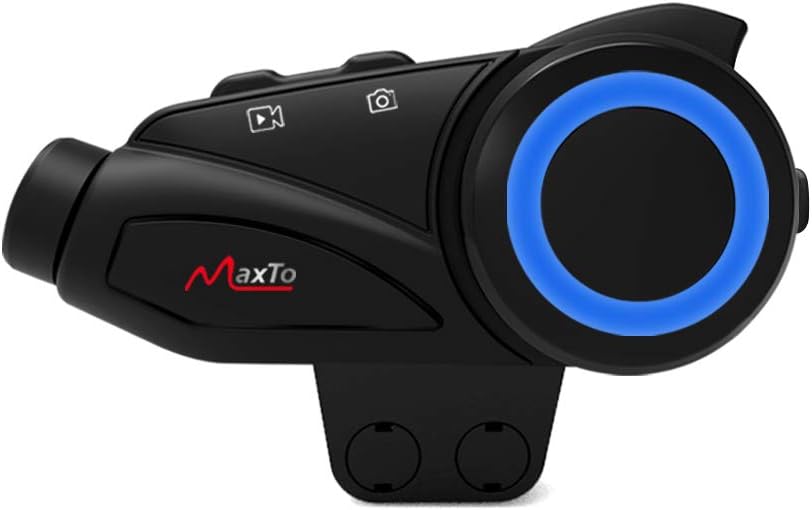
Image: The Maxto M3 unit attached to its helmet clip, demonstrating how it would sit on the side of a helmet.

Image: Two types of mounting clips for the Maxto M3: a screw-on clamp clip and an adhesive base with 3M VHB tape, providing flexible installation options.
2. Adhesive Mount Installation
- Clean the desired flat surface on your helmet where the unit will be mounted. Ensure it is dry and free of dust.
- Peel off the protective film from the 3M VHB adhesive on the mount.
- Firmly press the adhesive mount onto the helmet surface for at least 30 seconds. Allow 24 hours for the adhesive to fully cure before attaching the unit.
- Slide the Maxto M3 unit onto the adhesive mount until it clicks into place.
3. സ്പീക്കറും മൈക്രോഫോണും സ്ഥാപിക്കൽ
- Attach the Velcro pads to the back of the speakers.
- Position the speakers inside the helmet's ear pockets, ensuring they are aligned with your ears for optimal sound.
- നിങ്ങളുടെ ഹെൽമെറ്റ് തരത്തിന് അനുയോജ്യമായ മൈക്രോഫോൺ തിരഞ്ഞെടുക്കുക:
- ബൂം മൈക്രോഫോൺ: Ideal for open-face or flip-up helmets. Attach the Velcro to the boom mic and position it near your mouth.
- Soft Wire Microphone: Suitable for full-face helmets. Attach the Velcro to the mic and place it inside the helmet near your mouth, often along the cheek pad.
- Route the speaker and microphone wires neatly under the helmet padding to the mounting location of the Maxto M3 unit.
- Plug the speaker/microphone cable into the earphone jack on the Maxto M3 unit.
പ്രവർത്തന നിർദ്ദേശങ്ങൾ
പവർ ഓൺ/ഓഫ്
- പവർ ഓൺ: Press and hold the Power/Drive Recorder Switch button for approximately 3 seconds until the indicator light turns on.
- പവർ ഓഫ്: Press and hold the Power/Drive Recorder Switch button for approximately 3 seconds until the indicator light turns off.
Bluetooth Pairing (Mobile Phone)
- With the Maxto M3 powered off, press and hold the Multi-function Button for approximately 5-7 seconds until the indicator light flashes red and blue alternately, indicating pairing mode.
- നിങ്ങളുടെ മൊബൈൽ ഫോണിൽ, ബ്ലൂടൂത്ത് പ്രവർത്തനക്ഷമമാക്കി പുതിയ ഉപകരണങ്ങൾക്കായി തിരയുക.
- Select "Maxto M3" from the list of available devices.
- Once paired, the indicator light will turn solid blue.
Intercom Pairing (Device to Device)
The Maxto M3 supports intercom communication with other Maxto M3 units and can also pair with other brands of Bluetooth intercoms.

Image: Diagram illustrating the Maxto M3's compatibility with various other Bluetooth intercom brands and helmet types, showing its versatility in group communication.
- Ensure both Maxto M3 units are powered on and not connected to any other devices.
- On both units, press and hold the Intercom Button (often integrated with the Multi-function Button or a dedicated button) for approximately 3-5 seconds until the indicator lights flash rapidly.
- One unit will automatically search for the other. Once connected, the indicator lights will change to a steady color (e.g., blue).
- To initiate intercom conversation, briefly press the Intercom Button on either unit.
സംഗീത പ്ലേബാക്ക്
- പ്ലേ/താൽക്കാലികമായി നിർത്തുക: Briefly press the Multi-function Button.
- അടുത്ത ട്രാക്ക്: Rotate the Knob clockwise.
- മുമ്പത്തെ ട്രാക്ക്: Rotate the Knob counter-clockwise.
- വോളിയം കൂട്ടുക: Briefly press the Volume Up button (if separate) or rotate the Knob clockwise and hold.
- വോളിയം താഴേക്ക്: Briefly press the Volume Down button (if separate) or rotate the Knob counter-clockwise and hold.
ഫോൺ കോളുകൾ
- മറുപടി കോൾ: Briefly press the Multi-function Button.
- കോൾ അവസാനിപ്പിക്കുക: Briefly press the Multi-function Button.
- കോൾ നിരസിക്കുക: മൾട്ടി-ഫംഗ്ഷൻ ബട്ടൺ 2 സെക്കൻഡ് അമർത്തിപ്പിടിക്കുക.
- അവസാന നമ്പർ വീണ്ടും ഡയൽ ചെയ്യുക: മൾട്ടി-ഫംഗ്ഷൻ ബട്ടൺ രണ്ടുതവണ അമർത്തുക.
Video Recording (Drive Recorder)
The Maxto M3 features an integrated drive recorder. Ensure a microSD card (not included) is inserted into the card slot before recording.
- റെക്കോർഡിംഗ് ആരംഭിക്കുക: Briefly press the Drive Recorder Switch button. The indicator light will change to indicate recording is active.
- റെക്കോർഡിംഗ് നിർത്തുക: Briefly press the Drive Recorder Switch button again.
- റെക്കോർഡിംഗുകൾ ആക്സസ് ചെയ്യുക: Connect the device to a computer via USB or remove the microSD card to view രേഖപ്പെടുത്തി files.
Wi-Fi കണക്റ്റിവിറ്റി
The Maxto M3 can connect to a smartphone app via Wi-Fi for live view, ക്രമീകരണ ക്രമീകരണം, കൂടാതെ file മാനേജ്മെൻ്റ്.
- Wi-Fi സജീവമാക്കുക: Press the Wi-Fi Button. The Wi-Fi indicator will light up.
- ആപ്പിലേക്ക് കണക്റ്റുചെയ്യുക: On your smartphone, connect to the Maxto M3's Wi-Fi network (SSID and password usually found in the quick start guide or on the device). Open the dedicated Maxto app to control and view ഉപകരണം.
മെയിൻ്റനൻസ്
- വൃത്തിയാക്കൽ: ഒരു സോഫ്റ്റ് ഉപയോഗിക്കുക, ഡിamp യൂണിറ്റിന്റെ പുറംഭാഗം വൃത്തിയാക്കാൻ തുണി ഉപയോഗിക്കുക. കഠിനമായ രാസവസ്തുക്കളോ ഉരച്ചിലുകളുള്ള ക്ലീനറുകളോ ഉപയോഗിക്കരുത്.
- സംഭരണം: ദീർഘനേരം ഉപയോഗത്തിലില്ലാത്തപ്പോൾ, ഉപകരണം തണുത്തതും വരണ്ടതുമായ സ്ഥലത്ത് സൂക്ഷിക്കുക.
- ബാറ്ററി കെയർ: To prolong battery life, charge the device fully before long-term storage and recharge it every few months.
- ജല പ്രതിരോധം: The Maxto M3 is designed to be weather-resistant, but avoid submerging it in water. Ensure the USB port cover is securely closed.
ട്രബിൾഷൂട്ടിംഗ്
| പ്രശ്നം | സാധ്യമായ കാരണം | പരിഹാരം |
|---|---|---|
| ഉപകരണം പവർ ഓണാക്കുന്നില്ല. | കുറഞ്ഞ ബാറ്ററി. | ഉപകരണം പൂർണ്ണമായും ചാർജ് ചെയ്യുക. |
| ഫോൺ/ഇന്റർകോമുമായി ജോടിയാക്കാൻ കഴിയില്ല. | Not in pairing mode; too far apart; interference. | Ensure device is in pairing mode (flashing red/blue). Move closer. Restart both devices. |
| സ്പീക്കറുകളിൽ നിന്ന് ശബ്ദമില്ല. | Speakers not connected; volume too low; faulty speakers. | Check speaker connection to the unit. Increase volume. Test with another audio source if possible. |
| Video recording not working. | No microSD card; card full; card error. | Insert a microSD card. Format the card. Use a compatible card (Class 10 or higher). |
| Poor intercom range/quality. | Obstructions; too far apart; interference. | Reduce distance between units. Avoid large obstructions. |
സ്പെസിഫിക്കേഷനുകൾ
| ഫീച്ചർ | വിശദാംശങ്ങൾ |
|---|---|
| ബ്രാൻഡ് | MAXTO |
| മോഡലിൻ്റെ പേര് | M3 |
| നിർമ്മാതാവിൻ്റെ റഫറൻസ് | M3 ഹെഡ്സെറ്റ് |
| കണക്റ്റിവിറ്റി ടെക്നോളജി | വയർലെസ് |
| വയർലെസ് കമ്മ്യൂണിക്കേഷൻ ടെക്നോളജി | ബ്ലൂടൂത്ത് |
| മെറ്റീരിയൽ | പ്ലാസ്റ്റിക് |
| ശൈലി | Clip M3 |
| പ്രായപരിധി (വിവരണം) | മുതിർന്നവർ |
| ASIN | B08KCQCYSY |
വാറൻ്റിയും പിന്തുണയും
For warranty information and technical support, please refer to the official Maxto webനിങ്ങളുടെ സൈറ്റിൽ ബന്ധപ്പെടുക അല്ലെങ്കിൽ നിങ്ങളുടെ പ്രാദേശിക വിതരണക്കാരനെ ബന്ധപ്പെടുക. ഏതെങ്കിലും വാറന്റി ക്ലെയിമുകൾക്ക് വാങ്ങിയതിന്റെ തെളിവായി നിങ്ങളുടെ വാങ്ങൽ രസീത് സൂക്ഷിക്കുക.
For further assistance, you may also refer to the manufacturer's contact information provided with your product packaging.


