1. ആമുഖം
This manual provides essential instructions for the safe and efficient operation of your Energizer 150 Watts Power Inverter, Model EN150. This device converts 12V DC power from your vehicle's battery into 110V AC household power, and also provides USB charging ports. Please read this manual thoroughly before use and retain it for future reference.
2 സുരക്ഷാ വിവരങ്ങൾ
മുന്നറിയിപ്പ്: ഈ നിർദ്ദേശങ്ങൾ പാലിക്കുന്നതിൽ പരാജയപ്പെടുന്നത് ഗുരുതരമായ പരിക്കോ സ്വത്ത് നാശമോ ഉണ്ടാക്കിയേക്കാം.
Any operator or installer of this power inverter must read and follow all warnings, precautions, notes, and all installation and operation instructions detailed in this user manual.
- ഇൻവെർട്ടർ തുറക്കരുത് casing. ഉള്ളിൽ ഉപയോക്തൃ-സേവനയോഗ്യമായ ഭാഗങ്ങളൊന്നുമില്ല.
- Keep the inverter away from moisture, water, and flammable materials.
- അമിതമായി ചൂടാകുന്നത് തടയാൻ ഇൻവെർട്ടറിന് ചുറ്റും മതിയായ വായുസഞ്ചാരം ഉറപ്പാക്കുക.
- ഇൻവെർട്ടർ എസി ഡിസ്ട്രിബ്യൂഷൻ വയറിംഗുമായി ബന്ധിപ്പിക്കരുത്.
- ഇൻവെർട്ടർ എപ്പോഴും 12V DC പവർ സ്രോതസ്സിലേക്ക് മാത്രം ബന്ധിപ്പിക്കുക.
- Do not use the inverter with appliances that exceed its rated power output (150 Watts continuous).
- ഉപയോഗത്തിലില്ലാത്തപ്പോൾ പവർ സ്രോതസ്സിൽ നിന്ന് ഇൻവെർട്ടർ വിച്ഛേദിക്കുക.
3. ഉൽപ്പന്നം കഴിഞ്ഞുview
The Energizer EN150 Power Inverter is designed to provide convenient AC and USB power on the go. It features a compact design, allowing it to fit in most vehicle cup holders.
3.1 പ്രധാന സവിശേഷതകൾ
- 150 Watts continuous power, 300 Watts peak power.
- One 110V AC outlet (North American standard).
- Two USB Quick Charge 3.0 ports (30W total output).
- Direct cigarette lighter plug connection.
- Smart Chip Protection for safety.
- Ultra-silent thermal fan for efficient cooling.
- ETL Approved under UL Std 458.
3.2 പാക്കേജ് ഉള്ളടക്കം
- Energizer 150 Watts Power Inverter (Model EN150)
- Cigarette Lighter Power Cord (integrated)
- 1 Replacement Fuse
3.3 ഉൽപ്പന്ന ഡയഗ്രം

ചിത്രം 1: മുൻഭാഗം view of the Energizer 150 Watts Power Inverter, showing the AC outlet, two USB ports, and the integrated cigarette lighter plug with a spare fuse.

Figure 2: Detailed diagram highlighting the key features and components of the inverter, including power output, USB ports, AC outlet, and cooling fan.

Figure 3: Power distribution diagram, indicating the maximum wattage for USB and AC outputs. Users should ensure connected devices do not exceed 150 Watts for the AC outlet.
4. സജ്ജീകരണവും ഇൻസ്റ്റാളേഷനും
The Energizer EN150 Power Inverter is designed for easy setup in your vehicle.
- വാഹന അനുയോജ്യത: Ensure your vehicle has a 12V DC cigarette lighter socket.
- പ്ലേസ്മെൻ്റ്: The inverter is designed to fit securely in most vehicle cup holders or can be placed on any flat, stable surface. Ensure the inverter is placed in a location with good airflow to prevent overheating.
- കണക്ഷൻ: Insert the integrated cigarette lighter plug firmly into your vehicle's 12V accessory socket. The LED indicator on the inverter should illuminate, indicating it is receiving power.
- പവർ ചെയ്യുന്നത്: The inverter typically powers on automatically when connected. If there's a power switch, ensure it's in the "ON" position.
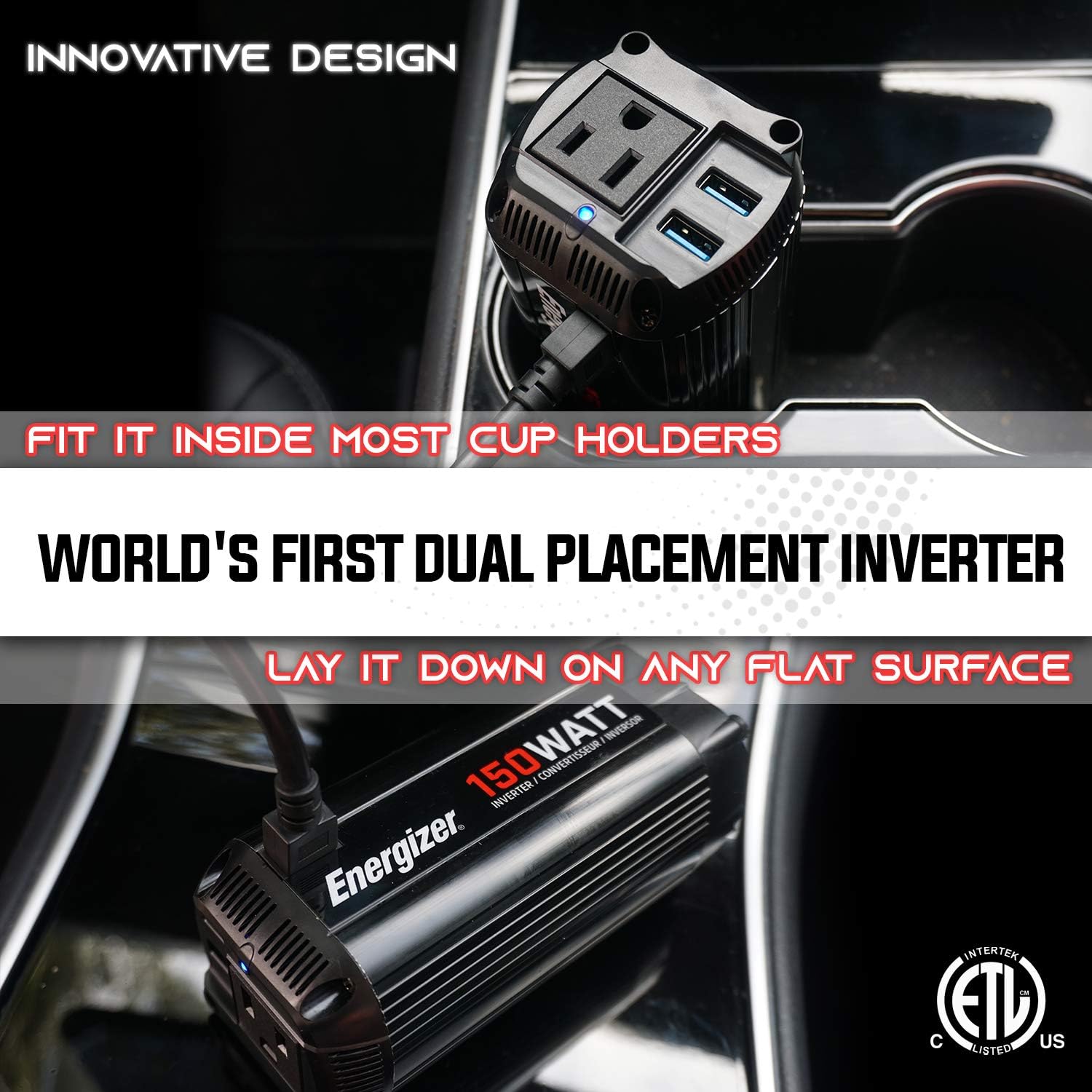
Figure 4: Illustration of the inverter's versatile placement options, fitting into a cup holder or resting on a flat surface.
5. പ്രവർത്തന നിർദ്ദേശങ്ങൾ
Once the inverter is properly connected to your vehicle's 12V DC power source, you can begin powering your devices.
- Connecting AC Devices: Plug your 110V AC device into the standard North American AC outlet on the inverter. Ensure the device's power consumption does not exceed 150 Watts.
- USB ഉപകരണങ്ങൾ ബന്ധിപ്പിക്കുന്നു: Plug your USB-powered devices into the USB Quick Charge 3.0 ports. These ports provide up to 30W total output for fast charging compatible devices.
- നിരീക്ഷണം: The LED indicator will show the operational status. A green light typically indicates normal operation.
- വിച്ഛേദിക്കൽ: When finished, disconnect your devices from the inverter, then unplug the inverter from the vehicle's accessory socket.
കുറിപ്പ്: For optimal performance and to prevent draining your vehicle's battery, it is recommended to operate the inverter with the vehicle's engine running, especially when powering higher-wattagഇ ഉപകരണങ്ങൾ.
6. പരിപാലനം
Regular maintenance ensures the longevity and safe operation of your Energizer Power Inverter.
- വൃത്തിയാക്കൽ: Periodically clean the exterior of the inverter with a dry, soft cloth. Do not use liquid cleaners or solvents.
- വെൻ്റിലേഷൻ: Ensure the ventilation openings are clear of dust and debris. Blocked vents can lead to overheating.
- ഫ്യൂസ് മാറ്റിസ്ഥാപിക്കൽ: The inverter comes with a spare fuse. If the inverter stops working, the fuse may need replacement. Refer to the specifications for the correct fuse type. To replace, carefully unscrew the tip of the cigarette lighter plug, remove the old fuse, and insert the new one.
- സംഭരണം: Store the inverter in a cool, dry place when not in use.
7. പ്രശ്നപരിഹാരം
This section addresses common issues you might encounter with your power inverter.
| പ്രശ്നം | സാധ്യമായ കാരണം | പരിഹാരം |
|---|---|---|
| Inverter not turning on (no LED light) |
|
|
| No power output from AC outlet or USB ports |
|
|
| Inverter fan is loud or constantly running |
|
|
8 സ്പെസിഫിക്കേഷനുകൾ
| ഫീച്ചർ | വിശദാംശങ്ങൾ |
|---|---|
| മോഡൽ | EN150 |
| തുടർച്ചയായ ശക്തി | 150 വാട്ട്സ് |
| പീക്ക് പവർ | 300 വാട്ട്സ് |
| ഇൻപുട്ട് വോളിയംtage | 12 വോൾട്ട് ഡിസി |
| Putട്ട്പുട്ട് വോളിയംtage | 110 വോൾട്ട് എസി |
| AC Outlet Type | Standard North American |
| USB പോർട്ടുകൾ | 2 x Quick Charge 3.0 (30W max total) |
| തരംഗരൂപം | പരിഷ്കരിച്ച സൈൻ വേവ് |
| അളവുകൾ (L x W x H) | 35.56 x 38.1 x 30.48 സെ.മീ (ഏകദേശം 14 x 15 x 12 ഇഞ്ച്) |
| ഭാരം | 521.63 ഗ്രാം (ഏകദേശം 1.15 പൗണ്ട്) |
| സുരക്ഷാ സർട്ടിഫിക്കേഷനുകൾ | ETL Approved Under UL Std 458 |
9. വാറൻ്റിയും പിന്തുണയും
Energizer stands behind the quality of its products.
9.1 വാറൻ്റി വിവരങ്ങൾ
ഈ ഉൽപ്പന്നം എ 2 വർഷത്തെ വാറൻ്റി on parts and labor. Please retain your proof of purchase for warranty claims. For detailed warranty terms and conditions, refer to the official Energizer product documentation or webസൈറ്റ്.

Figure 5: The Energizer 150 Watts Power Inverter, highlighting its 2-year warranty.
9.2 ഉപഭോക്തൃ പിന്തുണ
For technical assistance, troubleshooting, or warranty inquiries, please visit the official Energizer website or contact their customer support. Contact information can typically be found on the product packaging or the brand's official online presence.
10. ഉൽപ്പന്ന വീഡിയോ
Watch the official product video for a visual guide on the Energizer 150 Watts Power Inverter.
Video 1: Energizer 150 Watts Pure Sine Wave Power Inverter (EP150) overview. This video demonstrates the features and usage scenarios of the inverter, including its compact design and power capabilities.


