1. ഉൽപ്പന്നം കഴിഞ്ഞുview
The Mcdodo OT-7700 is a compact and durable adapter designed to bridge the connectivity gap between Lightning and Type-C devices. It facilitates both efficient charging and reliable data synchronization, offering a versatile solution for users with mixed device ecosystems.

Image 1.1: The Mcdodo OT-7700 Lightning to Type-C Connector. This image displays the compact, black adapter with the Mcdodo logo, featuring a Type-C male connector on one end and a Lightning female port on the other.
2. പാക്കേജ് ഉള്ളടക്കം
പാക്കേജിൽ എല്ലാ ഇനങ്ങളും ഉണ്ടെന്ന് ദയവായി പരിശോധിക്കുക:
- 1 x Mcdodo OT-7700 Lightning to Type-C Connector
3. സജ്ജീകരണവും കണക്ഷനും
The Mcdodo OT-7700 connector is designed for simple plug-and-play operation. No software installation is required.
- തുറമുഖങ്ങൾ തിരിച്ചറിയുക: Locate the Lightning cable (from your Apple device) and the Type-C port on your charging device or computer.
- Connect Lightning Cable: Insert your Lightning cable's male connector into the female Lightning port of the Mcdodo OT-7700 adapter. Ensure a secure connection.
- Connect Type-C Device: Insert the male Type-C connector of the Mcdodo OT-7700 adapter into the Type-C port of your desired device (e.g., laptop, power adapter, Android phone).

Image 3.1: Illustrates the connection process. A smartphone with a Type-C port is shown, and the Mcdodo OT-7700 adapter, already connected to a Lightning cable, is being plugged into the phone's Type-C port. This demonstrates the "Plugging to Use transfer Quickly" functionality.
4. പ്രവർത്തന നിർദ്ദേശങ്ങൾ
The adapter supports two primary functions:
4.1. ചാർജിംഗ്
Once connected as described in Section 3, the adapter will enable power transfer from the Type-C source to the Lightning device. Ensure your Type-C power source provides sufficient current for your Lightning device.
4.2. ഡാറ്റ സിൻക്രൊണൈസേഷൻ
For data transfer, connect your Lightning device (e.g., iPhone, iPad) via its Lightning cable to the Mcdodo OT-7700, and then connect the adapter's Type-C end to a computer or other data-enabled Type-C device. Your Lightning device should be recognized by the Type-C host device, allowing for data exchange.
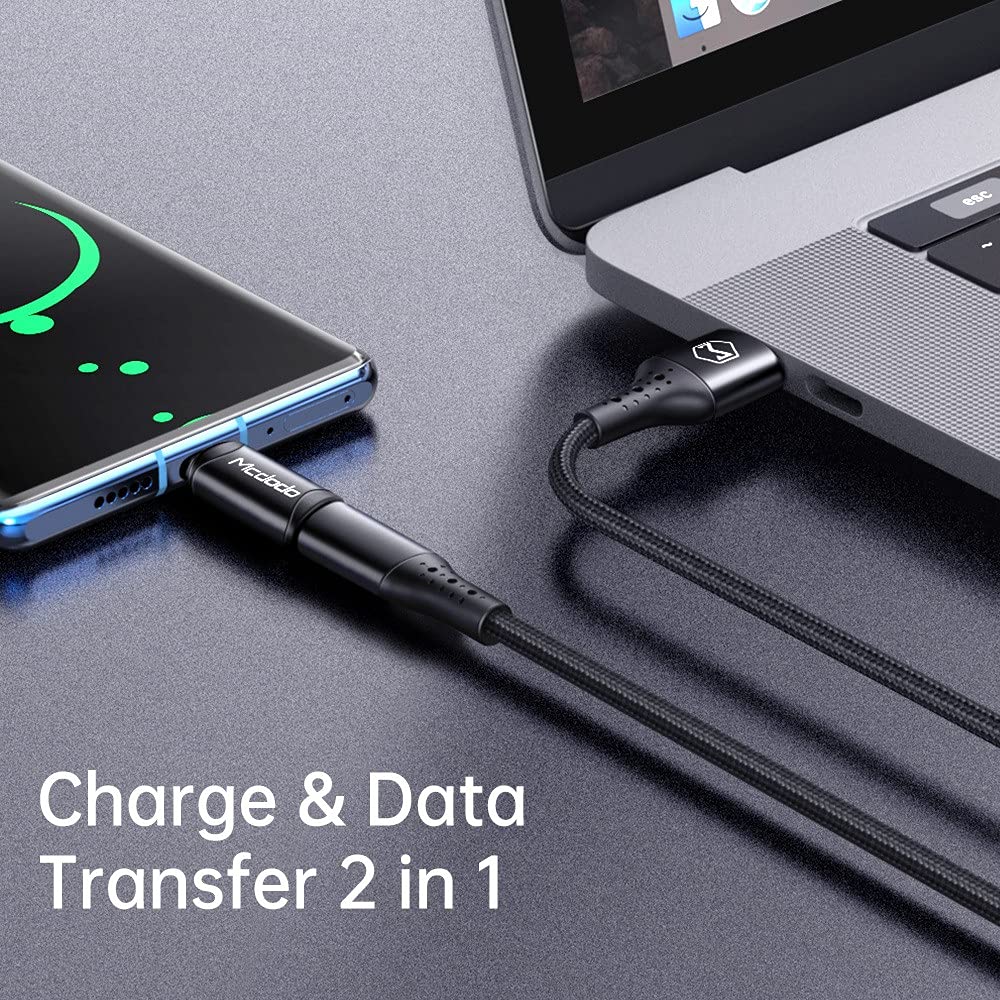
Image 4.1: Depicts the adapter facilitating both charging and data transfer. A smartphone is connected to a laptop via a cable and the Mcdodo OT-7700 adapter, illustrating its dual functionality.
5. പരിപാലനവും പരിചരണവും
- വൃത്തിയാക്കൽ: അഡാപ്റ്റർ വൃത്തിയാക്കാൻ മൃദുവായതും ഉണങ്ങിയതുമായ തുണി ഉപയോഗിക്കുക. ദ്രാവക ക്ലീനറുകളോ ഉരച്ചിലുകളുള്ള വസ്തുക്കളോ ഉപയോഗിക്കരുത്.
- സംഭരണം: നേരിട്ടുള്ള സൂര്യപ്രകാശവും കടുത്ത താപനിലയും ഏൽക്കാത്ത ഒരു തണുത്തതും വരണ്ടതുമായ സ്ഥലത്ത് അഡാപ്റ്റർ സൂക്ഷിക്കുക.
- കൈകാര്യം ചെയ്യൽ: Avoid bending or twisting the adapter excessively. Do not apply undue force when connecting or disconnecting.
- ഈട്: The adapter is constructed from aluminum alloy for enhanced durability. However, it is not waterproof and should be protected from moisture.
6. പ്രശ്നപരിഹാരം
| പ്രശ്നം | സാധ്യമായ കാരണം | പരിഹാരം |
|---|---|---|
| ഉപകരണം ചാർജ് ചെയ്യുന്നില്ല. | Loose connection, incompatible cable/charger, insufficient power from Type-C source. | Ensure all connections are secure. Try a different Lightning cable or Type-C charger. Verify the Type-C power source meets the device's requirements. |
| ഡാറ്റ കൈമാറ്റം പ്രവർത്തിക്കുന്നില്ല. | Loose connection, incompatible cable, driver issues on computer. | Check all connections. Ensure the Lightning cable supports data transfer. Try connecting to a different USB-C port or computer. |
| ഉപയോഗിക്കുമ്പോൾ അഡാപ്റ്റർ ചൂടാകുന്നതായി തോന്നുന്നു. | Normal operation under heavy load, excessive current draw. | A slight warmth is normal. If it becomes excessively hot, disconnect immediately and check for faulty cables or devices. Ensure the current draw does not exceed 3A. |
7 സ്പെസിഫിക്കേഷനുകൾ
| ഫീച്ചർ | വിശദാംശങ്ങൾ |
|---|---|
| മോഡൽ നമ്പർ | OT-7700 |
| കണക്റ്റർ തരം | Lightning (Female) to Type-C (Male) |
| പ്രവർത്തനക്ഷമത | Charging and Data Synchronization |
| മെറ്റീരിയൽ | അലുമിനിയം അലോയ് |
| നിറം | കറുപ്പ് |
| ഇനത്തിൻ്റെ ഭാരം | 14 ഗ്രാം |
| പരമാവധി കറന്റ് പിന്തുണ | 3A |

Image 7.1: Displays two Mcdodo OT-7700 adapters and highlights the "Support max 3A current" feature, indicating its charging capability.
8. വാറൻ്റിയും പിന്തുണയും
For warranty information or technical support, please refer to the official Mcdodo webസൈറ്റിൽ ബന്ധപ്പെടുക അല്ലെങ്കിൽ നിങ്ങളുടെ റീട്ടെയിലറെ ബന്ധപ്പെടുക. വാറന്റി ക്ലെയിമുകൾക്കായി നിങ്ങളുടെ വാങ്ങൽ രസീത് സൂക്ഷിക്കുക.


