1. ആമുഖം
Thank you for choosing the ROIDMI X20 Nex Cordless Vacuum Cleaner. This manual provides essential information for the safe and efficient use, maintenance, and troubleshooting of your device. Please read it thoroughly before first use and keep it for future reference.

ചിത്രം 1.1: പൂർണ്ണം view of the ROIDMI X20 Nex cordless vacuum cleaner.
2. സുരക്ഷാ നിർദ്ദേശങ്ങൾ
പരിക്കുകളോ കേടുപാടുകളോ തടയാൻ, എപ്പോഴും ഇനിപ്പറയുന്ന സുരക്ഷാ മുൻകരുതലുകൾ പാലിക്കുക:
- പുറത്തോ നനഞ്ഞ പ്രതലങ്ങളിലോ വാക്വം ക്ലീനർ ഉപയോഗിക്കരുത്.
- കുട്ടികളെ വാക്വം ക്ലീനർ പ്രവർത്തിപ്പിക്കാൻ അനുവദിക്കരുത്. ഉപകരണം ഉപയോഗിക്കുമ്പോൾ കുട്ടികളെയും വളർത്തുമൃഗങ്ങളെയും നിരീക്ഷിക്കുക.
- ഗ്യാസോലിൻ പോലുള്ള കത്തുന്നതോ കത്തുന്നതോ ആയ ദ്രാവകങ്ങൾ എടുക്കരുത്, അല്ലെങ്കിൽ അവ ഉള്ള സ്ഥലങ്ങളിൽ ഉപയോഗിക്കരുത്.
- കത്തുന്നതോ പുകവലിക്കുന്നതോ ആയ സിഗരറ്റ്, തീപ്പെട്ടി, ചൂടുള്ള ചാരം എന്നിവയൊന്നും എടുക്കരുത്.
- Ensure the filter is correctly installed before use.
- Use only ROIDMI recommended accessories and replacement parts.
- If the power cord or charger is damaged, it must be replaced by the manufacturer, its service agent, or similarly qualified persons to avoid a hazard.
3. ഉൽപ്പന്നം കഴിഞ്ഞുview
3.1 ഘടകങ്ങളും അനുബന്ധ ഉപകരണങ്ങളും
The ROIDMI X20 Nex comes with various components and accessories to enhance your cleaning experience:

Figure 3.1: All included accessories for the ROIDMI X20 Nex vacuum cleaner.
- പ്രധാന യൂണിറ്റ്: മോട്ടോർ, ഡസ്റ്റ് ബിൻ, ബാറ്ററി എന്നിവ ഇതിൽ ഉൾപ്പെടുന്നു.
- വിപുലീകരണ വടി: For floor cleaning and reaching high areas.
- Main Brush Head: Equipped with an electric brush for various floor types.
- Narrow Area Adapter: For cleaning tight spaces and corners.
- Electric Charger: For recharging the vacuum's battery.
- ഫിൽട്ടറുകൾ: HEPA filter and other filtration components.
- ക്ലീനിംഗ് ബ്രഷ്: For maintaining the vacuum and its accessories.
- വാൾ-മൗണ്ട് ചാർജിംഗ് ബേസ്: സൗകര്യപ്രദമായ സംഭരണത്തിനും ചാർജിംഗിനും.
- Sofa Brush: Ideal for upholstery and fabric surfaces.
- Flexible Tube with Brush for Dust and Water Tank Module: For specialized cleaning tasks.
4. സജ്ജീകരണം
4.1 അസംബ്ലി
- എക്സ്റ്റൻഷൻ റോഡ് ഘടിപ്പിക്കുക: Insert the extension rod into the main unit until it clicks into place.
- Attach the Main Brush Head: Connect the main brush head to the other end of the extension rod, ensuring it locks securely.
- ഫിൽട്ടറുകൾ ഇൻസ്റ്റാൾ ചെയ്യുക: Ensure all filters are correctly seated in the dust bin assembly.

Figure 4.1: The ROIDMI X20 Nex cordless vacuum cleaner assembled and ready for use.
4.2 പ്രാരംഭ ചാർജിംഗ്
Before first use, fully charge the vacuum cleaner. Connect the electric charger to the main unit and plug it into a power outlet. The charging indicator will show the charging status. A full charge takes approximately 2.5 hours and provides up to 65 minutes of runtime.
4.3 വാൾ മൗണ്ട് ഇൻസ്റ്റലേഷൻ
The wall-mount charging base allows for convenient storage and charging. Choose a suitable location near a power outlet. Secure the base to the wall using the provided screws and anchors. Ensure it is mounted at a height that allows the vacuum to hang securely.
5. പ്രവർത്തന നിർദ്ദേശങ്ങൾ
5.1 പവർ ഓൺ/ഓഫ്, വേഗത ക്രമീകരണം
Press the power button to turn the vacuum cleaner on or off. The ROIDMI X20 Nex features 3 speed settings (low, medium, high). Press the speed adjustment button to cycle through the power modes to suit your cleaning needs.

Figure 5.1: Close-up of hands holding the ergonomic handle of the ROIDMI X20 Nex, showing control buttons.
5.2 വ്യത്യസ്ത അറ്റാച്ചുമെന്റുകൾ ഉപയോഗിക്കുന്നു
- Main Brush Head: Suitable for all floor types, including hard floors and carpets. The integrated LED light illuminates dark areas.

Figure 5.2: A person using the ROIDMI X20 Nex vacuum cleaner in stick mode in a living room.

Figure 5.3: The main brush head effectively cleaning debris on a floor.
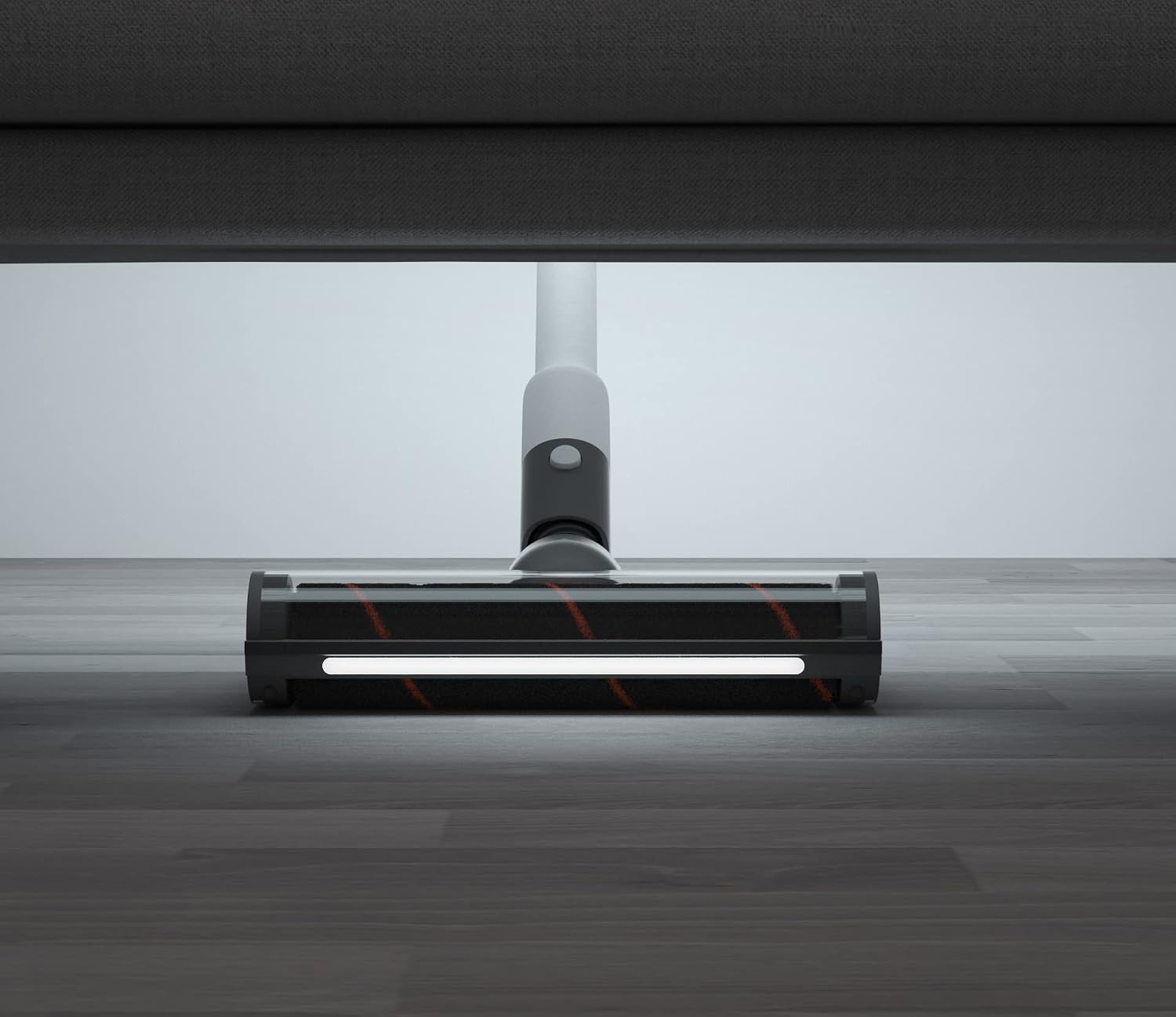
Figure 5.4: The main brush head with its LED light illuminated, cleaning under furniture.
- Sofa Brush: Attach directly to the main unit for handheld cleaning of upholstery, mattresses, and pet hair.

Figure 5.5: The ROIDMI X20 Nex in handheld mode with the sofa brush attachment, cleaning a sofa.
- Narrow Area Adapter: Use for crevices, corners, and other hard-to-reach spots.
- Flexible Tube with Brush: Provides extended reach and flexibility for cleaning car interiors or intricate areas.
5.3 Using the ROIDMI Cleaner App
The ROIDMI X20 Nex can connect to the "Roidmi Cleaner" application for additional features and control. Download the app from your device's app store and follow the in-app instructions to pair your vacuum cleaner.
6. പരിപാലനം
Regular maintenance ensures optimal performance and extends the lifespan of your ROIDMI X20 Nex.
6.1 ഡസ്റ്റ് ബിൻ ശൂന്യമാക്കൽ
Empty the dust bin after each use or when the MAX fill line is reached. Detach the dust bin from the main unit, open the lid, and dispose of the contents. Close the lid securely and reattach the dust bin.
6.2 ക്ലീനിംഗ് ഫിൽട്ടറുകൾ
The HEPA filter and other filtration components should be cleaned regularly (e.g., monthly, depending on usage). Tap out loose dirt, then rinse under running water. Ensure filters are completely dry before reinstallation to prevent damage to the motor.
6.3 ബ്രഷ് റോൾ വൃത്തിയാക്കൽ
Periodically check the main brush roll for tangled hair or debris. Use the provided cleaning brush or scissors to remove any obstructions. The brush roll can usually be detached for easier cleaning.

Figure 6.1: The main brush head on a carpet, with a detached cleaning tool nearby, useful for maintenance.
6.4 ബാറ്ററി കെയർ
To maximize battery life, avoid fully discharging the battery frequently. Store the vacuum cleaner in a cool, dry place when not in use. If storing for an extended period, charge the battery to approximately 50%.
7. പ്രശ്നപരിഹാരം
If you encounter issues with your ROIDMI X20 Nex, refer to the following common problems and solutions:
| പ്രശ്നം | സാധ്യമായ കാരണം | പരിഹാരം |
|---|---|---|
| വാക്വം ഓണാക്കുന്നില്ല | ബാറ്ററി കുറവാണ് അല്ലെങ്കിൽ തീർന്നിരിക്കുന്നു | ബാറ്ററി പൂർണ്ണമായും ചാർജ് ചെയ്യുക. |
| സക്ഷൻ പവർ കുറഞ്ഞു | Dust bin full; Filter clogged; Brush roll obstructed | Empty dust bin; Clean or replace filters; Remove obstructions from brush roll. |
| ബ്രഷ് റോൾ കറങ്ങുന്നില്ല | Obstruction in brush roll; Brush head not properly attached | Remove tangled hair or debris; Reattach brush head securely. |
| Vacuum stops during operation | Battery depleted; Overheating protection activated | Recharge battery; Allow vacuum to cool down before resuming use. |
If the problem persists after trying these solutions, please contact ROIDMI customer support.
8 സ്പെസിഫിക്കേഷനുകൾ
| ഫീച്ചർ | സ്പെസിഫിക്കേഷൻ |
|---|---|
| ബ്രാൻഡ് | ROIDMI |
| മോഡൽ നമ്പർ | XCQ06RM |
| നിറം | വെള്ള |
| അളവുകൾ (L x W x H) | 24 x 15 x 67 സെ.മീ |
| ഭാരം | 1.5 കിലോഗ്രാം |
| ഡസ്റ്റ് ബിൻ കപ്പാസിറ്റി | 400 മില്ലി ലിറ്റർ |
| ശക്തി | 138 വാട്ട്സ് |
| വാല്യംtage | 28.8 വോൾട്ട് |
| വേഗതകളുടെ എണ്ണം | 3 |
| ശബ്ദ നില | 65 ഡെസിബെൽ |
| പ്രവർത്തനസമയം | Up to 65 minutes (1 hour and 5 minutes) |
| ഫിൽട്ടർ തരം | HEPA ഫിൽട്ടർ |
| പവർ ഉറവിടം | ബാറ്ററി പവർ |
| വയർലെസ് | അതെ |
| ഉൾപ്പെടുത്തിയ ഘടകങ്ങൾ | Narrow area adapter, electric charger, filters, cleaning brush, wall-mount charging base, sofa brush, flexible tube with brush for dust and water tank module. |
9. വാറൻ്റിയും പിന്തുണയും
For warranty information and customer support, please refer to the documentation included with your purchase or visit the official ROIDMI website. Please have your model number (XCQ06RM) and purchase date available when contacting support.


