1. ആമുഖം
The Dinstar SBC300-20 is a Session Border Controller designed to provide robust and secure SIP-based services for small to medium-sized telecommunication operators. This device supports 20 concurrent SIP sessions and 20 transcoding sessions, ensuring efficient and reliable communication.
Key functionalities include safe network access, enhanced security, system interworking, flexible session routing and policy management, Quality of Service (QoS), media transcoding, and media processing. Built with a distributed multi-core processor and an embedded Linux operating system, the SBC300-20 offers high performance with low power consumption.
It is capable of supporting up to 50 concurrent SIP sessions and transcoding up to 50 concurrent calls, with support for encrypted sessions via TLS and SRTP. The SBC300-20 handles various codecs including G.729, G.723, G.711, G.726, iLBC, AMR, and OPUS.
2. ഉൽപ്പന്നം കഴിഞ്ഞുview
The Dinstar SBC300-20 is a compact and powerful device. Below is an image illustrating the product.
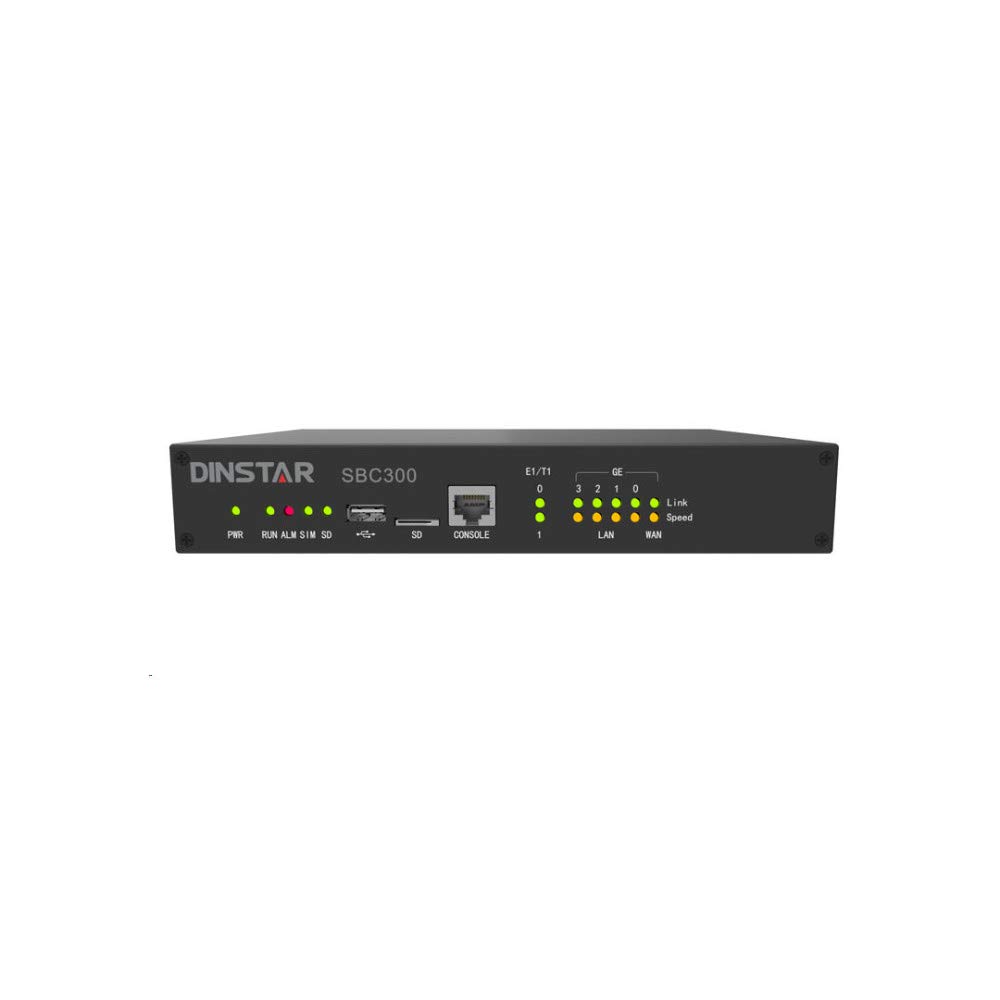
ചിത്രം 1: ഫ്രണ്ട് view of the Dinstar SBC300-20 Session Border Controller. This image shows the compact black metal casing of the device, designed for network integration.
3. പാക്കേജ് ഉള്ളടക്കം
Upon unpacking your Dinstar SBC300-20, please verify that all the following items are included:
- Dinstar SBC300-20 Session Border Controller unit
- Power Adapter (implied for electronic device operation)
- Ethernet Cable (implied for network connectivity)
- സ്റ്റീൽ കേബിൾ
- Quick Start Guide (implied for initial setup)
If any items are missing or damaged, please contact your vendor or Dinstar support immediately.
4. സജ്ജീകരണ നിർദ്ദേശങ്ങൾ
Follow these steps to set up your Dinstar SBC300-20:
- ഭൗതിക സ്ഥാനം: Choose a stable, well-ventilated location for the SBC. Ensure it is away from direct sunlight, heat sources, and moisture. The device is designed for wall mounting, as indicated in specifications.
- പവർ കണക്ഷൻ: Connect the power adapter to the SBC's power input port and then plug it into a standard electrical outlet.
- നെറ്റ്വർക്ക് കണക്ഷൻ: Connect the SBC to your network using standard Ethernet cables. The rear panel features non-blocking gigabit switching data network ports. Typically, one port connects to the internal network (LAN) and another to the external network (WAN/SIP Trunk provider).
- പ്രാരംഭ കോൺഫിഗറേഷൻ ആക്സസ്:
- Refer to the Quick Start Guide for the default IP address and login credentials.
- ആക്സസ് ചെയ്യുക web-based management interface from a computer connected to the same network segment as the SBC.
- Log in using the default username and password. It is highly recommended to change these default credentials immediately for security purposes.
- Basic Network Configuration: Configure the network interfaces (IP addresses, subnet masks, gateways, DNS servers) according to your network topology.
- SIP Trunk and Routing Configuration: Set up your SIP trunks, routing rules, and security policies within the SBC's web interface. This includes defining inbound and outbound call routing, media transcoding profiles, and firewall rules.
5. പ്രവർത്തന നിർദ്ദേശങ്ങൾ
Once the Dinstar SBC300-20 is set up and configured, its operation is largely automated. Here are key operational aspects:
- Session Management: The SBC automatically manages SIP sessions, including call setup, teardown, and mid-call signaling. It ensures proper routing and handles NAT traversal.
- Media Transcoding: The device performs real-time media transcoding between different codecs (e.g., G.729, G.711) as required by the connected endpoints or SIP trunks.
- സുരക്ഷ: The SBC acts as a security gateway, protecting your internal network from external threats by inspecting SIP traffic, preventing denial-of-service (DoS) attacks, and enforcing security policies. It supports encrypted sessions via TLS and SRTP.
- നിരീക്ഷണം: Regularly access the web management interface to monitor system status, active sessions, resource utilization, and logs. This helps in identifying potential issues and ensuring optimal performance.
- ഫേംവെയർ അപ്ഡേറ്റുകൾ: Periodically check the Dinstar official website for firmware updates. Applying updates can improve performance, add new features, and address security vulnerabilities. Follow the provided instructions carefully when performing firmware upgrades.
6. പരിപാലനം
Proper maintenance ensures the longevity and reliable performance of your Dinstar SBC300-20:
- പതിവ് നിരീക്ഷണം: Continuously monitor the SBC's performance and logs through the web interface. Look for unusual activity, high resource usage, or error messages.
- പരിസ്ഥിതി നിയന്ത്രണം: Ensure the operating environment remains within specified temperature and humidity ranges. Keep the device free from dust and obstructions to ventilation.
- സുരക്ഷാ ഓഡിറ്റുകൾ: ആനുകാലികമായി റീview your security configurations, including firewall rules, access control lists, and user credentials, to ensure they remain robust against evolving threats.
- ബാക്കപ്പ് കോൺഫിഗറേഷൻ: Regularly back up your SBC's configuration settings. This allows for quick restoration in case of a system failure or misconfiguration.
- കേബിൾ മാനേജുമെന്റ്: Ensure all network and power cables are securely connected and neatly organized to prevent accidental disconnections or damage.
7. പ്രശ്നപരിഹാരം
This section provides solutions to common issues you might encounter with your Dinstar SBC300-20.
7.1 വൈദ്യുതിയില്ല
- പവർ കേബിൾ പരിശോധിക്കുക: Ensure the power adapter is securely connected to both the SBC and the electrical outlet.
- ഔട്ട്ലെറ്റ് പരിശോധിക്കുക: ഇലക്ട്രിക്കൽ ഔട്ട്ലെറ്റ് പ്രവർത്തനക്ഷമമാണെന്ന് ഉറപ്പാക്കാൻ മറ്റൊരു ഉപകരണം ഉപയോഗിച്ച് അത് പരിശോധിക്കുക.
- പവർ അഡാപ്റ്റർ: If possible, test with a known good power adapter of the same specifications.
7.2 ആക്സസ് ചെയ്യാൻ കഴിയില്ല Web ഇൻ്റർഫേസ്
- നെറ്റ്വർക്ക് കണക്ഷൻ: Verify that your computer is connected to the same network as the SBC and that the Ethernet cables are properly connected.
- IP വിലാസം: Confirm the SBC's IP address. If unsure, you might need to reset the device to factory defaults (refer to the manual for specific instructions, if available, or contact support).
- ഫയർവാൾ: Ensure no local firewall on your computer or network is blocking access to the SBC's IP address or management port.
- ബ്രൗസർ കാഷെ: നിങ്ങളുടെ ബ്രൗസറിന്റെ കാഷെയും കുക്കികളും മായ്ക്കുക, അല്ലെങ്കിൽ മറ്റൊന്ന് പരീക്ഷിക്കുക web ബ്രൗസർ.
7.3 Call Issues (No Audio, One-Way Audio, Call Drops)
- SIP Trunk Status: Check the status of your SIP trunks in the SBC's interface to ensure they are registered and active.
- നെറ്റ്വർക്ക് കണക്റ്റിവിറ്റി: Verify network connectivity between the SBC, your IP-PBX/endpoints, and the SIP service provider.
- Firewall/NAT: Ensure that all necessary ports are open on your network firewall and that NAT settings on the SBC are correctly configured.
- കോഡെക് പൊരുത്തക്കേട്: Check if there's a codec mismatch. The SBC should transcode as configured, but verify the settings.
- Resource Utilization: Monitor the SBC's CPU and memory usage. High utilization might indicate an overload, especially if exceeding the 20 concurrent session recommendation.
- ലോഗുകൾ: Review the SBC's system and call logs for error messages or indications of why calls are failing.
For persistent issues, consult the detailed Dinstar SBC300-20 technical documentation or contact Dinstar technical support.
8 സ്പെസിഫിക്കേഷനുകൾ
The following are the technical specifications for the Dinstar SBC300-20:
| ഫീച്ചർ | സ്പെസിഫിക്കേഷൻ |
|---|---|
| ബ്രാൻഡ് | Dinstar |
| മോഡൽ നമ്പർ | എസ്ബിസി300-20 |
| SIP Sessions | Supports 20 concurrent sessions (up to 50 concurrent sessions) |
| Transcoding Sessions | Supports 20 concurrent sessions (up to 50 concurrent calls) |
| പിന്തുണയ്ക്കുന്ന കോഡെക്കുകൾ | G.729, G.723, G.711, G.726, iLBC, AMR, OPUS |
| ഓപ്പറേറ്റിംഗ് സിസ്റ്റം | ഉൾച്ചേർത്ത ലിനക്സ് |
| പ്രോസസ്സർ | Distributed multi-core processor |
| നെറ്റ്വർക്ക് ഇന്റർഫേസ് | Rear panel for non-blocking gigabit switching data network |
| സുരക്ഷാ സവിശേഷതകൾ | Safe network access, robust security, TLS and SRTP for encrypted sessions |
| നിറം | കറുപ്പ് |
| മെറ്റീരിയൽ | ലോഹം |
| മൗണ്ടിംഗ് തരം | മതിൽ മൗണ്ട് |
| ഉൾപ്പെടുത്തിയ ഘടകങ്ങൾ | Steel Cable (main unit and power adapter implied) |
| ഇനത്തിൻ്റെ ഭാരം | 3 പൗണ്ട് (ഏകദേശം 1.36 കിലോഗ്രാം) |
| ജല പ്രതിരോധ നില | വാട്ടർ റെസിസ്റ്റൻ്റ് അല്ല |
| യു.പി.സി | 687368409845 |
| ആദ്യ തീയതി ലഭ്യമാണ് | ഒക്ടോബർ 29, 2020 |
9. വാറൻ്റിയും പിന്തുണയും
വാറൻ്റി വിവരങ്ങൾ: For detailed warranty terms and conditions, please refer to the warranty card included with your product or visit the official Dinstar website. Warranty coverage typically varies by region and reseller. Please retain your proof of purchase for warranty claims.
സാങ്കേതിക സഹായം: If you encounter issues that cannot be resolved using this manual's troubleshooting section, please contact Dinstar technical support. You can usually find contact information on the Dinstar official website or through your product reseller. When contacting support, please have your product model number (SBC300-20) and serial number ready.
ഓൺലൈൻ ഉറവിടങ്ങൾ: Additional documentation, FAQs, and firmware updates may be available on the Dinstar official webസൈറ്റ്.


