ആമുഖം
Thank you for choosing the BENGOO KM-1 Wireless Gaming Mouse. This manual provides detailed instructions on how to set up, operate, and maintain your mouse to ensure optimal performance and longevity. The KM-1 mouse features a lightweight honeycomb shell, 2.4G wireless technology, adjustable DPI settings, and customizable RGB lighting, designed for a comfortable and responsive gaming experience.
പാക്കേജ് ഉള്ളടക്കം
- BENGOO KM-1 വയർലെസ് ഗെയിമിംഗ് മൗസ്
- USB റിസീവർ
- യുഎസ്ബി ചാർജിംഗ് കേബിൾ
സജ്ജമാക്കുക
1. മൗസ് ബന്ധിപ്പിക്കൽ
- Locate the USB receiver, typically stored in a compartment on the underside of the mouse.
- Plug the USB receiver into an available USB port on your computer (PC, Laptop, Mac).
- Turn on the mouse using the ON/OFF switch located on the underside. The mouse will automatically connect to the receiver.
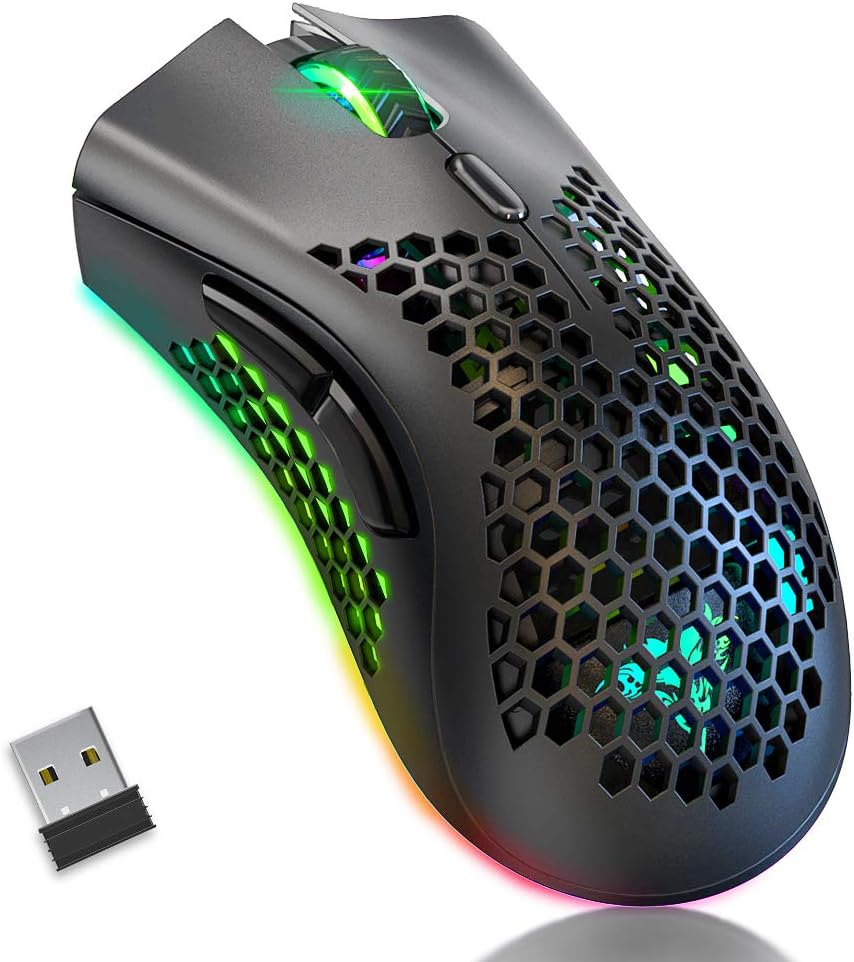
Image: The BENGOO KM-1 Wireless Gaming Mouse shown alongside its compact USB receiver, ready for connection.
The 2.4G wireless technology provides a stable connection with a range of up to 10 meters, ensuring no delays or interference during use.
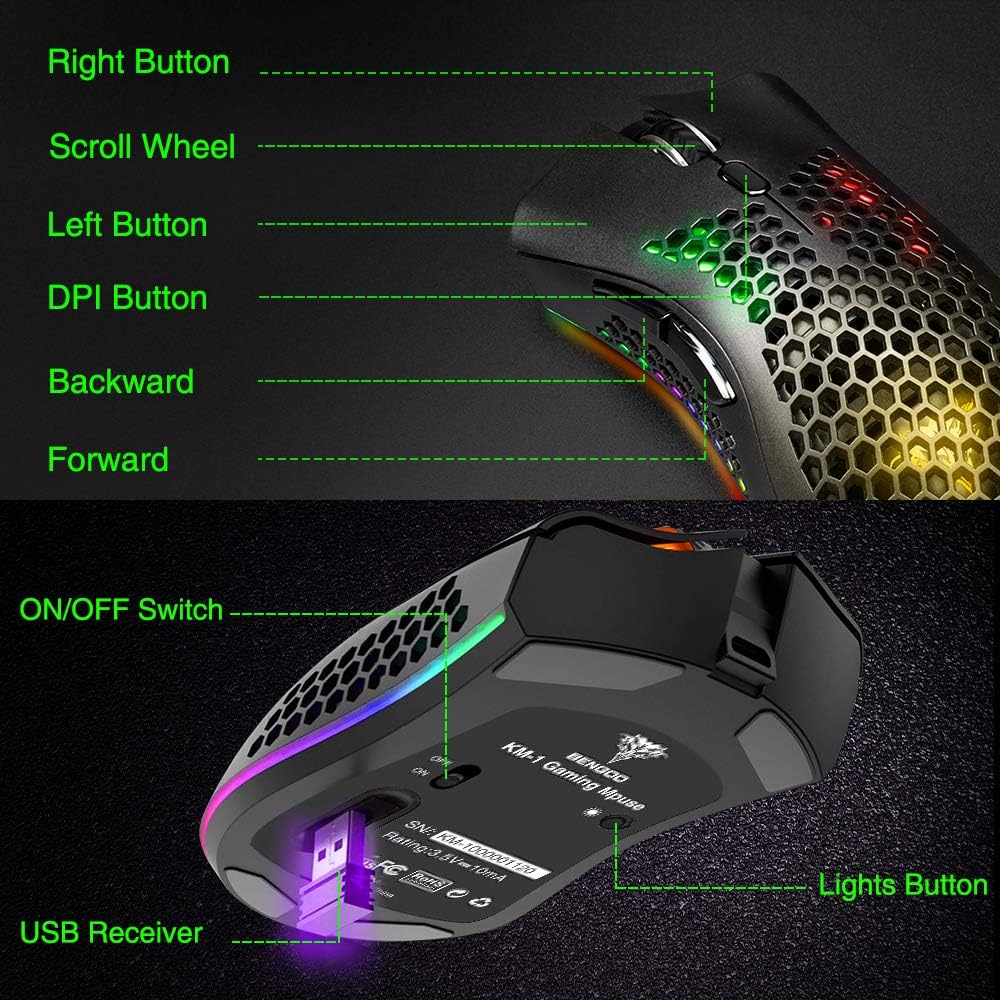
Image: A visual representation illustrating the 10-meter wireless operating range of the mouse from a computer.
2. മൗസ് ചാർജ് ചെയ്യുന്നു
The KM-1 mouse is rechargeable. When the battery is low, the mouse cursor may move slowly, unstably, or stop moving. Connect the included USB charging cable to the mouse and a USB power source to charge. The mouse can be used while charging.
Image: The BENGOO KM-1 mouse connected to a USB cable, indicating its rechargeable capability.
പ്രവർത്തന നിർദ്ദേശങ്ങൾ
1. ബട്ടൺ പ്രവർത്തനങ്ങൾ
The KM-1 mouse is equipped with six programmable buttons for enhanced control:
- ഇടത് ബട്ടൺ: സ്റ്റാൻഡേർഡ് ഇടത്-ക്ലിക്ക് പ്രവർത്തനം.
- വലത് ബട്ടൺ: സ്റ്റാൻഡേർഡ് റൈറ്റ്-ക്ലിക്ക് ഫംഗ്ഷൻ.
- സ്ക്രോൾ വീൽ: Scrolls pages up and down; can also be pressed for middle-click functionality.
- DPI ബട്ടൺ: മൗസ് സെൻസിറ്റിവിറ്റി (DPI) ക്രമീകരിക്കുന്നു.
- ഫോർവേഡ് ബട്ടൺ: മുന്നോട്ട് നാവിഗേറ്റ് ചെയ്യുന്നു web ബ്രൗസറുകൾ അല്ലെങ്കിൽ file പര്യവേക്ഷകർ.
- ബാക്ക് ബട്ടൺ: പിന്നിലേക്ക് നാവിഗേറ്റ് ചെയ്യുന്നു web ബ്രൗസറുകൾ അല്ലെങ്കിൽ file പര്യവേക്ഷകർ.

Image: A detailed diagram highlighting and labeling each of the six buttons on the BENGOO KM-1 Wireless Gaming Mouse.
2. ഡിപിഐ ക്രമീകരണം
The mouse features 3 adjustable DPI (Dots Per Inch) settings for precise control. Press the DPI button to cycle through the following sensitivities:
- 800 ഡിപിഐ
- 1600 ഡിപിഐ
- 3200 ഡിപിഐ

Image: A visual demonstrating the adjustable DPI settings (800-1600-3200) for the BENGOO KM-1 mouse, allowing users to customize cursor speed.
3. RGB ലൈറ്റിംഗ് നിയന്ത്രണം
The KM-1 mouse features Chroma RGB lighting. To activate the lights, ensure the mouse is turned on. Press the LED button (located on the underside near the ON/OFF switch) repeatedly to cycle through different lighting effects:
- റെയിൻബോ മോഡ്
- സ്ട്രീം മോഡ്
- ശ്വസന മോഡ്
- Pure Mode (Solid Color)
- ലൈറ്റുകൾ ഓഫ്

Image: A display of the various RGB lighting modes available on the BENGOO KM-1 mouse, including Rainbow, Stream, Breathing, and Pure modes.
4. എർഗണോമിക് ഡിസൈൻ
The mouse features a lightweight honeycomb shell design, which provides a comfortable grip and promotes airflow, keeping the palm cool during extended use. This design contributes to a soft feeling and excellent gaming experience.

ചിത്രം: ഒരു ക്ലോസ്-അപ്പ് view of the BENGOO KM-1 mouse, emphasizing its unique lightweight honeycomb shell design.
മെയിൻ്റനൻസ്
വൃത്തിയാക്കൽ
നിങ്ങളുടെ മൗസ് വൃത്തിയാക്കാൻ, മൃദുവായതും ഉണങ്ങിയതുമായ ഒരു തുണി ഉപയോഗിക്കുക. കഠിനമായ അഴുക്കിന്, ചെറുതായി dampen the cloth with water. Avoid using harsh chemicals or abrasive materials, as these can damage the mouse's surface or internal components. Ensure no liquid enters the honeycomb perforations.
ബാറ്ററി കെയർ
To prolong battery life, avoid fully discharging the mouse frequently. Charge the mouse when the low battery indicator appears or when performance degrades. Store the mouse in a cool, dry place when not in use for extended periods.
ട്രബിൾഷൂട്ടിംഗ്
- മൗസ് പ്രതികരിക്കുന്നില്ല:
- പ്രവർത്തിക്കുന്ന ഒരു USB പോർട്ടിലേക്ക് USB റിസീവർ സുരക്ഷിതമായി പ്ലഗ് ചെയ്തിട്ടുണ്ടെന്ന് ഉറപ്പാക്കുക.
- Check if the mouse is turned on using the ON/OFF switch.
- ബാറ്ററി കുറവാണെങ്കിൽ മൗസ് ചാർജ് ചെയ്യുക.
- റിസീവറിന്റെ 10 മീറ്റർ വയർലെസ് പരിധിക്കുള്ളിൽ മൗസ് ഉണ്ടെന്ന് ഉറപ്പാക്കുക.
- Cursor moves slowly or erratically:
- This often indicates a low battery. Charge the mouse fully.
- Ensure the mouse sensor is clean and free of debris.
- Try adjusting the DPI setting.
- RGB ലൈറ്റുകൾ പ്രവർത്തിക്കുന്നില്ല:
- മൗസ് ഓണാണെന്ന് ഉറപ്പാക്കുക.
- Press the LED button to cycle through the lighting modes.
- ബാറ്ററി നില പരിശോധിക്കുക.
- അനുയോജ്യതാ പ്രശ്നങ്ങൾ:
- The mouse is compatible with Windows (98/2000/ME/NT/XP/VISTA/7/8/10/11) and macOS. No specific drivers are required.
If you encounter issues not listed here, please refer to the manufacturer's support resources.
സ്പെസിഫിക്കേഷനുകൾ
| ഫീച്ചർ | വിശദാംശങ്ങൾ |
|---|---|
| ബ്രാൻഡ് | ബെങ്കൂ |
| മോഡൽ | KM-1 |
| കണക്റ്റിവിറ്റി ടെക്നോളജി | 2.4G Wireless, USB (for charging) |
| ചലനം കണ്ടെത്തൽ | ഒപ്റ്റിക്കൽ |
| ക്രമീകരിക്കാവുന്ന ഡിപിഐ | 800 / 1600 / 3200 |
| ബട്ടണുകൾ | 6 (Left, Right, Scroll Wheel, DPI, Forward, Back) |
| പ്രത്യേക സവിശേഷതകൾ | Lightweight Honeycomb Shell, RGB LED Lights, Rechargeable, Ergonomic Design |
| അനുയോജ്യത | വിൻഡോസ്, മാകോസ് |
| ഇനത്തിൻ്റെ ഭാരം | 12.3 ഔൺസ് |
| ഉൽപ്പന്ന അളവുകൾ | 13.78 x 13.78 x 7.87 ഇഞ്ച് |
| പവർ ഉറവിടം | ബാറ്ററി പവർ |
വാറൻ്റിയും പിന്തുണയും
For warranty information and customer support, please refer to the documentation included with your product or visit the official BENGOO webസൈറ്റ്. വാറൻ്റി ക്ലെയിമുകൾക്കായി നിങ്ങളുടെ വാങ്ങൽ രസീത് സൂക്ഷിക്കുക.
ഔദ്യോഗിക ഉൽപ്പന്ന വീഡിയോകൾ
No relevant official product videos with 'creator_type':'Seller' were found in the provided data to embed in this manual.


