ആമുഖം
The JoyGeek 3-in-1 Wireless Charging Station is designed to simplify your charging experience by allowing you to charge your iPhone, Apple Watch, and AirPods simultaneously. This sleek and convenient device helps organize your space by eliminating multiple cables and chargers, providing a tidy and efficient charging solution for your Apple devices.

Image: The JoyGeek 3-in-1 Wireless Charging Station in white, showcasing an iPhone, Apple Watch, and AirPods case charging simultaneously. A power adapter and cable are also visible.
സുരക്ഷാ വിവരങ്ങൾ
Please read all safety instructions before using this product to ensure proper operation and to prevent damage. Keep this manual for future reference.
- Do not disassemble or modify the charging station.
- Avoid exposure to water, moisture, or extreme temperatures.
- Use only the original 18W power adapter and 3.3ft USB-C cable provided with the charger for stable and efficient charging.
- ചാർജിംഗ് സ്റ്റേഷന് ചുറ്റും ഉപയോഗിക്കുമ്പോൾ ശരിയായ വായുസഞ്ചാരം ഉറപ്പാക്കുക.
- Do not place metallic objects, credit cards, or cases thicker than 0.2 inches (5mm) on the charging pads, as this may interfere with charging or cause overheating.
- കുട്ടികൾക്ക് ലഭ്യമാകാതെ സൂക്ഷിക്കുക.

Image: A diagram illustrating the multiple protection features of the JoyGeek charging station, including overcharge protection, short-circuit protection, over-current protection, and temperature control.
പാക്കേജ് ഉള്ളടക്കം
പാക്കേജിൽ എല്ലാ ഇനങ്ങളും ഉണ്ടെന്ന് ഉറപ്പാക്കുക:
- 1 x JoyGeek 3-in-1 Wireless Charging Station
- 1 x 18W പവർ അഡാപ്റ്റർ
- 1 x 3.3ft USB-C Cable
- 1 x ഉപയോക്തൃ മാനുവൽ (ഈ പ്രമാണം)
ഉൽപ്പന്നം കഴിഞ്ഞുview
The JoyGeek 3-in-1 Wireless Charging Station features dedicated charging areas for your iPhone, Apple Watch, and AirPods, designed for optimal convenience and organization.
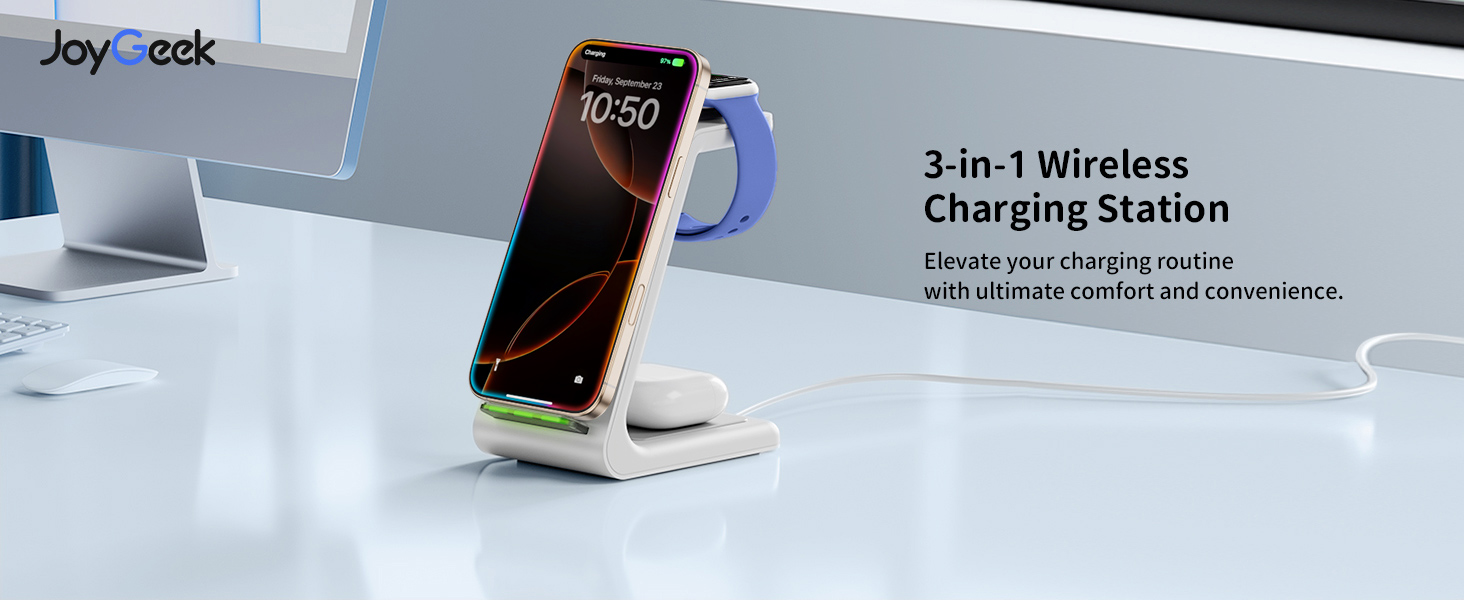
Image: A banner displaying the JoyGeek 3-in-1 Wireless Charging Station with the text "Elevate your charging routine with ultimate comfort and convenience."
പ്രധാന സവിശേഷതകൾ:
- സംയോജിത ഡിസൈൻ: Charges iPhone, Apple Watch, and AirPods simultaneously.
- Dual-Coil Design: Supports both horizontal and vertical charging for iPhones, ideal for watching videos or video calls.
- കേസ്-ഫ്രണ്ട്ലി: Charges through phone cases up to 0.2 inches (5mm) thick.
- Smart Indicator Light: Features small, individual green lights that illuminate upon connection and turn off automatically after approximately 10 seconds to avoid disturbing sleep.
- ഒന്നിലധികം സംരക്ഷണങ്ങൾ: Built-in safeguards against overcharge, short-circuit, over-current, and temperature fluctuations.
- Anti-skid Design: Ensures stability on surfaces.
സജ്ജമാക്കുക
- അൺപാക്ക്: പാക്കേജിംഗിൽ നിന്ന് എല്ലാ ഘടകങ്ങളും ശ്രദ്ധാപൂർവ്വം നീക്കം ചെയ്യുക.
- പവർ ബന്ധിപ്പിക്കുക: Insert the USB-C end of the provided cable into the charging port on the back of the JoyGeek 3-in-1 Wireless Charging Station.
- പ്ലഗ് ഇൻ: Connect the USB-A end of the cable to the provided 18W power adapter, then plug the adapter into a wall outlet.
- പ്ലേസ്മെൻ്റ്: ചാർജിംഗ് സ്റ്റേഷൻ ഒരു മേശ അല്ലെങ്കിൽ നൈറ്റ്സ്റ്റാൻഡ് പോലുള്ള പരന്നതും സ്ഥിരതയുള്ളതുമായ പ്രതലത്തിൽ സ്ഥാപിക്കുക.
പ്രവർത്തന നിർദ്ദേശങ്ങൾ
നിങ്ങളുടെ iPhone ചാർജ് ചെയ്യുന്നു:
Place your iPhone vertically or horizontally on the phone charging stand. The charging indicator light at the base will illuminate green briefly to confirm charging has started, then turn off. For large-sized phones like iPhone Pro Max series, place horizontally at the back center for optimal charging.

Image: An iPhone charging on the station, demonstrating both portrait mode for video calls and facial recognition, and landscape mode for watching videos and movies.
ഐഫോൺ അനുയോജ്യത:
Compatible with iPhone 16/16 Pro/16 Plus/16 Pro Max, 15/15 Pro/15 Plus/15 Pro Max, 14/14 Plus/14 Pro/14 Pro Max, 13/13 Pro/13 Pro Max, 12/12 Pro/12 Pro Max, 11/11 Pro/11 Pro Max, SE 2/SE 3, X/XR/XS/XS Max, 8/8 Plus. Note: Not compatible with iPhone 13 mini/12 mini.
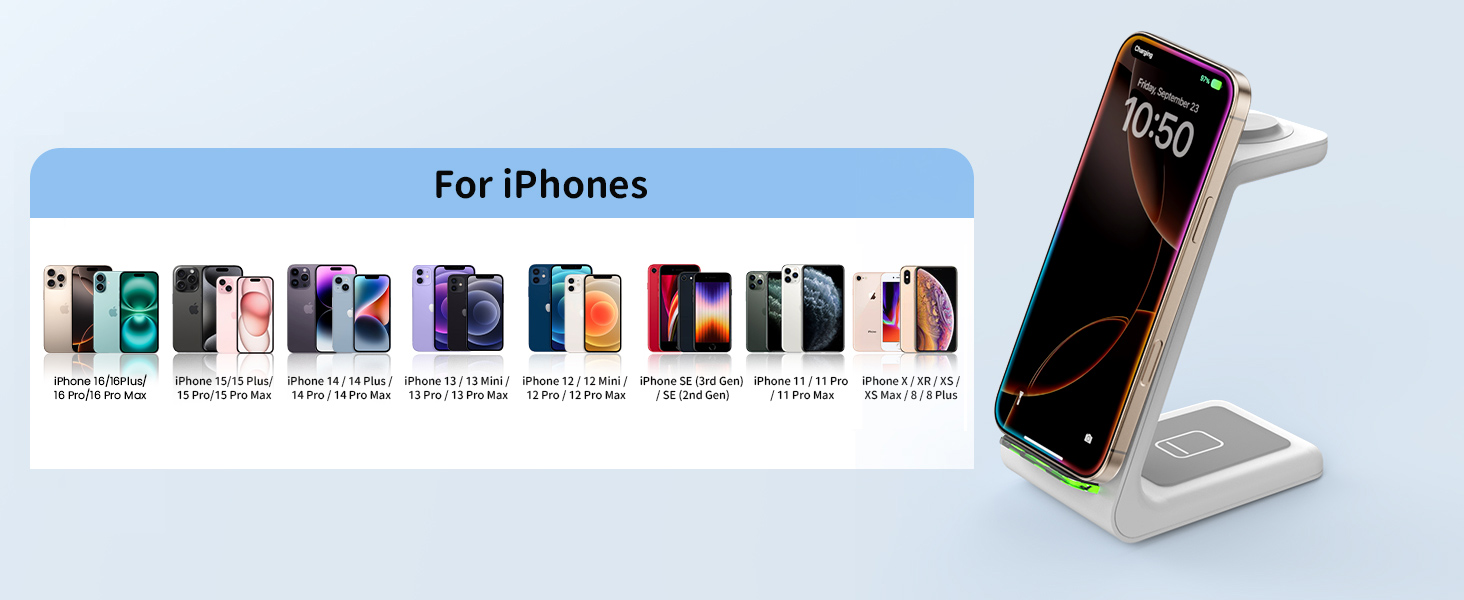
Image: A visual chart detailing the extensive compatibility of the charging station with various iPhone models.
നിങ്ങളുടെ ആപ്പിൾ വാച്ച് ചാർജ് ചെയ്യുന്നു:
Place your Apple Watch on the dedicated watch charging pad. Ensure the watch is properly aligned for charging to begin. The watch screen will indicate charging status.
ആപ്പിൾ വാച്ച് അനുയോജ്യത:
Compatible with Apple Watch 10/9/Ultra 2/8/7/6/5/4/3/2/SE 1/SE. Note: Not compatible with Samsung Watch.
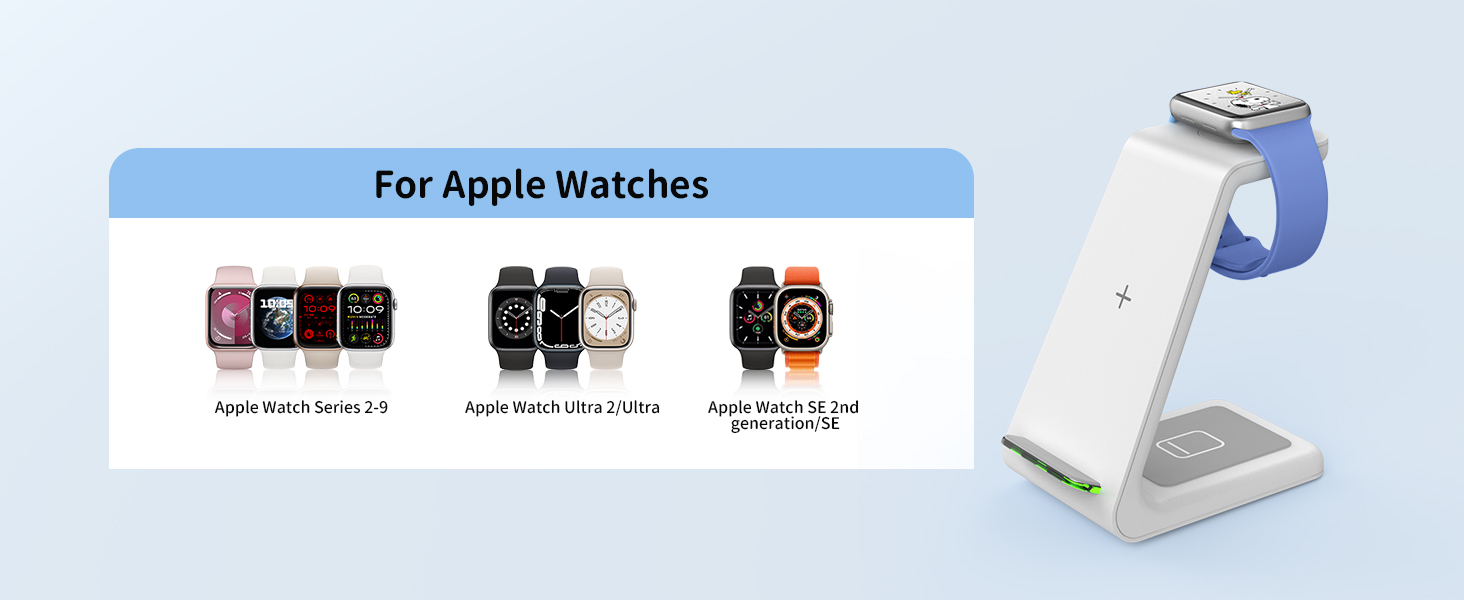
Image: A visual chart detailing the extensive compatibility of the charging station with various Apple Watch models.
നിങ്ങളുടെ എയർപോഡുകൾ ചാർജ് ചെയ്യുന്നു:
Place your AirPods (with wireless charging case) on the designated AirPods charging pad at the base of the station. The indicator light on your AirPods case will show charging status.
എയർപോഡുകൾ അനുയോജ്യത:
Compatible with AirPods 4/Pro 2/3 (MagSafe Version)/2 (Wireless Version).

Image: A visual chart detailing the extensive compatibility of the charging station with various AirPods models that support wireless charging.
Important Notes for Charging:
- Ensure your device is centered on the charging area for optimal performance.
- Remove any metal attachments, magnetic pads, credit cards, or pop-sockets from your phone case before charging, as these can interfere with wireless charging.
- The charging station is designed to work with phone cases up to 0.2 inches (5mm) thick. Thicker cases may need to be removed.

Image: A diagram illustrating the maximum case thickness for charging and examples of items like metal pads, metal cases, pop-sockets, and credit cards that should be removed before charging.
മെയിൻ്റനൻസ്
To ensure the longevity and optimal performance of your JoyGeek 3-in-1 Wireless Charging Station, follow these maintenance guidelines:
- വൃത്തിയാക്കൽ: Disconnect the power adapter before cleaning. Use a soft, dry cloth to wipe the surface of the charging station. Do not use abrasive cleaners, solvents, or harsh chemicals.
- സംഭരണം: ദീർഘനേരം ഉപയോഗിക്കാത്തപ്പോൾ, ചാർജിംഗ് സ്റ്റേഷൻ നേരിട്ട് സൂര്യപ്രകാശത്തിൽ നിന്നും കടുത്ത താപനിലയിൽ നിന്നും അകന്ന് തണുത്തതും വരണ്ടതുമായ സ്ഥലത്ത് സൂക്ഷിക്കുക.
- കൈകാര്യം ചെയ്യൽ: ഉപകരണം ശ്രദ്ധയോടെ കൈകാര്യം ചെയ്യുക. അത് താഴെയിടുകയോ ശക്തമായ ആഘാതങ്ങൾക്ക് വിധേയമാക്കുകയോ ചെയ്യരുത്.
ട്രബിൾഷൂട്ടിംഗ്
| പ്രശ്നം | സാധ്യമായ കാരണം | പരിഹാരം |
|---|---|---|
| ഉപകരണം ചാർജ് ചെയ്യുന്നില്ല. |
|
|
| സ്ലോ ചാർജിംഗ്. |
|
|
| Device or charger getting hot. |
|
|
| ഇൻഡിക്കേറ്റർ ലൈറ്റ് പ്രവർത്തിക്കുന്നില്ല. |
|
|
സ്പെസിഫിക്കേഷനുകൾ
| ഫീച്ചർ | വിശദാംശങ്ങൾ |
|---|---|
| മോഡൽ നമ്പർ | T3 |
| ബ്രാൻഡ് | ജോയ്ഗീക്ക് |
| കണക്റ്റിവിറ്റി ടെക്നോളജി | വയർലെസ് |
| കണക്റ്റർ തരം | യുഎസ്ബി ടൈപ്പ് സി |
| ഇൻപുട്ട് വോളിയംtage | 9 വോൾട്ട് |
| ഇനത്തിൻ്റെ ഭാരം | 0.64 ഔൺസ് |
| പാക്കേജ് അളവുകൾ | 5.51 x 4.84 x 3.07 ഇഞ്ച് |
| മാതൃരാജ്യം | ചൈന |
| പ്രത്യേക സവിശേഷതകൾ | Wireless charging station for Apple, clutter-free charging, charges cellphone, earbuds, and smartwatches all at once, allows for horizontal and vertical charging. |
വാറൻ്റിയും പിന്തുണയും
JoyGeek stands behind the quality of its products. Your JoyGeek 3-in-1 Wireless Charging Station comes with:
- 24-Month Replacement/Refund Service: വാങ്ങിയതിന് 24 മാസത്തിനുള്ളിൽ ഏതെങ്കിലും നിർമ്മാണ വൈകല്യങ്ങൾക്കോ പ്രകടന പ്രശ്നങ്ങൾക്കോ.
- ആജീവനാന്ത പിന്തുണ: Dedicated customer service and technical support for the lifespan of the product.
For customer service inquiries, technical support, or warranty claims, please contact JoyGeek directly through the retailer's platform or visit the official JoyGeek webബന്ധപ്പെടാനുള്ള വിവരങ്ങൾക്കുള്ള സൈറ്റ്.
We are committed to ensuring your satisfaction and providing a reliable charging experience.


