1. ആമുഖം
Thank you for choosing the Pure Elan Connect portable DAB+ radio. This manual provides comprehensive instructions for setting up, operating, and maintaining your device. The Elan Connect offers a versatile listening experience with DAB/DAB+ and FM radio, Bluetooth 5.0 connectivity, and a clear TFT colour display. Enjoy your music and radio stations wherever you go, powered by mains or batteries.
2 പ്രധാനപ്പെട്ട സുരക്ഷാ വിവരങ്ങൾ
- യൂണിറ്റ് തുള്ളിമരുന്നോ തെറിക്കുന്നതോ ആയ ദ്രാവകങ്ങളിലേക്ക് തുറന്നുകാട്ടരുത്.
- പാത്രങ്ങൾ പോലുള്ള ദ്രാവകങ്ങൾ നിറച്ച വസ്തുക്കൾ ഉപകരണത്തിൽ വയ്ക്കരുത്.
- ശരിയായ വായുസഞ്ചാരം ഉറപ്പാക്കുക. വായുസഞ്ചാര ദ്വാരങ്ങളൊന്നും തടയരുത്.
- Use only the power supply specified in this manual or on the product label.
- When using batteries, ensure they are inserted with correct polarity. Remove batteries if the unit will not be used for a long period.
- തീവ്രമായ താപനില ഒഴിവാക്കുക.
- യൂണിറ്റ് ഡിസ്അസംബ്ലിംഗ് ചെയ്യാനോ പരിഷ്ക്കരിക്കാനോ ശ്രമിക്കരുത്. എല്ലാ സേവനങ്ങളും യോഗ്യതയുള്ള ഉദ്യോഗസ്ഥർക്ക് റഫർ ചെയ്യുക.
3. പാക്കേജ് ഉള്ളടക്കം
താഴെ പറയുന്ന ഇനങ്ങൾക്കായി ബോക്സ് ചെക്ക് ചെയ്യുക:
- Pure Elan Connect Portable DAB+ Radio
- USB Power Cable (Note: Power adapter not included, requires 5V 1-2A USB power adapter)
- ഉടമയുടെ മാനുവൽ (ഈ പ്രമാണം)
4. ഉൽപ്പന്നം കഴിഞ്ഞുview
Familiarize yourself with the main components and controls of your Pure Elan Connect radio.

ചിത്രം 4.1: മുൻഭാഗം View of Pure Elan Connect
This image displays the front of the Pure Elan Connect radio. On the left is the speaker grille. To the right, a TFT colour display is visible, surrounded by various control buttons and a central rotary dial for navigation and selection.

ചിത്രം 4.2: പിൻഭാഗം View of Pure Elan Connect
പിൻഭാഗം view of the radio shows the telescopic antenna, which can be extended for better signal reception. Below it, a battery compartment cover is visible. To the left of the battery compartment, there is a USB power input port and a 3.5mm AUX jack for headphones or external audio input.
നിയന്ത്രണങ്ങളും പ്രദർശനവും:
- TFT Colour Display: Shows station information, menus, and settings.
- റോട്ടറി ഡയൽ: Used for navigating menus, adjusting volume, and selecting options. Press to confirm.
- പ്രീസെറ്റ് ബട്ടണുകൾ (1, 2, 3+): Quickly access your favourite stations.
- പവർ ബട്ടൺ: റേഡിയോ ഓൺ/ഓഫ് ചെയ്യുന്നു അല്ലെങ്കിൽ സ്റ്റാൻഡ്ബൈയിൽ ഇടുന്നു.
- മെനു ബട്ടൺ: പ്രധാന മെനുവിൽ പ്രവേശിക്കുന്നു.
- ബാക്ക് ബട്ടൺ: മുമ്പത്തെ സ്ക്രീനിലേക്കോ മെനുവിലേക്കോ മടങ്ങുന്നു.
- ഉറവിട ബട്ടൺ: Switches between DAB, FM, Bluetooth, and Internet Radio modes.
- വിവര ബട്ടൺ: Displays additional information about the current station or track.
5. സജ്ജീകരണം
5.1 Powering Your Radio
The Pure Elan Connect can be powered by mains electricity or 4x AA batteries (not included).
പ്രധാന ശക്തി:
- Connect the supplied USB power cable to the USB input port on the back of the radio.
- Plug the other end of the USB cable into a compatible USB power adapter (5V, 1-2A, not supplied) and then into a wall socket.
- The radio will power on or enter standby mode.
ബാറ്ററി പവർ:
- റേഡിയോയുടെ പിൻഭാഗത്തുള്ള ബാറ്ററി കമ്പാർട്ട്മെന്റ് കവർ തുറക്കുക.
- കമ്പാർട്ടുമെന്റിനുള്ളിൽ സൂചിപ്പിച്ചിരിക്കുന്നതുപോലെ ശരിയായ പോളാരിറ്റി (+/-) ഉറപ്പാക്കിക്കൊണ്ട് 4x AA ബാറ്ററികൾ ഇടുക.
- ബാറ്ററി കമ്പാർട്ട്മെൻ്റ് കവർ സുരക്ഷിതമായി അടയ്ക്കുക.
കുറിപ്പ്: For optimal battery life, it is recommended to remove batteries when the radio is primarily used with mains power, especially if using rechargeable batteries, to prevent potential drainage when in standby.
5.2 ആന്റിന സജ്ജീകരണം
For optimal DAB/DAB+ and FM reception, extend the telescopic antenna located on the back of the radio. Adjust its position for the best signal quality.
5.3 പ്രാരംഭ സജ്ജീകരണ വിസാർഡ്
The first time you power on your Elan Connect, or after a factory reset, a setup wizard will guide you through initial configurations.
- ഭാഷ തിരഞ്ഞെടുക്കൽ: Use the rotary dial to select your preferred language and press to confirm.
- സ്വകാര്യതാ നയം: Review the privacy policy information. Press the rotary dial to continue.
- Network Configuration (for Internet Radio):
- ലഭ്യമായ Wi-Fi നെറ്റ്വർക്കുകൾക്കായി റേഡിയോ സ്കാൻ ചെയ്യും.
- ലിസ്റ്റിൽ നിന്ന് നിങ്ങളുടെ നെറ്റ്വർക്ക് തിരഞ്ഞെടുക്കുക.
- Enter your Wi-Fi password using the rotary dial to select characters and press to confirm each character.
- Once connected, the radio will confirm the network status.
- സമയവും തീയതിയും: The radio can automatically set the time and date via DAB or Internet connection. Confirm your time zone.
Video 5.1: Product Demonstration Video
This video provides a visual guide to the initial setup and key features of the Pure Elan Connect radio, including connecting power, extending the antenna, and navigating the setup wizard. It demonstrates the physical aspects and basic functionality of the device.
6. പ്രവർത്തന നിർദ്ദേശങ്ങൾ
6.1 സ്വിച്ച് ഓൺ/ഓഫ്
അമർത്തുക ശക്തി button to turn the radio on or off (standby mode).
6.2 ഒരു ഉറവിടം തിരഞ്ഞെടുക്കുന്നു
അമർത്തുക ഉറവിടം button repeatedly to cycle through available modes: DAB Radio, FM Radio, Internet Radio, and Bluetooth.
6.3 DAB/DAB+ റേഡിയോ
- Select "DAB Radio" using the ഉറവിടം ബട്ടൺ.
- The radio will perform a full scan for available DAB stations. This may take a few moments.
- Use the rotary dial to browse the list of stations. Press the dial to select a station.
- To perform a full scan manually, go to മെനു> സ്കാൻ ചെയ്യുക.
6.4 എഫ്എം റേഡിയോ
- Select "FM Radio" using the ഉറവിടം ബട്ടൺ.
- Use the rotary dial to tune to a frequency.
- To auto-scan for the next available station, press and hold the rotary dial.
6.5 ഇൻ്റർനെറ്റ് റേഡിയോ
Access thousands of internet radio stations from around the world.
- Select "Internet Radio" using the ഉറവിടം ബട്ടൺ.
- Navigate through categories such as "Local Stations", "Stations", "Podcasts", or "Search".
- Use the rotary dial to select and confirm your choice.
6.6 ബ്ലൂടൂത്ത് കണക്റ്റിവിറ്റി
Connect your smartphone or other Bluetooth-enabled device to stream audio wirelessly.
- Select "Bluetooth" using the ഉറവിടം ബട്ടൺ. റേഡിയോ ജോടിയാക്കൽ മോഡിലേക്ക് പ്രവേശിക്കും.
- On your Bluetooth device, search for "Pure Elan Connect" in the Bluetooth settings.
- Select the radio to pair. Once connected, you can stream audio from your device.
6.7 പ്രീസെറ്റുകൾ
Store and recall your favourite stations quickly.
ഒരു പ്രീസെറ്റ് സംരക്ഷിക്കുന്നു:
- ആവശ്യമുള്ള സ്റ്റേഷനിലേക്ക് ട്യൂൺ ചെയ്യുക.
- Press and hold one of the preset buttons (1, 2, or 3+) until "Preset Saved" appears on the display.
- For presets 4-20, press and hold the "3+" button, then use the rotary dial to select a memory slot and press to confirm.
ഒരു പ്രീസെറ്റ് ഓർമ്മിപ്പിക്കുന്നു:
- Press the desired preset button (1, 2, or 3+) briefly to recall the stored station.
- For presets 4-20, briefly press the "3+" button, then use the rotary dial to select the desired preset and press to confirm.
6.8 Audio Settings (Equalizer)
സൗണ്ട് പ്രോ ക്രമീകരിക്കുകfile നിങ്ങളുടെ അഭിരുചിക്കനുസരിച്ച്.
- അമർത്തുക മെനു ബട്ടൺ.
- നാവിഗേറ്റ് ചെയ്യുക ഓഡിയോ ക്രമീകരണങ്ങൾ or ഇക്വലൈസർ.
- Choose from preset equalizer modes (e.g., Normal, Flat, Jazz, Rock, Classical, Pop, News) or select "My EQ" to customize bass and treble levels.
7. പരിപാലനവും പരിചരണവും
- വൃത്തിയാക്കൽ: മൃദുവായതും ഉണങ്ങിയതുമായ തുണി ഉപയോഗിച്ച് റേഡിയോ തുടയ്ക്കുക. അബ്രാസീവ് ക്ലീനറുകളോ ലായകങ്ങളോ ഉപയോഗിക്കരുത്.
- സംഭരണം: If storing for an extended period, remove batteries and store in a cool, dry place.
- ആൻ്റിന: Handle the telescopic antenna carefully to avoid bending or breaking.
8. പ്രശ്നപരിഹാരം
| പ്രശ്നം | സാധ്യമായ കാരണം | പരിഹാരം |
|---|---|---|
| വൈദ്യുതിയില്ല / റേഡിയോ ഓണാകില്ല. |
|
|
| മോശം DAB/FM റിസപ്ഷൻ. |
|
|
| Cannot connect to Wi-Fi / Internet Radio not working. |
|
|
| ബ്ലൂടൂത്ത് ജോടിയാക്കൽ പ്രശ്നങ്ങൾ. |
|
|
9 സ്പെസിഫിക്കേഷനുകൾ
| ഫീച്ചർ | വിശദാംശങ്ങൾ |
|---|---|
| മോഡൽ നമ്പർ | 248481 |
| അളവുകൾ (L x W x H) | 8.3 x 3.5 x 4.7 സെ.മീ |
| ഭാരം | 460 ഗ്രാം |
| ട്യൂണർ ടെക്നോളജി | DAB+, FM |
| കണക്റ്റിവിറ്റി | Bluetooth 5.0, Wi-Fi (for Internet Radio) |
| പ്രദർശിപ്പിക്കുക | TFT Colour Display |
| ഓഡിയോ ഔട്ട്പുട്ട് | 3.5mm AUX Jack (Headphone) |
| പവർ ഉറവിടം | Mains (via USB 5V 1-2A adapter, not included), 4x AA Batteries (not included) |
| സ്റ്റേഷൻ മെമ്മറി | 20 പ്രീസെറ്റുകൾ |
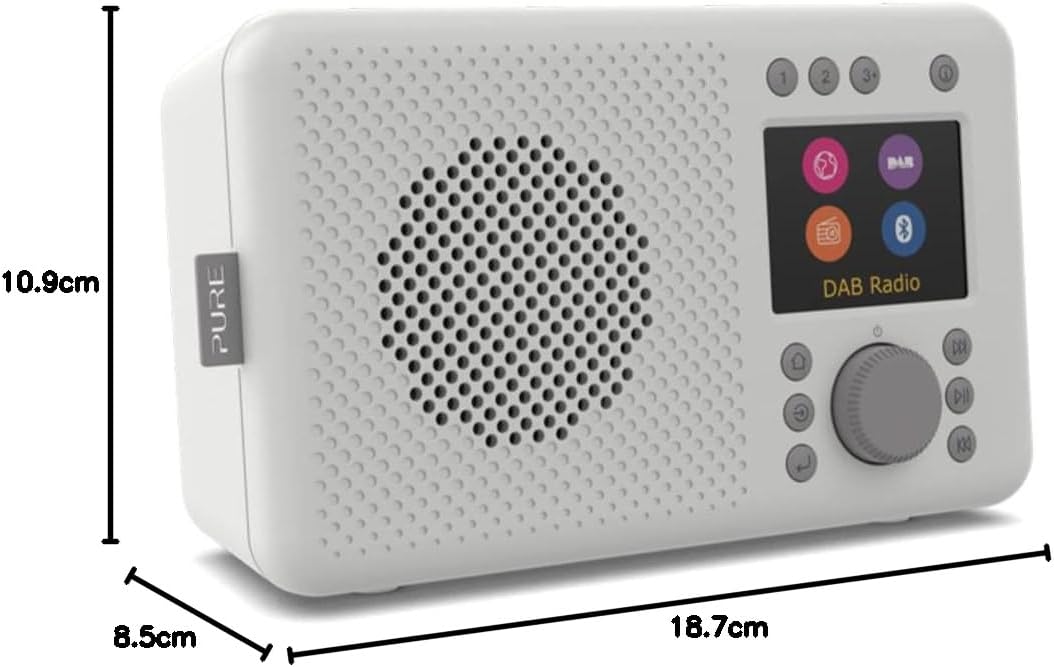
Figure 9.1: Pure Elan Connect Dimensions
This image illustrates the physical dimensions of the Pure Elan Connect radio, indicating a height of 10.9 cm, a depth of 8.5 cm, and a length of 18.7 cm.
10. വാറൻ്റിയും പിന്തുണയും
Your Pure Elan Connect radio comes with a standard manufacturer's warranty. Please refer to the warranty card included in your package for specific terms and conditions.
For technical support, troubleshooting assistance, or warranty claims, please visit the official Pure support website or contact their customer service directly. Contact details can typically be found on the Pure webസൈറ്റ് അല്ലെങ്കിൽ ഉൽപ്പന്ന പാക്കേജിംഗിൽ.
ഓൺലൈൻ ഉറവിടങ്ങൾ: For the latest information, FAQs, and software updates, please visit the Pure official webസൈറ്റ്: www.pure.com


