1. ആമുഖം
The Pure Elan Connect is a versatile portable radio offering a wide range of listening options including DAB+, FM, and Internet Radio. It features Bluetooth 5.0 connectivity for streaming audio from external devices, a clear TFT color display, and can be powered by mains or batteries for portability. This manual provides detailed instructions for setting up, operating, and maintaining your Elan Connect radio.
2 സുരക്ഷാ വിവരങ്ങൾ
- തീയോ വൈദ്യുതാഘാതമോ തടയാൻ യൂണിറ്റ് മഴയിലോ ഈർപ്പത്തിലോ തുറന്നുകാട്ടരുത്.
- ശരിയായ വായുസഞ്ചാരം ഉറപ്പാക്കുക. വായുസഞ്ചാര ദ്വാരങ്ങൾ തടയരുത്.
- Use only power adapters specified by the manufacturer. The unit does not include a power adapter; use a standard USB charger (5V, 0.5A to 2A output).
- യൂണിറ്റ് ഡിസ്അസംബ്ലിംഗ് ചെയ്യാനോ പരിഷ്ക്കരിക്കാനോ ശ്രമിക്കരുത്. എല്ലാ സേവനങ്ങളും യോഗ്യതയുള്ള ഉദ്യോഗസ്ഥർക്ക് റഫർ ചെയ്യുക.
- നേരിട്ടുള്ള സൂര്യപ്രകാശം, താപ സ്രോതസ്സുകൾ, ശക്തമായ കാന്തികക്ഷേത്രങ്ങൾ എന്നിവയിൽ നിന്ന് അകന്നുനിൽക്കുക.
- When using batteries, ensure they are inserted with correct polarity. Remove batteries if the unit will not be used for a long period.
- പ്രാദേശിക നിയന്ത്രണങ്ങൾ അനുസരിച്ച് ബാറ്ററികൾ ഉത്തരവാദിത്തത്തോടെ സംസ്കരിക്കുക.
3. പാക്കേജ് ഉള്ളടക്കം
എല്ലാ ഇനങ്ങളും നിലവിലുണ്ടോ എന്ന് ദയവായി പരിശോധിക്കുക:
- Pure Elan Connect Radio
- USB Charging Cable (Power adapter not included)
- ഉപയോക്തൃ മാനുവൽ (ഈ പ്രമാണം)
4. ഉൽപ്പന്നം കഴിഞ്ഞുview
Familiarize yourself with the main components of your Pure Elan Connect radio.
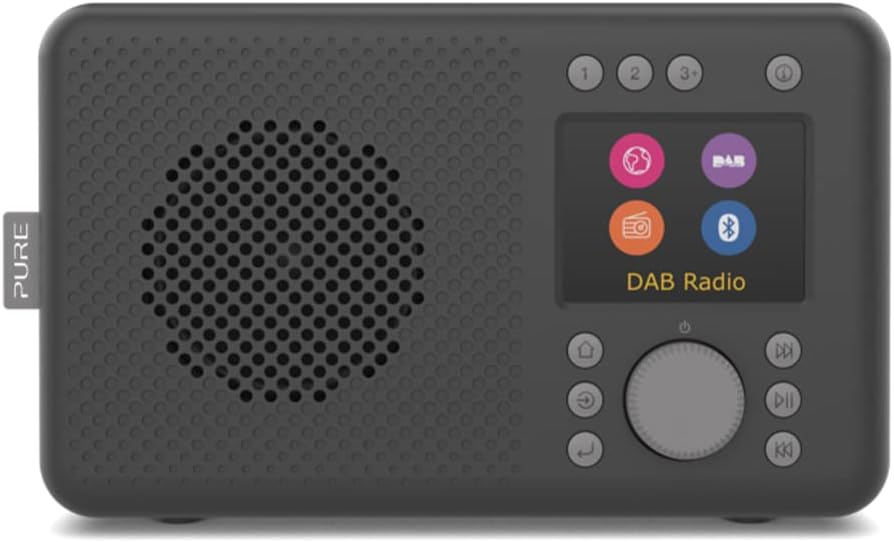
ചിത്രം 4.1: ഫ്രണ്ട് view of the Pure Elan Connect radio in Charcoal Black. It features a speaker grille on the left, a color TFT display on the right, and control buttons and a rotary dial below the display.

ചിത്രം 4.2: പിൻഭാഗം view of the Pure Elan Connect radio. It shows the extendable telescopic antenna, a battery compartment cover, a 3.5mm headphone jack, and a micro USB power input port.

ചിത്രം 4.3: Dimensions of the Pure Elan Connect radio. The radio measures approximately 21.2 cm in length, 8.9 cm in width, and 12 cm in height.
5. സജ്ജീകരണം
5.1 പവർ ചെയ്യുന്നു
The Elan Connect can be powered using the supplied USB cable connected to a USB power adapter (not included) or by inserting 4 AA batteries (not included) into the battery compartment on the rear of the unit.
- പ്രധാന ശക്തി: Connect the micro USB end of the cable to the 'Input 5V 2.0A' port on the back of the radio and the other end to a suitable USB power adapter. Plug the adapter into a wall socket.
- ബാറ്ററി പവർ: Open the battery compartment cover on the rear. Insert 4 AA batteries, ensuring correct polarity. Close the cover securely.
5.2 പ്രാരംഭ സജ്ജീകരണ വിസാർഡ്
The first time you power on the radio, it will guide you through an initial setup wizard.
- ഭാഷ തിരഞ്ഞെടുക്കൽ: Use the rotary dial to scroll through the available languages and press the dial to confirm your selection.
- Network Setup (for Internet Radio): ഒരു Wi-Fi നെറ്റ്വർക്കിലേക്ക് കണക്റ്റുചെയ്യാൻ റേഡിയോ നിങ്ങളെ പ്രേരിപ്പിക്കും.
- Select 'Scan' to find available networks.
- ലിസ്റ്റിൽ നിന്ന് നിങ്ങളുടെ Wi-Fi നെറ്റ്വർക്ക് തിരഞ്ഞെടുക്കുക.
- Enter the Wi-Fi password using the rotary dial to navigate characters and press to select.
- Once connected, the radio will confirm the connection.
- സമയവും തീയതിയും: The radio can automatically set the time and date via DAB or Internet connection. You can also set it manually.
6. പ്രവർത്തന നിർദ്ദേശങ്ങൾ
വീഡിയോ 6.1: This video demonstrates the physical overview of the Pure Elan Connect radio, including its compact size, the extendable antenna, and the basic interaction with the rotary dial and display for selecting modes and adjusting volume.
6.1 മോഡുകൾക്കിടയിൽ മാറൽ
The Elan Connect supports multiple listening modes: Internet Radio, DAB+, FM, and Bluetooth. Press the 'Mode' button (usually labeled with a house icon or 'Menu') to cycle through the available modes or access the main menu to select your desired source.
6.2 ഇൻ്റർനെറ്റ് റേഡിയോ
Access thousands of internet radio stations from around the world.
- Select 'Internet Radio' from the mode menu.
- You can browse stations by location, genre, or search for specific stations.
- Use the rotary dial to navigate and select stations.
- To save a station as a preset, press and hold one of the preset buttons (1, 2, 3+) until the display confirms the save.
6.3 DAB+ റേഡിയോ
ഉയർന്ന നിലവാരമുള്ള ഡിജിറ്റൽ റേഡിയോ പ്രക്ഷേപണങ്ങൾ ആസ്വദിക്കൂ.
- ഒപ്റ്റിമൽ റിസപ്ഷനായി ടെലിസ്കോപ്പിക് ആന്റിന പൂർണ്ണമായും നീട്ടുക.
- Select 'DAB+' from the mode menu.
- ലഭ്യമായ DAB+ സ്റ്റേഷനുകൾക്കായി റേഡിയോ യാന്ത്രികമായി സ്കാൻ ചെയ്യും.
- Use the rotary dial to browse and select stations.
- Save stations to presets as described for Internet Radio.
6.4 എഫ്എം റേഡിയോ
Tune into traditional FM broadcasts.
- ടെലിസ്കോപ്പിക് ആന്റിന പൂർണ്ണമായും നീട്ടുക.
- Select 'FM' from the mode menu.
- Use the rotary dial to manually tune or press the 'Scan' button to auto-scan for stations.
- Save stations to presets as described previously.
6.5 ബ്ലൂടൂത്ത് കണക്റ്റിവിറ്റി
Stream audio wirelessly from your smartphone, tablet, or other Bluetooth-enabled device.
- Select 'Bluetooth' from the mode menu. The radio will enter pairing mode and become discoverable.
- On your external device, enable Bluetooth and search for 'Pure Elan Connect'.
- Select the radio from the list to pair. Once paired, you can play audio through the radio's speaker.
6.6 പ്രീസെറ്റുകൾ ഉപയോഗിക്കുന്നു
The Elan Connect allows you to save up to 20 presets for each source (DAB+, FM, Internet Radio).
- ഒരു പ്രീസെറ്റ് സംരക്ഷിക്കുന്നു: While listening to a station, press and hold one of the numbered preset buttons (1, 2, or 3+). If you press 3+, the display will show a list of available preset slots (3-20). Use the rotary dial to select a slot and press to confirm.
- ഒരു പ്രീസെറ്റ് ഓർമ്മിപ്പിക്കുന്നു: Briefly press the corresponding numbered preset button (1, 2, or 3+). If you press 3+, use the rotary dial to select the desired preset from the list and press to confirm.
6.7 Display and Volume Control
- വോളിയം: Rotate the main dial to adjust the volume level.
- പ്രദർശന തെളിച്ചം: Navigate to 'System Settings' > 'Display' to adjust the brightness level of the TFT color display.
7. പരിപാലനം
- വൃത്തിയാക്കൽ: റേഡിയോയുടെ ഉപരിതലം വൃത്തിയാക്കാൻ മൃദുവായതും ഉണങ്ങിയതുമായ തുണി ഉപയോഗിക്കുക. അബ്രാസീവ് ക്ലീനറുകളോ ലായകങ്ങളോ ഉപയോഗിക്കരുത്.
- ആൻ്റിന: ടെലിസ്കോപ്പിക് ആന്റിന വളയുകയോ പൊട്ടുകയോ ചെയ്യാതിരിക്കാൻ ശ്രദ്ധയോടെ കൈകാര്യം ചെയ്യുക.
- സോഫ്റ്റ്വെയർ അപ്ഡേറ്റുകൾ: The radio supports over-the-air software updates. Check for updates periodically via 'System Settings' > 'Software Update' to ensure optimal performance and access to new features.
8. പ്രശ്നപരിഹാരം
| പ്രശ്നം | സാധ്യമായ കാരണം / പരിഹാരം |
|---|---|
| ഒരു പവറും / യൂണിറ്റും ഓണാകുന്നില്ല. |
|
| ശബ്ദമില്ല. |
|
| Poor DAB+/FM reception. |
|
| Cannot connect to Wi-Fi / Internet Radio not working. |
|
| ബ്ലൂടൂത്ത് ജോടിയാക്കൽ പ്രശ്നങ്ങൾ. |
|
9 സ്പെസിഫിക്കേഷനുകൾ
| ഫീച്ചർ | സ്പെസിഫിക്കേഷൻ |
|---|---|
| മോഡൽ നമ്പർ | 248482 |
| അളവുകൾ (L x W x H) | 21.2 x 8.9 x 12 സെ.മീ |
| ഭാരം | 460 ഗ്രാം |
| Radio Tuners | DAB+, FM, ഇന്റർനെറ്റ് റേഡിയോ |
| ബ്ലൂടൂത്ത് പതിപ്പ് | 5.0 |
| പ്രദർശിപ്പിക്കുക | 2.4-inch TFT Color Display |
| പ്രീസെറ്റുകൾ | 20 per source (DAB+, FM, Internet Radio) |
| ഓഡിയോ ഔട്ട്പുട്ട് | Integrated Speaker, 3.5mm Headphone Jack |
| പവർ ഉറവിടം | Micro USB (5V, 0.5A-2A), 4x AA Batteries |
10. വാറൻ്റിയും പിന്തുണയും
Pure products are designed and manufactured to the highest standards. For warranty information and technical support, please refer to the official Pure webസൈറ്റ് ചെയ്യുക അല്ലെങ്കിൽ നിങ്ങളുടെ പ്രാദേശിക റീട്ടെയിലറെ ബന്ധപ്പെടുക.
Official Pure Webസൈറ്റ്: www.pure.com
വാറൻ്റി ക്ലെയിമുകൾക്കായി നിങ്ങളുടെ വാങ്ങിയതിൻ്റെ തെളിവ് സൂക്ഷിക്കുക.


