1. ഉൽപ്പന്നം കഴിഞ്ഞുview
The Alpine Halo9 iLX-F409 is a state-of-the-art digital multimedia receiver featuring a large 9-inch capacitive touchscreen. Designed to fit into single-DIN dash openings, its adjustable vertical mounting positions and viewing angles ensure optimal visibility and integration into various vehicle interiors. This receiver enhances your driving experience with advanced connectivity and audio capabilities.
പ്രധാന സവിശേഷതകൾ:
- 9 ഇഞ്ച് കപ്പാസിറ്റീവ് ടച്ച്സ്ക്രീൻ: Offers intuitive control and clear display with adjustable positioning.
- Digital Multimedia Receiver: Includes an AM/FM tuner (does not play CDs).
- ബ്ലൂടൂത്ത് കണക്റ്റിവിറ്റി: Enables hands-free calling and audio streaming.
- സ്മാർട്ട്ഫോൺ സംയോജനം: Compatible with Apple CarPlay and Android Auto for seamless access to navigation, music, and communication.
- ഓഡിയോ ഇഷ്ടാനുസൃതമാക്കൽ: Features a 5-band graphic equalizer with time correction, high- and low-pass filters, and MediaXpander HD.
- വിപുലീകരണക്ഷമത: Works with SiriusXM SXV300 tuner (sold separately) and supports optional 2-camera switcher.
- വീഡിയോ പ്ലേബാക്ക്: Plays MP3, WMA, AAC, FLAC music files, and AVI, MPEG4 video files.
2. സജ്ജീകരണവും ഇൻസ്റ്റാളേഷനും
മികച്ച പ്രകടനത്തിന് ശരിയായ ഇൻസ്റ്റാളേഷൻ നിർണായകമാണ്. യോഗ്യതയുള്ള ഒരു പ്രൊഫഷണലാണ് ഇൻസ്റ്റാളേഷൻ നടത്തേണ്ടതെന്ന് ശുപാർശ ചെയ്യുന്നു. ഇൻസ്റ്റാളേഷൻ ആരംഭിക്കുന്നതിന് മുമ്പ് വാഹനത്തിന്റെ പവർ വിച്ഛേദിച്ചിട്ടുണ്ടെന്ന് ഉറപ്പാക്കുക.
ഇൻസ്റ്റലേഷൻ ഘട്ടങ്ങൾ (പൊതുവായത്):
- മൗണ്ടിംഗ്: Secure the main unit into the single-DIN dash opening. Adjust the 9-inch touchscreen to the desired vertical position and viewing ആംഗിൾ.
- വയറിംഗ്: Connect the power, ground, and speaker wires according to the vehicle's wiring diagram and the receiver's harness.
- ആന്റിന കണക്ഷൻ: AM/FM ആന്റിന ബന്ധിപ്പിക്കുക.
- Parking Brake Connection: A wired connection to the parking brake is required to access certain settings and video display features for safety. The parking brake must be connected, set, released, and set again to enable these functions.
- USB and HDMI: Connect the rear USB port and HDMI input as needed for external devices.
- ക്യാമറ ഇൻപുട്ടുകൾ: If using a rear-view camera or an optional 2-camera switcher, connect them to the designated camera harness outputs.
- സ്റ്റിയറിംഗ് വീൽ നിയന്ത്രണങ്ങൾ: If your vehicle has factory steering wheel audio controls, an adapter (sold separately) is required for compatibility.
Refer to the detailed wiring diagram included in the product packaging for specific connections.
3. പ്രവർത്തന നിർദ്ദേശങ്ങൾ
പവർ ഓൺ/ഓഫ്:
The unit powers on automatically with the vehicle's ignition. There is no dedicated power button on the unit itself. To turn off the display, use the "Display Off" option in the main menu.
ടച്ച്സ്ക്രീൻ നാവിഗേഷൻ:
The 9-inch capacitive touchscreen allows for intuitive control. Swipe left or right to navigate between screens, tap icons to select functions, and use pinch-to-zoom gestures where applicable (e.g., navigation maps).
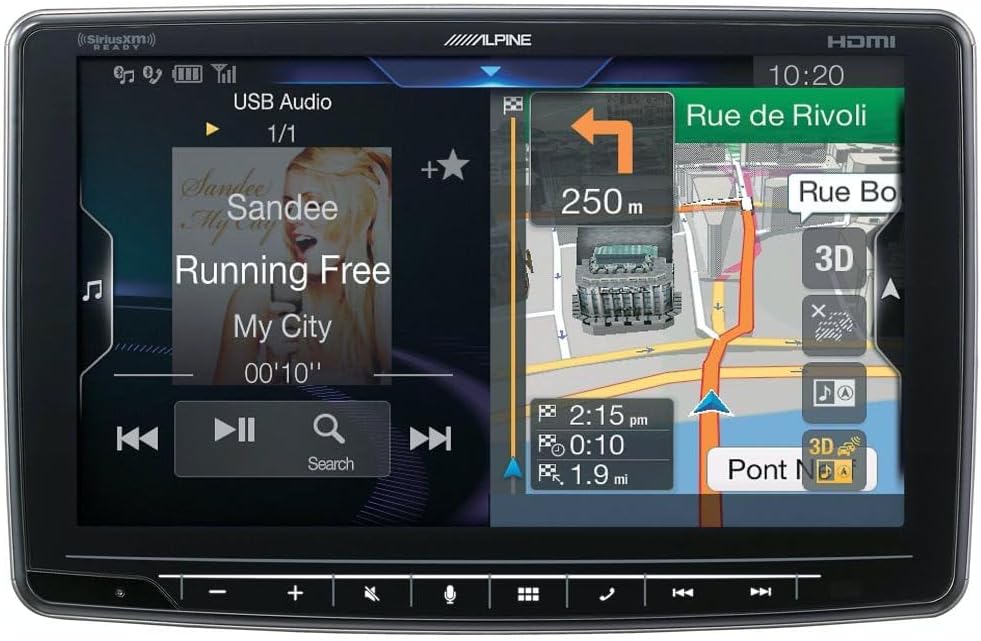
Image: Main menu of the Alpine Halo9 iLX-F409, displaying icons for various audio sources and connectivity options.
റേഡിയോ (AM/FM):
- Tap the "Radio" icon on the main menu.
- Use the on-screen controls to tune to desired stations, scan, or save presets.
ബ്ലൂടൂത്ത് ഓഡിയോയും കോളിംഗും:
- ജോടിയാക്കൽ: Go to "Setup" > "Bluetooth" on the receiver and enable Bluetooth on your smartphone. Select the receiver from your phone's Bluetooth device list to pair.
- ഓഡിയോ സ്ട്രീമിംഗ്: Once paired, select "Bluetooth Audio" from the main menu to stream music from your device.
- ഹാൻഡ്സ് ഫ്രീ കോളിംഗ്: Use the "Phone" icon to access contacts, make calls, and manage incoming calls directly from the touchscreen.
ആപ്പിൾ കാർപ്ലേ / ആൻഡ്രോയിഡ് ഓട്ടോ:
Connect your compatible iPhone or Android smartphone via the USB port. The system will automatically launch Apple CarPlay or Android Auto, mirroring your phone's interface for safe access to navigation, music, messages, and more.

Image: Apple CarPlay interface on the Alpine Halo9 iLX-F409, showing various app icons for navigation, music, and communication.
ഓഡിയോ ക്രമീകരണങ്ങൾ:
Access the "Setup" menu to fine-tune audio settings. The 5-band graphic equalizer allows you to adjust frequency levels for optimal sound. Time correction features can be used to optimize sound staging within the vehicle.
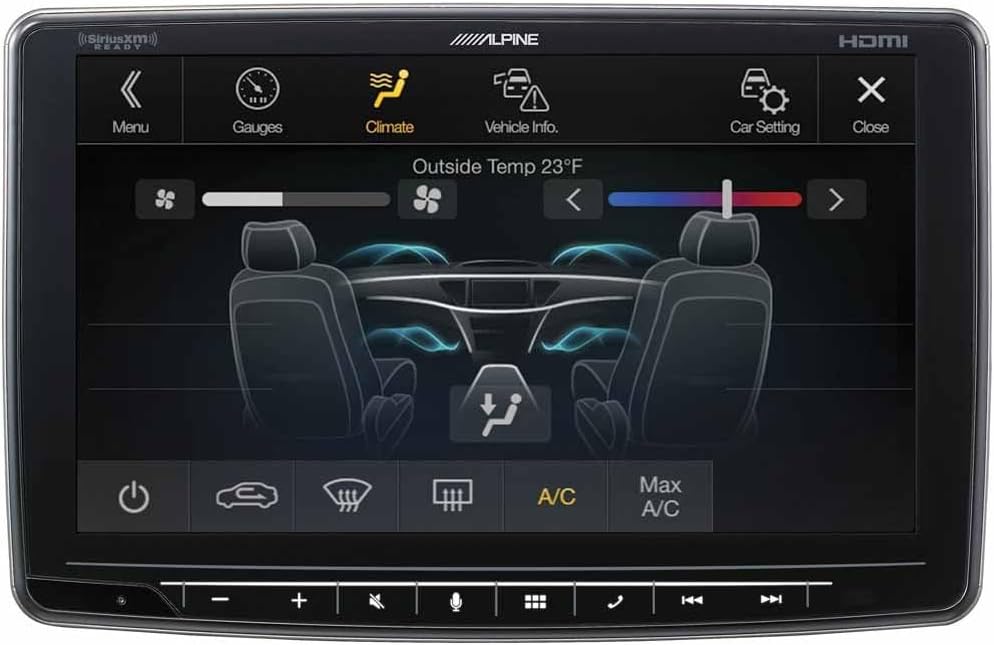
Image: Graphic Equalizer screen on the Alpine Halo9 iLX-F409, showing sliders for adjusting audio frequencies.
പുറകിലുള്ള-View ക്യാമറ:
When the vehicle is shifted into reverse, the display automatically switches to the rear-view ക്യാമറ ഫീഡ്, വ്യക്തമായ view of the area behind your vehicle for safer maneuvering.
4. പരിപാലനം
- സ്ക്രീൻ ക്ലീനിംഗ്: ടച്ച്സ്ക്രീൻ മൃദുവായി തുടയ്ക്കാൻ മൃദുവായ, ലിന്റ് രഹിത തുണി ഉപയോഗിക്കുക. കഠിനമായ പാടുകൾക്ക്, ചെറുതായി dampതുണിയിൽ വെള്ളം അല്ലെങ്കിൽ സ്ക്രീൻ-സേഫ് ക്ലീനർ ഉപയോഗിക്കുക. കഠിനമായ രാസവസ്തുക്കളോ ഉരച്ചിലുകളോ ഉള്ള വസ്തുക്കൾ ഒഴിവാക്കുക.
- സോഫ്റ്റ്വെയർ അപ്ഡേറ്റുകൾ: Periodically check the Alpine support webഒപ്റ്റിമൽ പ്രകടനവും പുതിയ സവിശേഷതകളിലേക്കുള്ള ആക്സസും ഉറപ്പാക്കാൻ ഫേംവെയർ അപ്ഡേറ്റുകൾക്കായി സൈറ്റ്. അപ്ഡേറ്റിനൊപ്പം നൽകിയിരിക്കുന്ന നിർദ്ദേശങ്ങൾ ശ്രദ്ധാപൂർവ്വം പാലിക്കുക.
- പൊതു പരിചരണം: യൂണിറ്റ് പൊടിയിൽ നിന്നും അവശിഷ്ടങ്ങളിൽ നിന്നും മുക്തമായി സൂക്ഷിക്കുക. തീവ്രമായ താപനിലയിലോ നേരിട്ടുള്ള സൂര്യപ്രകാശത്തിലോ ദീർഘനേരം തുറന്നുകാട്ടുന്നത് ഒഴിവാക്കുക.
5. പ്രശ്നപരിഹാരം
| പ്രശ്നം | സാധ്യമായ കാരണം | പരിഹാരം |
|---|---|---|
| പവർ ഇല്ല | അയഞ്ഞ വൈദ്യുതി കണക്ഷൻ, ഫ്യൂസ് പൊട്ടി. | Check power wiring and vehicle fuses. Ensure proper connection. |
| ഓഡിയോ ഇല്ല | Volume too low, incorrect source selected, loose speaker wires. | ശബ്ദം കൂട്ടുക, ശരിയായ ഓഡിയോ ഉറവിടം തിരഞ്ഞെടുക്കുക, സ്പീക്കർ കണക്ഷനുകൾ പരിശോധിക്കുക. |
| ആപ്പിൾ കാർപ്ലേ/ആൻഡ്രോയിഡ് ഓട്ടോ കണക്റ്റ് ചെയ്യുന്നില്ല | യുഎസ്ബി കേബിൾ തകരാറാണ്, ഫോൺ അനുയോജ്യമല്ല, സോഫ്റ്റ്വെയർ തകരാർ. | Try a different USB cable, ensure phone is compatible and updated, restart phone and receiver. |
| Video Playback Disabled | Parking brake not engaged or incorrectly wired. | Ensure parking brake is properly connected and engaged as per safety requirements. |
If problems persist, consult a qualified car audio technician or Alpine customer support.
6 സ്പെസിഫിക്കേഷനുകൾ
- മോഡൽ നമ്പർ: iLX-F409
- സ്ക്രീൻ വലിപ്പം: 9 ഇഞ്ച്
- സ്ക്രീൻ തരം: കപ്പാസിറ്റീവ് ടച്ച്സ്ക്രീൻ
- Dash Opening Compatibility: സിംഗിൾ-ഡിഐഎൻ
- ട്യൂണർ: AM/FM (Digital Multimedia Receiver)
- ബ്ലൂടൂത്ത്: Hands-free calling and audio streaming
- സ്മാർട്ട്ഫോൺ അനുയോജ്യത: ആപ്പിൾ കാർപ്ലേ, ആൻഡ്രോയിഡ് ഓട്ടോ
- ഓഡിയോ സവിശേഷതകൾ: 5-band graphic equalizer, time correction, high-pass filters, low-pass filters, MediaXpander HD
- ഇൻപുട്ടുകൾ: Rear USB port, HDMI input, rear-view camera harness
- ഔട്ട്പുട്ടുകൾ: 6-ചാനൽ പ്രിamp outputs (4-volt front, rear, subwoofer)
- Ampജീവപര്യന്തം: Built-in internal amp (18 watts RMS CTA-2006/45 peak x 4 channels)
- അളവുകൾ: 14 x 14 x 12 ഇഞ്ച് (ഉൽപ്പന്നം)
- ഭാരം: 9 പൗണ്ട്
7. വാറൻ്റിയും പിന്തുണയും
The Alpine Halo9 iLX-F409 Digital Multimedia Receiver comes with a 1 വർഷത്തെ നിർമ്മാതാവിന്റെ വാറന്റി. For warranty claims or technical assistance, please contact Alpine customer support or visit their official webസൈറ്റ്.
നിങ്ങളുടെ റീട്ടെയിലറിൽ നിന്ന് അധിക സംരക്ഷണ പ്ലാനുകൾ ലഭ്യമായേക്കാം. ഉദാഹരണത്തിന്ample, a 3-Year Protection Plan may be offered for extended coverage.
For the latest support resources, FAQs, and contact information, please visit the ആൽപൈൻ സ്റ്റോർ or the official Alpine support portal.
8. Product Visuals and Demonstrations
ഉൽപ്പന്ന ചിത്രങ്ങൾ:
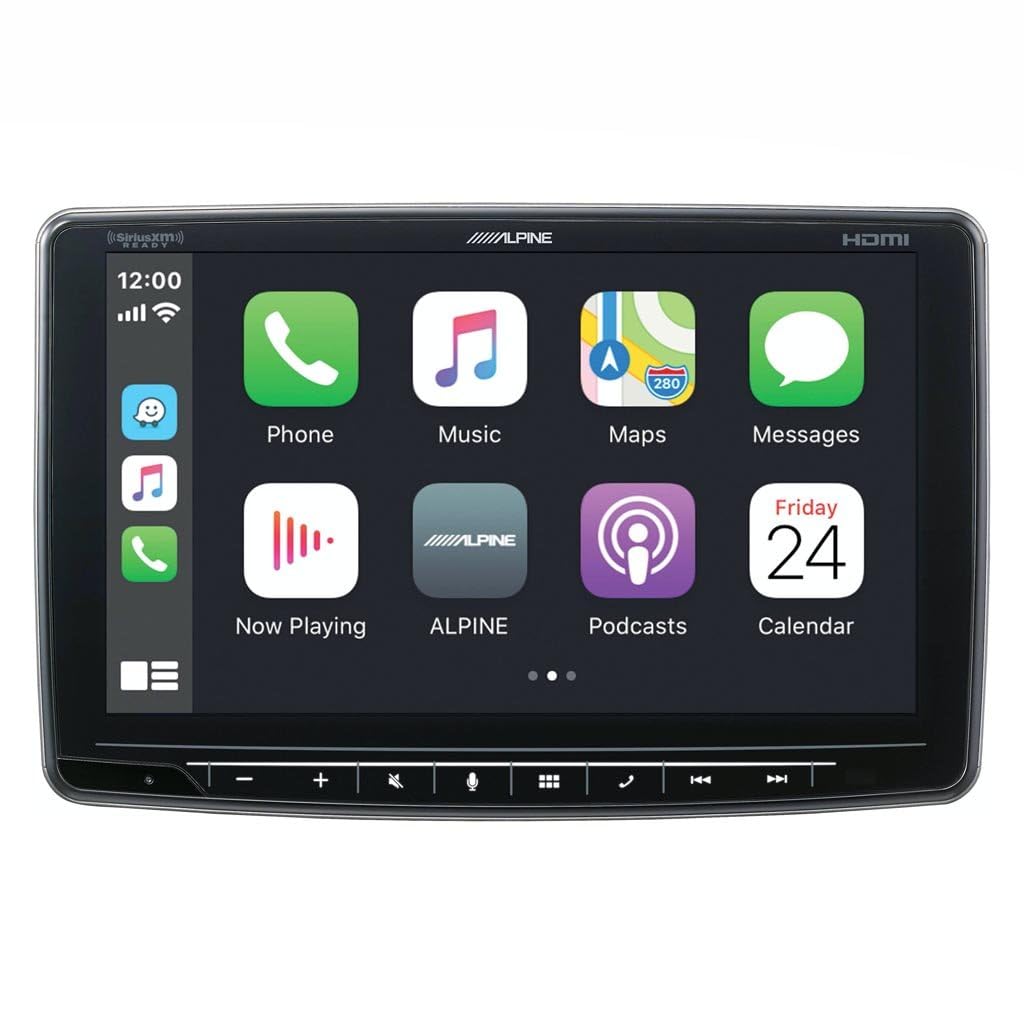
Image: Alpine Halo9 iLX-F409 displaying simultaneous navigation and music playback, highlighting its split-screen capability.

Image: Main menu of the Alpine Halo9 iLX-F409, displaying icons for various audio sources and connectivity options.
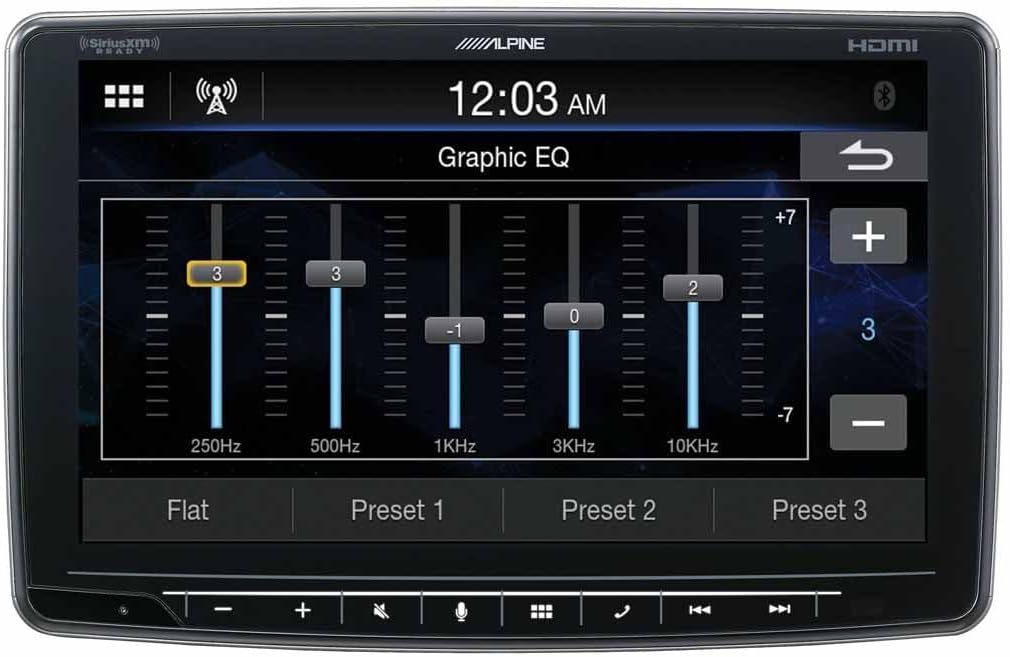
Image: Vehicle climate control interface displayed on the Alpine Halo9 iLX-F409, demonstrating integration with car systems.
ഔദ്യോഗിക ഉൽപ്പന്ന വീഡിയോകൾ:
Video: A customer review ഷോasing the Alpine Halo9 iLX-F409 in a vehicle, demonstrating its touchscreen functionality and various features. This video is from a seller-type creator and is genuinely useful for understanding the product's operation.


