ആമുഖം
Welcome to the user manual for your West Ocean Large Smart Digital LED WiFi Wall Clock. This guide provides detailed instructions for setting up, operating, and maintaining your clock to ensure optimal performance and longevity. Please read this manual thoroughly before using the product.
സുരക്ഷാ വിവരങ്ങൾ
സുരക്ഷിതമായ പ്രവർത്തനം ഉറപ്പാക്കുന്നതിനും കേടുപാടുകൾ തടയുന്നതിനും, ദയവായി ഇനിപ്പറയുന്ന സുരക്ഷാ മാർഗ്ഗനിർദ്ദേശങ്ങൾ പാലിക്കുക:
- Read all instructions carefully before initial use.
- ഉപകരണത്തെ തീവ്രമായ താപനിലയിലോ, നേരിട്ടുള്ള സൂര്യപ്രകാശത്തിലോ, ഉയർന്ന ആർദ്രതയിലോ തുറന്നുകാട്ടരുത്.
- Use only the provided power adapter. Using an unauthorized adapter may damage the clock and void the warranty.
- കുട്ടികൾക്കും വളർത്തുമൃഗങ്ങൾക്കും ലഭ്യമല്ലാത്തവിധം ഉപകരണം സൂക്ഷിക്കുക.
- ഉപകരണം സ്വയം ഡിസ്അസംബ്ലിംഗ് ചെയ്യാനോ പരിഷ്ക്കരിക്കാനോ നന്നാക്കാനോ ശ്രമിക്കരുത്. എല്ലാ സേവനങ്ങളും യോഗ്യതയുള്ള ഉദ്യോഗസ്ഥരെ ഏൽപ്പിക്കുക.
- Avoid placing the clock near strong magnetic fields.

This image illustrates the key features of the West Ocean Smart Digital LED WiFi Wall Clock, including its various control methods, time synchronization capabilities, display options, alarm and timer functions, and installation versatility.
പാക്കേജ് ഉള്ളടക്കം
എല്ലാ ഇനങ്ങളും ഉണ്ടെന്നും നല്ല നിലയിലാണെന്നും ഉറപ്പാക്കാൻ പാക്കേജ് ഉള്ളടക്കങ്ങൾ പരിശോധിക്കുക:
- West Ocean Large Smart Digital LED WiFi Wall Clock
- ഇൻഫ്രാറെഡ് വിദൂര നിയന്ത്രണം
- പവർ അഡാപ്റ്റർ
- മൗണ്ടിംഗ് ഹാർഡ്വെയർ (സ്ക്രൂകൾ, വാൾ ആങ്കറുകൾ)
- Connection Cables (for relay output, if applicable)
- ഉപയോക്തൃ മാനുവൽ (ഈ പ്രമാണം അല്ലെങ്കിൽ അച്ചടിച്ച പതിപ്പ്)
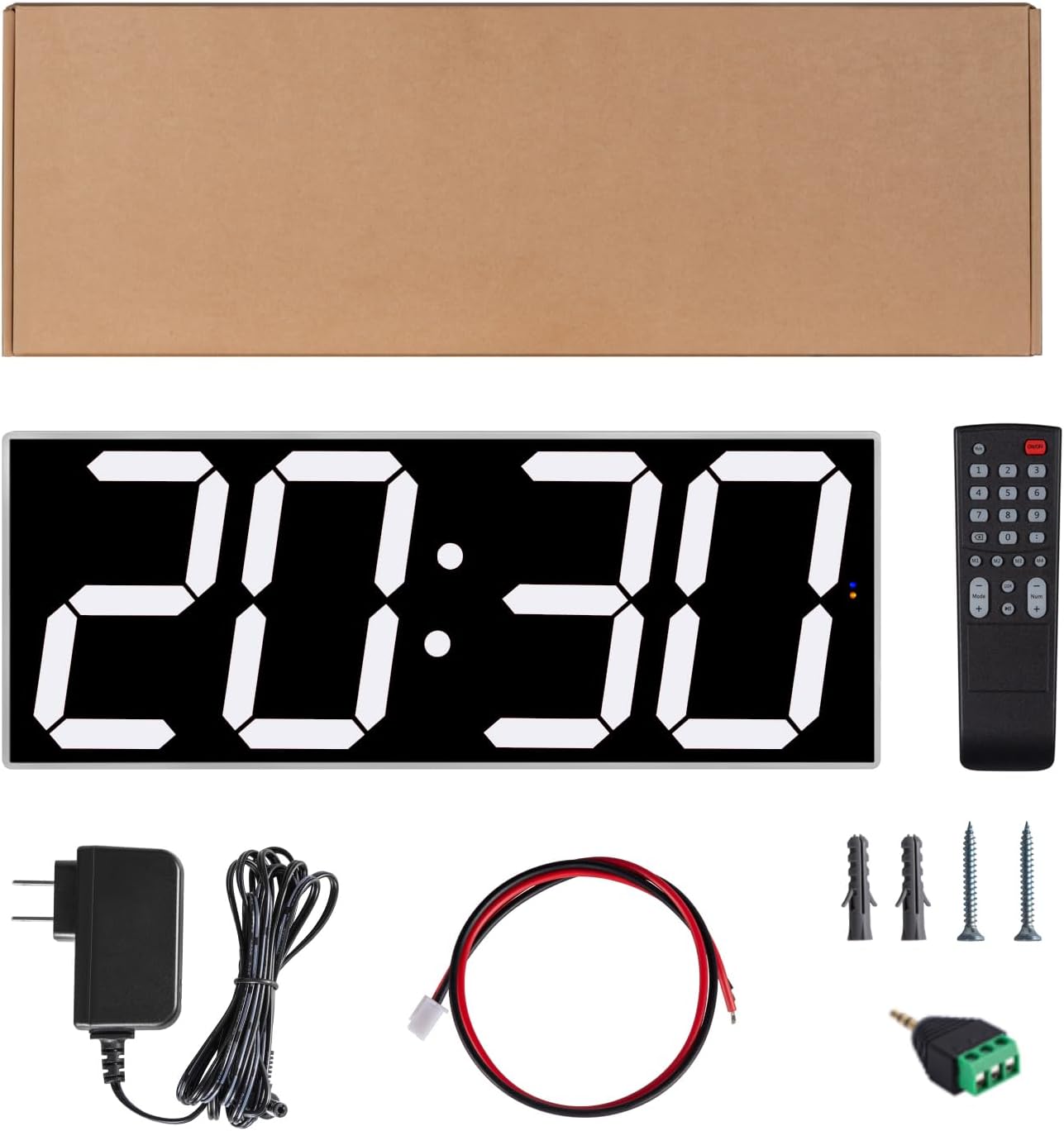
The image displays the complete package contents: the large digital clock, its remote control, power adapter, necessary wiring, and wall mounting hardware.
ഉൽപ്പന്നം കഴിഞ്ഞുview
ഫീച്ചറുകൾ
- 6-inch Large White LED Digits: Features 170 high-quality SMD LEDs for exceptional brightness and readability from a distance.
- ക്രമീകരിക്കാവുന്ന തെളിച്ചം: Offers 30 manual brightness levels for customization in various lighting conditions.
- Automatic Time Sync: Syncs time automatically via Wi-Fi NTP servers for high precision.
- പകൽ വെളിച്ച ലാഭിക്കൽ സമയം (DST) ക്രമീകരണം: Automatically adjusts for DST in North America, Europe, Australia, and New Zealand.
- ഒന്നിലധികം നിയന്ത്രണ രീതികൾ: Easily adjust settings via a web interface on your smartphone or PC, an Infrared Remote Control, or onboard buttons.
- API തുറക്കുക: Advanced users can integrate the clock into smart systems via open Web & UDP APIs.
- Advanced Countdown Timer: Allows multiple preset countdowns and supports switching between clock and countdown modes.
- 30 Custom Alarms: Set up to 30 alarms with options for alarm sound, countdown trigger, or relay switch activation.
- ബഹുമുഖ ഇൻസ്റ്റാളേഷൻ: Designed for easy installation, compatible with wall mounts and tripod stands.
- Display Orientation Inversion: The screen display can be flipped 180 degrees to suit different viewing angles or socket orientations.
ഘടകങ്ങൾ

ഈ ഡയഗ്രം വിശദമായി നൽകുന്നു view of the clock's dimensions and the layout of its rear panel, highlighting key components such as the IR receiver, status indicators for WiFi, alarm, and relay, control buttons, and various input/output ports.
സജ്ജമാക്കുക
പ്രാരംഭ പവർ-ഓൺ
- നൽകിയിരിക്കുന്ന പവർ അഡാപ്റ്റർ ഇതിലേക്ക് ബന്ധിപ്പിക്കുക DC 12V port on the back of the clock.
- പവർ അഡാപ്റ്റർ ഒരു സാധാരണ ഇലക്ട്രിക്കൽ ഔട്ട്ലെറ്റിലേക്ക് പ്ലഗ് ചെയ്യുക.
- The clock display will illuminate, indicating it is powered on.
Wi-Fi Connection and Time Synchronization
The clock utilizes Wi-Fi to automatically synchronize time for high precision and to enable advanced control features.
- Upon powering on, the clock will broadcast its own Wi-Fi network (e.g., "WS-604-XXXX").
- On your smartphone or computer, connect to this Wi-Fi network.
- എ തുറക്കുക web ബ്രൗസർ ചെയ്ത് നാവിഗേറ്റ് ചെയ്യുക 192.168.4.1. This will open the clock's web ഇൻ്റർഫേസ്.
- എന്നതിനുള്ളിലെ സ്ക്രീനിലെ നിർദ്ദേശങ്ങൾ പാലിക്കുക web interface to connect the clock to your desired home or office Wi-Fi network.
- Once successfully connected to your network, the clock will automatically synchronize its time via NTP (Network Time Protocol) servers.
- Configure Daylight Saving Time (DST) settings through the web interface if applicable to your region to ensure correct time all year round.

This image demonstrates the Wi-Fi connectivity and control options for the clock, showing how it can be managed via a web interface on both a computer and a smartphone after connecting to its Wi-Fi network.

This screenshot shows the main menu of the clock's web interface, providing access to settings like clock calibration, remote control, alarm settings, countdown timer settings, and Wi-Fi configurations.

ഈ ചിത്രം കാണിക്കുന്നത് web interface screen for configuring Daylight Saving Time, allowing users to select their region for automatic DST adjustments.

This icon visually represents the clock's ability to synchronize time globally, ensuring accurate timekeeping.
ഓപ്പറേഷൻ
നിയന്ത്രണ രീതികൾ
The West Ocean Smart Digital LED WiFi Wall Clock offers multiple ways to control its functions:
- ഇൻഫ്രാറെഡ് റിമോട്ട് കൺട്രോൾ: Use the included remote for basic functions such as ON/OFF, mode switching, and brightness adjustment. Ensure a clear line of sight to the clock's IR receiver.
- Web ഇൻ്റർഫേസ്: For advanced settings, alarm configuration, countdown timer management, and detailed Wi-Fi setup, access the web മുഖേനയുള്ള ഇൻ്റർഫേസ് 192.168.4.1 after connecting to the clock's Wi-Fi network.
- ഓൺബോർഡ് ബട്ടണുകൾ: Small physical buttons located on the back of the clock provide direct control for essential functions, serving as a backup or quick access method.

This image illustrates the three primary control methods for the clock: the infrared remote control, the web-based interface accessible via a computer or smartphone, and the physical buttons located on the clock itself.
തെളിച്ചം ക്രമീകരിക്കുന്നു
The clock features 30 manual brightness levels to suit various environments and preferences. You can adjust the display brightness using either the infrared remote control or through the dedicated settings in the web ഇൻ്റർഫേസ്.

This icon symbolizes the clock's adjustable brightness feature, allowing users to customize the display intensity.
അലാറങ്ങൾ സജ്ജീകരിക്കുന്നു
The clock supports up to 30 custom alarms, which can be configured exclusively via the web interface. For each alarm, you can set the time, days of the week, and choose from options such as an audible alarm sound, triggering a countdown, or activating a relay switch.

This screenshot illustrates the alarm event settings within the web interface, where users can configure multiple alarms with options for relay duration, speaker output, or countdown triggers.
കൗണ്ട്ഡൗൺ ടൈമർ ഉപയോഗിക്കുന്നു
The clock features an advanced countdown timer function, allowing for multiple preset countdowns. These can be configured and activated through the web interface. The display can seamlessly switch between showing the current time and the active countdown.

This image shows the countdown timer settings interface, allowing users to set various countdown durations in seconds, minutes, or hours, with options for looping.
ഡിസ്പ്ലേ ഓറിയൻ്റേഷൻ
The screen display orientation can be adjusted by 180 degrees to suit the socket's orientation or your preferred mounting direction. This setting is typically found within the clock's web ഇൻ്റർഫേസ്.

This image demonstrates the clock's ability to invert its display orientation by 180 degrees, allowing for flexible mounting options while maintaining correct readability.
ഇൻസ്റ്റലേഷൻ
The West Ocean Smart Digital LED WiFi Wall Clock offers versatile installation options to fit various environments:
മതിൽ മൗണ്ടിംഗ്
Use the provided mounting holes and hardware (screws, wall anchors) to securely attach the clock to a wall. Ensure the wall material is suitable and can support the clock's weight. For optimal viewing, choose a location free from glare and at an appropriate height.
ട്രൈപോഡ് അനുയോജ്യത
The clock is designed with compatibility for standard tripods, making it an excellent choice for temporary setups, presentations, or events where portability is desired.

This image illustrates the versatile installation options for the clock, demonstrating both wall-mounting for time display and tripod installation for timing functions in various environments.
മെയിൻ്റനൻസ്
Proper maintenance will help extend the life of your West Ocean Smart Digital LED WiFi Wall Clock:
- വൃത്തിയാക്കൽ: Use a soft, dry, lint-free cloth to clean the display and frame. Avoid using abrasive cleaners, solvents, or chemical sprays, as these can damage the surface.
- ശക്തി: Always use the original power adapter provided with your clock. Disconnect power before cleaning or if the clock will not be used for an extended period.
- റിമോട്ട് കൺട്രോൾ ബാറ്ററി: The infrared remote control requires a battery (1 Lithium Ion battery included). Replace the battery as needed. Refer to the remote's battery compartment for the specific battery type.
ട്രബിൾഷൂട്ടിംഗ്
പൊതുവായ പ്രശ്നങ്ങളും പരിഹാരങ്ങളും
| പ്രശ്നം | പരിഹാരം |
|---|---|
| ക്ലോക്ക് ഓണാക്കുന്നില്ല | Ensure the power adapter is securely connected to both the clock and a working electrical outlet. Check if the outlet has power. |
| Time is incorrect or not syncing | Verify that the clock is successfully connected to your Wi-Fi network and has internet access for NTP synchronization. Check DST settings in the web interface to ensure they are correctly configured for your region. |
| റിമോട്ട് കൺട്രോൾ പ്രവർത്തിക്കുന്നില്ല | Check the battery in the remote control and replace if necessary. Ensure there are no obstructions between the remote and the clock's IR receiver. |
| ആക്സസ് ചെയ്യാൻ കഴിയില്ല web ഇൻ്റർഫേസ് | Ensure your smartphone or computer is connected to the clock's direct Wi-Fi network (e.g., "WS-604-XXXX") and that you are navigating to the correct IP address: 192.168.4.1. |
സ്പെസിഫിക്കേഷനുകൾ
- ബ്രാൻഡ്: പശ്ചിമ സമുദ്രം
- മോഡൽ: WS-604
- ഡിസ്പ്ലേ തരം: ഡിജിറ്റൽ LED
- Digit Size: 6 inches (single digit height)
- അളവുകൾ: 18"ആംശം x 6.85"ആംശം
- ഊർജ്ജ സ്രോതസ്സ്: കോർഡഡ് ഇലക്ട്രിക് (DC 12V)
- ഫ്രെയിം മെറ്റീരിയൽ: Acrylic glazed cover / ABS Plastic
- പ്രത്യേക സവിശേഷതകൾ: Adjustable Brightness (30 levels), Automatic Daylight Saving Time adjustment, Large Display, Wi-Fi NTP Time Synchronization, Web Interface Control, UDP & Web Socket Open API, Advanced Countdown Timer, 30 Custom Alarms.
- മൗണ്ടിംഗ് തരം: Wall Mount, Tripod Compatible
- ഇനത്തിൻ്റെ ഭാരം: Approximately 0.035 ounces (1 gram)
- ബാറ്ററികൾ: 1 Lithium Ion battery required (included, typically for remote control)
- ഇൻഡോർ/ഔട്ട്ഡോർ ഉപയോഗം: ഇൻഡോർ
- ശുപാർശ ചെയ്യുന്ന മുറി തരങ്ങൾ: Meeting rooms, classrooms, production floors, halls, churches, conference rooms.
വാറൻ്റിയും പിന്തുണയും
വാറൻ്റി വിവരങ്ങൾ
This product comes with a Limited Warranty. For detailed information regarding the terms and conditions of your warranty, including coverage and duration, please refer to the documentation included with your original purchase or contact West Ocean customer support directly.
ഉപഭോക്തൃ പിന്തുണ
For further assistance, technical support, or any inquiries not covered in this manual, please visit the official West Ocean store on Amazon:
A comprehensive User Guide in PDF format is also available for download, which may contain additional details:


