1. ആമുഖം
വിവിധ പ്ലാറ്റ്ഫോമുകളിലുടനീളം വ്യക്തവും സുഖകരവുമായ ആശയവിനിമയത്തിനായി EKSA H12 3.5mm വയർഡ് കമ്പ്യൂട്ടർ ഹെഡ്സെറ്റ് രൂപകൽപ്പന ചെയ്തിരിക്കുന്നു. നോയ്സ്-കാൻസിലിംഗ് കഴിവുകളും ഇഷ്ടാനുസൃതമായി ട്യൂൺ ചെയ്ത 40mm സ്പീക്കർ ഡ്രൈവറുകളും ഉള്ള ക്രമീകരിക്കാവുന്ന ഓമ്നി-ഡയറക്ഷണൽ മൈക്രോഫോണിന്റെ സവിശേഷതയായ ഈ ഹെഡ്സെറ്റ് പിസി, ലാപ്ടോപ്പ്, ഓഫീസ്, കോൾ സെന്റർ, ഓൺലൈൻ ആശയവിനിമയ ആവശ്യങ്ങൾ എന്നിവയ്ക്ക് അനുയോജ്യമാണ്. ഇതിന്റെ ഭാരം കുറഞ്ഞ രൂപകൽപ്പനയും മൃദുവായ ഇയർ പാഡുകളും ദിവസം മുഴുവൻ സുഖം ഉറപ്പാക്കുന്നു.
2. ഉൽപ്പന്നം കഴിഞ്ഞുview
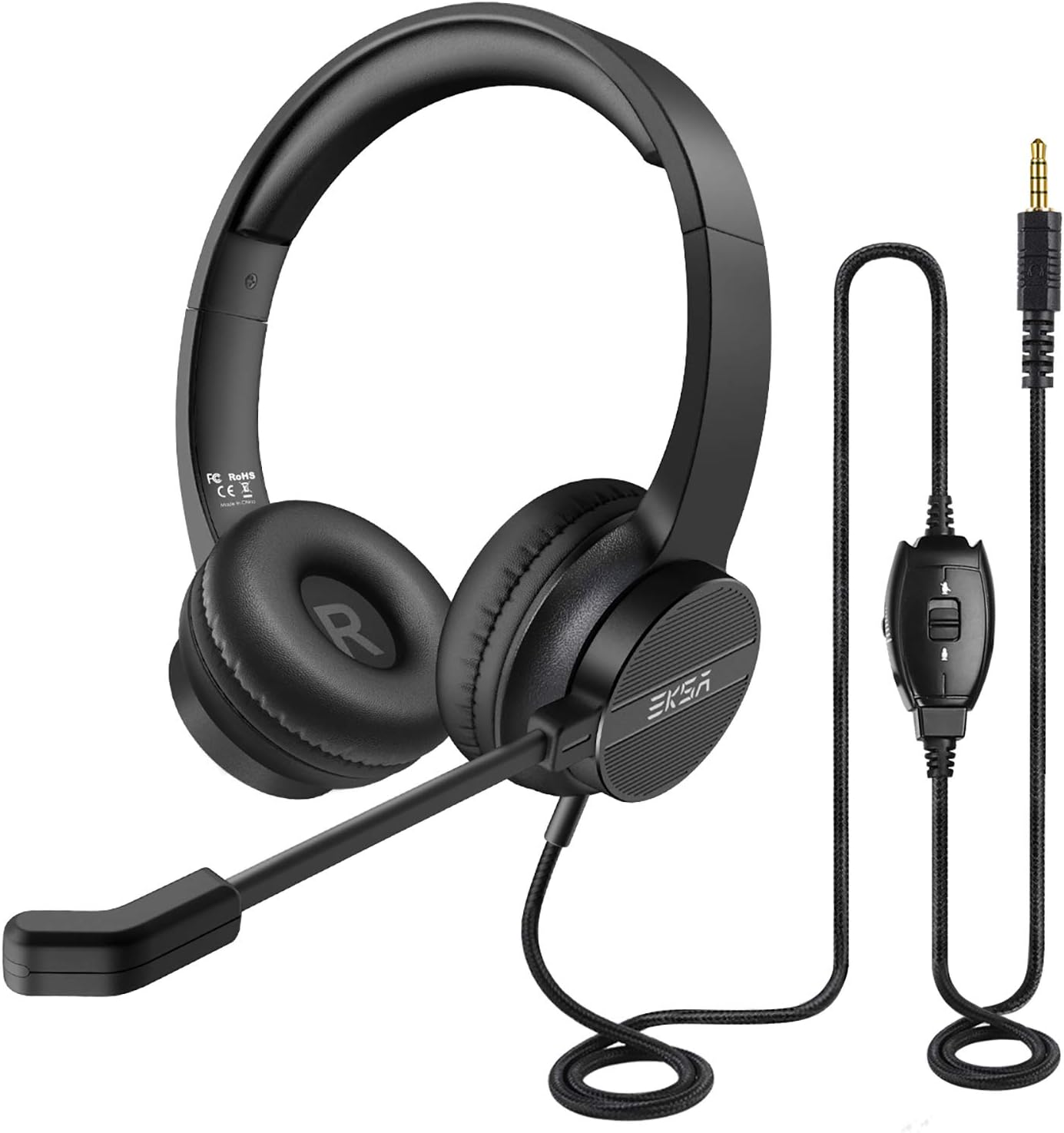
EKSA H12 ഹെഡ്സെറ്റിൽ സുഖപ്രദമായ ഓവർ-ഇയർ ഡിസൈൻ, ക്രമീകരിക്കാവുന്ന ബൂം മൈക്രോഫോൺ, ഓഡിയോ ക്രമീകരണങ്ങൾ എളുപ്പത്തിൽ ആക്സസ് ചെയ്യുന്നതിനായി ഇൻ-ലൈൻ കൺട്രോൾ യൂണിറ്റ് എന്നിവ ഉൾപ്പെടുന്നു.
2.1 പ്രധാന ഘടകങ്ങൾ
- ക്രമീകരിക്കാവുന്ന ഹെഡ്ബാൻഡ്: സുഖസൗകര്യങ്ങൾക്കായി പാഡ് ചെയ്തിരിക്കുന്നു, വ്യത്യസ്ത തല വലുപ്പങ്ങൾക്ക് അനുയോജ്യമായ രീതിയിൽ ക്രമീകരിക്കാം.
- മൃദുവായ ഇയർ പാഡുകൾ: ദിവസം മുഴുവൻ സുഖസൗകര്യങ്ങൾക്കായി കൃത്രിമ ലെതറെറ്റും മൃദുവായ പ്രോട്ടീൻ മെമ്മറി ഫോമും ഉപയോഗിച്ച് നിർമ്മിച്ചത്.
- ഓമ്നി-ഡയറക്ഷണൽ മൈക്രോഫോൺ: പശ്ചാത്തല ശബ്ദം കുറച്ചുകൊണ്ട് സ്വാഭാവിക ശബ്ദം മനസ്സിലാക്കുന്നതിനായി രൂപകൽപ്പന ചെയ്തിരിക്കുന്ന വഴക്കമുള്ളതും ക്രമീകരിക്കാവുന്നതുമായ ബൂം മൈക്ക്.
- ഇൻ-ലൈൻ കൺട്രോൾ യൂണിറ്റ്: വോളിയം ക്രമീകരണം, മൈക്രോഫോൺ മ്യൂട്ട്, സ്പീക്കർ മ്യൂട്ട് എന്നിവയ്ക്കായുള്ള സംയോജിത നിയന്ത്രണങ്ങൾ.
- 3.5 എംഎം ജാക്ക്: വിശാലമായ അനുയോജ്യതയ്ക്കായി സ്റ്റാൻഡേർഡ് ഓഡിയോ കണക്റ്റർ.
- വൈ-അഡാപ്റ്റർ: പ്രത്യേക ഓഡിയോ, മൈക്രോഫോൺ ഇൻപുട്ടുകൾ ആവശ്യമുള്ള ഉപകരണങ്ങൾക്കായി ഉൾപ്പെടുത്തിയിരിക്കുന്നു.
2.2 സുഖവും ഈടും
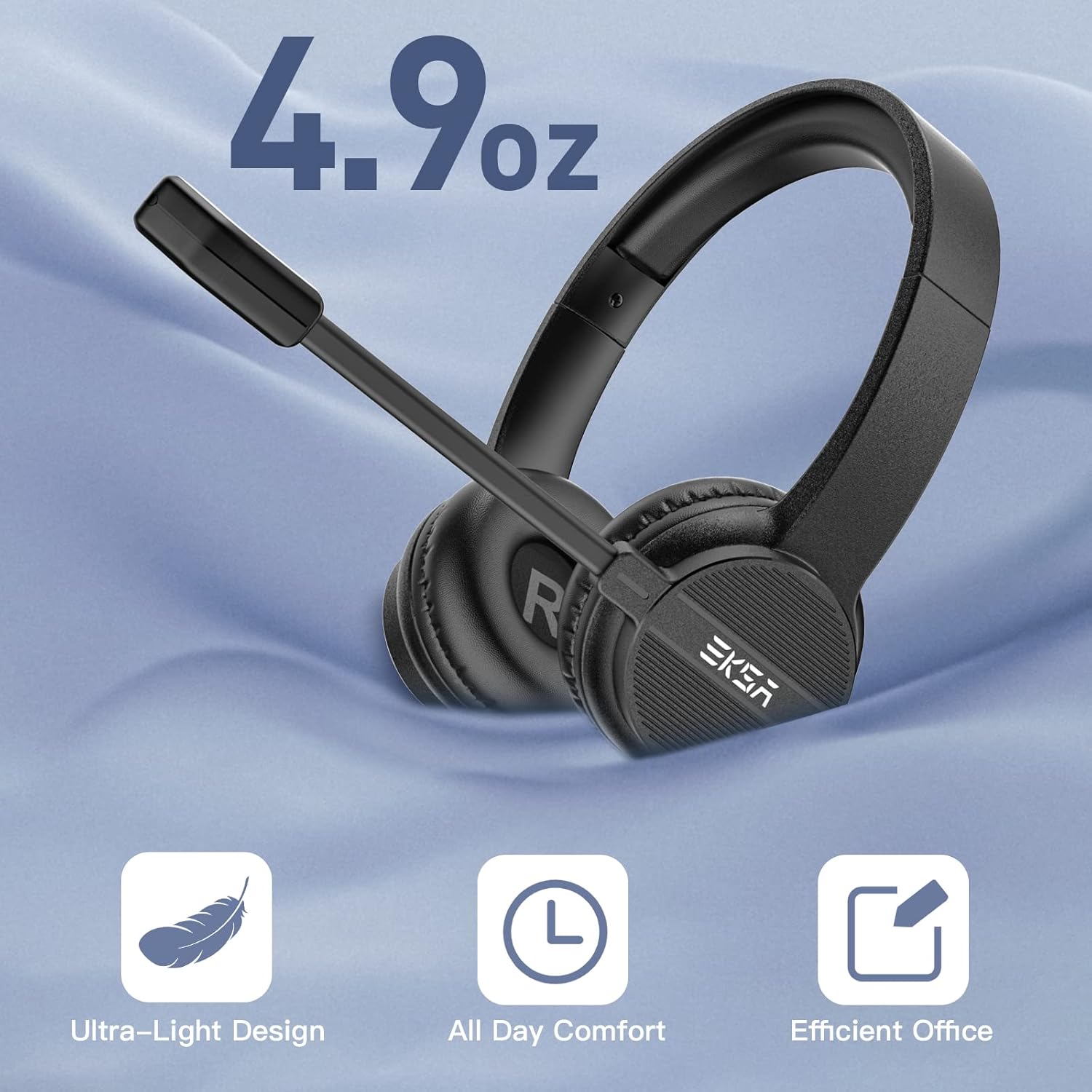
4.9 ഔൺസ് മാത്രം ഭാരമുള്ള EKSA H12 ഹെഡ്സെറ്റ്, ജോലി സമയത്തോ ഓൺലൈൻ ക്ലാസുകളിലോ ദീർഘനേരം ധരിക്കാൻ അനുയോജ്യമായ മൃദുവായ ഇയർ പാഡുകൾ ഉൾക്കൊള്ളുന്ന, അൾട്രാ-ലൈറ്റ് സുഖസൗകര്യങ്ങൾക്കായി രൂപകൽപ്പന ചെയ്തിരിക്കുന്നു.
EKSA H12 ഹെഡ്സെറ്റ് ദീർഘനേരം ഉപയോഗിക്കുന്നതിനായി രൂപകൽപ്പന ചെയ്തിരിക്കുന്നു. ഇതിന്റെ അൾട്രാ-ലൈറ്റ്വെയ്റ്റ് ഡിസൈൻ (ഏകദേശം 4.9 oz / 0.24 kg) കൃത്രിമ ലെതറെറ്റ് ഇയർ പാഡുകളും സോഫ്റ്റ് പ്രോട്ടീൻ മെമ്മറി ഫോം ഇയർമഫുകളും സംയോജിപ്പിച്ച് നിലനിൽക്കുന്ന സുഖസൗകര്യങ്ങൾ ഉറപ്പാക്കുന്നു. ക്രമീകരിക്കാവുന്ന പാഡഡ് ഹെഡ്ബാൻഡ് മിക്ക ഹെഡ് വലുപ്പങ്ങളെയും ഉൾക്കൊള്ളുന്നു, ഇത് ടെലിഫോൺ തീവ്രമായി ഉപയോഗിക്കുന്ന ഉപയോക്താക്കൾക്ക് അനുയോജ്യമാക്കുന്നു.

ഹെഡ്സെറ്റിൽ മൃദുവായ ഇയർ കുഷ്യനുകളും ഒരു ഈടുനിൽക്കുന്ന ഹെഡ്ബാൻഡും ഉണ്ട്, ദീർഘായുസ്സ് ഉറപ്പാക്കാൻ 20,000-ത്തിലധികം വളവുകളിൽ പരീക്ഷിച്ചു.
2.3 ഓഡിയോ ഗുണനിലവാരവും ശബ്ദ റദ്ദാക്കലും

ഹെഡ്സെറ്റിൽ കസ്റ്റം-ട്യൂൺ ചെയ്ത 40mm സ്പീക്കർ ഡ്രൈവറുകൾ സജ്ജീകരിച്ചിരിക്കുന്നു, ഇത് വ്യക്തമായ സ്റ്റീരിയോ ശബ്ദം നൽകുന്നു, ഇത് കോൾ ഗുണനിലവാരവും ഓഡിയോ പ്ലേബാക്കും മെച്ചപ്പെടുത്തുന്നു.

പശ്ചാത്തല ശബ്ദം കുറയ്ക്കാനുള്ള ഹെഡ്സെറ്റിന്റെ കഴിവ് ഈ ചിത്രം പ്രകടമാക്കുന്നു, 96dB (ശബ്ദം + ശബ്ദം) ൽ നിന്ന് 15dB (ശബ്ദം മാത്രം) ആയി ഗണ്യമായ കുറവ് കാണിക്കുന്നു, ഇത് വ്യക്തമായ ആശയവിനിമയം ഉറപ്പാക്കുന്നു.
അനാവശ്യമായ പശ്ചാത്തല ശബ്ദം സജീവമായി കുറയ്ക്കുന്നതിനൊപ്പം നിങ്ങളുടെ ശബ്ദം വ്യക്തമായി കേൾക്കുന്നതിനായാണ് ക്രമീകരിക്കാവുന്ന ഓമ്നി-ദിശാസൂചന മൈക്രോഫോൺ രൂപകൽപ്പന ചെയ്തിരിക്കുന്നത്, ഇത് കോളുകൾ, കോൺഫറൻസുകൾ, ഓൺലൈൻ കോഴ്സുകൾ എന്നിവയ്ക്ക് അനുയോജ്യമാക്കുന്നു. 40mm സ്പീക്കർ ഡ്രൈവറുകൾ കേൾക്കുന്നതിനും സംസാരിക്കുന്നതിനും വ്യക്തമായ ഓഡിയോ നൽകുന്നു.
2.4 അനുയോജ്യത

പിസികൾ, ലാപ്ടോപ്പുകൾ, സ്മാർട്ട്ഫോണുകൾ, ടാബ്ലെറ്റുകൾ, എംപി3 പ്ലെയറുകൾ, ഗെയിം കൺട്രോളറുകൾ എന്നിവയുൾപ്പെടെയുള്ള വിവിധ ഉപകരണങ്ങളുമായി 3.5 എംഎം ജാക്ക് വിശാലമായ അനുയോജ്യത ഉറപ്പാക്കുന്നു.
EKSA H12 ഹെഡ്സെറ്റ് അതിന്റെ 3.5mm ജാക്ക് കണക്ഷനുമായി വിപുലമായ അനുയോജ്യത വാഗ്ദാനം ചെയ്യുന്നു. ഇത് Mac OS X, Windows 2000/7/8/10/XP/Vista, ടാബ്ലെറ്റ് പിസികൾ, സ്മാർട്ട്ഫോണുകൾ, ഡെസ്ക്ടോപ്പ് കമ്പ്യൂട്ടറുകൾ എന്നിവയെ പിന്തുണയ്ക്കുന്നു. പ്രത്യേക ഓഡിയോ, മൈക്രോഫോൺ ഇൻപുട്ടുകൾ ആവശ്യമുള്ള ഉപകരണങ്ങൾക്കായി ഒരു ഡ്യുവൽ 3.5mm Y-അഡാപ്റ്റർ ഉൾപ്പെടുത്തിയിട്ടുണ്ട്.
3. സജ്ജീകരണം
3.1 ഹെഡ്സെറ്റ് ബന്ധിപ്പിക്കുന്നു
- നിങ്ങളുടെ ഉപകരണത്തിൽ (പിസി, ലാപ്ടോപ്പ്, സ്മാർട്ട്ഫോൺ, ടാബ്ലെറ്റ് മുതലായവ) 3.5 എംഎം ഓഡിയോ ജാക്ക് കണ്ടെത്തുക.
- ഹെഡ്സെറ്റിൽ നിന്ന് 3.5mm കണക്റ്റർ നേരിട്ട് നിങ്ങളുടെ ഉപകരണത്തിന്റെ ഓഡിയോ ജാക്കിലേക്ക് പ്ലഗ് ചെയ്യുക.
- നിങ്ങളുടെ ഉപകരണത്തിൽ മൈക്രോഫോണിനും ഓഡിയോയ്ക്കുമായി പ്രത്യേക പോർട്ടുകൾ ഉണ്ടെങ്കിൽ, ഉൾപ്പെടുത്തിയിരിക്കുന്ന ഡ്യുവൽ 3.5mm Y-അഡാപ്റ്റർ ഉപയോഗിക്കുക. ഹെഡ്സെറ്റിന്റെ 3.5mm കണക്റ്റർ Y-അഡാപ്റ്ററിലേക്ക് പ്ലഗ് ചെയ്യുക, തുടർന്ന് രണ്ട് Y-അഡാപ്റ്റർ കണക്ടറുകൾ നിങ്ങളുടെ ഉപകരണത്തിലെ അനുബന്ധ മൈക്രോഫോണിലേക്കും ഓഡിയോ പോർട്ടുകളിലേക്കും പ്ലഗ് ചെയ്യുക.
- ഇൻപുട്ട്, ഔട്ട്പുട്ട് ഉപകരണമായി EKSA H12 തിരഞ്ഞെടുത്തിട്ടുണ്ടെന്ന് ഉറപ്പാക്കാൻ നിങ്ങളുടെ ഉപകരണത്തിന്റെ ഓഡിയോ ക്രമീകരണങ്ങൾ ക്രമീകരിക്കുക.
4. പ്രവർത്തന നിർദ്ദേശങ്ങൾ
4.1 മൈക്രോഫോൺ ക്രമീകരിക്കൽ
വോയ്സ് പിക്കപ്പ് ഒപ്റ്റിമൈസ് ചെയ്യുന്നതിന് ഓമ്നി-ഡയറക്ഷണൽ ബൂം മൈക്രോഫോൺ ഇഷ്ടാനുസരണം വളച്ചൊടിച്ച് സ്ഥാപിക്കാവുന്നതാണ്. മികച്ച ഓഡിയോ വ്യക്തതയ്ക്കായി നിങ്ങളുടെ വായിൽ നിന്ന് സുഖകരമായ അകലത്തിൽ ഇത് ക്രമീകരിക്കുക.
4.2 ഇൻ-ലൈൻ നിയന്ത്രണങ്ങൾ ഉപയോഗിക്കുന്നു
സൗകര്യപ്രദമായ ഇൻ-ലൈൻ കൺട്രോൾ യൂണിറ്റ് വോളിയം എളുപ്പത്തിൽ ക്രമീകരിക്കാനും മൈക്രോഫോൺ മ്യൂട്ട് ചെയ്യാനും കേബിളിൽ നിന്ന് നേരിട്ട് സ്പീക്കറിനെ മ്യൂട്ട് ചെയ്യാനും അനുവദിക്കുന്നു.
- വോളിയം നിയന്ത്രണം: ഓഡിയോ വോളിയം കൂട്ടാനോ കുറയ്ക്കാനോ ഇൻ-ലൈൻ കൺട്രോൾ യൂണിറ്റിലെ '+', '-' ബട്ടണുകൾ ഉപയോഗിക്കുക.
- മൈക്രോഫോൺ നിശബ്ദമാക്കുക: നിങ്ങളുടെ മൈക്രോഫോൺ വേഗത്തിൽ മ്യൂട്ട് ചെയ്യാനോ അൺമ്യൂട്ട് ചെയ്യാനോ മൈക്രോഫോൺ മ്യൂട്ട് ബട്ടൺ അമർത്തുക.
- സ്പീക്കർ നിശബ്ദമാക്കുക: ഹെഡ്സെറ്റിന്റെ ഓഡിയോ ഔട്ട്പുട്ട് വേഗത്തിൽ മ്യൂട്ട് ചെയ്യാനോ അൺമ്യൂട്ട് ചെയ്യാനോ സ്പീക്കർ മ്യൂട്ട് ബട്ടൺ അമർത്തുക.
5. പരിപാലനം
- വൃത്തിയാക്കൽ: ഹെഡ്സെറ്റ് വൃത്തിയാക്കാൻ മൃദുവായതും ഉണങ്ങിയതുമായ തുണി ഉപയോഗിക്കുക. കഠിനമായ രാസവസ്തുക്കളോ ഉരച്ചിലുകളോ ഉള്ള വസ്തുക്കൾ ഉപയോഗിക്കുന്നത് ഒഴിവാക്കുക.
- സംഭരണം: ഉപയോഗത്തിലില്ലാത്തപ്പോൾ, ഹെഡ്സെറ്റ് വൃത്തിയുള്ളതും വരണ്ടതുമായ സ്ഥലത്ത് സൂക്ഷിക്കുക, പ്രത്യേകിച്ച് ഉൾപ്പെടുത്തിയിരിക്കുന്ന സ്റ്റോറേജ് ബാഗിൽ, പൊടിയിൽ നിന്നും കേടുപാടുകളിൽ നിന്നും സംരക്ഷിക്കുക.
- കേബിൾ കെയർ: ആന്തരിക കേടുപാടുകൾ തടയാൻ കേബിളിൽ മൂർച്ചയുള്ള വളവുകളോ അമിതമായി വലിക്കലോ ഒഴിവാക്കുക.
- ഇയർ പാഡുകൾ: കൃത്രിമ ലെതറെറ്റ് ഇയർ പാഡുകൾ പരസ്യം ഉപയോഗിച്ച് സൌമ്യമായി തുടയ്ക്കാം.amp ആവശ്യമെങ്കിൽ തുണി ഉപയോഗിക്കുക. ഉപയോഗിക്കുന്നതിന് മുമ്പ് അവ പൂർണ്ണമായും ഉണങ്ങിയെന്ന് ഉറപ്പാക്കുക.
6. പ്രശ്നപരിഹാരം
| പ്രശ്നം | സാധ്യമായ പരിഹാരം |
|---|---|
| ഹെഡ്സെറ്റിൽ നിന്നുള്ള ഓഡിയോ ഇല്ല | 3.5mm ജാക്ക് പൂർണ്ണമായും ചേർത്തിട്ടുണ്ടോയെന്ന് പരിശോധിക്കുക. നിങ്ങളുടെ കമ്പ്യൂട്ടറിന്റെ ശബ്ദ ക്രമീകരണങ്ങളിൽ ഹെഡ്സെറ്റ് ഡിഫോൾട്ട് ഓഡിയോ ഔട്ട്പുട്ട് ഉപകരണമായി തിരഞ്ഞെടുത്തിട്ടുണ്ടെന്ന് ഉറപ്പാക്കുക. ഇൻ-ലൈൻ നിയന്ത്രണത്തിലും നിങ്ങളുടെ ഉപകരണത്തിലും വോളിയം ലെവലുകൾ പരിശോധിക്കുക. സ്പീക്കർ മ്യൂട്ട് ബട്ടൺ സജീവമല്ലെന്ന് ഉറപ്പാക്കുക. |
| മൈക്രോഫോൺ പ്രവർത്തിക്കുന്നില്ല | ഇൻ-ലൈൻ നിയന്ത്രണത്തിലെ മൈക്രോഫോൺ മ്യൂട്ട് ബട്ടൺ സജീവമല്ലെന്ന് ഉറപ്പാക്കുക. നിങ്ങളുടെ കമ്പ്യൂട്ടറിന്റെ ശബ്ദ ക്രമീകരണങ്ങളിൽ ഹെഡ്സെറ്റ് ഡിഫോൾട്ട് ഇൻപുട്ട് ഉപകരണമായി തിരഞ്ഞെടുത്തിട്ടുണ്ടോയെന്ന് പരിശോധിക്കുക. മൈക്രോഫോൺ ശരിയായി സ്ഥാപിച്ചിട്ടുണ്ടെന്ന് ഉറപ്പാക്കുക. Y-അഡാപ്റ്റർ ഉപയോഗിക്കുകയാണെങ്കിൽ, അത് മൈക്കിലേക്കും ഓഡിയോ പോർട്ടുകളിലേക്കും ശരിയായി ബന്ധിപ്പിച്ചിട്ടുണ്ടെന്ന് ഉറപ്പാക്കുക. |
| മോശം ഓഡിയോ നിലവാരം / സ്റ്റാറ്റിക് | 3.5mm ജാക്ക് വൃത്തിയുള്ളതാണെന്നും പൂർണ്ണമായും ഇൻസേർട്ട് ചെയ്തിട്ടുണ്ടെന്നും ഉറപ്പാക്കുക. ഉപകരണ-നിർദ്ദിഷ്ട പ്രശ്നങ്ങൾ ഒഴിവാക്കാൻ ഹെഡ്സെറ്റ് മറ്റൊരു പോർട്ടിലേക്കോ ഉപകരണത്തിലേക്കോ കണക്റ്റ് ചെയ്യാൻ ശ്രമിക്കുക. വൈദ്യുതകാന്തിക ഇടപെടലിന്റെ ഉറവിടങ്ങൾക്ക് സമീപം കേബിൾ സ്ഥാപിക്കുന്നത് ഒഴിവാക്കുക. |
| ഹെഡ്സെറ്റ് അസ്വസ്ഥമാണ് | ഹെഡ്ബാൻഡ് നന്നായി ഘടിപ്പിക്കുന്നതിനായി ക്രമീകരിക്കുക. ഇയർ പാഡുകൾ നിങ്ങളുടെ ചെവിക്ക് മുകളിൽ ശരിയായി സ്ഥാപിച്ചിട്ടുണ്ടെന്ന് ഉറപ്പാക്കുക. ദീർഘനേരം ഉപയോഗിക്കുമ്പോൾ ചെറിയ ഇടവേളകൾ എടുക്കുക. |
7 സ്പെസിഫിക്കേഷനുകൾ
| ഫീച്ചർ | വിശദാംശങ്ങൾ |
|---|---|
| മോഡലിൻ്റെ പേര് | H12 |
| കണക്റ്റിവിറ്റി ടെക്നോളജി | വയേർഡ് (3.5mm ജാക്ക്) |
| ഹെഡ്ഫോണുകൾ ജാക്ക് | 3.5 mm ജാക്ക് |
| ഉൾപ്പെടുത്തിയ ഘടകങ്ങൾ | ഹെഡ്സെറ്റ്, Y-അഡാപ്റ്റർ കേബിൾ |
| മെറ്റീരിയൽ | കൃത്രിമ ലെതറെറ്റ്, മെമ്മറി ഫോം, പാഡഡ് മെറ്റീരിയൽ |
| അനുയോജ്യമായ ഉപകരണങ്ങൾ | മാക് ഒഎസ് എക്സ്, വിൻഡോസ് 2000/7/8/10/എക്സ്പി/വിസ്റ്റ, ടാബ്ലെറ്റ് പിസി, സ്മാർട്ട്ഫോൺ, ഡെസ്ക്ടോപ്പ് കമ്പ്യൂട്ടർ, ഗെയിം കൺട്രോളറുകൾ |
| നിയന്ത്രണ തരം | ഇൻ-ലൈൻ കോൾ നിയന്ത്രണം (ശബ്ദം, മൈക്ക് മ്യൂട്ട്, സ്പീക്കർ മ്യൂട്ട്) |
| കേബിൾ സവിശേഷത | പിൻവലിക്കാവുന്ന |
| ഇനത്തിൻ്റെ ഭാരം | 0.24 കിലോഗ്രാം (8.4 ഔൺസ്) |
| ശബ്ദ നിയന്ത്രണ സവിശേഷതകൾ | ആക്ടീവ് നോയ്സ് റദ്ദാക്കൽ (മൈക്രോഫോൺ) |
| നിറം | കറുപ്പ് |
| ചെവി പ്ലേസ്മെൻ്റ് | ചെവിയിൽ |
| ഓഡിയോ ഡ്രൈവർ തരം | ഡൈനാമിക് ഡ്രൈവർ (40mm) |
8. ഔദ്യോഗിക ഉൽപ്പന്ന വീഡിയോകൾ
വീട്ടിൽ ലാപ്ടോപ്പ് ജോലികൾക്കായി EKSA 3.5mm ഹെഡ്സെറ്റിന്റെ ഉപയോഗം പ്രദർശിപ്പിക്കുന്ന ഔദ്യോഗിക ഉൽപ്പന്ന വീഡിയോ, അതിന്റെ സവിശേഷതകളും ഉപയോഗ എളുപ്പവും എടുത്തുകാണിക്കുന്നു.
ഔദ്യോഗിക ഉൽപ്പന്ന വീഡിയോ പ്രദർശനംasinമൈക്രോഫോണുള്ള EKSA ഹെഡ്സെറ്റിന്റെ പൊതുവായ സവിശേഷതകളും ഗുണങ്ങളും.
9. വാറണ്ടിയും പിന്തുണയും
ഈ ഉൽപ്പന്നത്തിന് EKSA 2 വർഷത്തെ വിൽപ്പനാനന്തര സേവനം നൽകുന്നു. ഏതെങ്കിലും അന്വേഷണങ്ങൾ, സാങ്കേതിക പിന്തുണ അല്ലെങ്കിൽ വാറന്റി ക്ലെയിമുകൾ എന്നിവയ്ക്കായി, ദയവായി അവരുടെ ഔദ്യോഗിക വിലാസം വഴി EKSA ഉപഭോക്തൃ സേവനവുമായി ബന്ധപ്പെടുക. webഉൽപ്പന്നം വാങ്ങിയ സൈറ്റ് അല്ലെങ്കിൽ റീട്ടെയിലർ. നിങ്ങളുടെ സംതൃപ്തിയാണ് ഞങ്ങളുടെ മുൻഗണന.


