ആമുഖം
The Lenovo 530 Wireless Mouse is designed for reliable and convenient navigation. Featuring 2.4 GHz wireless technology and a nano USB receiver, it offers a plug-and-play experience without the need for complex installations. Its ergonomic and contoured design ensures comfort for extended use, making it suitable for various computing tasks.
കഴിഞ്ഞുview of the Lenovo 530 Wireless Mouse, highlighting its features and design.
സജ്ജമാക്കുക
Follow these steps to set up your Lenovo 530 Wireless Mouse:
- ബാറ്ററി തിരുകുക: Open the battery compartment located on the underside of the mouse. Insert one AA battery, ensuring correct polarity. The mouse comes with an included AA battery.
- Locate the Nano USB Receiver: The nano USB receiver is typically stored inside the battery compartment for safekeeping during transport. Remove it from its storage slot.
- റിസീവർ ബന്ധിപ്പിക്കുക: Plug the nano USB receiver into an available USB port on your computer (PC).
- പവർ ഓൺ: Turn on the mouse using the power switch, usually located on the bottom of the mouse.
- യാന്ത്രിക കണക്ഷൻ: The mouse should automatically connect to your computer. No additional drivers are typically required for Windows 7, 8, 8.1, 10, or 11.

Image showing the battery compartment and nano USB receiver storage on the underside of the mouse.

The Lenovo 530 Wireless Mouse connected wirelessly to a laptop via its 2.4 GHz nano USB receiver.
പ്രവർത്തന നിർദ്ദേശങ്ങൾ
The Lenovo 530 Wireless Mouse features a standard three-button design with a scroll wheel for intuitive control.
- ഇടത് ക്ലിക്ക്: Use the left button for selecting items, opening applications, and confirming actions.
- വലത് ക്ലിക്കിൽ: Use the right button to access context menus and additional options.
- സ്ക്രോൾ വീൽ: Rotate the scroll wheel to navigate vertically through documents and web pages. The scroll wheel also functions as a middle button when pressed.
- ഒപ്റ്റിക്കൽ സെൻസർ: The 1200 DPI optical sensor provides precise and responsive tracking on various surfaces.

The mouse features a 1200 DPI optical sensor for smooth navigation and is compatible with Windows operating systems.
എർഗണോമിക്സും ആശ്വാസവും
The mouse is designed for ambidextrous use, accommodating both left-handed and right-handed users comfortably. Its contoured shape provides a natural grip for extended periods.

The ambidextrous design ensures comfortable use for both left and right-handed individuals.
മെയിൻ്റനൻസ്
- ബാറ്ററി മാറ്റിസ്ഥാപിക്കൽ: When the mouse performance degrades or stops responding, replace the AA battery. Open the battery compartment on the underside, remove the old battery, and insert a new AA battery with correct polarity. The mouse offers up to 12 months of battery life, which may vary based on usage.
- വൃത്തിയാക്കൽ: മൗസിന്റെ പുറംഭാഗം വൃത്തിയാക്കാൻ മൃദുവായതും ഉണങ്ങിയതുമായ തുണി ഉപയോഗിക്കുക. ഒപ്റ്റിക്കൽ സെൻസറിന്, ഒരു കോട്ടൺ സ്വാബ് ചെറുതായി ഉപയോഗിക്കുക dampഎലിയുടെ ഉള്ളിലേക്ക് ദ്രാവകം കടക്കുന്നില്ല എന്ന് ഉറപ്പാക്കാൻ റബ്ബിംഗ് ആൽക്കഹോൾ ഉപയോഗിച്ച് പൂശിയിരിക്കുന്നു.
- റിസീവർ സംഭരണം: When not in use or during travel, store the nano USB receiver in its dedicated slot within the battery compartment to prevent loss.

The mouse is lightweight and designed for portability, offering up to 12 months of battery life.
ട്രബിൾഷൂട്ടിംഗ്
- മൗസ് പ്രതികരിക്കുന്നില്ല:
- മൗസ് ഓണാണെന്ന് ഉറപ്പാക്കുക.
- Check if the battery is correctly inserted and has sufficient charge. Replace if necessary.
- Verify the nano USB receiver is securely plugged into a working USB port on your computer. Try a different USB port.
- ഇടപെടൽ അല്ലെങ്കിൽ റേഞ്ച് പ്രശ്നങ്ങൾ ഒഴിവാക്കാൻ മൗസ് USB റിസീവറിന് അടുത്തേക്ക് നീക്കുക.
- ക്രമരഹിതമായ കഴ്സർ ചലനം:
- മൗസിന്റെ അടിവശത്തുള്ള ഒപ്റ്റിക്കൽ സെൻസർ വൃത്തിയാക്കുക.
- അനുയോജ്യമായ ഒരു പ്രതലത്തിലാണ് മൗസ് ഉപയോഗിക്കുന്നതെന്ന് ഉറപ്പാക്കുക. ഉയർന്ന പ്രതിഫലനശേഷിയുള്ളതോ സുതാര്യമായതോ ആയ പ്രതലങ്ങൾ ട്രാക്കിംഗിനെ ബാധിച്ചേക്കാം. ഒരു മൗസ് പാഡ് ശുപാർശ ചെയ്യുന്നു.
- കണക്റ്റിവിറ്റി പ്രശ്നങ്ങൾ:
- If the connection is lost, try unplugging and re-plugging the nano USB receiver.
- നിങ്ങളുടെ കമ്പ്യൂട്ടർ പുനരാരംഭിക്കുക.
സ്പെസിഫിക്കേഷനുകൾ
| ഫീച്ചർ | വിശദാംശങ്ങൾ |
|---|---|
| മോഡൽ നമ്പർ | GY50Z18988 |
| കണക്റ്റിവിറ്റി | 2.4 GHz വയർലെസ് (നാനോ യുഎസ്ബി റിസീവർ) |
| സെൻസർ ടെക്നോളജി | ഒപ്റ്റിക്കൽ |
| DPI (ഡോട്ട്സ് പെർ ഇഞ്ച്) | 1200 ഡിപിഐ |
| ബട്ടണുകൾ | Left, Right, Scroll Wheel (Middle Click) |
| ബട്ടൺ ആയുസ്സ് | Up to 8 million clicks (Left/Right buttons) |
| ബാറ്ററി തരം | 1 x AA ബാറ്ററി (ഉൾപ്പെടുത്തിയിരിക്കുന്നു) |
| ബാറ്ററി ലൈഫ് | Up to 12 months (actual duration may vary based on usage) |
| ഓപ്പറേറ്റിംഗ് സിസ്റ്റം അനുയോജ്യത | Windows 7, Windows 8, Windows 8.1, Windows 10, Windows 11 |
| അളവുകൾ (L x W x H) | 4.17 x 2.48 x 1.46 ഇഞ്ച് (10.6 x 6.3 x 3.7 സെ.മീ) |
| ഭാരം | 2.24 ഔൺസ് (65 ഗ്രാം) |
| പ്രത്യേക സവിശേഷതകൾ | Lightweight, Ambidextrous Design, Nano USB Receiver Storage |
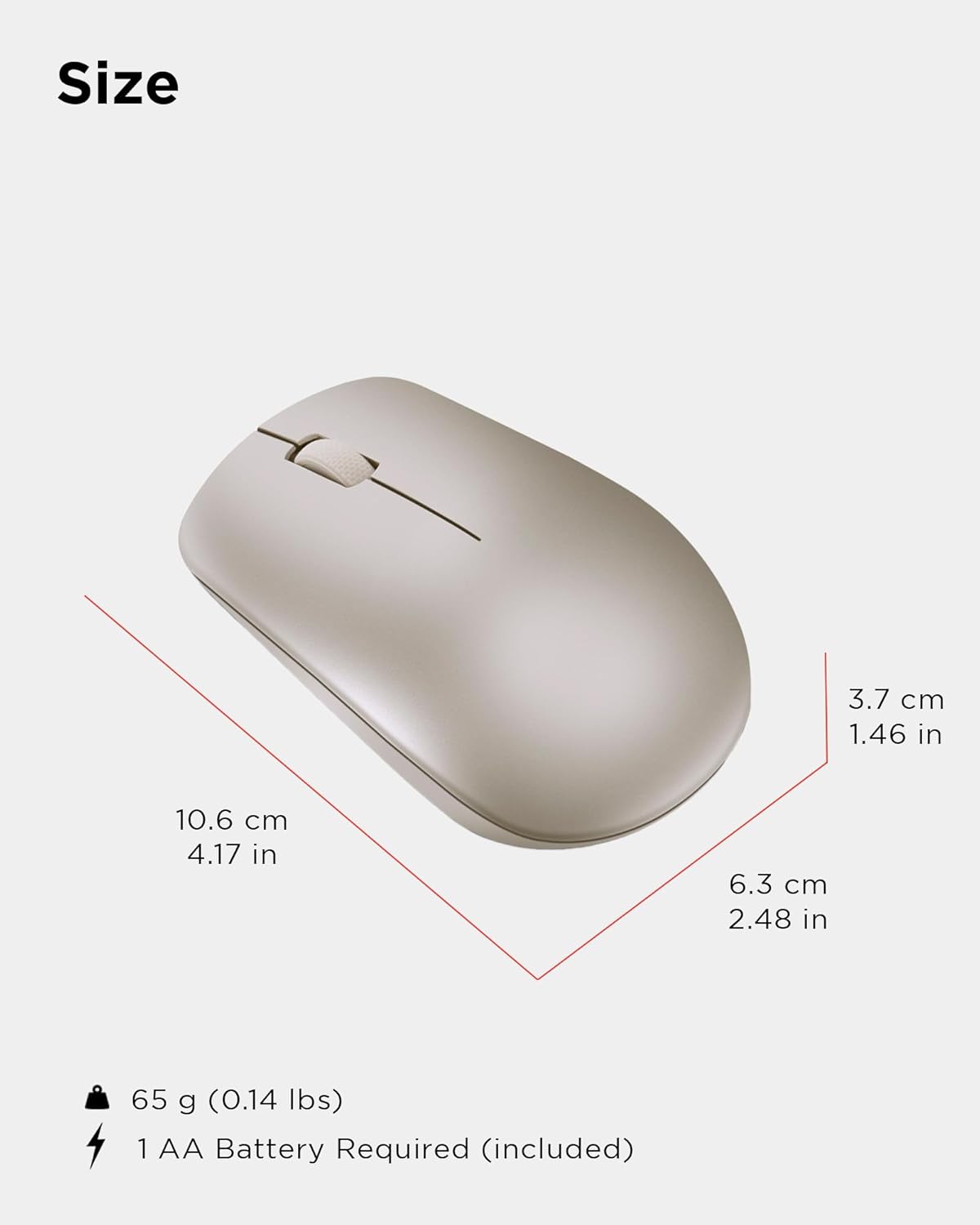
Physical dimensions and weight of the Lenovo 530 Wireless Mouse.
വാറൻ്റിയും പിന്തുണയും
For warranty information and technical support, please refer to the documentation included with your product packaging or visit the official Lenovo support website. The warranty period and terms may vary by region and retailer.
ഓൺലൈൻ പിന്തുണ: സന്ദർശിക്കുക support.lenovo.com ഡ്രൈവറുകൾ, മാനുവലുകൾ, ട്രബിൾഷൂട്ടിംഗ് ഗൈഡുകൾ എന്നിവയ്ക്കായി.
പിന്തുണയുമായി ബന്ധപ്പെടുക: Refer to your product's warranty card or the Lenovo support webപ്രാദേശിക കോൺടാക്റ്റ് നമ്പറുകൾക്കും സേവന ഓപ്ഷനുകൾക്കുമുള്ള സൈറ്റ്.