ആമുഖം
This OIVO PS5 Controller Charging Station is designed to efficiently charge two PlayStation 5 DualSense or Edge controllers simultaneously. Featuring rapid charging capabilities, clear LED indicators for charging status, and an integrated on/off switch, it provides a convenient and safe charging solution for your gaming setup. Built-in protection chips ensure safety against overcharge, overcurrent, and overvoltage, allowing for safe overnight charging.

Image: The OIVO PS5 Dual Controller Charging Station with two white PS5 DualSense controllers docked, showcasing its compact design and included power cable.

ചിത്രം: കഴിഞ്ഞുview of the charging station's key features, including 2.0-hour fast charging, clear blue and red LED indicators, a touch switch for control, and integrated safety chip for protection.
ബോക്സിൽ എന്താണുള്ളത്
എല്ലാ ഇനങ്ങളും ഉണ്ടെന്ന് ഉറപ്പാക്കാൻ പാക്കേജിന്റെ ഉള്ളടക്കങ്ങൾ പരിശോധിക്കുക:
- 1 x OIVO PS5 Controller Charging Station
- 1 x EU പവർ അഡാപ്റ്റർ
- 1 x USB-A മുതൽ USB-C കേബിൾ വരെ
- 1 x ഉപയോക്തൃ മാനുവൽ

Image: A visual representation of the charging station and its components, emphasizing the built-in safety protections against various electrical hazards.
സജ്ജമാക്കുക
Follow these steps to set up your OIVO PS5 Controller Charging Station:
- പവർ അഡാപ്റ്റർ ബന്ധിപ്പിക്കുക: Insert the USB-C end of the provided cable into the Type-C input port on the charging station. Connect the USB-A end to the EU power adapter, then plug the adapter into a wall outlet.
- Alternative Power Sources: The charging station can also be powered by a PS5 console, PC, or a USB hub using the provided USB-A to USB-C cable. However, for optimal performance and charging speed, it is recommended to use the included EU power adapter.
- Place Controllers: Gently align your PS5 DualSense or Edge controllers with the charging pins on the station. Ensure the controllers are securely seated for proper contact. The station features anti-slip pads on the bottom for stability.
- പവർ ഓൺ: Locate the On/Off switch near the USB-C port and slide it to the 'ON' position to activate the charging station.

Image: Demonstrates the flexibility of powering the charging station from different sources like a PS5 console, PC, USB hub, or a standard AC adapter.

ചിത്രം: ഒരു ക്ലോസ്-അപ്പ് view of the charging pins, highlighting the contact points where the controller connects to the station.
പ്രവർത്തന നിർദ്ദേശങ്ങൾ
Understand how to use your charging station effectively:
- ചാർജിംഗ് പ്രക്രിയ: Once controllers are correctly placed and the station is powered on, charging will begin automatically. The station is designed to fully charge two PS5 controllers in approximately 2 hours.
- LED സൂചകങ്ങൾ: The front LED display clearly indicates the charging status for each controller:
- ചുവന്ന വെളിച്ചം: കൺട്രോളർ നിലവിൽ ചാർജ് ചെയ്യുകയാണെന്ന് സൂചിപ്പിക്കുന്നു.
- നീല വെളിച്ചം: Indicates that the controller is fully charged or in standby mode.
Note: The charging light on the front of the PS5 controller charging station also features a blue strip light that blinks to indicate charging, differing from the official version.
- ഓൺ/ഓഫ് സ്വിച്ച്: An integrated on/off switch is located near the USB-C port, allowing you to easily turn off the LED lights or the entire charging process when not in use.
- RGB പ്രകാശം: The charging station features RGB accent lighting with 9 different modes, which can be controlled via a touch switch to enhance your gaming environment.
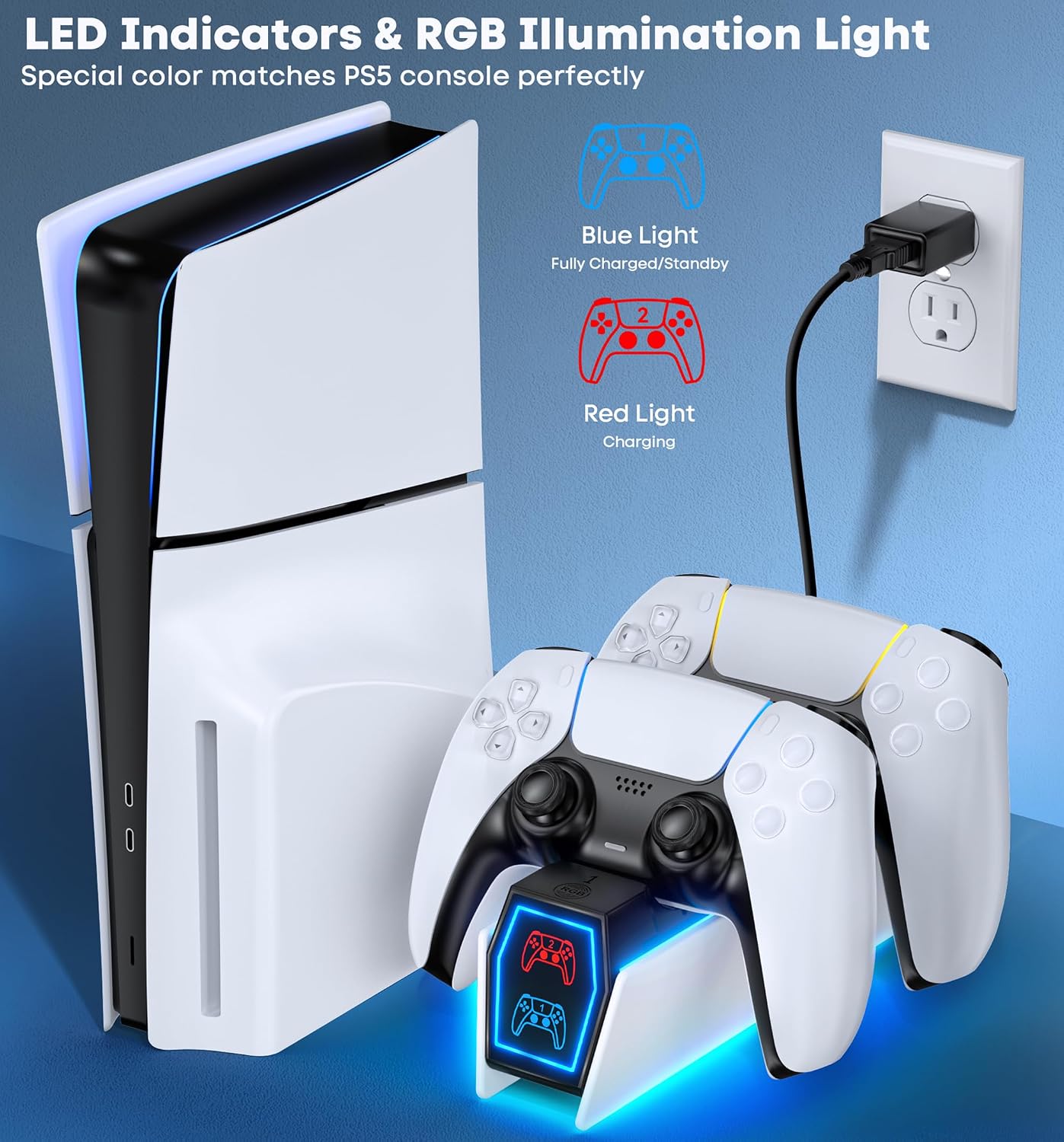
Image: The charging station positioned beside a PS5 console, clearly showing the blue and red LED indicators for charging status.

ചിത്രം: വിശദമായ ഒരു ചിത്രം view of the convenient On/Off switch located on the charging station.
മെയിൻ്റനൻസ്
നിങ്ങളുടെ ചാർജിംഗ് സ്റ്റേഷന്റെ ദീർഘായുസ്സും ഒപ്റ്റിമൽ പ്രകടനവും ഉറപ്പാക്കാൻ, ഈ അറ്റകുറ്റപ്പണി മാർഗ്ഗനിർദ്ദേശങ്ങൾ പാലിക്കുക:
- വൃത്തിയാക്കൽ: Disconnect the power adapter before cleaning. Use a soft, dry cloth to wipe the surface of the charging station. Do not use abrasive cleaners, solvents, or harsh chemicals, as these may damage the finish.
- സംഭരണം: ദീർഘനേരം ഉപയോഗിക്കാത്തപ്പോൾ, ചാർജിംഗ് സ്റ്റേഷൻ നേരിട്ട് സൂര്യപ്രകാശത്തിൽ നിന്നും കടുത്ത താപനിലയിൽ നിന്നും അകന്ന് തണുത്തതും വരണ്ടതുമായ സ്ഥലത്ത് സൂക്ഷിക്കുക.
- ശ്രദ്ധയോടെ കൈകാര്യം ചെയ്യുക: Avoid dropping or subjecting the charging station to strong impacts, as this can damage internal components.
ട്രബിൾഷൂട്ടിംഗ്
If you encounter any issues with your OIVO PS5 Controller Charging Station, please refer to the following common problems and solutions:
| പ്രശ്നം | സാധ്യമായ കാരണം | പരിഹാരം |
|---|---|---|
| Controllers are not charging. |
|
|
| LED indicators are not lighting up. |
|
|
| ചാർജിംഗ് മന്ദഗതിയിലാണ്. | Using an underpowered USB port or non-original adapter. | Use the provided EU power adapter for optimal charging speed. |
| Official PS5 controller stops charging at 70%. | Built-in protection chip in the official controller. | This is normal behavior for official PS5 controllers due to their internal protection chip. The charging station is designed to work with this feature. |
സ്പെസിഫിക്കേഷനുകൾ
| മോഡൽ നമ്പർ | NG-P5334-01 |
| ഉൽപ്പന്ന അളവുകൾ | 17.91 x 6.1 x 22.35 സെ.മീ |
| ഭാരം | 250 ഗ്രാം |
| കണക്റ്റിവിറ്റി ടെക്നോളജി | USB |
| കണക്റ്റർ തരം | EU Power Adapter |
| അനുയോജ്യമായ കൺട്രോളറുകൾ | PS5 DualSense Controller, PS5 Edge Controller |
| ഉൾപ്പെടുത്തിയ ഘടകങ്ങൾ | PS5 Charger, EU Power Adapter |
| കേബിൾ നീളം | 3 യാർഡ് |
| പ്രത്യേക സവിശേഷതകൾ | Fast Charging, Short Circuit Protection, Charging Indicator |
| നിറം | വെള്ള |
| ഇൻപുട്ട് വോളിയംtage | 5 വോൾട്ട് |
| നിർമ്മാതാവ് | OIVO |
| മാതൃരാജ്യം | ചൈന |
വാറൻ്റിയും പിന്തുണയും
OIVO is committed to providing high-quality products and excellent customer service. While specific warranty details may vary by region or retailer, OIVO strives to ensure customer satisfaction.
If you experience any issues with your OIVO PS5 Controller Charging Station or require technical assistance, please contact OIVO customer support through the retailer's platform or the official OIVO website. Please have your model number (NG-P5334-01) and purchase information ready when contacting support.


