1. ആമുഖം
This manual provides detailed instructions for the setup, operation, maintenance, and troubleshooting of your Tascam US-2x2HR USB Audio Interface. The US-2x2HR is a versatile 2-in/2-out high-resolution audio/MIDI interface designed for recording, streaming, podcasting, and music creation.
2 പ്രധാന സവിശേഷതകൾ
- 2-in/2-out USB Audio Interface: Connect two inputs and two outputs for flexible recording and playback.
- ഉയർന്ന മിഴിവുള്ള ഓഡിയോ: Supports audio formats up to 24-bit/192 kHz for pristine sound quality.
- Ultra-HDDA Mic Preamps: Equipped with two combo (XLR) inputs featuring Ultra-HDDA mic preamps and +48V phantom power for condenser microphones.
- ബഹുമുഖ ഇൻപുട്ടുകൾ: Two combo (TRS) line inputs with guitar input support for direct instrument connection.
- Low-Latency Driver: Improved TASCAM driver with selectable buffer size (from 4 samples on Windows) for stable, low-latency performance.
- Zero-Latency Direct Monitoring: Allows real-time monitoring of input signals before they reach the computer, eliminating latency during recording.
- മിഡി ഇൻ/ഔട്ട്: Integrated MIDI input and output for connecting MIDI keyboards, drum machines, and other controllers.
- Stereo/Mono Selectable Loopback Function: Enables internal routing of audio for streaming and podcasting applications.
- USB ടൈപ്പ്-സി കണക്ഷൻ: Modern and reliable connectivity to your computer or compatible iOS device.
- റോബസ്റ്റ് മെറ്റൽ സിasing: Durable metal construction with aluminum side panels ensures stability and longevity.
- സോഫ്റ്റ്വെയർ ബണ്ടിൽ: Includes Cubase LE, Sample Tank 4 SE, and a 3-month Auto-Tune Unlimited subscription.
3. സജ്ജീകരണ ഗൈഡ്
3.1 പായ്ക്ക് ചെയ്യലും പ്രാരംഭ പരിശോധനയും
Carefully remove the US-2x2HR from its packaging. Verify that all components are present and undamaged. Retain the packaging for future transport or storage.
3.2 ഡ്രൈവർ ഇൻസ്റ്റലേഷൻ
Before connecting the US-2x2HR to your computer, download and install the latest drivers from the official Tascam website. This ensures optimal performance and compatibility with your operating system (Windows/macOS). For Windows users, the TASCAM native driver offers selectable buffer sizes for low-latency operation.
3.3 നിങ്ങളുടെ കമ്പ്യൂട്ടറുമായി ബന്ധിപ്പിക്കുന്നു
Connect the US-2x2HR to your computer using the supplied USB Type-C cable. The interface is bus-powered, meaning it draws power directly from the USB connection. For iOS devices (iPad/iPhone), an optional battery pack or AC adapter may be required for power.

Figure 3.3.1: Connecting the USB Type-C cable to the interface.
3.4 മൈക്രോഫോണുകളും ഉപകരണങ്ങളും ബന്ധിപ്പിക്കുന്നു
The US-2x2HR features two combo inputs (IN1 and IN2) on the front panel, which accept both XLR and 1/4-inch TRS/TS connectors.
- XLR ഇൻപുട്ടുകൾ: Use XLR cables for microphones. If using condenser microphones, activate the +48V phantom power switch located on the front panel.
- 1/4-inch TRS/TS Inputs: Use 1/4-inch cables for line-level instruments (keyboards, drum machines) or guitars. Use the MIC/LINE/INST switch to select the appropriate input type. Set to 'INST' for guitars and basses.
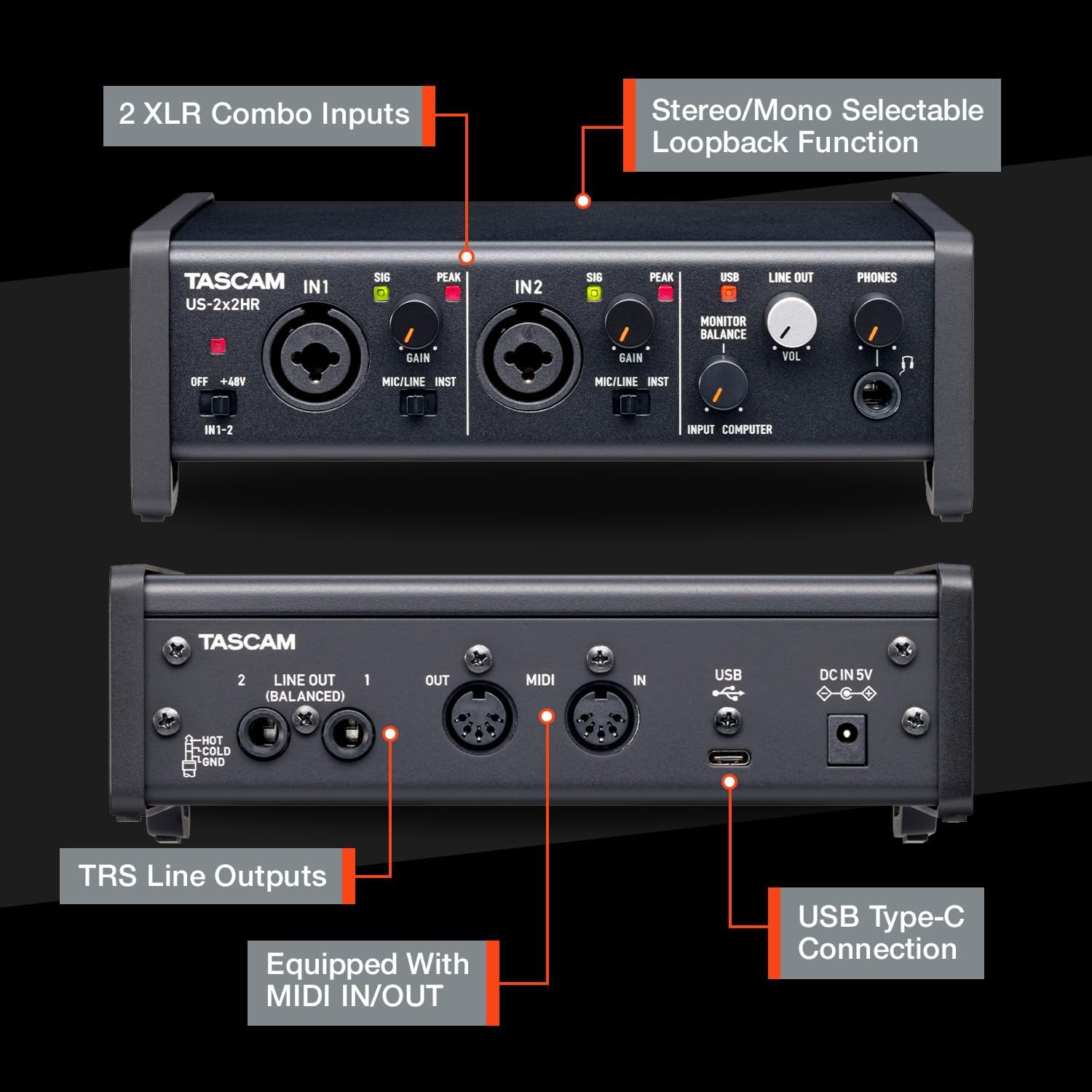
Figure 3.4.1: Front and rear panel connections and controls.
3.5 Connecting Headphones and Monitors
- ഹെഡ്ഫോണുകൾ: Plug your headphones into the 1/4-inch PHONES jack on the front panel. Adjust the headphone volume using the VOL knob.
- Studio Monitors: Connect your active studio monitors to the LINE OUT (BALANCED) TRS jacks on the rear panel.

Figure 3.5.1: Rear panel connections including balanced line outputs and MIDI ports.
3.6 MIDI കണക്ഷനുകൾ
The US-2x2HR includes MIDI IN and OUT ports on the rear panel. Use standard 5-pin DIN MIDI cables to connect external MIDI devices such as keyboards, synthesizers, or drum machines. This allows for synchronization and control of your MIDI equipment.

Figure 3.6.1: MIDI IN/OUT ports for connecting external MIDI devices.
4. പ്രവർത്തന നിർദ്ദേശങ്ങൾ
4.1 Input Gain Adjustment
Use the GAIN knobs for IN1 and IN2 to adjust the input level of your microphones or instruments. The SIG (Signal) indicator will light up when an input signal is detected, and the PEAK indicator will light up if the signal is too high, indicating potential clipping. Adjust the gain to achieve a strong signal without peaking.
4.2 ഫാന്റം പവർ (+48V)
The +48V switch activates phantom power for condenser microphones connected to the XLR inputs. Ensure this is only enabled when using microphones that require phantom power. Turn off phantom power when connecting dynamic microphones or line-level devices.
4.3 നേരിട്ടുള്ള നിരീക്ഷണം
The US-2x2HR features a direct monitoring function to eliminate latency during recording. This allows you to hear your input signal directly through the interface without going through your computer's software. Use the MONITOR BALANCE knob to blend between the input signal (INPUT) and the computer playback (COMPUTER) in your headphones or monitors.

Figure 4.3.1: Comparison of normal and zero-latency direct monitoring routes.
4.4 ലൂപ്പ്ബാക്ക് ഫംഗ്ഷൻ
The loopback function allows you to record or stream the audio output from your computer along with your live input signals. This is particularly useful for podcasts, live streams, and online collaborations. The loopback function can be set to stereo or mono via the Tascam driver settings panel.

Figure 4.4.1: Tascam driver settings panel for configuring buffer size and loopback.
4.5 സോഫ്റ്റ്വെയർ ഉപയോഗം
The US-2x2HR comes bundled with professional software including Cubase LE, Sample Tank 4 SE, and a 3-month Auto-Tune Unlimited subscription. Install these applications on your computer to begin recording, mixing, and processing your audio. Refer to the individual software manuals for detailed usage instructions.

Figure 4.5.1: Bundled software for recording and production.
5. പരിപാലനം
To ensure the longevity and optimal performance of your Tascam US-2x2HR, follow these maintenance guidelines:
- വൃത്തിയാക്കൽ: Use a soft, dry cloth to clean the exterior of the unit. Avoid abrasive cleaners, solvents, or waxes. Do not allow liquids to enter the unit.
- സംഭരണം: ഉപയോഗത്തിലില്ലാത്തപ്പോൾ, നേരിട്ടുള്ള സൂര്യപ്രകാശവും തീവ്രമായ താപനിലയും ഏൽക്കാത്ത തണുത്തതും വരണ്ടതുമായ സ്ഥലത്ത് ഇന്റർഫേസ് സൂക്ഷിക്കുക.
- കേബിൾ മാനേജുമെന്റ്: Avoid excessive bending or pulling of cables. Ensure connections are secure but not overly tight.
- ഫേംവെയർ അപ്ഡേറ്റുകൾ: Periodically check the Tascam website for any available firmware updates for your device. Follow the instructions provided by Tascam for safe updating.
6. പ്രശ്നപരിഹാരം
If you encounter issues with your US-2x2HR, refer to the following common troubleshooting steps:
- No Power/No Connection:
- Ensure the USB cable is securely connected to both the interface and your computer.
- നിങ്ങളുടെ കമ്പ്യൂട്ടറിൽ മറ്റൊരു USB പോർട്ട് പരീക്ഷിക്കുക.
- ഒരു യുഎസ്ബി ഹബ് ഉപയോഗിക്കുകയാണെങ്കിൽ, കമ്പ്യൂട്ടറിലേക്ക് നേരിട്ട് കണക്റ്റുചെയ്യാൻ ശ്രമിക്കുക.
- Verify that the correct drivers are installed and recognized by your operating system.
- No Sound Input:
- Check that the input source (microphone, instrument) is properly connected and powered on.
- Adjust the GAIN knob for the corresponding input.
- Ensure the MIC/LINE/INST switch is set correctly for your input source.
- If using a condenser microphone, verify that +48V phantom power is enabled.
- Check your Digital Audio Workstation (DAW) or recording software settings to ensure the US-2x2HR is selected as the input device and the correct input channel is armed.
- സൗണ്ട് ഔട്ട്പുട്ട് ഇല്ല:
- Check headphone and monitor connections.
- Adjust the PHONES VOL knob and the MONITOR BALANCE knob.
- Ensure your computer's sound output is directed to the US-2x2HR.
- Verify that your DAW or playback software is routing audio to the US-2x2HR outputs.
- ഉയർന്ന ലേറ്റൻസി:
- Ensure the latest Tascam drivers are installed.
- Adjust the buffer size in the Tascam driver settings panel (lower buffer size reduces latency but requires more CPU power).
- Utilize the direct monitoring function to bypass software latency for input signals.
- Unexpected Phantom Power Behavior:
- Some users have reported that phantom power may be active on startup even if the switch is in the OFF position. If you experience this, toggle the +48V switch ON and then OFF again to ensure it is disengaged, especially when using sensitive equipment like ribbon microphones.
7 സ്പെസിഫിക്കേഷനുകൾ
| ഇനത്തിൻ്റെ ഭാരം | 1 പൗണ്ട് |
| ഉൽപ്പന്ന അളവുകൾ | 8 x 8 x 4 ഇഞ്ച് |
| ഇനം മോഡൽ നമ്പർ | US2X2HR |
| വർണ്ണ നാമം | കറുപ്പ് |
| അനുയോജ്യമായ ഉപകരണങ്ങൾ | Personal Computer, iOS Devices (with optional power) |
| ഹാർഡ്വെയർ ഇന്റർഫേസ് | USB |
| പിന്തുണയ്ക്കുന്ന സോഫ്റ്റ്വെയർ | TASCAM, Cubase LE, Sample Tank 4 SE, Auto-Tune Unlimited |
| മിക്സർ ചാനൽ അളവ് | 2 |
| ഓപ്പറേറ്റിംഗ് സിസ്റ്റം | Windows, macOS, iOS |
| കണക്റ്റിവിറ്റി ടെക്നോളജി | USB |
| ചാനലുകളുടെ എണ്ണം | 2 |
| ഓഡിയോ റെസല്യൂഷൻ | 24-ബിറ്റ്/192 kHz വരെ |
8. വാറൻ്റി വിവരങ്ങൾ
The Tascam US-2x2HR is covered by a manufacturer's warranty. Please refer to the warranty card included with your product or visit the official Tascam webവാറന്റി കവറേജ്, ദൈർഘ്യം, സേവന നടപടിക്രമങ്ങൾ എന്നിവയെക്കുറിച്ചുള്ള വിശദമായ നിബന്ധനകൾക്കും വ്യവസ്ഥകൾക്കും സൈറ്റ് സന്ദർശിക്കുക.
9. പിന്തുണ
For technical assistance, driver downloads, firmware updates, or further inquiries, please visit the official Tascam support webസൈറ്റ്. നിങ്ങൾക്ക് അവിടെ പതിവുചോദ്യങ്ങളും ഉപഭോക്തൃ സേവനത്തിനായുള്ള ബന്ധപ്പെടാനുള്ള വിവരങ്ങളും കണ്ടെത്താനാകും.
Official Tascam Webസൈറ്റ്: tascam.com


