1. ആമുഖം
Thank you for choosing the ROIDMI X30 Pro Cordless Vacuum Cleaner. This powerful and versatile cleaning device is designed to provide efficient and convenient cleaning for your home. Featuring a 120,000 rpm digital motor, a six-level HEPA filtration system, and a smart OLED color screen, the X30 Pro offers advanced cleaning performance and real-time information. This manual provides essential instructions for assembly, operation, maintenance, and troubleshooting to ensure optimal performance and longevity of your device.
2. സുരക്ഷാ നിർദ്ദേശങ്ങൾ
Please read all safety warnings and instructions before using this appliance.
- ഈ ഉപകരണം ഗാർഹിക ഉപയോഗത്തിന് മാത്രമുള്ളതാണ്. വാണിജ്യ അല്ലെങ്കിൽ വ്യാവസായിക ആവശ്യങ്ങൾക്ക് ഇത് ഉപയോഗിക്കരുത്.
- Do not use the vacuum cleaner to pick up water or other liquids, hot ashes, large sharp objects, or hazardous materials.
- മുടി, അയഞ്ഞ വസ്ത്രങ്ങൾ, വിരലുകൾ, ശരീരത്തിൻ്റെ എല്ലാ ഭാഗങ്ങളും തുറസ്സുകളിൽ നിന്നും ചലിക്കുന്ന ഭാഗങ്ങളിൽ നിന്നും അകറ്റി നിർത്തുക.
- Ensure the dustbin and filters are correctly installed before use.
- Do not operate the vacuum cleaner if it is damaged or malfunctioning. Contact customer support for assistance.
- Use only the original charger and accessories provided by ROIDMI.
- പ്രധാന യൂണിറ്റ് വെള്ളത്തിലോ മറ്റ് ദ്രാവകങ്ങളിലോ മുക്കരുത്.
- കുട്ടികളെ മേൽനോട്ടം വഹിക്കുകയും അവർ ഉപകരണവുമായി കളിക്കുന്നില്ലെന്ന് ഉറപ്പാക്കുകയും ചെയ്യുക.
- ഉപയോഗത്തിലില്ലാത്തപ്പോഴും വൃത്തിയാക്കുന്നതിനോ അറ്റകുറ്റപ്പണികൾ നടത്തുന്നതിനോ മുമ്പും പവർ ഔട്ട്ലെറ്റിൽ നിന്ന് ചാർജർ അൺപ്ലഗ് ചെയ്യുക.
3. പാക്കേജ് ഉള്ളടക്കം
പാക്കേജിൽ എല്ലാ ഘടകങ്ങളും ഉണ്ടെന്ന് ഉറപ്പാക്കുക:
- പ്രധാന വാക്വം യൂണിറ്റ്
- വിപുലീകരണ വടി
- Nex-V All-Surface Brush Head
- Pet and Mattress Brush
- വിള്ളൽ ഉപകരണം
- പൊടി പൊടിക്കുന്ന ബ്രഷ്
- MOP Accessory (for wet cleaning)
- ചുമരിൽ ഘടിപ്പിച്ച ചാർജിംഗ് ഡോക്ക്
- പവർ അഡാപ്റ്റർ
- HEPA ഫിൽറ്റർ (മുൻകൂട്ടി ഇൻസ്റ്റാൾ ചെയ്തത്)
- ഉപയോക്തൃ മാനുവൽ
4. ഉൽപ്പന്നം കഴിഞ്ഞുview
Familiarize yourself with the main components of your ROIDMI X30 Pro.

Image 1: Fully assembled ROIDMI X30 Pro Cordless Vacuum Cleaner, showing the main unit, extension rod, and floor brush.

Image 2: Close-up of the main vacuum unit, highlighting the ergonomic handle, dustbin, and motor housing.
OLED Color Screen
The integrated OLED color screen provides real-time information, including:
- ബാറ്ററി നില
- Current cleaning mode
- Dustbin full indicator
- ഫിൽട്ടർ റീപ്ലേസ്മെൻ്റ് റിമൈൻഡർ
- Calorie consumption during cleaning (via Bluetooth app)
5. സജ്ജീകരണം
5.1 അസംബ്ലി
- സുരക്ഷിതമായി ക്ലിക്ക് ചെയ്യുന്നത് വരെ എക്സ്റ്റൻഷൻ വടി പ്രധാന വാക്വം യൂണിറ്റിലേക്ക് തിരുകുക.
- Attach the desired cleaning head (e.g., Nex-V brush) to the other end of the extension rod until it clicks. For direct handheld use, attach accessories directly to the main unit.
5.2 പ്രാരംഭ ചാർജിംഗ്
ആദ്യ ഉപയോഗത്തിന് മുമ്പ്, വാക്വം ക്ലീനർ പൂർണ്ണമായും ചാർജ് ചെയ്യുക.
- Mount the charging dock on a wall in a convenient location, ensuring it is near a power outlet.
- ചാർജിംഗ് ഡോക്കിലേക്ക് പവർ അഡാപ്റ്റർ ബന്ധിപ്പിച്ച് ഒരു പവർ ഔട്ട്ലെറ്റിലേക്ക് പ്ലഗ് ചെയ്യുക.
- Place the vacuum cleaner onto the charging dock. The OLED screen will indicate charging status. A full charge takes approximately 2.5 hours.
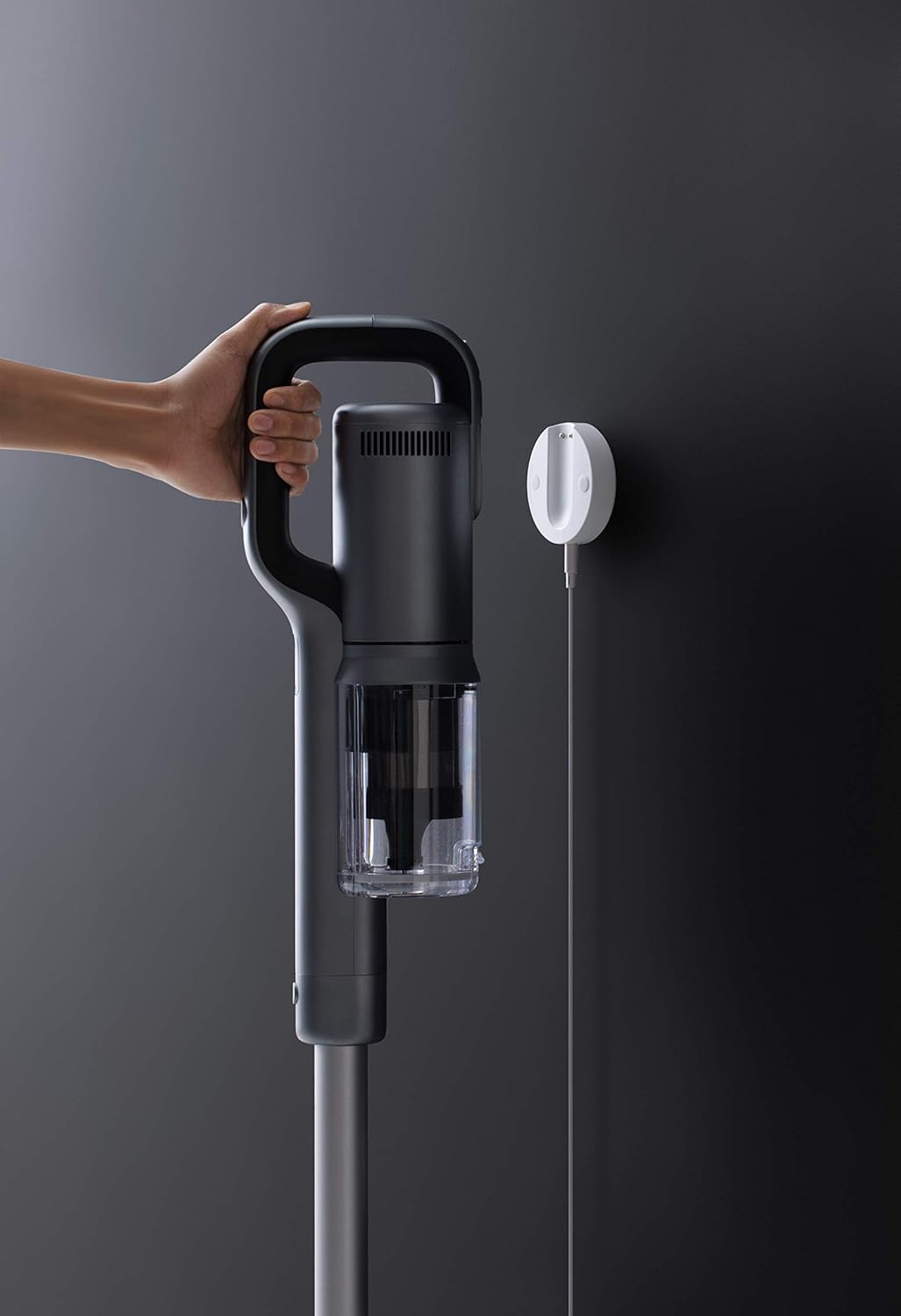
Image 3: The ROIDMI X30 Pro charging on its wall-mounted dock, connected to a power source.
5.3 Bluetooth Connection (Optional)
For enhanced features and real-time data, connect your ROIDMI X30 Pro to the ROIDMI app via Bluetooth.
- Download the 'ROIDMI' app from your smartphone's app store.
- നിങ്ങളുടെ സ്മാർട്ട്ഫോണിൽ ബ്ലൂടൂത്ത് പ്രവർത്തനക്ഷമമാക്കിയിട്ടുണ്ടെന്ന് ഉറപ്പാക്കുക.
- Open the ROIDMI app and follow the on-screen instructions to pair your vacuum cleaner.
6. പ്രവർത്തന നിർദ്ദേശങ്ങൾ
6.1 പവർ ഓൺ/ഓഫ്, മോഡ് തിരഞ്ഞെടുക്കൽ
- Press the power button on the main unit to turn the vacuum cleaner on. It will start in standard cleaning mode.
- Press the mode selection button to cycle through different power modes (e.g., Standard, Max). The OLED screen will display the current mode.
- വാക്വം ക്ലീനർ ഓഫാക്കാൻ വീണ്ടും പവർ ബട്ടൺ അമർത്തുക.
6.2 Using Cleaning Attachments
Select the appropriate attachment for your cleaning task:
- Nex-V All-Surface Brush Head: Ideal for both hard floors and carpets. Its innovative hydrophobic fiber design eliminates the need to switch brush rolls between different surfaces.
- Pet and Mattress Brush: Designed for deep cleaning of upholstery, mattresses, and pet hair removal from fabrics.
- വിള്ളൽ ഉപകരണം: ഇടുങ്ങിയ വിടവുകൾ, കോണുകൾ, എത്തിപ്പെടാൻ പ്രയാസമുള്ള സ്ഥലങ്ങൾ എന്നിവയ്ക്ക് അനുയോജ്യം.
- ഡസ്റ്റിംഗ് ബ്രഷ്: Suitable for delicate surfaces, curtains, and shelves.
- MOP Accessory: For wet cleaning. Attach this accessory to the main unit or extension rod as instructed in its specific manual. Ensure the dustbin is empty before using the MOP function.
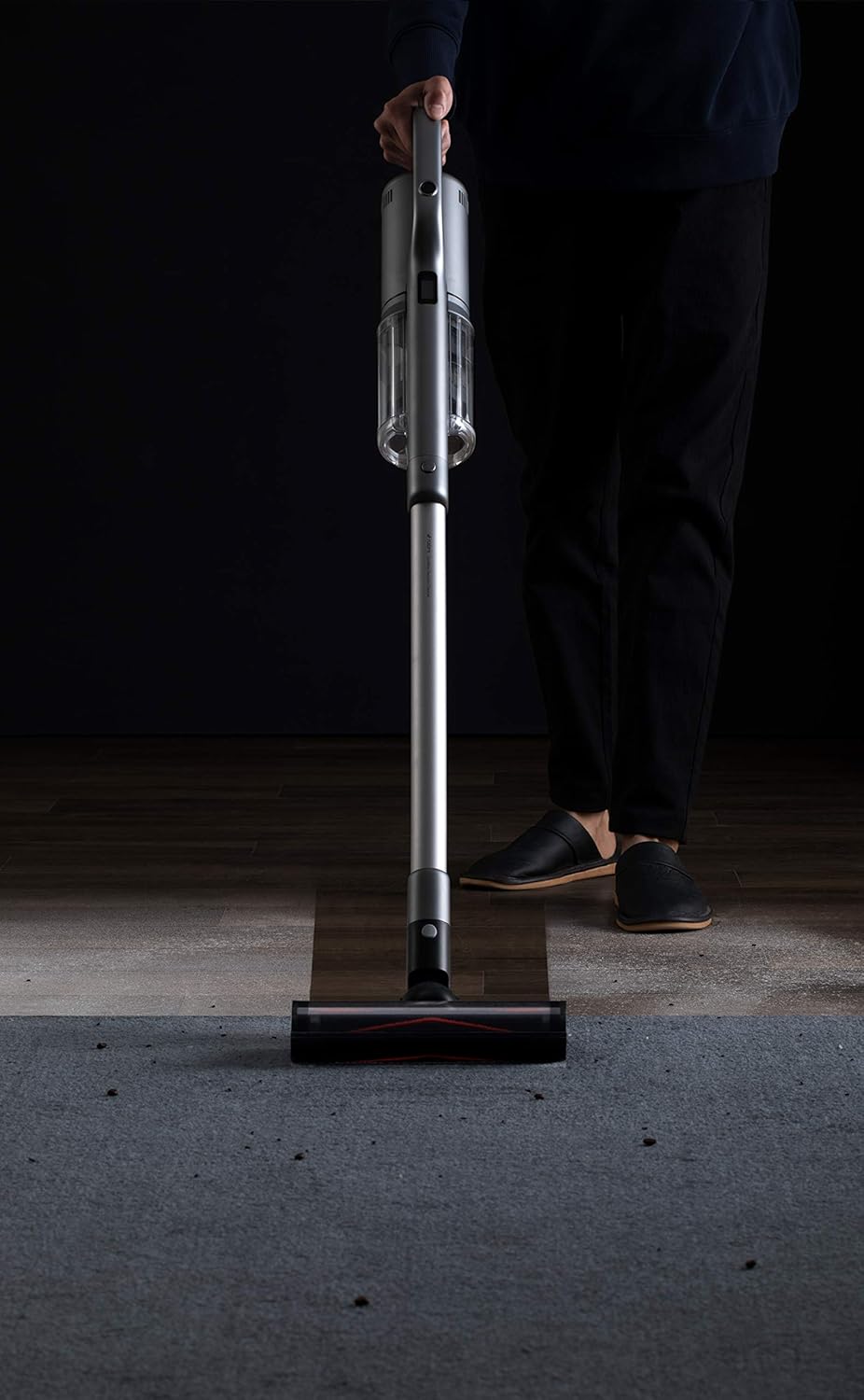
Image 4: A user operating the ROIDMI X30 Pro on a carpeted floor, demonstrating its ease of use.

Image 5: The flexible brush head of the ROIDMI X30 Pro reaching under low furniture for thorough cleaning.

Image 6: The ROIDMI X30 Pro in operation, with the OLED screen clearly displaying operational information.
7. പരിപാലനം
Regular maintenance ensures the longevity and optimal performance of your ROIDMI X30 Pro.
7.1 ഡസ്റ്റ്ബിൻ ശൂന്യമാക്കൽ
Empty the dustbin when the 'dustbin full' indicator appears on the OLED screen or after each use.
- വാക്വം ക്ലീനർ ഓഫ് ചെയ്തിട്ടുണ്ടെന്ന് ഉറപ്പാക്കുക.
- പ്രധാന യൂണിറ്റിൽ നിന്ന് വേർപെടുത്താൻ ഡസ്റ്റ്ബിൻ റിലീസ് ബട്ടൺ അമർത്തുക.
- Hold the dustbin over a trash can and open the bottom flap to release the debris.
- ഫ്ലാപ്പ് അടച്ച് ഡസ്റ്റ്ബിൻ ക്ലിക്ക് ചെയ്യുന്നതുവരെ പ്രധാന യൂണിറ്റിലേക്ക് വീണ്ടും ഘടിപ്പിക്കുക.
7.2 HEPA ഫിൽട്ടർ വൃത്തിയാക്കൽ
Clean the HEPA filter regularly, especially when suction power decreases or the 'filter change' indicator appears.
- മുകളിൽ വിവരിച്ചതുപോലെ മാലിന്യക്കൂമ്പാരം നീക്കം ചെയ്യുക.
- HEPA ഫിൽറ്റർ ശ്രദ്ധാപൂർവ്വം ഡസ്റ്റ്ബിന്നിൽ നിന്ന് നീക്കം ചെയ്യുക.
- പൊടി നീക്കം ചെയ്യാൻ ഒരു ചവറ്റുകുട്ടയിൽ ഫിൽട്ടർ സൌമ്യമായി ടാപ്പ് ചെയ്യുക.
- വെള്ളം വ്യക്തമാകുന്നതുവരെ ഫിൽട്ടർ ഒഴുകുന്ന വെള്ളത്തിനടിയിൽ കഴുകുക. ഡിറ്റർജന്റുകൾ ഉപയോഗിക്കരുത്.
- Allow the filter to air dry completely for at least 24 hours before reinserting it. Do not use a dryer or direct heat.
7.3 ബ്രഷ് റോൾ വൃത്തിയാക്കൽ
കെട്ടിക്കിടക്കുന്ന മുടിയോ അവശിഷ്ടങ്ങളോ ഉണ്ടോ എന്ന് ഇടയ്ക്കിടെ ബ്രഷ് റോളിൽ പരിശോധിക്കുക.
- Turn off the vacuum cleaner and detach the brush head.
- ബ്രഷ് റോൾ റിലീസ് മെക്കാനിസം (സാധാരണയായി ഒരു ലാച്ച് അല്ലെങ്കിൽ ബട്ടൺ) കണ്ടെത്തി ബ്രഷ് റോൾ നീക്കം ചെയ്യുക.
- കെട്ടിക്കിടക്കുന്ന മുടിയോ നാരുകളോ മുറിച്ച് നീക്കം ചെയ്യാൻ കത്രികയോ ക്ലീനിംഗ് ടൂളോ ഉപയോഗിക്കുക.
- ബ്രഷ് റോൾ വീണ്ടും തിരുകുക, അത് സ്ഥലത്ത് ഉറപ്പിക്കുക.
8. പ്രശ്നപരിഹാരം
If you encounter issues with your ROIDMI X30 Pro, refer to the following common problems and solutions:
| പ്രശ്നം | സാധ്യമായ കാരണം | പരിഹാരം |
|---|---|---|
| വാക്വം ഓണാക്കുന്നില്ല | ബാറ്ററി ചാർജ് കുറവാണ്; പവർ ബട്ടൺ ശരിയായി അമർത്തിയിട്ടില്ല. | Charge the battery; Ensure power button is fully pressed |
| ദുർബലമായ സക്ഷൻ പവർ | Dustbin full; Clogged filter; Blocked brush head/tube | Empty dustbin; Clean/replace filter; Remove blockages |
| ബ്രഷ് റോൾ കറങ്ങുന്നില്ല | Tangled hair/debris; Brush roll not installed correctly | Clean brush roll; Reinstall brush roll securely |
| OLED സ്ക്രീൻ പ്രദർശിപ്പിക്കുന്നില്ല | Device off; Malfunction | Turn on device; If issue persists, contact support |
| MOP accessory not dispensing water | Water tank empty; Nozzle clogged | Refill water tank; Clean nozzle |
If the problem persists after attempting these solutions, please contact ROIDMI customer support.
9 സ്പെസിഫിക്കേഷനുകൾ
| ഫീച്ചർ | സ്പെസിഫിക്കേഷൻ |
|---|---|
| ബ്രാൻഡ് | ROIDMI |
| മോഡൽ നമ്പർ | XCQ28RM |
| മോട്ടോർ സ്പീഡ് | 120,000 rpm (Engine-X 2.0 Digital Motor) |
| പ്രവർത്തനസമയം | Up to 70 minutes (1 hour 10 minutes) |
| ചാർജിംഗ് സമയം | Approx. 2.5 hours (wireless fast charge) |
| ഫിൽട്ടറേഷൻ സിസ്റ്റം | Six-level HEPA filtration with ZiWei sterilization |
| പ്രദർശിപ്പിക്കുക | OLED Color Screen |
| കണക്റ്റിവിറ്റി | Bluetooth (for ROIDMI App) |
| അളവുകൾ (L x W x H) | 119.1 x 25.09 x 16.04 സെ.മീ |
| നിറം | ചാരനിറം |
| പ്രത്യേക സവിശേഷതകൾ | HEPA, Portable, Pet Brush, MOP Accessory compatible |
| ഉപരിതല ശുപാർശ | Carpet, All floors |
| പവർ ഉറവിടം | ബാറ്ററി പവർ |
| ഫോം ഫാക്ടർ | വടി |
10. വാറൻ്റി വിവരങ്ങൾ
ROIDMI products are covered by a limited warranty. Please refer to the warranty card included in your product packaging or visit the official ROIDMI webനിങ്ങളുടെ പ്രദേശത്തിന് പ്രത്യേകമായുള്ള വിശദമായ വാറന്റി നിബന്ധനകൾക്കും വ്യവസ്ഥകൾക്കും സൈറ്റ് സന്ദർശിക്കുക. വാറന്റി ക്ലെയിമുകൾക്കുള്ള വാങ്ങലിന്റെ തെളിവായി നിങ്ങളുടെ വാങ്ങൽ രസീത് സൂക്ഷിക്കുക.
11. ഉപഭോക്തൃ പിന്തുണ
For technical assistance, spare parts, or any inquiries regarding your ROIDMI X30 Pro, please contact ROIDMI customer support through their official website or the contact information provided in your product documentation. When contacting support, please have your model number (XCQ28RM) and purchase details ready.


