1. ആമുഖം
The Keychron K10 is a versatile 104-key full-size mechanical keyboard designed for enhanced productivity and gaming. It offers seamless connectivity across multiple operating systems, including Mac and Windows, through both Bluetooth wireless and USB Type-C wired modes. Featuring durable Gateron G Pro Brown switches and a white LED backlight, the K10 provides a comfortable and responsive typing experience for various uses.

Image: The Keychron K10 full-size mechanical keyboard, showcasing its complete layout and design.
2 പ്രധാന സവിശേഷതകൾ
- Full-Size 104-Key Layout: Includes a dedicated number pad for maximum productivity, suitable for both work and gaming.
- Dual Connectivity Modes: Connects wirelessly via Broadcom Bluetooth 5.1 to up to three devices simultaneously, or use the reliable USB Type-C wired connection.
- Mac & Windows Compatibility: Designed with a unique Mac layout, it also includes all essential multimedia and function keys for Windows. Extra keycaps are provided for both operating systems, allowing for easy customization.
- Gateron G Pro Brown Switches: Offers a tactile typing experience with a gentle sound level, providing unrivaled responsiveness and a lifespan of up to 50 million keystrokes.
- വെളുത്ത LED ബാക്ക്ലൈറ്റ്: Enhances visibility and aesthetics, especially in low-light conditions.
- ദീർഘകാല ബാറ്ററി: Equipped with a 4000 mAh battery, providing up to 240 hours of usage with the backlight off.
- എർഗണോമിക് ഡിസൈൻ: Features two-level adjustable feet (6° and 9°) and an inclined bottom frame for comfortable, long-lasting typing.
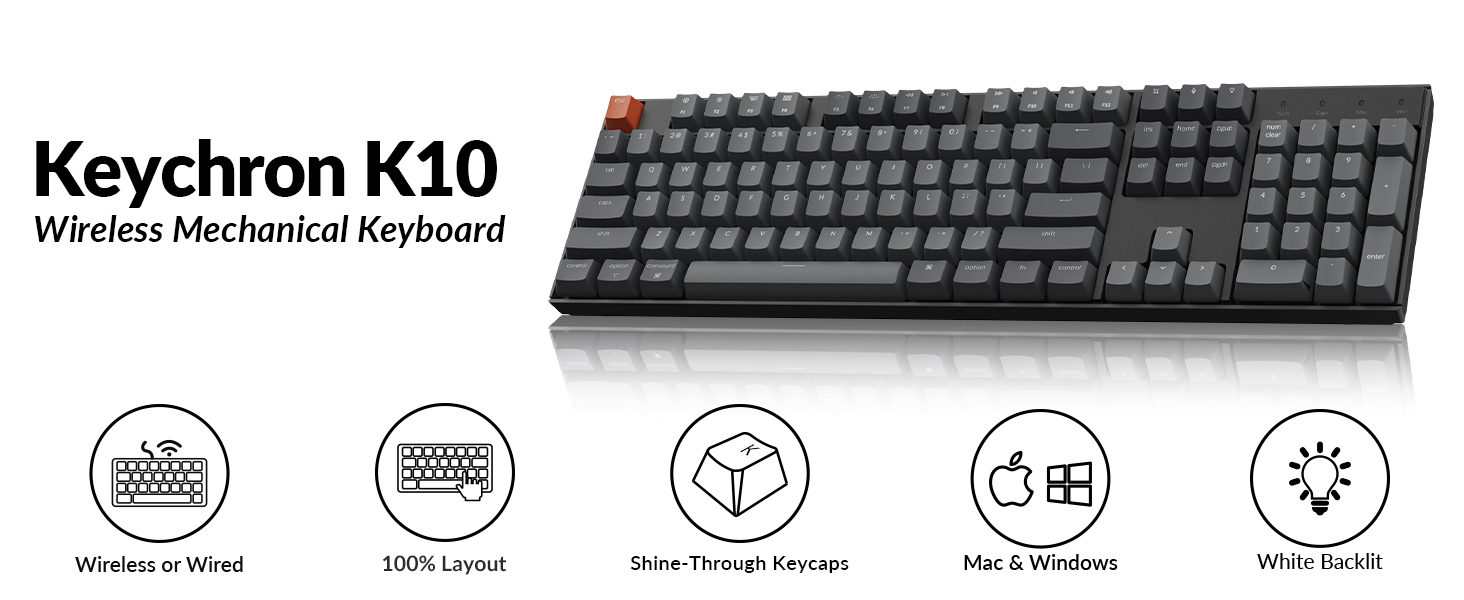
Image: Visual summary of Keychron K10 features, including wireless/wired, 100% layout, shine-through keycaps, Mac & Windows compatibility, and white backlight.
3. സജ്ജീകരണം
3.1. ബ്ലൂടൂത്ത് കണക്ഷൻ
- Locate the mode switch on the side of the keyboard.
- Slide the toggle switch to the ബ്ലൂടൂത്ത് സ്ഥാനം.
- പിടിക്കുക Fn + 1 keys simultaneously until the Bluetooth indicator light flashes repeatedly. This indicates the keyboard is in pairing mode.
- On your device (smartphone, tablet, or laptop), enable Bluetooth.
- ഇതിനായി തിരയുക "Keychron K10" in the list of available Bluetooth devices and select it to connect.
- To switch between paired devices (up to 3), press Fn + 1, Fn + 2, അല്ലെങ്കിൽ Fn + 3.

Image: Diagram illustrating the steps for connecting the Keychron K10 via Bluetooth to various devices.

Image: The Keychron K10 keyboard connected to a desktop monitor, tablet, and smartphone, demonstrating its multi-device connectivity.
3.2. വയർഡ് കണക്ഷൻ
For a direct and stable connection, use the provided USB Type-C cable.
- Locate the mode switch on the side of the keyboard.
- Slide the toggle switch to the കേബിൾ സ്ഥാനം.
- Connect one end of the USB Type-C cable to the keyboard's USB-C port.
- നിങ്ങളുടെ കമ്പ്യൂട്ടറിൽ ലഭ്യമായ USB പോർട്ടിലേക്ക് കേബിളിന്റെ മറ്റേ അറ്റം ബന്ധിപ്പിക്കുക.
- കീബോർഡ് യാന്ത്രികമായി തിരിച്ചറിയപ്പെടുകയും ഉപയോഗത്തിന് തയ്യാറാകുകയും ചെയ്യും.

Image: The Keychron K10 keyboard connected via USB-C cable to a computer, illustrating both wired and wireless connectivity options.
3.3. ഓപ്പറേറ്റിംഗ് സിസ്റ്റം സ്വിച്ച്
The Keychron K10 supports both Mac and Windows operating systems. Use the dedicated OS switch located on the side of the keyboard to select the correct layout.
- Locate the OS switch next to the connectivity mode switch.
- ഇതിലേക്ക് സ്വിച്ച് സ്ലൈഡുചെയ്യുക മാക് for macOS devices or വിൻഡോസ് for Windows devices.
- For optimal experience, replace keycaps (e.g., Alt/Command) using the provided keycap puller as needed.

Image: Close-up of the side of the Keychron K10 keyboard, showing the physical switch for selecting between Windows and macOS modes.
4. കീബോർഡ് പ്രവർത്തിപ്പിക്കൽ
4.1. ബാക്ക്ലൈറ്റ് നിയന്ത്രണം
The Keychron K10 features a white LED backlight. Use the following key combinations to control it:
- അമർത്തുക Fn + F5 ബാക്ക്ലൈറ്റ് തെളിച്ചം കുറയ്ക്കാൻ.
- അമർത്തുക Fn + F6 ബാക്ക്ലൈറ്റ് തെളിച്ചം വർദ്ധിപ്പിക്കുന്നതിന്.
- അമർത്തുക Fn + ലൈറ്റ് ബൾബ് കീ (usually F12 or a dedicated key) to cycle through backlight effects.

Image: The Keychron K10 keyboard with its white LED backlight illuminated, showcasing the uniform lighting across all keys.
4.2. മൾട്ടിമീഡിയ, ഫംഗ്ഷൻ കീകൾ
The K10 includes dedicated multimedia and function keys for convenience. These keys are typically located on the F-row.
- F1-F12: Function as multimedia controls (e.g., volume, play/pause) or standard F-keys depending on the operating system and settings.
- സമർപ്പിത കീകൾ: Includes a Screenshot Key, Siri (Cortana) Key, and Screen Lock Key for quick access to system functions.

Image: Close-up of the Keychron K10 keyboard's indicator lights for Num Lock, Caps Lock, Mac Layout, and Windows Layout, providing visual feedback on keyboard status.
4.3. ബാറ്ററി മാനേജ്മെന്റ്
The keyboard is powered by a 4000 mAh Lithium Polymer battery. To charge, connect the keyboard via the USB Type-C cable to a power source (e.g., computer USB port, wall adapter).
- A red indicator light typically signifies charging.
- പൂർണ്ണമായി ചാർജ് ചെയ്യുമ്പോൾ ലൈറ്റ് ഓഫാകും അല്ലെങ്കിൽ നിറം മാറും.
- Battery life can last up to 240 hours with the backlight off.

Image: The Keychron K10 keyboard with a prominent "4000 mAh" overlay, highlighting its large battery capacity.

Image: A graphic illustrating the Keychron K10's battery working time, indicating up to 240 hours with the backlight off.
5. പരിപാലനം
Proper maintenance ensures the longevity and optimal performance of your Keychron K10 keyboard.
- വൃത്തിയാക്കൽ:
- മൃദുവായ, ലിൻ്റ് രഹിത തുണി ഉപയോഗിക്കുകampകീക്യാപ്പുകളും ഫ്രെയിമും തുടയ്ക്കാൻ വെള്ളമോ നേരിയ ക്ലീനിംഗ് ലായനിയോ ഉപയോഗിച്ച് നനയ്ക്കുക.
- For deeper cleaning, use the provided keycap puller to remove keycaps and clean dust or debris from underneath with compressed air or a small brush.
- കഠിനമായ രാസവസ്തുക്കളോ ഉരച്ചിലുകളോ ഉപയോഗിക്കുന്നത് ഒഴിവാക്കുക.
- സംഭരണം: നേരിട്ടുള്ള സൂര്യപ്രകാശവും കടുത്ത താപനിലയും ഏൽക്കാത്ത തണുത്തതും വരണ്ടതുമായ സ്ഥലത്ത് കീബോർഡ് സൂക്ഷിക്കുക.
- ബാറ്ററി കെയർ: For long-term storage, ensure the battery is charged to about 50% to prevent degradation.
6. പ്രശ്നപരിഹാരം
If you encounter issues with your Keychron K10, refer to the following common solutions:
| പ്രശ്നം | സാധ്യമായ പരിഹാരം |
|---|---|
| കീബോർഡ് ബ്ലൂടൂത്ത് വഴി ബന്ധിപ്പിക്കുന്നില്ല. |
|
| Keys not responding in wired mode. |
|
| ബാക്ക്ലൈറ്റ് പ്രവർത്തിക്കുന്നില്ല അല്ലെങ്കിൽ മങ്ങിയിരിക്കുന്നു. |
|
| Incorrect key functions (Mac/Windows). |
|
For further assistance, please refer to the official Keychron support resources or contact customer service.
7 സ്പെസിഫിക്കേഷനുകൾ
| ഫീച്ചർ | വിശദാംശങ്ങൾ |
|---|---|
| മോഡൽ | കെ 10-എ 3 |
| കീകളുടെ എണ്ണം | 104 |
| സ്വിച്ച് തരം | Gateron G Pro Brown Mechanical Switch |
| കണക്റ്റിവിറ്റി | Bluetooth 5.1 & USB Type-C (Wired) |
| ബാക്ക്ലൈറ്റ് | വെളുത്ത LED |
| ബാറ്ററി | 4000 mAh Lithium Polymer (rechargeable) |
| ബാറ്ററി ലൈഫ് (ബാക്ക്ലൈറ്റ് ഓഫ്) | 240 മണിക്കൂർ വരെ |
| അളവുകൾ (L x W x H) | 17.13 x 4.72 x 1.61 ഇഞ്ച് (435 x 120 x 41 മിമി) |
| ഭാരം | 1.97 പൗണ്ട് (895 ഗ്രാം) |
| ഓപ്പറേറ്റിംഗ് സിസ്റ്റം അനുയോജ്യത | മാക്, വിൻഡോസ് |
| പ്രത്യേക സവിശേഷതകൾ | Ergonomic, Backlit, Multi-device support |
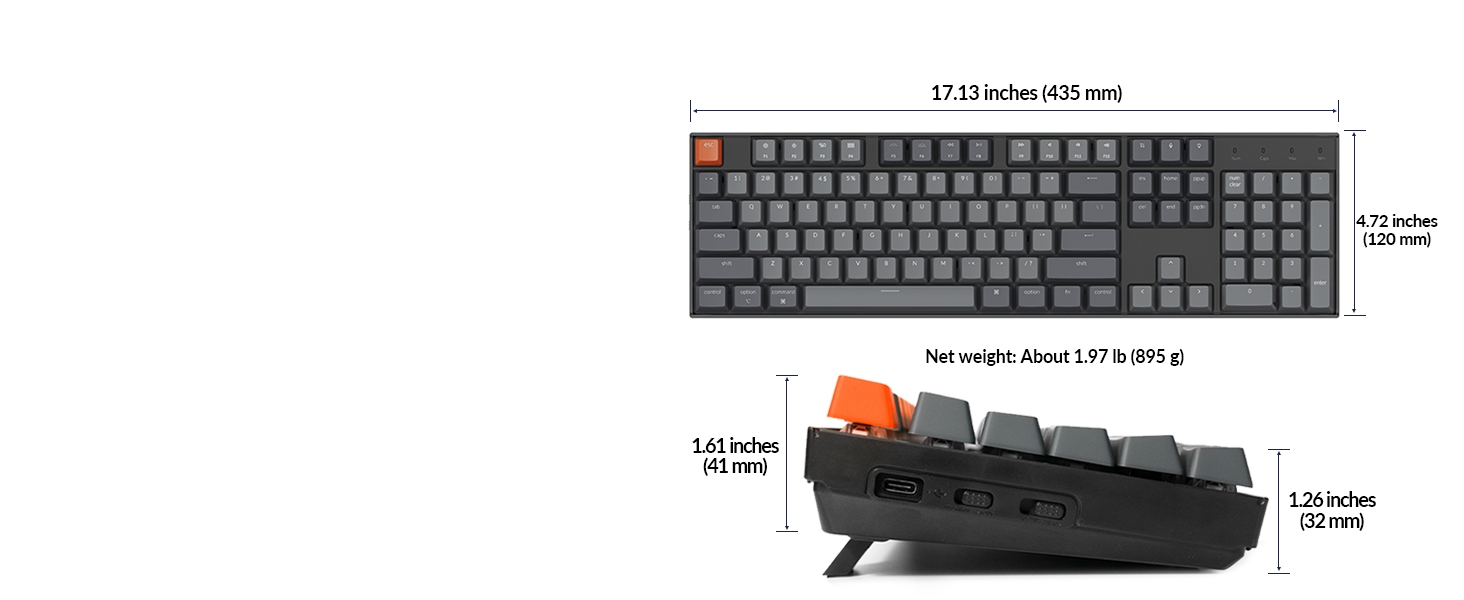
Image: Diagram showing the precise dimensions of the Keychron K10 keyboard in both inches and millimeters.

ചിത്രം: ക്ലോസ്-അപ്പ് view of the Gateron G Pro Brown mechanical switch, detailing its operating force, pre-travel, behavior (tactile), sound level (gentle), and lifespan.

Image: Comparison of different Gateron switch types (Silent Red, Red, Brown) and their characteristics, including operating force, pre-travel, behavior, and sound level.
8. പാക്കേജ് ഉള്ളടക്കം
The Keychron K10 package includes the following items:
- 1x Keychron K10 Mechanical Keyboard
- 1x USB-A മുതൽ USB ടൈപ്പ്-സി കേബിൾ വരെ
- 1x കീക്യാപ്പ് പുള്ളർ
- മാക്, വിൻഡോസ് ഓപ്പറേറ്റിംഗ് സിസ്റ്റങ്ങൾക്കുള്ള അധിക കീക്യാപ്പുകൾ

Image: Visual representation of the Keychron K10 keyboard and its included accessories: USB-A to USB Type-C cable and keycap puller.
9. വാറൻ്റിയും പിന്തുണയും
Keychron products typically come with a limited warranty. Please refer to the warranty card included in your package or visit the official Keychron webവിശദമായ വാറന്റി നിബന്ധനകൾക്കും വ്യവസ്ഥകൾക്കും സൈറ്റ്.
For technical support, troubleshooting, or product inquiries, you can contact Keychron customer service through their official webസൈറ്റ് അല്ലെങ്കിൽ നിങ്ങളുടെ ഉൽപ്പന്ന ഡോക്യുമെന്റേഷനിൽ നൽകിയിരിക്കുന്ന ബന്ധപ്പെടാനുള്ള വിവരങ്ങൾ.
ഔദ്യോഗിക ഉപയോക്തൃ ഗൈഡ് (PDF): ഉപയോക്തൃ ഗൈഡ് ഡൗൺലോഡ് ചെയ്യുക
ട്രബിൾഷൂട്ടിംഗ് ഗൈഡ് (PDF): ട്രബിൾഷൂട്ടിംഗ് ഗൈഡ് ഡൗൺലോഡ് ചെയ്യുക
10. ഔദ്യോഗിക ഉൽപ്പന്ന വീഡിയോകൾ
Keychron K10 Full Size 104 Keys Bluetooth Wireless Mechanical Gaming Keyboard for Mac Windows
Video: An official product video from Keychron showcasing the K10 keyboard's features, including its Bluetooth and wired connectivity, Mac and Windows compatibility, and multi-device support. This video highlights the keyboard's versatility for various computing environments.


