1. ആമുഖം
This manual provides comprehensive instructions for the safe and efficient use of your Sonim XP3 XP3800 flip phone. Designed for durability and reliable communication, the XP3 XP3800 is a rugged 4G LTE device built to withstand challenging environments.
1.1. പാക്കേജ് ഉള്ളടക്കം
നിങ്ങളുടെ ഉൽപ്പന്ന പാക്കേജിൽ എല്ലാ ഇനങ്ങളും ഉണ്ടെന്ന് ദയവായി പരിശോധിക്കുക:
- Sonim XP3 XP3800 Flip Phone
- റീചാർജ് ചെയ്യാവുന്ന ലിഥിയം-അയൺ ബാറ്ററി
- ചാർജിംഗ് കേബിൾ (USB-C)
- വാൾ അഡാപ്റ്റർ
- ദ്രുത ആരംഭ ഗൈഡ്

ചിത്രം 1.1: മുൻഭാഗം view of the Sonim XP3 XP3800 flip phone in its closed state, displaying the external screen with current time and network status.
2. ആരംഭിക്കുന്നു
2.1. പ്രാരംഭ സജ്ജീകരണം
Before using your Sonim XP3 XP3800, ensure the battery is charged and the SIM card is properly installed. The phone is designed for use with Verizon's 4G LTE network.
2.2. ബാറ്ററി, സിം കാർഡ് ഇൻസ്റ്റാളേഷൻ
- ബാറ്ററി കവർ നീക്കം ചെയ്യുക: Locate the latch or screws on the back of the phone and carefully open the battery cover.
- സിം കാർഡ് ചേർക്കുക: Locate the SIM card slot. Align your Verizon Nano-SIM card with the slot's orientation and gently push it in until it clicks into place. The Sonim XP3 XP3800 supports a single SIM card.
- ബാറ്ററി ചേർക്കുക: Align the battery contacts with the phone's terminals and place the battery into its compartment.
- ബാറ്ററി കവർ മാറ്റിസ്ഥാപിക്കുക: Securely close the battery cover, ensuring it is latched or screwed tightly to maintain the phone's rugged integrity.
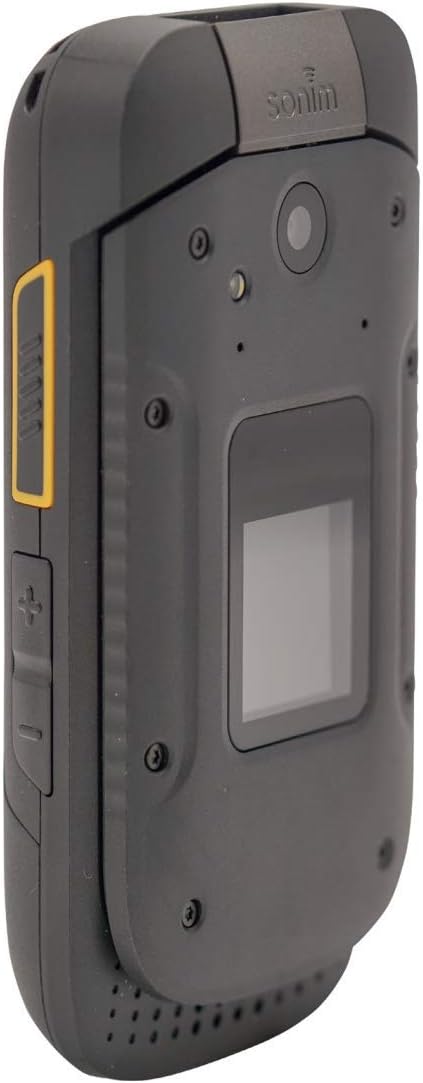
ചിത്രം 2.1: വിവിധ views of the Sonim XP3 XP3800, illustrating its design and the location of the battery cover on the rear.
2.3. പവർ ചെയ്യലും ഓഫും
- പവർ ഓണാക്കാൻ: Press and hold the Power/End Call button (usually red) until the Sonim logo appears on the screen.
- പവർ ഓഫ് ചെയ്യാൻ: Press and hold the Power/End Call button. Select "Power Off" from the options that appear on the screen.
3. അടിസ്ഥാന പ്രവർത്തനങ്ങൾ
3.1. കോളുകൾ ചെയ്യലും സ്വീകരിക്കലും
- ഒരു കോൾ ചെയ്യുന്നു:
- Open the flip phone.
- കീപാഡ് ഉപയോഗിച്ച് ഫോൺ നമ്പർ നൽകുക.
- കോൾ ആരംഭിക്കാൻ ഗ്രീൻ കോൾ ബട്ടൺ അമർത്തുക.
- ഒരു കോൾ സ്വീകരിക്കുന്നു:
- ഫോൺ റിംഗ് ചെയ്യുമ്പോൾ, മറുപടി നൽകാൻ ഫ്ലിപ്പ് തുറക്കുക അല്ലെങ്കിൽ ഗ്രീൻ കോൾ ബട്ടൺ അമർത്തുക.
- ഒരു കോൾ അവസാനിപ്പിക്കാൻ, റെഡ് എൻഡ് കോൾ ബട്ടൺ അമർത്തുക.
3.2. സന്ദേശങ്ങൾ അയയ്ക്കുന്നു
- പ്രധാന സ്ക്രീനിൽ നിന്ന് "സന്ദേശങ്ങൾ" മെനുവിലേക്ക് നാവിഗേറ്റ് ചെയ്യുക.
- "പുതിയ സന്ദേശം" അല്ലെങ്കിൽ "സന്ദേശം സൃഷ്ടിക്കുക" തിരഞ്ഞെടുക്കുക.
- സ്വീകർത്താവിന്റെ ഫോൺ നമ്പർ നൽകുക അല്ലെങ്കിൽ കോൺടാക്റ്റുകളിൽ നിന്ന് തിരഞ്ഞെടുക്കുക.
- കീപാഡ് ഉപയോഗിച്ച് നിങ്ങളുടെ സന്ദേശം ടൈപ്പ് ചെയ്യുക.
- "അയയ്ക്കുക" അമർത്തുക.
3.3. ക്യാമറ ഉപയോഗിക്കുന്നത്
The Sonim XP3 XP3800 is equipped with a camera for capturing photos and videos.
- പ്രധാന മെനുവിൽ നിന്ന്, "ക്യാമറ" തിരഞ്ഞെടുക്കുക.
- സ്ക്രീൻ ഉപയോഗിച്ച് നിങ്ങളുടെ ഷോട്ട് ഫ്രെയിം ചെയ്യുക.
- Press the designated camera button or the center navigation key to take a picture.
ചിത്രം 3.1: വശം view of the Sonim XP3 XP3800, highlighting the camera lens and the external display.
3.4. Phone Navigation
Navigate through menus and options using the directional keypad and the center selection button.
- ദിശാസൂചന കീകൾ: Use the Up, Down, Left, and Right keys to move through menu items.
- Center Key: Press the center key to select an item or confirm an action.
- സോഫ്റ്റ് കീകൾ: The keys directly below the screen (left and right) perform functions indicated by the text above them, which change depending on the current screen.
- വോളിയം കീകൾ: Located on the side of the phone, these adjust call volume and media playback volume.

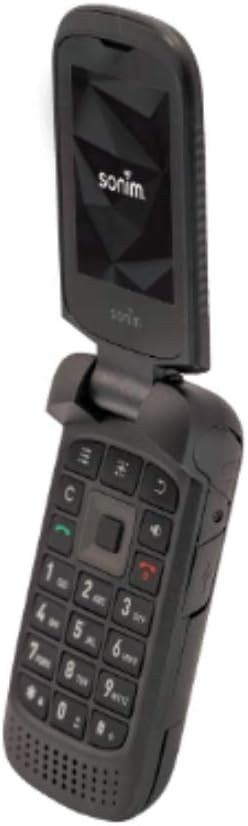
Figure 3.2: Open view of the Sonim XP3 XP3800, displaying the internal screen and the full alphanumeric keypad for navigation and input.
4 പ്രധാന സവിശേഷതകൾ
The Sonim XP3 XP3800 is engineered with specific features to meet the demands of challenging environments:
- Military Standard Durability: Built to military specifications, making it highly resistant to drops, dust, and water.
- പരുക്കൻ ഡിസൈൻ: Ideal for construction workers and individuals in demanding professions, offering enhanced protection against impacts.
- 4G LTE കണക്റ്റിവിറ്റി: Ensures fast and reliable communication on the Verizon network.
- ദീർഘകാല ബാറ്ററി: Designed for extended use, reducing the need for frequent recharging.
- ഫിസിക്കൽ കീപാഡ്: Large, tactile buttons for easy operation even with gloves.
5. പരിപാലനം
Proper maintenance ensures the longevity and optimal performance of your Sonim XP3 XP3800.
- വൃത്തിയാക്കൽ: ഒരു സോഫ്റ്റ് ഉപയോഗിക്കുക, ഡിamp cloth to wipe the phone's exterior. Avoid harsh chemicals or abrasive materials. Ensure all ports are closed before cleaning with moisture.
- സംഭരണം: നേരിട്ടുള്ള സൂര്യപ്രകാശവും കടുത്ത താപനിലയും ഏൽക്കാത്ത തണുത്തതും വരണ്ടതുമായ സ്ഥലത്ത് ഫോൺ സൂക്ഷിക്കുക.
- ബാറ്ററി കെയർ: Avoid fully discharging the battery frequently. For long-term storage, charge the battery to about 50% and remove it from the device if possible.
- തുറമുഖ സംരക്ഷണം: Keep the USB-C charging port and headphone jack covers securely closed when not in use to prevent dust and water ingress.
6. പ്രശ്നപരിഹാരം
This section addresses common issues you might encounter with your Sonim XP3 XP3800.
| പ്രശ്നം | സാധ്യമായ കാരണം | പരിഹാരം |
|---|---|---|
| ഫോൺ പവർ ഓൺ ആകുന്നില്ല. | Low or no battery charge; battery not properly installed. | Charge the battery for at least 30 minutes. Ensure the battery is correctly seated. |
| കോളുകൾ വിളിക്കാനോ സ്വീകരിക്കാനോ കഴിയില്ല. | No network signal; SIM card not installed or faulty; account issues. | Check signal strength. Reinstall SIM card. Contact Verizon customer service. |
| ക്യാമറ പ്രവർത്തിക്കുന്നില്ല. | സോഫ്റ്റ്വെയർ തകരാർ; ഭൗതികമായ കേടുപാടുകൾ. | Restart the phone. If the issue persists, contact Sonim support. |
| Poor audio quality during calls. | Weak signal; speaker/microphone obstruction. | Move to an area with better signal. Clean speaker/microphone openings. |
7 സ്പെസിഫിക്കേഷനുകൾ
Detailed technical specifications for the Sonim XP3 XP3800:
| ഫീച്ചർ | വിശദാംശങ്ങൾ |
|---|---|
| മോഡൽ നമ്പർ | XP3 XP3800 |
| അളവുകൾ | 2.3 x 1.1 x 4.4 ഇഞ്ച് |
| ഇനത്തിൻ്റെ ഭാരം | 6.9 ounces (6.88 Ounces) |
| ബാറ്ററി | 1 ലിഥിയം അയോൺ ബാറ്ററി (ഉൾപ്പെടുത്തിയിരിക്കുന്നു) |
| ഓപ്പറേറ്റിംഗ് സിസ്റ്റം | ആൻഡ്രോയിഡ് |
| സിപിയു മോഡൽ | സ്നാപ്ഡ്രാഗൺ |
| റെസലൂഷൻ | 320 x 240 |
| വയർലെസ് കാരിയർ | വെറൈസൺ |
| സെല്ലുലാർ ടെക്നോളജി | 4G |
| നിറം | കറുപ്പ് |
| വയർലെസ് നെറ്റ്വർക്ക് സാങ്കേതികവിദ്യ | എൽടിഇ |
| സിം കാർഡ് സ്ലോട്ട് എണ്ണം | സിംഗിൾ സിം |
| നിർമ്മാതാവ് | സോണിം |
| ആദ്യ തീയതി ലഭ്യമാണ് | നവംബർ 15, 2019 |
8. പിന്തുണയും വാറണ്ടിയും
For technical assistance, product support, or warranty inquiries, please contact Sonim customer service. Refer to the official Sonim website or the quick start guide included in your package for the most current contact information and warranty details.
പ്രധാനപ്പെട്ട നിയമപരമായ നിരാകരണം: Use your phone safely and conform to any legal requirements regarding the use of cellular phones.


