ആമുഖം
This manual provides comprehensive instructions for the Elekpia Universal Remote Control, model CT-RC1US-18. This remote is designed for seamless compatibility with a wide range of Toshiba LED LCD HDTV models, including but not limited to CT-90325, CT-90326, CT-90329, CT-8037, CT-90302, CT-90275, CT-90, CT-90366, and CT-RC1US-18. Please read this manual carefully to ensure proper setup and operation of your new remote control.
സജ്ജമാക്കുക
ബാറ്ററി ഇൻസ്റ്റാളേഷൻ
The Elekpia Universal Remote Control requires two (2) 1.5V AA batteries for operation. No programming is needed; simply install the batteries, and the remote will be ready to use with your compatible Toshiba TV.
- റിമോട്ട് കൺട്രോളിൻ്റെ പിൻഭാഗത്ത് ബാറ്ററി കമ്പാർട്ട്മെൻ്റ് കവർ കണ്ടെത്തുക.
- കമ്പാർട്ട്മെന്റ് തുറക്കാൻ ടാബിൽ അമർത്തി കവർ താഴേക്ക് സ്ലൈഡ് ചെയ്യുക.
- രണ്ട് (2) AA ബാറ്ററികൾ ഇടുക, പോസിറ്റീവ് (+) ഉം നെഗറ്റീവ് (-) ടെർമിനലുകളും കമ്പാർട്ടുമെന്റിനുള്ളിലെ അടയാളപ്പെടുത്തലുകളുമായി ശരിയായി വിന്യസിക്കുന്നുണ്ടെന്ന് ഉറപ്പാക്കുക.
- സുരക്ഷിതമായി ക്ലിക്ക് ചെയ്യുന്നതുവരെ ബാറ്ററി കമ്പാർട്ട്മെന്റ് കവർ തിരികെ സ്ഥലത്തേക്ക് സ്ലൈഡ് ചെയ്യുക.

ചിത്രം 1: മുന്നിലും പിന്നിലും view of the Elekpia Universal Remote Control, highlighting the battery compartment on the rear.
Once batteries are installed, the remote is ready for immediate use with your Toshiba TV. No additional setup or code entry is required.
പ്രവർത്തന നിർദ്ദേശങ്ങൾ
This universal remote control is designed to replicate the functions of your original Toshiba TV remote. Point the remote directly at your television's infrared receiver for optimal performance.
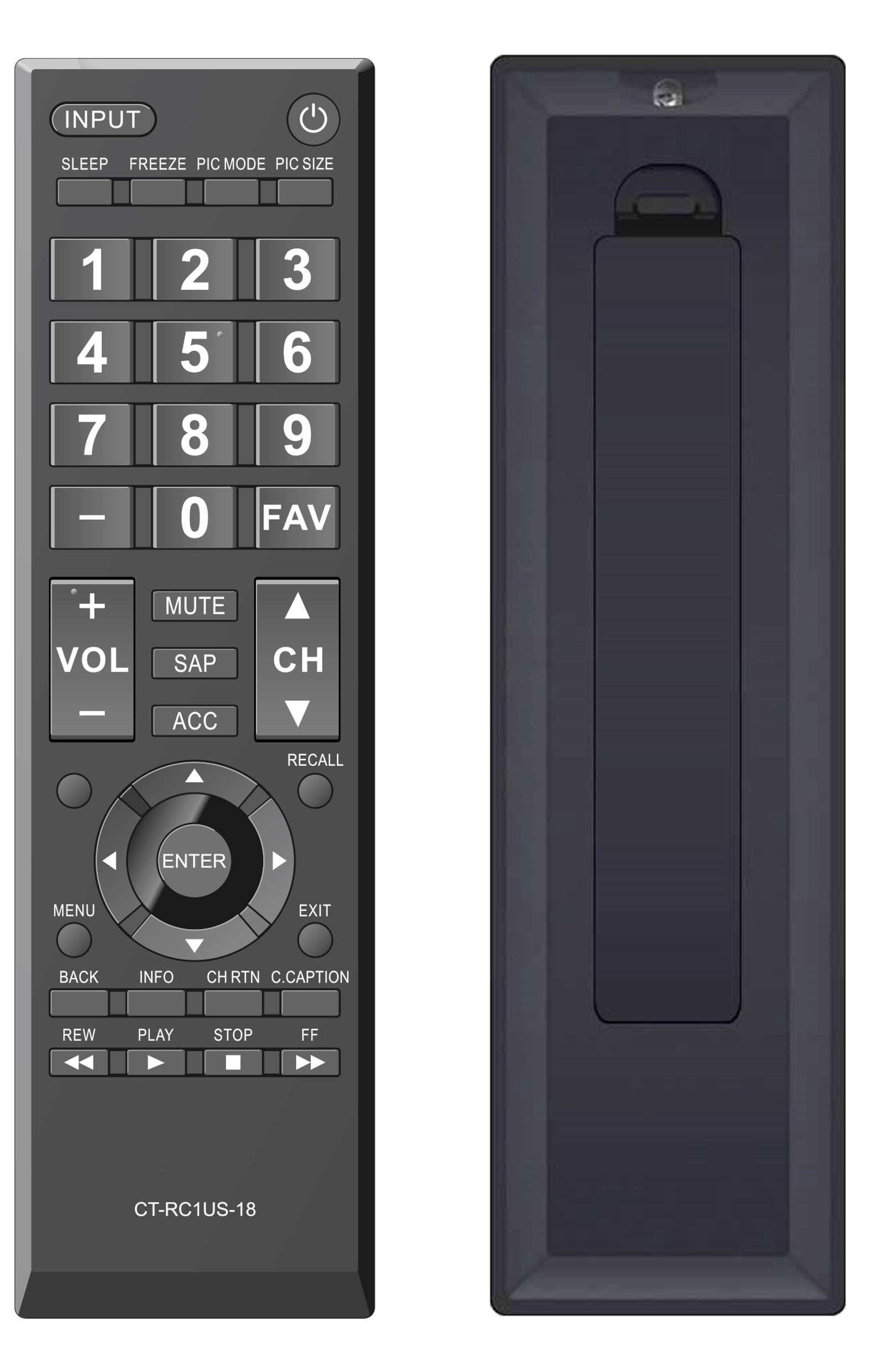
ചിത്രം 2: മുൻഭാഗം view of the Elekpia Universal Remote Control, displaying the layout of all buttons.
ബട്ടൺ പ്രവർത്തനങ്ങൾ
- ശക്തി (⏻): ടെലിവിഷൻ ഓൺ അല്ലെങ്കിൽ ഓഫ് ചെയ്യുന്നു.
- ഇൻപുട്ട്: Cycles through available input sources (HDMI 1, HDMI 2, AV, etc.).
- ഉറങ്ങുക: Activates or adjusts the TV's sleep timer function.
- ഫ്രീസ് ചെയ്യുക: Pauses the current image on the screen (functionality may vary by TV model).
- PIC മോഡ്: Adjusts picture modes (e.g., Standard, Movie, Dynamic).
- PIC SIZE: Changes the aspect ratio or picture size.
- നമ്പർ പാഡ് (0-9): ചാനൽ നമ്പറുകൾ നേരിട്ട് നൽകുന്നു.
- - (Dash): Used for entering sub-channels (e.g., 7-1).
- FAV: Accesses favorite channels list.
- VOL (+/-): വോളിയം ലെവൽ കൂട്ടുകയോ കുറയ്ക്കുകയോ ചെയ്യുന്നു.
- നിശബ്ദമാക്കുക: Silences the television audio.
- എസ്എപി: Selects Secondary Audio Program (SAP) or alternate audio tracks.
- എ.സി.സി: Accesses accessibility features or audio settings.
- CH (മുകളിലേക്ക്/താഴേക്ക്): Changes the television channel up or down.
- ഓർക്കുക: Switches between the current and previously viewഎഡി ചാനൽ.
- Navigation Pad (Up, Down, Left, Right, ENTER): Navigates through on-screen menus and confirms selections.
- മെനു: ടെലിവിഷന്റെ പ്രധാന മെനു തുറക്കുന്നു.
- പുറത്ത്: Closes the current menu or returns to the previous screen.
- തിരികെ: മുമ്പത്തെ മെനുവിലേക്കോ സ്ക്രീനിലേക്കോ മടങ്ങുന്നു.
- വിവരം: നിലവിലെ പ്രോഗ്രാമിനെക്കുറിച്ചോ ഇൻപുട്ടിനെക്കുറിച്ചോ ഉള്ള വിവരങ്ങൾ പ്രദർശിപ്പിക്കുന്നു.
- CH RTN (Channel Return): Similar to RECALL, returns to the previous channel.
- C.CAPTION (Closed Caption): Toggles closed captions on or off.
- REW (Rewind), PLAY, STOP, FF (Fast Forward): Controls for media playback (e.g., when using a connected USB device or smart TV apps, if supported by the TV).
മെയിൻ്റനൻസ്
റിമോട്ട് വൃത്തിയാക്കൽ
റിമോട്ട് കൺട്രോളിന്റെ രൂപവും പ്രവർത്തനക്ഷമതയും നിലനിർത്താൻ, അത് പതിവായി വൃത്തിയാക്കുക:
- റിമോട്ടിന്റെ ഉപരിതലം തുടയ്ക്കാൻ മൃദുവായതും ഉണങ്ങിയതുമായ തുണി ഉപയോഗിക്കുക.
- കഠിനമായ അഴുക്കിന്, ചെറുതായി dampവെള്ളം അല്ലെങ്കിൽ നേരിയതും ഉരച്ചിലുകൾ ഇല്ലാത്തതുമായ ഒരു ക്ലീനർ ഉപയോഗിച്ച് തുണി തുടയ്ക്കുക. അമിതമായ ഈർപ്പം ഒഴിവാക്കുക.
- കഠിനമായ രാസവസ്തുക്കളോ, ലായകങ്ങളോ, അബ്രസീവ് ക്ലീനിംഗ് പാഡുകളോ ഉപയോഗിക്കരുത്, കാരണം ഇവ റിമോട്ടിന്റെ ഫിനിഷിനോ ആന്തരിക ഘടകങ്ങളോ കേടുവരുത്തും.
ബാറ്ററി മാറ്റിസ്ഥാപിക്കൽ
Replace batteries when the remote's response becomes sluggish or stops working. Always replace both AA batteries at the same time with new ones. Do not mix old and new batteries, or different types of batteries, as this can lead to leakage or damage.
സംഭരണം
If the remote control will not be used for an extended period, remove the batteries to prevent potential leakage and damage to the device.
ട്രബിൾഷൂട്ടിംഗ്
If you encounter issues with your Elekpia Universal Remote Control, please refer to the following common solutions:
- റിമോട്ട് പ്രതികരിക്കുന്നില്ല:
- Ensure the batteries are correctly installed with the proper polarity (+/-).
- പുതിയ AA ബാറ്ററികൾ ഉപയോഗിച്ച് ബാറ്ററികൾ മാറ്റിസ്ഥാപിക്കുക.
- റിമോട്ട് കൺട്രോളിനും ടിവിയുടെ ഇൻഫ്രാറെഡ് സെൻസറിനും ഇടയിൽ എന്തെങ്കിലും തടസ്സങ്ങളുണ്ടോയെന്ന് പരിശോധിക്കുക.
- Ensure you are pointing the remote directly at the TV.
- ചില ബട്ടണുകൾ പ്രവർത്തിക്കുന്നില്ല:
- This remote is pre-programmed for Toshiba TVs. Verify your TV model is compatible.
- Clean the remote's surface, especially around the unresponsive buttons, to remove any dirt or debris that might be interfering with button presses.
- ടിവി ഓൺ/ഓഫ് ആകുന്നില്ല:
- Confirm the TV is plugged into a working power outlet.
- Try using the power button directly on the TV to confirm it is operational.
If these steps do not resolve the issue, please refer to the customer support section.
സ്പെസിഫിക്കേഷനുകൾ
| മോഡൽ നമ്പർ | CT-RC1US-18 |
| ബ്രാൻഡ് | എലെക്പിയ |
| ഉൽപ്പന്ന അളവുകൾ | 7 x 2 x 0.6 ഇഞ്ച് |
| ഇനത്തിൻ്റെ ഭാരം | 3 ഔൺസ് |
| പവർ ഉറവിടം | 2 x 1.5V AA ബാറ്ററികൾ (ഉൾപ്പെടുത്തിയിട്ടില്ല) |
| അനുയോജ്യമായ ഉപകരണങ്ങൾ | Toshiba LED LCD HDTVs |
| പിന്തുണയ്ക്കുന്ന ഉപകരണങ്ങളുടെ പരമാവധി എണ്ണം | 1 |
| നിറം | കറുപ്പ് |
വാറൻ്റി വിവരങ്ങൾ
Specific warranty details for the Elekpia Universal Remote Control CT-RC1US-18 are not provided in this manual. Please refer to the product packaging, the retailer's return policy, or the manufacturer's official website for information regarding warranty coverage and terms.
ഉപഭോക്തൃ പിന്തുണ
For further assistance or inquiries regarding your Elekpia Universal Remote Control, please contact the retailer from whom you purchased the product. You may also visit the official Elekpia website for potential support resources or contact information.


