1. ഉൽപ്പന്നം കഴിഞ്ഞുview
The 1Mii B06TX is a versatile Bluetooth 5.2 audio transmitter designed to add Bluetooth audio transmission capabilities to your television or other audio sources. It enables you to wirelessly stream audio to up to two Bluetooth headphones or speakers simultaneously, perfect for private listening or sharing audio without disturbing others.

Figure 1.1: 1Mii B06TX Bluetooth Transmitter and its accessories.
2. ബോക്സിൽ എന്താണുള്ളത്?
- 1Mii B06TX Bluetooth audio transmitter
- 5V power supply cable (100 cm)
- 3.5 mm audio cable (90 cm)
- 3.5 mm to RCA cable (82 cm)
- Optical cable (99 cm)
- ഉപയോക്തൃ മാനുവൽ

Figure 2.1: Contents of the 1Mii B06TX package.
അൺബോക്സിംഗ് വീഡിയോ
Video 2.1: A short video demonstrating the unboxing and contents of the 1Mii B06TX package.
3. സജ്ജീകരണവും ഇൻസ്റ്റാളേഷനും
Follow these steps to set up your 1Mii B06TX Bluetooth Transmitter and connect it to your audio source and Bluetooth devices.
3.1 Connecting to Power and Audio Source
- പവർ ബന്ധിപ്പിക്കുക: Plug the provided 5V power supply cable into the DC 5V port on the 1Mii B06TX and connect the other end to a USB power adapter (not included) or a USB port on your TV. Using a dedicated wall adapter is recommended to avoid potential ground noise.
- ഓഡിയോ ബന്ധിപ്പിക്കുക: Choose the appropriate audio cable (Optical, Coaxial, 3.5mm AUX, or RCA) based on your TV's available audio output ports. Connect one end to the corresponding input on the 1Mii B06TX and the other end to your TV's audio output.
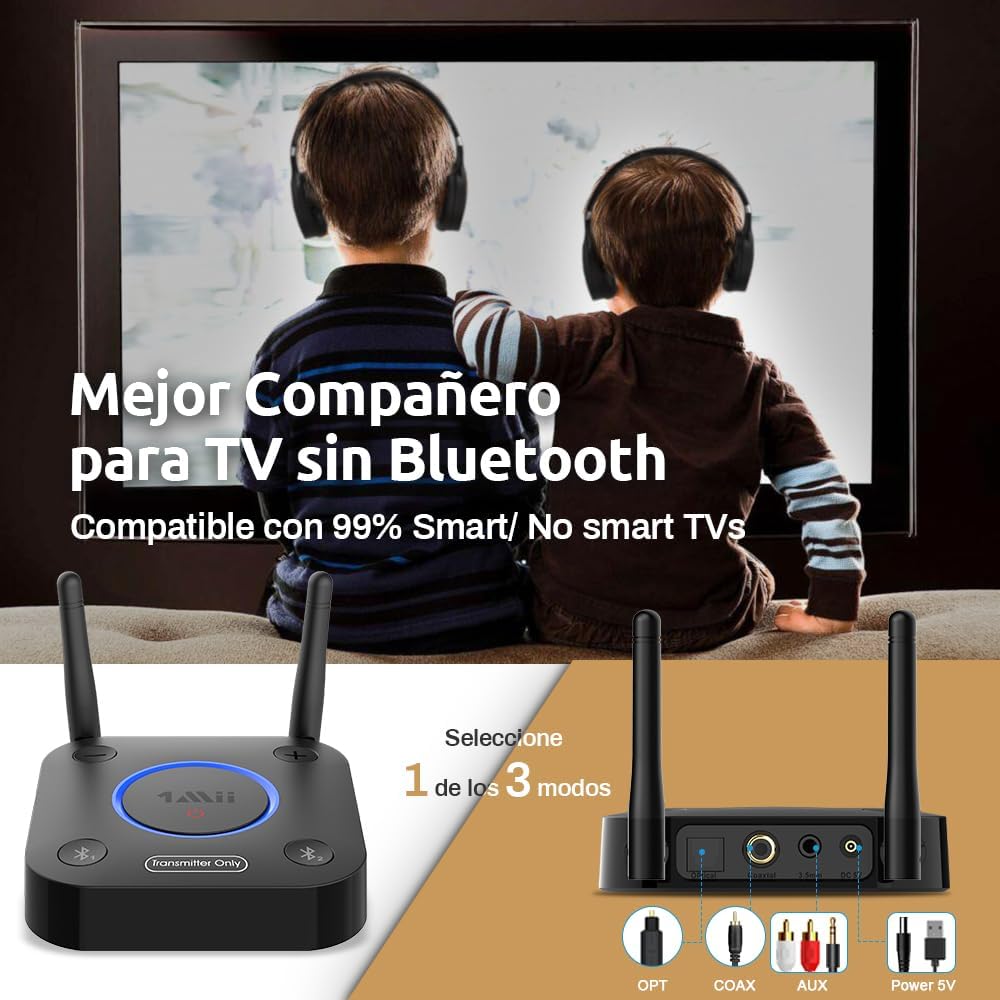
Figure 3.1: Available audio input ports on the 1Mii B06TX (Optical, Coaxial, RCA, AUX).
3.2 Pairing Bluetooth Headphones/Speakers
The 1Mii B06TX supports connecting up to two Bluetooth devices simultaneously.
Pairing the First Device:
- Ensure the 1Mii B06TX is powered on.
- Press and hold the 'Bluetooth 1' button on the 1Mii B06TX until the LED indicator flashes red and blue, indicating pairing mode.
- Put your first Bluetooth headphone or speaker into pairing mode. Refer to your device's manual for specific instructions.
- Place the Bluetooth device close to the 1Mii B06TX (within 1 meter). They should automatically connect. Once connected, the LED for 'Bluetooth 1' will turn solid blue.
Pairing the Second Device (Dual Link):
- After the first device is successfully paired, press and hold the 'Bluetooth 2' button on the 1Mii B06TX until its LED indicator flashes red and blue.
- Put your second Bluetooth headphone or speaker into pairing mode.
- Place the second Bluetooth device close to the 1Mii B06TX. They should automatically connect. Once connected, the LED for 'Bluetooth 2' will turn solid blue.

Figure 3.2: The 1Mii B06TX supports simultaneous connection to two Bluetooth headphones.
Connection and Pairing Videos
Video 3.1: Detailed instructions on how to connect Bluetooth headphones to the 1Mii B06TX transmitter.
Video 3.2: A guide on how to pair two headphones simultaneously with the 1Mii B06TX.
4. പ്രവർത്തന നിർദ്ദേശങ്ങൾ
4.1 വോളിയം നിയന്ത്രണം
Use the '+' and '-' buttons on the 1Mii B06TX to adjust the volume of the connected Bluetooth devices. This provides independent volume control from your TV's volume.
4.2 Audio Quality and Latency
The 1Mii B06TX supports aptX Low Latency (aptX LL) and aptX HD codecs. For optimal audio-visual synchronization (no noticeable delay between picture and sound), ensure your Bluetooth headphones or speakers also support aptX LL. If your devices do not support aptX LL, there might be a slight audio delay.

Figure 4.1: Enjoying TV audio privately with the 1Mii B06TX.
4.3 Long Range Performance
Equipped with dual antennas, the 1Mii B06TX offers an extended Bluetooth range. Expect up to 20-30 meters indoors and up to 60 meters in open air, allowing you to listen to your TV from various locations within your home.

Figure 4.2: The dual antennas provide extended range for flexible listening.
5. പരിപാലനം
To ensure the longevity and optimal performance of your 1Mii B06TX Bluetooth Transmitter, follow these simple maintenance guidelines:
- വൃത്തിയാക്കൽ: Use a soft, dry cloth to wipe the device. Avoid using liquid cleaners or abrasive materials.
- സംഭരണം: ദീർഘനേരം ഉപയോഗിക്കാത്തപ്പോൾ, നേരിട്ടുള്ള സൂര്യപ്രകാശത്തിൽ നിന്നും കടുത്ത താപനിലയിൽ നിന്നും മാറി തണുത്തതും വരണ്ടതുമായ സ്ഥലത്ത് ഉപകരണം സൂക്ഷിക്കുക.
- കേബിൾ കെയർ: Handle all cables gently. Avoid bending or crimping them excessively, as this can damage the internal wires.
6. പ്രശ്നപരിഹാരം
If you encounter issues with your 1Mii B06TX, please refer to the following common problems and solutions:
| പ്രശ്നം | സാധ്യമായ കാരണം / പരിഹാരം |
|---|---|
| ഓഡിയോ ഇല്ല അല്ലെങ്കിൽ ഇടവിട്ടുള്ള ഓഡിയോ ഇല്ല. |
|
| Audio delay (latency) with aptX LL compatible headphones. |
|
| Difficulty pairing or maintaining connection with two headphones. |
|
| Shorter than expected Bluetooth range. |
|
| Incompatibility with Apple AirPods Pro/Pro 2. |
|
7 സ്പെസിഫിക്കേഷനുകൾ
| ഫീച്ചർ | വിശദാംശങ്ങൾ |
|---|---|
| ബ്രാൻഡ് | 1Mii |
| മോഡൽ | B06TX |
| അളവുകൾ | 9.5 x 11.2 x 2.7 സെ.മീ; 220 ഗ്രാം |
| ഹാർഡ്വെയർ ഇന്റർഫേസ് | 3.5 mm Audio, Bluetooth 5 |
| അനുയോജ്യമായ ഉപകരണങ്ങൾ | Headphones, Television |
| വയർലെസ് കണക്ഷൻ തരം | ബ്ലൂടൂത്ത് 5.2 |
| പിന്തുണയ്ക്കുന്ന ഫോർമാറ്റുകൾ | Bluetooth 5.2, aptX-LL, aptX HD, AAC, SBC |
| ഓഡിയോ ഇൻപുട്ട് | 3.5mm AUX, RCA, Optical TOSLINK, Coaxial |
| ഓഡിയോ put ട്ട്പുട്ട് മോഡ് | സ്റ്റീരിയോ |
| പവർ ഉറവിടം | Electric Cable (5V) |
| തുറമുഖങ്ങളുടെ എണ്ണം | 3 (Audio Inputs) |
| പ്രത്യേക സവിശേഷതകൾ | Long range, volume control, low latency, aptX HD |
8 സുരക്ഷാ വിവരങ്ങൾ
ഇനിപ്പറയുന്ന സുരക്ഷാ മുൻകരുതലുകൾ പാലിക്കുക:
- ഉപകരണത്തെ അങ്ങേയറ്റത്തെ താപനിലയിൽ തുറന്നുകാട്ടരുത്.
- ജലത്തിൽ നിന്നും ഈർപ്പത്തിൽ നിന്നും അകറ്റി നിർത്തുക.
- Dispose of batteries (if applicable) properly according to local regulations.
- Avoid interference with other wireless devices by ensuring proper setup and placement.
9. വാറൻ്റിയും പിന്തുണയും
1Mii products come with a manufacturer's warranty. For detailed warranty information, technical support, or any questions during use, please refer to the contact information provided in your product packaging or visit the official 1Mii website. Our technical engineers and after-sales team are available to assist you.


