ആമുഖം
Thank you for choosing the VINABTY RC4846 Replacement Remote Control. This remote is designed to provide seamless control for a wide range of Sharp LED LCD TVs and other compatible brands and models. It requires no complex setup or programming, offering an immediate out-of-the-box experience. Simply insert the batteries, and it's ready for use.
സജ്ജമാക്കുക
1. ബാറ്ററി ഇൻസ്റ്റാളേഷൻ
The remote control requires two AAA (UM-4 R03 1.5V) alkaline batteries (not included).
- റിമോട്ട് കൺട്രോളിന്റെ പിൻഭാഗത്ത് ബാറ്ററി കമ്പാർട്ട്മെന്റ് കണ്ടെത്തുക.
- ലാച്ച് താഴേക്ക് അമർത്തി ബാറ്ററി കവർ താഴേക്ക് സ്ലൈഡ് ചെയ്ത് അത് തുറക്കുക.
- കമ്പാർട്ടുമെന്റിനുള്ളിലെ അടയാളപ്പെടുത്തലുകളുമായി പോസിറ്റീവ് (+), നെഗറ്റീവ് (-) ടെർമിനലുകൾ ശരിയായി വിന്യസിക്കുന്നുണ്ടെന്ന് ഉറപ്പാക്കാൻ രണ്ട് AAA ബാറ്ററികൾ ഇടുക.
- സുരക്ഷിതമായി ക്ലിക്കുചെയ്യുന്നത് വരെ ബാറ്ററി കവർ തിരികെ സ്ഥലത്തേക്ക് സ്ലൈഡ് ചെയ്യുക.

ചിത്രം: പിന്നിലേക്ക് view of the remote control with the battery compartment open, illustrating correct battery insertion.
2. പ്രാരംഭ ഉപയോഗം
This remote control is designed for immediate use with compatible TV models. No programming or code entry is required. Once batteries are installed, point the remote at your TV and press the power button to test functionality.
പ്രവർത്തന നിർദ്ദേശങ്ങൾ
The VINABTY RC4846 remote control features standard buttons for TV operation. Familiarize yourself with the layout:
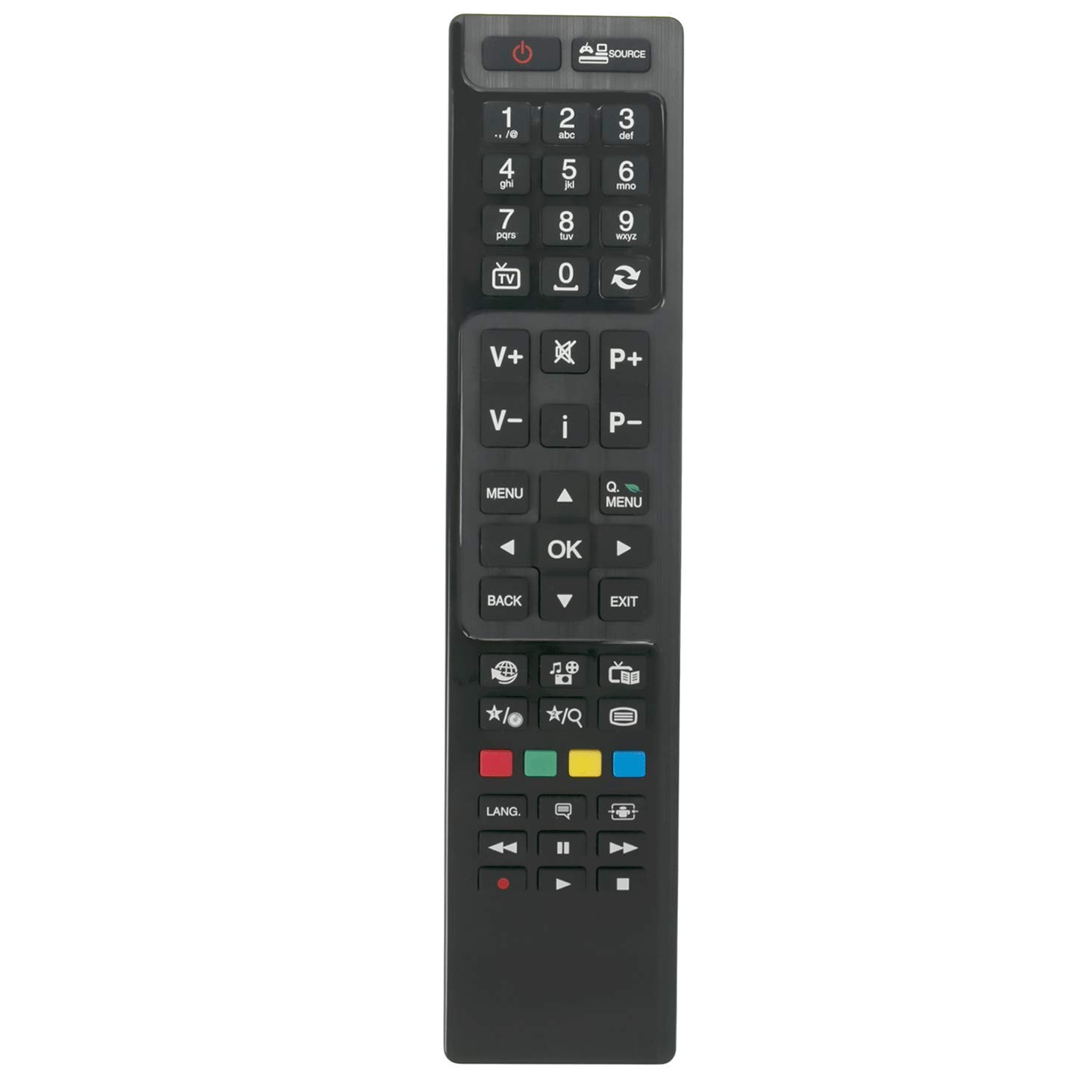
ചിത്രം: മുൻഭാഗം view റിമോട്ട് കൺട്രോളിന്റെ, ബട്ടൺ ലേഔട്ട് ഹൈലൈറ്റ് ചെയ്യുന്നു.
- പവർ ബട്ടൺ (⏻): ടിവി ഓണാക്കുകയോ ഓഫാക്കുകയോ ചെയ്യുന്നു.
- നമ്പർ ബട്ടണുകൾ (0-9): ചാനലുകൾ നേരിട്ട് തിരഞ്ഞെടുക്കുക.
- Volume Up/Down (V+/V-): ശബ്ദ വോളിയം ക്രമീകരിക്കുന്നു.
- Channel Up/Down (P+/P-): ടിവി ചാനലുകൾ മാറ്റുന്നു.
- നിശബ്ദ ബട്ടൺ (i): ടിവി ശബ്ദം നിശബ്ദമാക്കുകയോ അൺമ്യൂട്ട് ചെയ്യുകയോ ചെയ്യുന്നു.
- മെനു ബട്ടൺ: ടിവിയുടെ പ്രധാന മെനു ആക്സസ് ചെയ്യുന്നു.
- നാവിഗേഷൻ ബട്ടണുകൾ (മുകളിലേക്ക്, താഴേക്ക്, ഇടത്, വലത്): മെനുകളിലൂടെയും ഓപ്ഷനുകളിലൂടെയും നാവിഗേറ്റ് ചെയ്യുന്നു.
- ശരി ബട്ടൺ: Confirms selections in menus.
- എക്സിറ്റ് ബട്ടൺ: നിലവിലെ മെനുവിൽ നിന്നോ ഫംഗ്ഷനിൽ നിന്നോ പുറത്തുകടക്കുന്നു.
- ബാക്ക് ബട്ടൺ: Returns to the previous screen or channel.
- ഉറവിട ബട്ടൺ (ഉറവിടം): ഇൻപുട്ട് ഉറവിടങ്ങൾ തിരഞ്ഞെടുക്കുന്നു (HDMI, AV, മുതലായവ).
- കളർ ബട്ടണുകൾ (ചുവപ്പ്, പച്ച, മഞ്ഞ, നീല): Used for specific functions within certain TV menus or smart TV applications.
- മീഡിയ നിയന്ത്രണ ബട്ടണുകൾ (പ്ലേ ചെയ്യുക, താൽക്കാലികമായി നിർത്തുക, നിർത്തുക, റിവൈൻഡ് ചെയ്യുക, ഫാസ്റ്റ് ഫോർവേഡ് ചെയ്യുക): മീഡിയ പ്ലേബാക്ക് നിയന്ത്രിക്കുന്നു.
മെയിൻ്റനൻസ്
ബാറ്ററി മാറ്റിസ്ഥാപിക്കൽ
Replace batteries when the remote's response becomes sluggish or stops working. Always replace both batteries at the same time with new AAA alkaline batteries. Do not mix old and new batteries, or different types of batteries.
വൃത്തിയാക്കൽ
To clean the remote control, wipe it with a soft, dry cloth. Do not use liquid cleaners, sprays, or abrasive materials, as these can damage the remote's surface or internal components.
സംഭരണം
റിമോട്ട് കൺട്രോൾ ദീർഘനേരം ഉപയോഗിക്കുന്നില്ലെങ്കിൽ, ചോർച്ചയും ഉപകരണത്തിന് കേടുപാടുകൾ സംഭവിക്കാനുള്ള സാധ്യതയും തടയാൻ ബാറ്ററികൾ നീക്കം ചെയ്യുക.
ട്രബിൾഷൂട്ടിംഗ്
- റിമോട്ട് പ്രതികരിക്കുന്നില്ല:
- ശരിയായ പോളാരിറ്റിയോടെ ബാറ്ററികൾ ശരിയായി ചേർത്തിട്ടുണ്ടോയെന്ന് പരിശോധിക്കുക.
- പഴയ ബാറ്ററികൾ പുതിയ AAA ആൽക്കലൈൻ ബാറ്ററികൾ ഉപയോഗിച്ച് മാറ്റിസ്ഥാപിക്കുക.
- റിമോട്ട് കൺട്രോളിനും ടിവിയുടെ ഇൻഫ്രാറെഡ് സെൻസറിനും ഇടയിൽ തടസ്സങ്ങളൊന്നുമില്ലെന്ന് ഉറപ്പാക്കുക.
- Make sure you are within the effective operating range (up to 10 meters).
- ചില ബട്ടണുകൾ പ്രവർത്തിക്കുന്നില്ല:
- This remote is a replacement and may not support all advanced functions of your original TV remote, especially smart TV features not present on the original model it replicates.
- Ensure the remote is compatible with your specific TV model. Refer to the product description for a list of compatible models.
സ്പെസിഫിക്കേഷനുകൾ
| ഫീച്ചർ | വിശദാംശങ്ങൾ |
|---|---|
| ബ്രാൻഡ് | വിനാബ്റ്റി |
| മോഡലിൻ്റെ പേര് | RC4846 |
| ഉൽപ്പന്ന അളവുകൾ | 11 x 2 x 0.5 സെ.മീ |
| ഇനത്തിൻ്റെ ഭാരം | 60 ഗ്രാം |
| പ്രത്യേക ഫീച്ചർ | സുഖപ്രദമായ ഡിസൈൻ |
| നിറം | കറുപ്പ് |
| അനുയോജ്യമായ ഉപകരണങ്ങൾ | ടെലിവിഷൻ |
| കണക്റ്റിവിറ്റി ടെക്നോളജി | ഇൻഫ്രാറെഡ് (IR) |
| കൺട്രോളർ തരം | ബട്ടൺ നിയന്ത്രണം |
| പരമാവധി പരിധി | 10 മീറ്റർ |
| ബാറ്ററി വിവരണം | ആൽക്കലൈൻ (AAA) |
പിന്തുണ
If you have any questions or encounter issues not covered in this manual, please contact VINABTY customer service for assistance. Refer to your product packaging or purchase details for specific contact information.

