1. ആമുഖം
The Orbic Speed Mobile Hotspot provides a secure and reliable Wi-Fi connection, ideal for remote work or travel. This device supports 4G LTE connectivity and allows up to 10 Wi-Fi enabled devices, such as laptops and tablets, to connect simultaneously. Its design emphasizes portability with a lightweight, compact form factor and a long-lasting rechargeable battery. The Orbic Speed is equipped with dual-band 802.11ac Wi-Fi for high-speed connectivity and extended range.
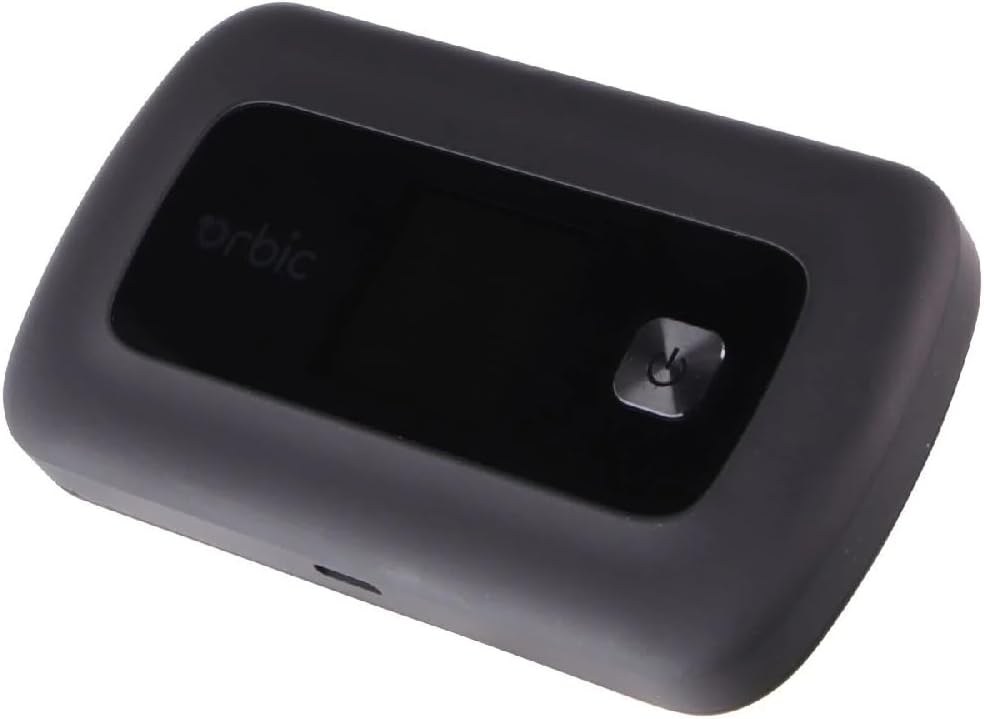
Figure 1: Orbic Speed Mobile Hotspot. This image shows the Orbic Speed Mobile Hotspot. It is a compact, black rectangular device featuring a small display screen and a prominent power button on its top surface. The Orbic logo is visible on the display area. A charging port is visible on the side.
2. സജ്ജീകരണം
2.1. പാക്കേജ് ഉള്ളടക്കം
- Orbic Speed Mobile Hotspot
- യുഎസ്ബി ചാർജിംഗ് കേബിൾ
- SIM Card (pre-installed or separate)
- ദ്രുത ആരംഭ ഗൈഡ്
2.2 ഉപകരണം ചാർജ് ചെയ്യുന്നു
Before initial use, fully charge the Orbic Speed Mobile Hotspot. Connect the provided USB charging cable to the device's charging port and plug the other end into a compatible USB power adapter or computer USB port. The device's indicator lights or screen will show charging status.
2.3. SIM Card Installation (if not pre-installed)
- ഉപകരണം ഓഫാണെന്ന് ഉറപ്പാക്കുക.
- സാധാരണയായി ബാറ്ററി കവറിനടിയിലോ വശത്തോ സിം കാർഡ് സ്ലോട്ട് കണ്ടെത്തുക.
- Insert the provided SIM card into the slot, ensuring correct orientation as indicated by a diagram near the slot.
- ബാറ്ററി കവർ നീക്കം ചെയ്താൽ സുരക്ഷിതമാക്കുക.
2.4. പവർ ഓൺ/ഓഫ്
- പവർ ഓണാക്കാൻ: Press and hold the Power button until the screen illuminates or indicator lights activate.
- പവർ ഓഫ് ചെയ്യാൻ: Press and hold the Power button until the device prompts you to power off, then confirm, or until the screen goes blank.
3. പ്രവർത്തന നിർദ്ദേശങ്ങൾ
3.1. ഹോട്ട്സ്പോട്ടിലേക്ക് ഉപകരണങ്ങൾ ബന്ധിപ്പിക്കുന്നു
The Orbic Speed Mobile Hotspot allows up to 10 Wi-Fi enabled devices to connect simultaneously.
- Ensure the Orbic Speed Hotspot is powered on.
- On your Wi-Fi enabled device (laptop, tablet, smartphone), open the Wi-Fi settings.
- Scan for available Wi-Fi networks. The hotspot's network name (SSID) will typically be displayed on its screen or on a label inside the battery compartment.
- Select the hotspot's SSID from the list.
- Enter the Wi-Fi password (security key) when prompted. This is also usually displayed on the hotspot's screen or label.
- Your device should now be connected to the internet via the hotspot.
3.2. Managing Hotspot Settings
Advanced settings can typically be managed via a web interface. Connect a device to the hotspot's Wi-Fi network, then open a web browser and navigate to the hotspot's administration IP address (e.g., 192.168.1.1 or 192.168.0.1). Login credentials are usually found on the device or in the quick start guide.
- Change Wi-Fi Name (SSID) and Password: For security, it is recommended to change the default Wi-Fi name and password.
- View ബന്ധിപ്പിച്ച ഉപകരണങ്ങൾ: Monitor which devices are currently connected to your hotspot.
- ഡാറ്റ ഉപയോഗ നിരീക്ഷണം: Track your data consumption.
- Network Mode Selection: Choose between 4G LTE or other available network modes.
3.3. എൽഇഡി സൂചകങ്ങൾ
The device may feature LED indicators to provide quick status updates:
- പവർ എൽഇഡി: Indicates power status (on/off, charging).
- Network/Signal LED: Shows network connectivity and signal strength (e.g., green for strong signal, red for no signal).
- Wi-Fi LED: Indicates Wi-Fi functionality (on/off, data activity).
4. പരിപാലനം
4.1. ബാറ്ററി പരിചരണം
- അങ്ങേയറ്റത്തെ താപനിലയിലേക്ക് ബാറ്ററി തുറന്നുകാട്ടുന്നത് ഒഴിവാക്കുക.
- Do not fully discharge the battery regularly; charge it before it runs out completely.
- ഒറിജിനൽ അല്ലെങ്കിൽ സാക്ഷ്യപ്പെടുത്തിയ അനുയോജ്യമായ ചാർജിംഗ് ആക്സസറികൾ മാത്രം ഉപയോഗിക്കുക.
4.2. വൃത്തിയാക്കൽ
മൃദുവായതും ഉണങ്ങിയതുമായ തുണി ഉപയോഗിച്ച് ഉപകരണം തുടയ്ക്കുക. ലിക്വിഡ് ക്ലീനറുകളോ ഉരച്ചിലുകളുള്ള വസ്തുക്കളോ ഉപയോഗിക്കരുത്.
4.3. സോഫ്റ്റ്വെയർ അപ്ഡേറ്റുകൾ
Periodically check for software updates through the device's web administration interface. Updates can improve performance, add features, and enhance security.
5. പ്രശ്നപരിഹാരം
| പ്രശ്നം | സാധ്യമായ കാരണം | പരിഹാരം |
|---|---|---|
| ഇൻ്റർനെറ്റ് കണക്ഷനില്ല | No SIM card, invalid SIM, no network signal, data plan expired. | Check SIM card installation. Verify network signal strength. Contact your service provider to check data plan status. Restart the hotspot. |
| Slow Connection Speed | ദുർബലമായ സിഗ്നൽ, വളരെയധികം കണക്റ്റഡ് ഉപകരണങ്ങൾ, നെറ്റ്വർക്ക് തിരക്ക്. | Move to an area with better signal. Disconnect unused devices. Try restarting the hotspot. |
| ഉപകരണം പവർ ചെയ്യുന്നില്ല | Low battery, faulty charger/cable. | Charge the device for at least 30 minutes. Try a different charging cable and adapter. |
| വൈഫൈയിലേക്ക് കണക്റ്റുചെയ്യാൻ കഴിയില്ല | Incorrect password, Wi-Fi disabled on hotspot, device too far. | Verify Wi-Fi password. Ensure Wi-Fi is enabled on the hotspot. Move closer to the hotspot. |
6 സ്പെസിഫിക്കേഷനുകൾ
| മോഡലിൻ്റെ പേര് | Orbic Speed |
| മോഡൽ നമ്പർ | ORB400LBVZRT |
| അളവുകൾ (L x W x H) | 4.41 x 0.69 x 2.56 ഇഞ്ച് |
| ഭാരം | 7.4 ഔൺസ് |
| കണക്റ്റിവിറ്റി ടെക്നോളജി | 4G LTE, Wi-Fi |
| വയർലെസ് മാനദണ്ഡങ്ങൾ | 802.11ac, 802.11b, 802.11g, 802.11n |
| ഫ്രീക്വൻസി ബാൻഡ് | ഡ്യുവൽ-ബാൻഡ് |
| പരമാവധി ബന്ധിപ്പിച്ച ഉപകരണങ്ങൾ | 10 വരെ |
| ഉപയോഗ സമയം | 12 മണിക്കൂർ വരെ |
| സ്റ്റാൻഡ്-ബൈ സമയം | 5 ദിവസം വരെ |
| അനുയോജ്യമായ ഉപകരണങ്ങൾ | Laptop, Tablet |
| ഓപ്പറേറ്റിംഗ് സിസ്റ്റം | ലിനക്സ് |
| സുരക്ഷാ പ്രോട്ടോക്കോൾ | WPS |
7. വാറൻ്റിയും പിന്തുണയും
For detailed warranty information and technical support, please refer to the documentation included with your product or visit the official Orbic webസൈറ്റ്. വാറന്റി നിബന്ധനകളും വ്യവസ്ഥകളും പ്രദേശത്തിനും റീട്ടെയിലർക്കും അനുസരിച്ച് വ്യത്യാസപ്പെടാം.
Orbic Official Webസൈറ്റ്: https://www.orbic.us/


