1. ആമുഖം
Thank you for choosing the Suntek HC-801LTE 4G Trail Hunting Camera. This high-quality 4G wildlife camera features a 36MP image resolution and 4K video preview, offering advanced monitoring capabilities. It is designed for tracking animal movements, searching for traces, and for security purposes, such as detecting intrusions. With its cloud service integration and mobile app control, you can receive instant notifications and manage your camera remotely. This manual provides detailed instructions to help you set up, operate, and maintain your camera for optimal performance.
2. പാക്കേജ് ഉള്ളടക്കം
എല്ലാ ഇനങ്ങളും ഉണ്ടെന്ന് ഉറപ്പാക്കാൻ പാക്കേജ് ഉള്ളടക്കങ്ങൾ പരിശോധിക്കുക:
- HC-801PRO Hunting Camera
- ആൻ്റിന
- USB കേബിൾ
- മൗണ്ടിംഗ് സ്ട്രാപ്പ്
- User Manual (on CD, English version included)

Image: The HC-801LTE camera shown with its standard accessories, including the 4G antenna, USB cable, and a black mounting strap.
കുറിപ്പ്: SIM card, SD card, and AA batteries are not included and must be purchased separately.
3. ഉൽപ്പന്നം കഴിഞ്ഞുview
Familiarize yourself with the main components of your HC-801LTE camera:
- ഫ്രണ്ട് പാനൽ: Main lens, PIR sensors, IR LEDs, TFT display.
- സൈഡ് പാനൽ: Latches for securing the camera housing.
- താഴെയുള്ള പാനൽ: USB port, Micro SD card slot, external DC power port, SIM card slot, tripod mount.
- ബാക്ക് പാനൽ: Battery compartment, mounting strap guides, product label.

ചിത്രം: മുൻഭാഗം view of the HC-801LTE camera, highlighting the lens, PIR sensors, and the integrated display.

ചിത്രം: വശം view of the HC-801LTE camera, illustrating the robust latches that secure the device.
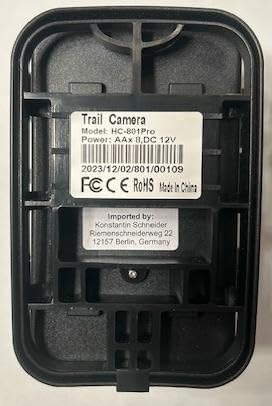
ചിത്രം: പിന്നിലേക്ക് view of the HC-801LTE camera, displaying the battery compartment and the product label with model and power specifications.
4. സജ്ജീകരണം
Follow these steps to prepare your camera for use:
- ബാറ്ററി ഇൻസ്റ്റാളേഷൻ: Open the camera housing and insert 8 AA batteries into the battery compartment, ensuring correct polarity. The camera can also be powered permanently with a 9-12V, 1.5A network power supply.
- മൈക്രോ എസ്ഡി കാർഡ് ഇൻസ്റ്റലേഷൻ: Insert a Micro SD card (up to 64GB, not included) into the designated slot. Ensure the card is formatted correctly for optimal performance.
- സിം കാർഡ് ഇൻസ്റ്റാളേഷൻ: For 4G functionality, insert a compatible SIM card into the SIM card slot. Ensure the SIM card is activated and has an active data plan.
- ആന്റിന അറ്റാച്ച്മെന്റ്: Screw the provided 4G antenna firmly into the antenna port on top of the camera.
- മൗണ്ടിംഗ്: Use the included mounting strap to secure the camera to a tree or pole. Alternatively, use the tripod mount for flexible positioning.

Image: The HC-801LTE camera with its 4G antenna, demonstrating its connectivity with a smartphone running the Suntekcam application.
5. പ്രവർത്തന നിർദ്ദേശങ്ങൾ
This section details how to operate your Suntek HC-801LTE camera and utilize its features.
5.1 പവർ ഓൺ/ഓഫ്
Locate the power switch inside the camera housing. Switch it to the 'ON' position to power on the camera. To power off, switch it to the 'OFF' position.
5.2 ഓപ്പറേറ്റിംഗ് മോഡുകൾ
The camera supports various operating modes:
- ഫോട്ടോ മോഡ്: നിശ്ചല ചിത്രങ്ങൾ പകർത്തുന്നു.
- വീഡിയോ മോഡ്: വീഡിയോ ക്ലിപ്പുകൾ റെക്കോർഡുചെയ്യുന്നു.
- ഫോട്ടോ + വീഡിയോ മോഡ്: കണ്ടെത്തുമ്പോൾ ഒരു സ്റ്റിൽ ഇമേജും തുടർന്ന് ഒരു വീഡിയോ ക്ലിപ്പും പകർത്തുന്നു.
5.3 Suntekcam App Usage
The Suntekcam app allows for remote control and monitoring of your camera:
- ആപ്പ് ഡൗൺലോഡ് ചെയ്യുക: Scan the QR code provided in the camera's manual or visit http://app.appurl.me/79814428341 ഡൗൺലോഡ് ചെയ്യാൻ
അനുബന്ധ രേഖകൾ - HC-801LTE (801Plus)

Suntek HC-810A Trail Camera User Manual
User manual for the Suntek HC-810A trail camera, covering product introduction, parameters, functions, and troubleshooting.
Suntek HC-810Pro 4G Trail Camera User Manual and Specifications
Comprehensive guide to the Suntek HC-810Pro 4G Trail Camera, covering specifications, installation, setup, app binding, troubleshooting, and operating instructions. Learn about photo and video recording capabilities, memory storage, power sources, and detection systems.
4G Trail Camera HC-900Pro User Manual
User manual for the 4G Trail Camera HC-900Pro, detailing specifications, installation, and app binding. Includes instructions in English, Czech, Slovak, Hungarian, and German.
Suntek HC-810Pro 4G Trail Camera User Manual and Specifications
Comprehensive guide for the Suntek HC-810Pro 4G Trail Camera, covering installation, setup, app binding, troubleshooting, and technical specifications. Learn how to use its advanced features for wildlife monitoring.
SUNTEK HC-300 Wildlife Digital Infrared Trail Camera User's Manual
This user's manual provides detailed instructions for operating the SUNTEK HC-300 Wildlife Digital Infrared Trail Camera, covering setup, basic and advanced operations, settings, and technical specifications.
HC-801A Trail Camera User Manual
User manual for the HC-801A trail camera, covering product introduction, structure, parameters, functions, troubleshooting, and warranty information.