1. ഉൽപ്പന്നം കഴിഞ്ഞുview
The EZVIZ C6W Mini PT IP 4MP Wi-Fi Camera (Model 303101768) is designed for indoor security monitoring, offering advanced features such as pan and tilt functionality, 4-megapixel resolution, human detection, two-way audio, and local storage options. This manual provides instructions for setting up, operating, and maintaining your camera.

ചിത്രം 1.1: EZVIZ C6W Pan & Tilt Wi-Fi Camera. This image displays the camera's sleek dome design and highlights its primary features, including 4-megapixel resolution for clear imaging, person detection capabilities, a 360-degree panoramic view, automatic zoom tracking, and efficient H.265 video compression technology.
2. പാക്കേജ് ഉള്ളടക്കം
നിങ്ങളുടെ പാക്കേജിൽ എല്ലാ ഘടകങ്ങളും ഉണ്ടെന്ന് ഉറപ്പാക്കുക:
- EZVIZ C6W Camera
- പവർ അഡാപ്റ്റർ
- മൗണ്ടിംഗ് സ്ക്രൂ കിറ്റ്
- ദ്രുത ആരംഭ ഗൈഡ് (വിശദമായ നിർദ്ദേശങ്ങൾക്ക് ഈ മാനുവൽ കാണുക)
3. സജ്ജീകരണ നിർദ്ദേശങ്ങൾ
3.1. ക്യാമറ ഓൺ ചെയ്യുക
- ക്യാമറയുടെ പവർ പോർട്ടിലേക്ക് പവർ അഡാപ്റ്റർ ബന്ധിപ്പിക്കുക.
- ഒരു മതിൽ ഔട്ട്ലെറ്റിലേക്ക് പവർ അഡാപ്റ്റർ പ്ലഗ് ചെയ്യുക.
- Wait for the camera's indicator light to flash blue, indicating it is ready for setup.
3.2. Installing the EZVIZ App
The EZVIZ app is required for camera setup and operation.
- Download the EZVIZ app from the App Store (iOS) or Google Play Store (Android).
- Register for an EZVIZ account if you do not have one, or log in with your existing account.
3.3. ആപ്പിലേക്ക് ക്യാമറ ചേർക്കുന്നു
- Open the EZVIZ app.
- Tap the "+" icon on the home screen to add a device.
- Scan the QR code located on the bottom of your camera or on the quick start guide.
- Follow the in-app prompts to connect the camera to your Wi-Fi network. Ensure your Wi-Fi network is 2.4 GHz.
- കണക്ട് ചെയ്തുകഴിഞ്ഞാൽ, ഇൻഡിക്കേറ്റർ ലൈറ്റ് കടും നീലയായി മാറും.
3.4. ക്യാമറ മൌണ്ട് ചെയ്യുന്നു (ഓപ്ഷണൽ)
The camera can be placed on a flat surface or mounted to a ceiling or wall using the provided screw kit.
- Choose a suitable location for optimal coverage.
- Use the mounting template (if provided) to mark screw positions.
- പൈലറ്റ് ദ്വാരങ്ങൾ തുരന്ന് വാൾ ആങ്കറുകൾ ഘടിപ്പിക്കുക.
- Secure the mounting plate (if applicable) with screws.
- മൗണ്ടിംഗ് പ്ലേറ്റിലേക്ക് ക്യാമറ അറ്റാച്ചുചെയ്യുക.
4. ക്യാമറ പ്രവർത്തിപ്പിക്കുക
4.1. തത്സമയം View കൂടാതെ പാൻ/ടിൽറ്റ് നിയന്ത്രണം
Access the live feed and control the camera's movement through the EZVIZ app.
- Open the EZVIZ app and select your camera.
- Use the on-screen joystick or swipe gestures to pan (horizontal) and tilt (vertical) the camera lens.
- The camera offers a 360° Field-of-View സമഗ്രമായ കവറേജിനായി.
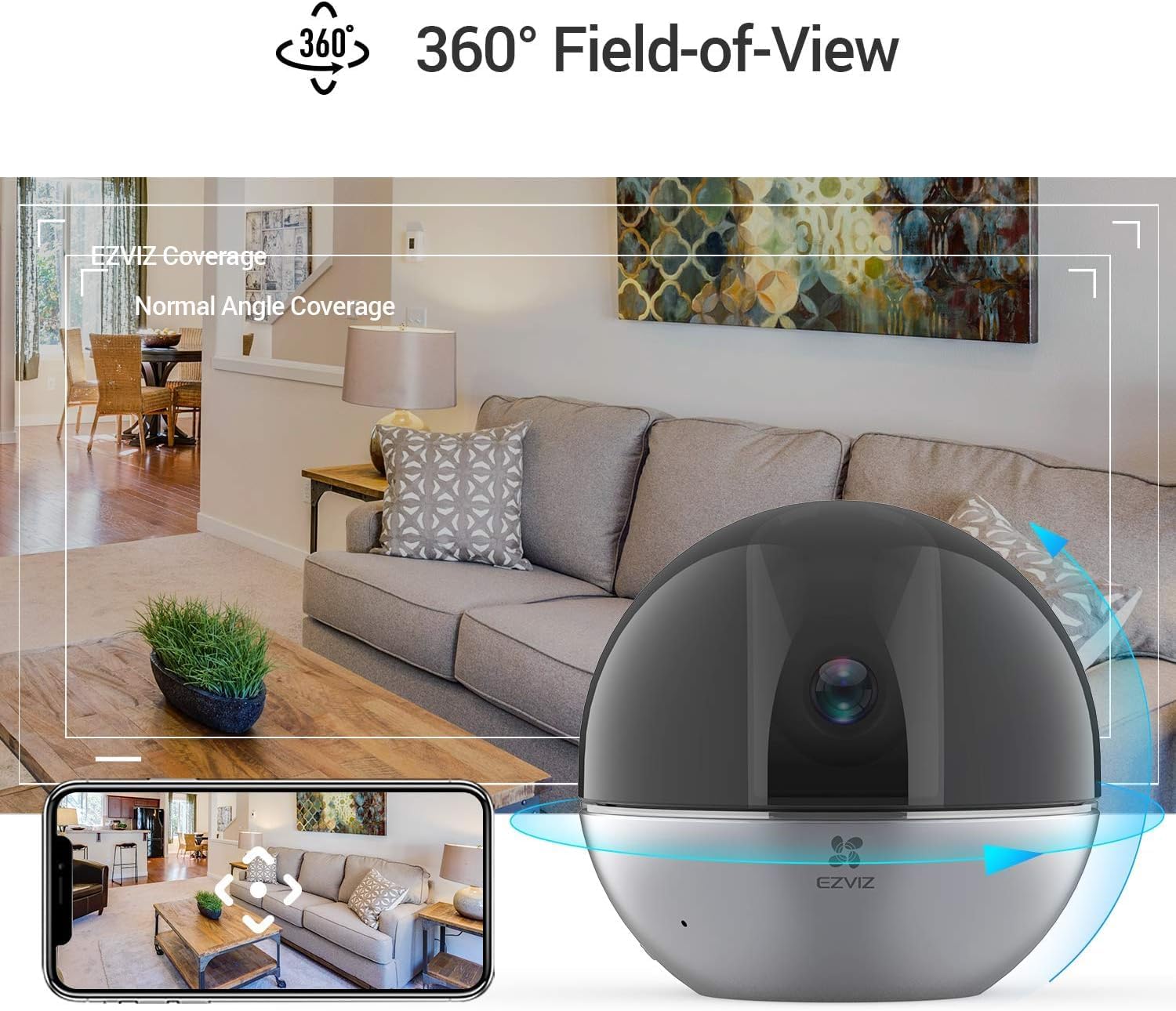
ചിത്രം 4.1: 360° Field-of-View. This image illustrates the camera's ability to provide a full panoramic view of a room, with an accompanying smartphone screen showing how users can navigate this wide field of view within the EZVIZ app.
4.2. ടു-വേ ഓഡിയോ
ടു-വേ ഓഡിയോ സവിശേഷത ഉപയോഗിച്ച് ക്യാമറയ്ക്ക് സമീപമുള്ള വ്യക്തികളുമായി ആശയവിനിമയം നടത്തുക.
- ലൈവിൽ view, സംസാരിക്കാൻ മൈക്രോഫോൺ ഐക്കണിൽ ടാപ്പ് ചെയ്യുക.
- Tap it again to end speaking.
- The camera's speaker will transmit your voice, and its microphone will capture audio from the camera's location.

ചിത്രം 4.2: Two-Way Audio Functionality. This image shows the EZVIZ app on a smartphone, highlighting the 'Speak' button, and illustrating how users can engage in two-way communication with the camera's location, with example speech bubbles.
4.3. ചലന കണ്ടെത്തലും ട്രാക്കിംഗും
The camera can detect human motion and automatically track subjects.
- പ്രവർത്തനക്ഷമമാക്കുക വ്യക്തി കണ്ടെത്തൽ in the app settings to receive alerts when human figures are detected.
- സജീവമാക്കുക യാന്ത്രിക സൂം ട്രാക്കിംഗ് for the camera to automatically zoom in and follow detected motion.
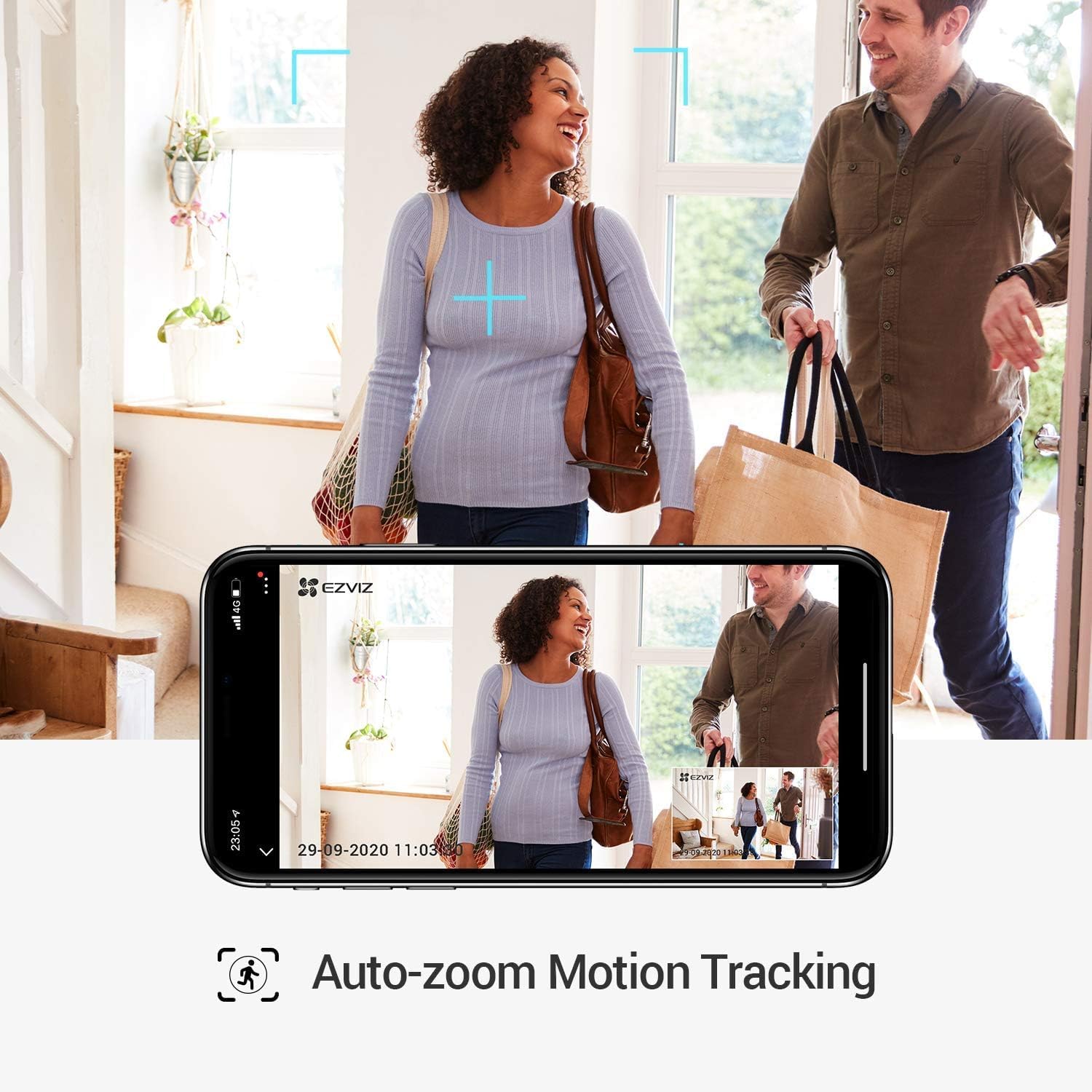
ചിത്രം 4.3: Auto-Zoom Motion Tracking. This image illustrates the camera's capability to automatically zoom and track moving subjects, showing a couple entering a home and the camera's view on a smartphone screen following their movement.

ചിത്രം 4.4: Person Detection. This image shows the camera's person detection feature in action, with blue focus squares highlighting a child playing, indicating that a human figure has been identified.

ചിത്രം 4.5: Automatic Tracking Mechanism. This image provides a close-up of the camera lens, with blue light rays emanating from it, visually representing the camera's internal mechanism for automatic tracking and movement.
4.4. സ്വകാര്യത മോഡ്
Activate Privacy Mode to physically retract the camera lens, ensuring privacy when needed.
- In the EZVIZ app, locate and tap the സ്വകാര്യത മോഡ് ബട്ടൺ.
- The camera lens will retract into its housing, stopping all recording and live viewing.
- Tap the button again to resume normal operation.

ചിത്രം 4.6: One-Touch Privacy Shutter. This image shows the camera's privacy feature, where the lens retracts into the dome, visually indicating that the camera is no longer recording or viewing, ensuring user privacy.
4.5 പ്രാദേശിക സംഭരണം
The camera supports local storage via a microSD card (sold separately) for continuous recording or event-triggered recordings.
- Insert a microSD card (up to 256GB recommended) into the designated slot on the camera.
- Format the microSD card through the EZVIZ app settings.
- Configure recording schedules and event recording preferences in the app.
5. പരിപാലനം
5.1. ക്യാമറ വൃത്തിയാക്കൽ
- വൃത്തിയാക്കുന്നതിനുമുമ്പ് ക്യാമറ ഓഫ് ചെയ്തിട്ടുണ്ടെന്ന് ഉറപ്പാക്കുക.
- ക്യാമറ ബോഡി തുടയ്ക്കാൻ മൃദുവായതും ഉണങ്ങിയതുമായ ഒരു തുണി ഉപയോഗിക്കുക.
- ലെൻസിന്, പോറലുകൾ ഒഴിവാക്കാൻ ഒപ്റ്റിക്സിനായി പ്രത്യേകം രൂപകൽപ്പന ചെയ്ത ലെൻസ് ക്ലീനിംഗ് തുണി ഉപയോഗിക്കുക.
- കഠിനമായ രാസവസ്തുക്കളോ ഉരച്ചിലുകൾ ഉപയോഗിക്കരുത്.
5.2. ഫേംവെയർ അപ്ഡേറ്റുകൾ
Regularly check for and install firmware updates through the EZVIZ app to ensure optimal performance and security.
- Open the EZVIZ app.
- നിങ്ങളുടെ ക്യാമറയുടെ ക്രമീകരണങ്ങളിലേക്ക് നാവിഗേറ്റ് ചെയ്യുക.
- Look for a "Firmware Version" or "Update" option and follow the prompts.
6. പ്രശ്നപരിഹാരം
6.1. ക്യാമറ ഓഫ്ലൈൻ
- പവർ പരിശോധിക്കുക: ക്യാമറ ഒരു പവർ സ്രോതസ്സുമായി ശരിയായി ബന്ധിപ്പിച്ചിട്ടുണ്ടെന്നും അഡാപ്റ്റർ പ്രവർത്തിക്കുന്നുണ്ടെന്നും ഉറപ്പാക്കുക.
- Wi-Fi പരിശോധിക്കുക: Verify your Wi-Fi router is on and broadcasting a 2.4 GHz network. Ensure the camera is within range.
- പുനരാരംഭിക്കുക: Unplug the camera, wait 30 seconds, and plug it back in. Restart your Wi-Fi router.
- Re-add Camera: If issues persist, try removing the camera from the app and adding it again.
6.2. മോശം വീഡിയോ നിലവാരം
- നെറ്റ്വർക്ക് വേഗത: Ensure your internet connection meets the requirements for streaming high-resolution video.
- വൈഫൈ സിഗ്നൽ: ക്യാമറ നിങ്ങളുടെ വൈ-ഫൈ റൂട്ടറിന് അടുത്തേക്ക് നീക്കുക അല്ലെങ്കിൽ ഒരു വൈ-ഫൈ എക്സ്റ്റെൻഡർ പരിഗണിക്കുക.
- ലെൻസ് ശുചിത്വം: മെയിന്റനൻസ് വിഭാഗത്തിൽ വിവരിച്ചിരിക്കുന്നതുപോലെ ക്യാമറ ലെൻസ് വൃത്തിയാക്കുക.
- WDR Feature: The camera features Wide Dynamic Range (WDR) to improve image clarity in scenes with both very bright and very dark areas. Ensure this feature is enabled in the app settings if needed.

ചിത്രം 6.1: WDR Comparison. This image demonstrates the difference between EZVIZ C6W's True-WDR and standard Digital WDR, showing how True-WDR enhances image quality by balancing exposure in challenging lighting conditions, revealing more detail in both bright and dark regions of a scene.
6.3. Motion Detection Not Working
- കണ്ടെത്തൽ പ്രാപ്തമാക്കുക: Verify that "Person Detection" and "Motion Detection" are enabled in the app settings.
- സംവേദനക്ഷമത: Adjust the motion detection sensitivity level in the app.
- കണ്ടെത്തൽ മേഖല: Ensure the area you want to monitor is within the camera's detection zone.
- ഷെഡ്യൂൾ: Check if motion detection is scheduled to be active during the desired times.
7 സ്പെസിഫിക്കേഷനുകൾ
| ഫീച്ചർ | സ്പെസിഫിക്കേഷൻ |
|---|---|
| മോഡലിൻ്റെ പേര് | C6W |
| ഉൽപ്പന്ന മോഡൽ നമ്പർ | 303101768 |
| ഫലപ്രദമായ വീഡിയോ റെസല്യൂഷൻ | 4 Megapixels (2K Resolution) |
| വീഡിയോ ക്യാപ്ചർ റെസല്യൂഷൻ | 3K |
| ഫ്രെയിം റേറ്റ് | സെക്കൻഡിൽ 25 ഫ്രെയിമുകൾ |
| കണക്റ്റിവിറ്റി ടെക്നോളജി | വയർലെസ് (വൈ-ഫൈ) |
| വയർലെസ് കമ്മ്യൂണിക്കേഷൻ ടെക്നോളജി | വൈഫൈ |
| പ്രത്യേക സവിശേഷതകൾ | Two-way audio, Motion detector, Local recording, Person Detection, Auto-Zoom Tracking, Privacy Mode |
| ഇൻഡോർ/ഔട്ട്ഡോർ ഉപയോഗം | ഇൻഡോർ |
| നൈറ്റ് വിഷൻ റേഞ്ച് | 10 മീറ്റർ |
| പവർ ഉറവിടം | Corded Electric (5 Volts, 8 Watt-hours) |
| മെറ്റീരിയൽ | പ്ലാസ്റ്റിക് |
| നിറം | കറുപ്പ് |
| ഇനത്തിന്റെ അളവുകൾ (L x W x H) | 9.6 x 9.6 x 9.1 സെ.മീ |
| ഉൽപ്പന്ന അളവുകൾ | 9.58 x 9.58 x 9.06 സെ.മീ; 252 ഗ്രാം |
| ജല പ്രതിരോധ നില | വാട്ടർ റെസിസ്റ്റൻ്റ് അല്ല |
| അനുയോജ്യമായ ഉപകരണങ്ങൾ | Smartphone (via EZVIZ App), Amazon Alexa |
| ഉൾപ്പെടുത്തിയ ഘടകങ്ങൾ | Camera, mounting screws, power adapter |
8. വാറൻ്റി വിവരങ്ങൾ
EZVIZ products typically come with a limited warranty. For detailed warranty terms and conditions, including coverage period and service procedures, please refer to the warranty card included with your product or visit the official EZVIZ webസൈറ്റ്.
പ്രധാനപ്പെട്ടത്: വാറന്റി ക്ലെയിമുകൾക്കുള്ള വാങ്ങിയതിന്റെ തെളിവായി നിങ്ങളുടെ വാങ്ങൽ രസീത് സൂക്ഷിക്കുക.
9. പിന്തുണ
For technical assistance, frequently asked questions, or further support, please visit the official EZVIZ support page or contact their customer service.
- ഓൺലൈൻ പിന്തുണ: സന്ദർശിക്കുക www.ezviz.com/support (or your regional EZVIZ webസൈറ്റ്).
- EZVIZ ആപ്പ്: The app often contains a "Help" or "FAQ" section.