1. ഉൽപ്പന്നം കഴിഞ്ഞുview
The Roku Ultra LT is a high-performance streaming player designed to deliver a seamless 4K/HDR/HD viewing experience. It features a quad-core processor for smooth operation and offers both wired (Ethernet) and dual-band wireless connectivity for reliable streaming. The enhanced voice remote includes private listening capabilities and TV control functions, simplifying your entertainment experience.

Figure 1: Roku Ultra LT device, enhanced voice remote, and headphones.
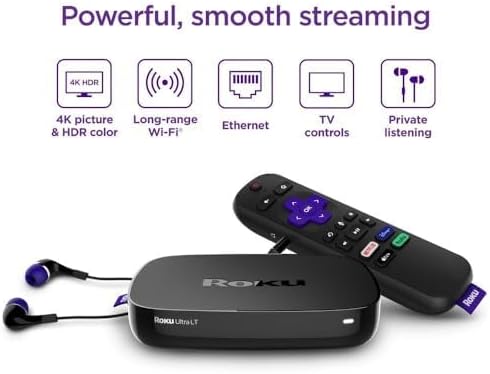
Figure 2: Key features of the Roku Ultra LT streaming player.
പ്രധാന സവിശേഷതകൾ:
- ശക്തമായ പ്രകടനം: Quad-core processor for smooth HD, 4K, and HDR streaming.
- ഫ്ലെക്സിബിൾ കണക്റ്റിവിറ്റി: Dual-band wireless and Ethernet port for stable internet connection.
- Enhanced Voice Remote: Features voice search, TV power/volume/mute buttons, and a headphone jack for private listening.
- MicroSD Port: Provides additional storage for channels.
- Premium HDMI Cable: Includes a 6FT 4K HDR ready HDMI cable for optimal picture quality.
2. സജ്ജീകരണ ഗൈഡ്
2.1. എന്താണ് ഉൾപ്പെടുത്തിയിരിക്കുന്നത്
ആരംഭിക്കുന്നതിന് മുമ്പ്, നിങ്ങളുടെ പാക്കേജിൽ എല്ലാ ഘടകങ്ങളും ഉണ്ടെന്ന് ഉറപ്പാക്കുക:
- Roku Ultra LT സ്ട്രീമിംഗ് പ്ലെയർ
- Enhanced Voice Remote
- സ്വകാര്യ ശ്രവണത്തിനുള്ള ഹെഡ്ഫോണുകൾ
- പവർ അഡാപ്റ്റർ
- Premium 6FT 4K HDR Ready HDMI Cable
- 2 AAA ബാറ്ററികൾ (റിമോട്ടിന്)
2.2. Connecting Your Roku Ultra LT
- ടിവിയിലേക്ക് കണക്റ്റ് ചെയ്യുക: Plug one end of the included HDMI cable into the HDMI port on your Roku Ultra LT and the other end into an available HDMI port on your TV.
- പവറിലേക്ക് ബന്ധിപ്പിക്കുക: Plug the power adapter into the DC IN port on your Roku Ultra LT, then plug the other end into a wall outlet. The device will power on automatically.
- Internet Connection (Optional Ethernet): For a wired connection, plug an Ethernet cable (not included) into the Ethernet port on your Roku Ultra LT and the other end into your router. If using Wi-Fi, proceed to the on-screen setup.
- റിമോട്ട് ബാറ്ററികൾ ചേർക്കുക: Open the battery compartment on the back of the enhanced voice remote and insert the two included AAA batteries, matching the polarity indicators.
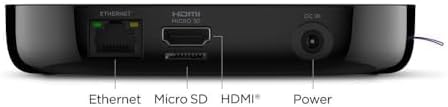
Figure 3: Rear ports of the Roku Ultra LT device.
2.3. On-Screen Guided Setup
Once connected, follow the on-screen instructions to complete the setup:
- ഭാഷ തിരഞ്ഞെടുക്കുക: നിങ്ങൾ തിരഞ്ഞെടുത്ത ഭാഷ തിരഞ്ഞെടുക്കുക.
- നെറ്റ്വർക്ക് കണക്ഷൻ: If not using Ethernet, select your wireless network from the list and enter your Wi-Fi password.
- സോഫ്റ്റ്വെയർ അപ്ഡേറ്റ്: The device may download and install the latest software. This can take several minutes.
- Roku Account Activation: You will be prompted to activate your Roku account. Follow the instructions to link your device to an existing account or create a new one.
- Add Channels: Browse and add your favorite streaming channels.
വീഡിയോ 1: ഒരു ഓവർview of the Roku Ultra LT, including initial setup and features. This video demonstrates the physical device and remote, and discusses its capabilities.
3. Operating Your Roku Ultra LT
3.1. Using the Enhanced Voice Remote
The enhanced voice remote provides intuitive control over your Roku device and TV.
- ശബ്ദ തിരയൽ: Press and hold the microphone button and speak your command to search for movies, shows, actors, or launch channels.
- ദ്രുത ആക്സസ് ബട്ടണുകൾ: Dedicated buttons provide instant access to popular streaming services like Netflix, Disney+, Apple TV+, and Hulu.
- ടിവി നിയന്ത്രണങ്ങൾ: Use the power, volume, and mute buttons to control your television directly from the Roku remote.
- സ്വകാര്യ ശ്രവണം: Plug the included headphones into the headphone jack on the side of the remote to enjoy your content without disturbing others.
3.2. റോക്കു ഇന്റർഫേസ് നാവിഗേറ്റ് ചെയ്യുക
The Roku home screen provides easy access to all your installed channels and features.
- ഹോം സ്ക്രീൻ: Displays your installed streaming channels. You can customize the order of channels.
- സ്ട്രീമിംഗ് സ്റ്റോർ: Browse and add new channels from the Roku Channel Store.
- തിരയുക: Use the search function (via voice or on-screen keyboard) to find content across various channels.
- ക്രമീകരണങ്ങൾ: Access device settings, network configuration, display type, audio options, and more.
Video 2: A demonstration of the Roku Ultra LT in use, showcasing its interface, remote control functions, and various streaming options.
4. പരിപാലനം
4.1. ജനറൽ കെയർ
- Keep the device and remote in a dry, clean environment.
- തീവ്രമായ താപനിലയിലോ നേരിട്ടുള്ള സൂര്യപ്രകാശത്തിലോ ഉപകരണം തുറന്നുകാട്ടുന്നത് ഒഴിവാക്കുക.
- Do not block ventilation openings on the device.
4.2. വൃത്തിയാക്കൽ
- Use a soft, dry cloth to clean the exterior of the Roku Ultra LT and its remote.
- Do not use liquid cleaners or aerosols directly on the device.
4.3. സോഫ്റ്റ്വെയർ അപ്ഡേറ്റുകൾ
- The Roku Ultra LT automatically checks for software updates. Ensure your device is connected to the internet to receive the latest features and improvements.
- You can manually check for updates via ക്രമീകരണങ്ങൾ > സിസ്റ്റം > സോഫ്റ്റ്വെയർ അപ്ഡേറ്റ്.
5. പ്രശ്നപരിഹാരം
5.1. No Power / No Indicator Light
- Ensure the power adapter is securely connected to the Roku Ultra LT and a working wall outlet.
- Try plugging the power adapter into a different outlet.
5.2. No Picture on TV
- Verify the HDMI cable is securely connected to both the Roku Ultra LT and your TV.
- നിങ്ങളുടെ ടിവി ശരിയായ HDMI ഇൻപുട്ട് ഉറവിടത്തിലേക്ക് സജ്ജീകരിച്ചിട്ടുണ്ടെന്ന് ഉറപ്പാക്കുക.
- നിങ്ങളുടെ ടിവിയിൽ വ്യത്യസ്തമായ ഒരു HDMI പോർട്ട് അല്ലെങ്കിൽ വ്യത്യസ്തമായ ഒരു HDMI കേബിൾ പരീക്ഷിച്ചുനോക്കൂ.
- Restart your Roku device by unplugging the power adapter for 5 seconds and then plugging it back in.
5.3. Remote Not Responding
- റിമോട്ടിലെ AAA ബാറ്ററികൾ മാറ്റിസ്ഥാപിക്കുക.
- Ensure there are no obstructions between the remote and the Roku device.
- If the remote is paired via Wi-Fi Direct, try re-pairing it by holding the pairing button inside the battery compartment for 5 seconds.
5.4. ബഫറിംഗ് അല്ലെങ്കിൽ മോശം സ്ട്രീമിംഗ് നിലവാരം
- Check your internet connection speed. A stable connection is crucial for 4K/HDR streaming.
- If using Wi-Fi, try moving your Roku device closer to your wireless router or connect via Ethernet for a more stable connection.
- നിങ്ങളുടെ റൂട്ടറും മോഡവും പുനരാരംഭിക്കുക.
- Close any unused apps on your Roku device or other devices on your network that might be consuming bandwidth.
6 സാങ്കേതിക സവിശേഷതകൾ
| ഫീച്ചർ | വിശദാംശങ്ങൾ |
|---|---|
| ബ്രാൻഡ് | റോക്കു |
| മോഡൽ നമ്പർ | 4662RW |
| ഫോം ഫാക്ടർ | ടിവി ബോക്സ് |
| റെസലൂഷൻ | 4K (supports HD, 4K, HDR) |
| കണക്റ്റിവിറ്റി | Dual-band Wireless, Ethernet |
| തുറമുഖങ്ങൾ | HDMI, Ethernet, MicroSD, DC In |
| കൺട്രോളർ തരം | Enhanced Voice Remote |
| വിദൂര സവിശേഷതകൾ | Voice Control, TV Power/Volume/Mute, Private Listening (headphone jack) |
| ബാറ്ററികൾ (റിമോട്ട്) | 2 AAA ബാറ്ററികൾ (ഉൾപ്പെട്ടിരിക്കുന്നു) |
| നിറം | കറുപ്പ് |
| അളവുകൾ | 6 x 4 x 8 ഇഞ്ച് |
| ഭാരം | 1.37 പൗണ്ട് |
7. വാറണ്ടിയും പിന്തുണയും
7.1. ഉൽപ്പന്ന വാറൻ്റി
For detailed warranty information, please refer to the warranty card included in your product packaging or visit the official Roku support webസൈറ്റ്. വാറന്റി നിബന്ധനകളും വ്യവസ്ഥകളും പ്രദേശത്തിനും റീട്ടെയിലർക്കും അനുസരിച്ച് വ്യത്യാസപ്പെടാം.
7.2. ഉപഭോക്തൃ പിന്തുണ
If you encounter any issues or have questions about your Roku Ultra LT, please visit the Roku support website for FAQs, troubleshooting guides, and contact information for customer service. You can also find additional resources and community forums online.
ഓൺലൈൻ പിന്തുണ: www.roku.com/support