1. ആമുഖം
യുടെ ഇൻസ്റ്റാളേഷൻ, പ്രവർത്തനം, പരിപാലനം എന്നിവയ്ക്കുള്ള വിശദമായ നിർദ്ദേശങ്ങൾ ഈ മാനുവൽ നൽകുന്നു. AMPIRE LDS-NBT-CP Smartphone Interface. This device integrates your smartphone's functionalities, such as Apple CarPlay and Android Auto, directly into your BMW's NBT multimedia system, enhancing your in-car experience with navigation, communication, and entertainment features.
2. ഉൽപ്പന്നം കഴിഞ്ഞുview
ദി AMPIRE LDS-NBT-CP is a plug-and-play smartphone interface designed for seamless integration with your vehicle's factory multimedia system. It displays content on the original factory monitor and routes audio through the vehicle's AUX input.

ചിത്രം 2.1: മുൻഭാഗം view യുടെ AMPIRE LDS-NBT-CP Smartphone Interface unit, showing various ports and indicators.
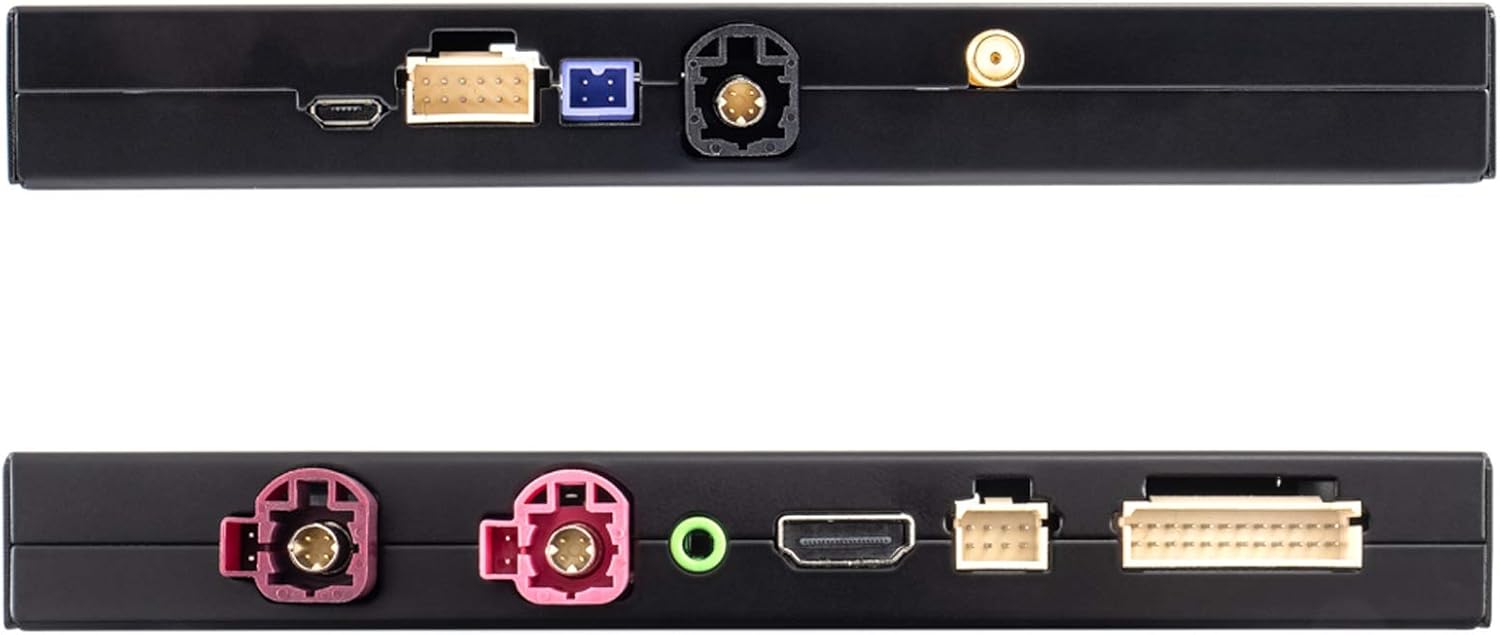
ചിത്രം 2.2: മുകളിലും താഴെയും views of the interface, highlighting connection ports for USB, WiFi, and other inputs/outputs.
3 പ്രധാന സവിശേഷതകൾ
- Full Smartphone Integration: Seamlessly integrates Apple CarPlay and Android Auto into your vehicle's factory system.
- നാവിഗേഷൻ: Utilize navigation applications like Google Maps and Waze directly on your car's display.
- മീഡിയ പ്ലേബാക്ക്: Access music streaming services such as Spotify and Amazon Prime Music.
- ഉയർന്ന മിഴിവുള്ള ഡിസ്പ്ലേ: Supports up to 1080p HD resolution for video and images.
- വയർലെസ് കണക്റ്റിവിറ്റി: Features wireless functions via 5.8G WLAN or Bluetooth. CarPlay can also be connected via cable.
- ക്യാമറ ഇൻപുട്ടുകൾ: Includes inputs for front and rear view cameras (composite video).
- ഓഡിയോ പ്രോസസ്സിംഗ്: Integrated audio DSP with EQ for enhanced sound quality.
- സോഫ്റ്റ്വെയർ അപ്ഡേറ്റുകൾ: Supports software updates via the USB input.
- നിയന്ത്രണം: Operates using the vehicle's existing buttons and control systems.
- ശബ്ദ നിയന്ത്രണം: Siri voice control is available in CarPlay mode via the included microphone.
- Mirrorlink: Android users can utilize the Mirrorlink function to mirror their smartphone display.
4 അനുയോജ്യത
This interface is compatible with BMW vehicles equipped with the NBT multimedia system. Please verify your vehicle's model and manufacturing date against the list below:
- BMW 1 Series: F20/21 (03/2013 - 03/2015)
- BMW 2 Series: F22 (11/2013 - 03/2015)
- BMW 3 Series: F30/31 (11/2012 - 07/2015), F34 (03/2013 - 07/2015), F80 (03/2014 - 07/2015)
- BMW 4 Series: F32 (07/2013 - 07/2015), F33 (11/2013 - 07/2015), F36 (03/2014 - 07/2015)
- BMW 5 Series: F07 (07/2012 onwards), F10/11/18 (09/2012 onwards)
- BMW 6 Series: F06/12/13 (03/2013 onwards)
- BMW 7 Series: F01/02/03 (07/2012 - 06/2015)
- ബിഎംഡബ്ല്യു എക്സ്3: F25 (04/2013 - 03/2016)
- ബിഎംഡബ്ല്യു എക്സ്4: F26 (04/2014 - 03/2016)
- ബിഎംഡബ്ല്യു എക്സ്5: F15 (08/2014 - 07/2016), F85 (12/2014 - 07/2016)
- ബിഎംഡബ്ല്യു എക്സ്6: F16 (08/2014 - 07/2016), F86 (12/2014 - 07/2016)
The interface is designed to work with smartphones for audio and video applications in the car.
5. പാക്കേജ് ഉള്ളടക്കം
പാക്കേജ് തുറക്കുമ്പോൾ, ഇനിപ്പറയുന്ന എല്ലാ ഘടകങ്ങളും ഉണ്ടെന്നും കേടുപാടുകൾ കൂടാതെയുണ്ടെന്നും ഉറപ്പാക്കുക:

ചിത്രം 5.1: കഴിഞ്ഞുview of all items included in the package, including the interface unit, various cables, and accessories.
- AMPIRE LDS-NBT-CP Smartphone Interface Unit
- Wiring Harness Set (Power, Video, USB, etc.)
- External Microphone for Voice Control
- വൈഫൈ ആൻ്റിന
- AUX ഓഡിയോ കേബിൾ

Image 5.2: Close-up of the main wiring harness, showing various connectors for integration into the vehicle's system.
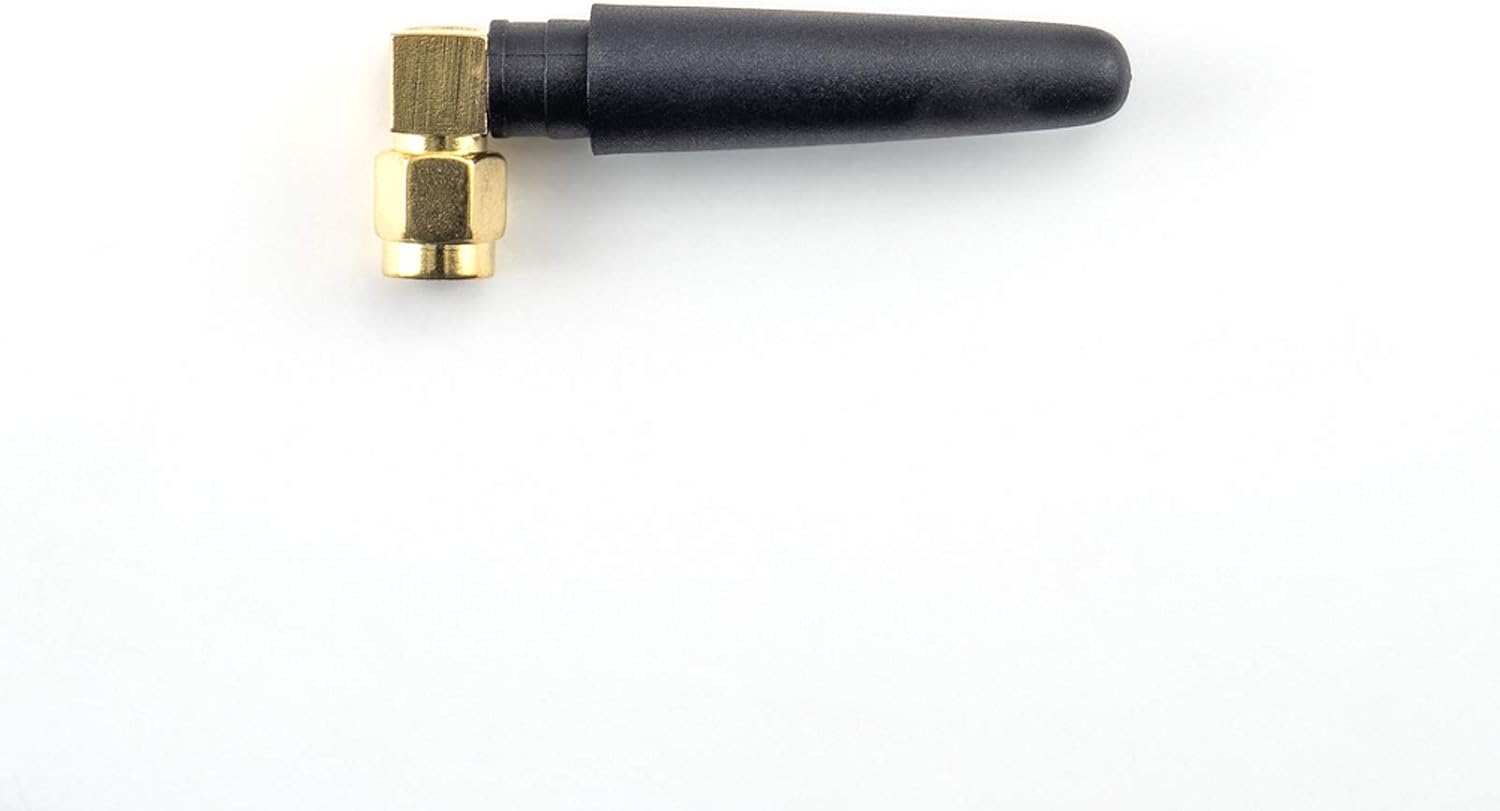
Image 5.3: The compact WiFi antenna, essential for wireless connectivity features.

Image 5.4: The external microphone, used for Siri voice commands and hands-free calling.

Image 5.5: The AUX audio cable, used to route sound from the interface to the vehicle's sound system.
6. സജ്ജീകരണവും ഇൻസ്റ്റാളേഷനും
ദി AMPIRE LDS-NBT-CP Smartphone Interface is designed for integration into your vehicle's existing wiring and multimedia system. Due to the complexity of automotive electronics, professional installation by a qualified technician is highly recommended to ensure correct functionality and to avoid damage to your vehicle or the interface.
6.1. General Installation Steps (Consult a professional for detailed instructions):
- വാഹനം വേർപെടുത്തൽ: Carefully remove necessary trim panels and the head unit to access the vehicle's wiring.
- ഇന്റർഫേസ് കണക്ഷൻ: Connect the main wiring harness from the interface to the vehicle's head unit and power supply. This is typically a plug-and-play process, but specific connections must be identified.
- ഡിസ്പ്ലേ കണക്ഷൻ: Connect the video input/output cables between the interface and the vehicle's display.
- ഓഡിയോ കണക്ഷൻ: Connect the AUX audio cable from the interface to the vehicle's AUX input. Ensure the vehicle's audio source is set to AUX for sound output from the interface.
- പെരിഫറൽ കണക്ഷനുകൾ:
- Connect the external microphone for voice control. Position it optimally for clear audio capture.
- Attach the WiFi antenna for wireless connectivity.
- If installing front or rear cameras, connect them to the designated camera inputs on the interface.
- Connect any USB devices (e.g., for wired CarPlay or software updates) to the USB port.
- പരിശോധന: Before reassembling the vehicle, perform thorough testing of all functions, including CarPlay, Android Auto, audio, and camera inputs.
- പുനഃസംയോജനം: Once all functions are verified, carefully reassemble the vehicle's trim panels.
Refer to your vehicle's specific service manual or consult a professional installer for precise wiring diagrams and disassembly procedures.
7. പ്രവർത്തന നിർദ്ദേശങ്ങൾ
ഇൻസ്റ്റാൾ ചെയ്തുകഴിഞ്ഞാൽ, ദി AMPIRE LDS-NBT-CP interface allows you to access smartphone functionalities through your BMW's NBT system.
7.1. Activating the Interface
The interface is typically activated by pressing and holding a specific button on your vehicle's iDrive controller or steering wheel. Consult your installer or vehicle documentation for the exact activation method.
7.2. Connecting Your Smartphone
- വയർലെസ് കാർപ്ലേ/ആൻഡ്രോയിഡ് ഓട്ടോ:
- നിങ്ങളുടെ സ്മാർട്ട്ഫോണിലെ ബ്ലൂടൂത്തും വൈ-ഫൈയും പ്രവർത്തനക്ഷമമാക്കിയിട്ടുണ്ടെന്ന് ഉറപ്പാക്കുക.
- On the interface screen, navigate to the CarPlay or Android Auto option.
- Pair your smartphone with the interface via Bluetooth. Follow the on-screen prompts.
- Once paired, the system will automatically connect via Wi-Fi for wireless CarPlay/Android Auto.
- വയർഡ് കാർപ്ലേ:
- Connect your iPhone to the interface's USB port using a certified USB cable.
- CarPlay should automatically launch on the vehicle's display.
7.3. Using CarPlay and Android Auto
Once connected, you can control CarPlay or Android Auto using your vehicle's factory controls (iDrive controller, steering wheel buttons). The interface mirrors your smartphone's display, allowing access to:
- നാവിഗേഷൻ: Use Apple Maps, Google Maps, Waze, etc.
- ഫോൺ കോളുകൾ: Make and receive calls hands-free.
- സന്ദേശമയയ്ക്കൽ: Send and receive messages via voice commands.
- സംഗീതം: Play music from your favorite apps.
- ശബ്ദ സഹായികൾ: Use Siri (for CarPlay) or Google Assistant (for Android Auto) via the external microphone.
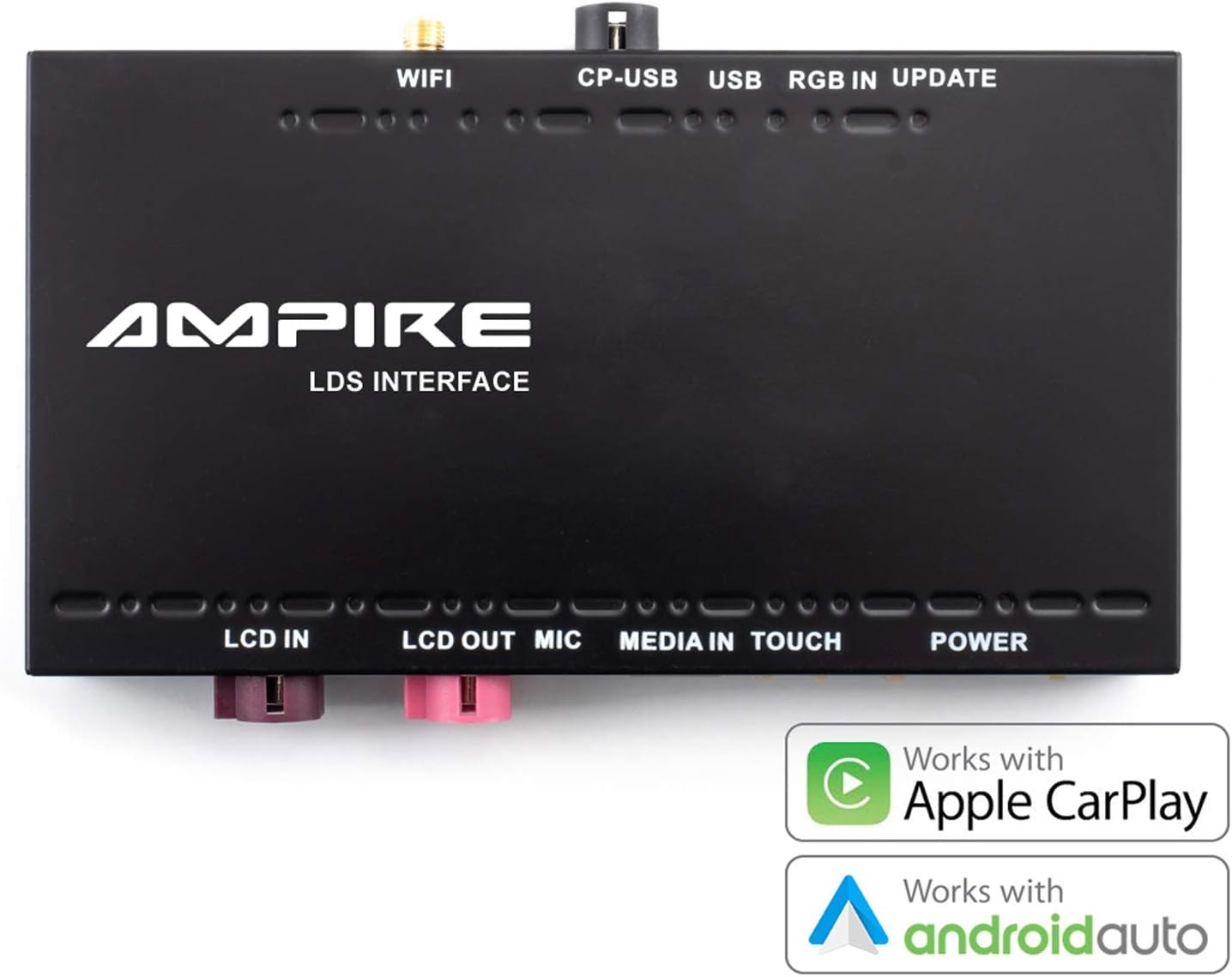
Image 7.1: The interface unit, emphasizing its compatibility with both Apple CarPlay and Android Auto.
7.4. Mirrorlink (Android Only)
For Android users, the Mirrorlink function allows you to mirror your smartphone's entire display onto the car's screen. This provides access to apps not natively supported by Android Auto. Refer to your smartphone's settings for Mirrorlink activation.
8. പരിപാലനം
ദി AMPIRE LDS-NBT-CP Smartphone Interface is designed for reliable operation with minimal maintenance. Follow these guidelines to ensure its longevity:
- വൃത്തിയാക്കൽ: Keep the interface unit and connections free from dust and debris. Use a soft, dry cloth for cleaning. Do not use liquid cleaners directly on the unit.
- സോഫ്റ്റ്വെയർ അപ്ഡേറ്റുകൾ: നിർമ്മാതാവിന്റെ website for available software updates. Updates can improve performance, add features, or resolve issues. Use the USB input for software updates as instructed by the manufacturer.
- പരിസ്ഥിതി വ്യവസ്ഥകൾ: Ensure the unit is installed in a location protected from extreme temperatures, direct sunlight, and moisture.
- കേബിൾ സമഗ്രത: Regularly inspect all connected cables for any signs of wear or damage. Replace damaged cables immediately to prevent malfunctions.
9. പ്രശ്നപരിഹാരം
നിങ്ങളുടെ ഉപകരണത്തിൽ പ്രശ്നങ്ങൾ നേരിടുകയാണെങ്കിൽ AMPIRE LDS-NBT-CP interface, refer to the following common troubleshooting steps:
- ഡിസ്പ്ലേ/കറുത്ത സ്ക്രീൻ ഇല്ല:
- Ensure the interface is powered on and correctly connected to the vehicle's display.
- Verify that the vehicle's display input is switched to the correct source (if applicable).
- Check all video cables for secure connections.
- ഓഡിയോ ഇല്ല:
- Confirm the vehicle's audio source is set to AUX.
- Check the AUX audio cable connection between the interface and the vehicle.
- Ensure the volume on both your smartphone and the vehicle's system is turned up.
- കാർപ്ലേ/ആൻഡ്രോയിഡ് ഓട്ടോ കണക്റ്റ് ചെയ്യുന്നില്ല:
- For wireless connection, ensure Bluetooth and Wi-Fi are enabled on your smartphone and paired correctly.
- For wired CarPlay, try a different USB cable or USB port if available.
- Restart your smartphone and the vehicle's multimedia system.
- നിങ്ങളുടെ സ്മാർട്ട്ഫോണിന്റെ ഓപ്പറേറ്റിംഗ് സിസ്റ്റം കാലികമാണെന്ന് ഉറപ്പാക്കുക.
- ശബ്ദ നിയന്ത്രണം പ്രവർത്തിക്കുന്നില്ല:
- Check if the external microphone is securely connected and positioned correctly.
- Ensure microphone permissions are granted on your smartphone for CarPlay/Android Auto.
- ഇടയ്ക്കിടെയുള്ള കണക്റ്റിവിറ്റി:
- Check for sources of interference (e.g., other wireless devices).
- വൈഫൈ ആന്റിന സുരക്ഷിതമായി ഘടിപ്പിച്ചിട്ടുണ്ടെന്ന് ഉറപ്പാക്കുക.
If these steps do not resolve the issue, contact AMPIRE customer support or your professional installer for further assistance.
10 സ്പെസിഫിക്കേഷനുകൾ
| ഫീച്ചർ | വിശദാംശങ്ങൾ |
|---|---|
| ബ്രാൻഡ് | AMPഐ.ആർ.ഇ |
| മോഡൽ നമ്പർ | LDS-NBT-CP |
| അനുയോജ്യമായ ഉപകരണങ്ങൾ | സ്മാർട്ട്ഫോൺ |
| നിർദ്ദിഷ്ട ഉൽപ്പന്ന ഉപയോഗം | കാർ ഓഡിയോയും വീഡിയോയും |
| കണക്റ്റർ തരം | USB, Wi-Fi, AUX type A |
| തുറമുഖങ്ങളുടെ എണ്ണം | 3 (Note: This refers to primary user-accessible ports like USB, AUX. The device has more internal connections.) |
| ഓഡിയോ ഔട്ട്പുട്ട് | Speakers (via vehicle's AUX input) |
| ബാറ്ററികൾ ആവശ്യമാണ് | ഇല്ല |
| ഇനത്തിൻ്റെ ഭാരം | 1.14 കി.ഗ്രാം |
| നിറം | കറുപ്പ് |
| ആദ്യം ലഭ്യമായ തീയതി | ഡിസംബർ 3, 2021 |
11. വാറൻ്റിയും പിന്തുണയും
ദി AMPIRE LDS-NBT-CP Smartphone Interface is built for durability and a long lifespan. For specific warranty details, please refer to the documentation provided with your purchase or contact AMPIRE customer support directly. For technical assistance or installation inquiries, it is recommended to consult with your professional installer or the AMPIRE support team.
നിർമ്മാതാവ്: AMPഐ.ആർ.ഇ


