1. ആമുഖം
The POMIACAM IPC9310SN is a professional 4-inch display IPC camera tester designed for comprehensive video surveillance system testing. It supports 4K H.265 IP cameras, 8MP CVI, 8MP TVI, and 5MP AHD CCTV cameras, along with various testing tools including cable testing, DC12V power output, and Power over Ethernet (PoE) functionality. This manual provides detailed instructions for setting up, operating, maintaining, and troubleshooting your device.

Figure 1.1: The IPC9310SN Camera Tester (left) and its accompanying wire tracker (right).
2. സജ്ജീകരണം
2.1 അൺബോക്സിംഗും പ്രാരംഭ പരിശോധനയും
Upon receiving your IPC9310SN Camera Tester, carefully open the packaging and inspect all components for any signs of damage. Ensure all items listed in the packing list are present.
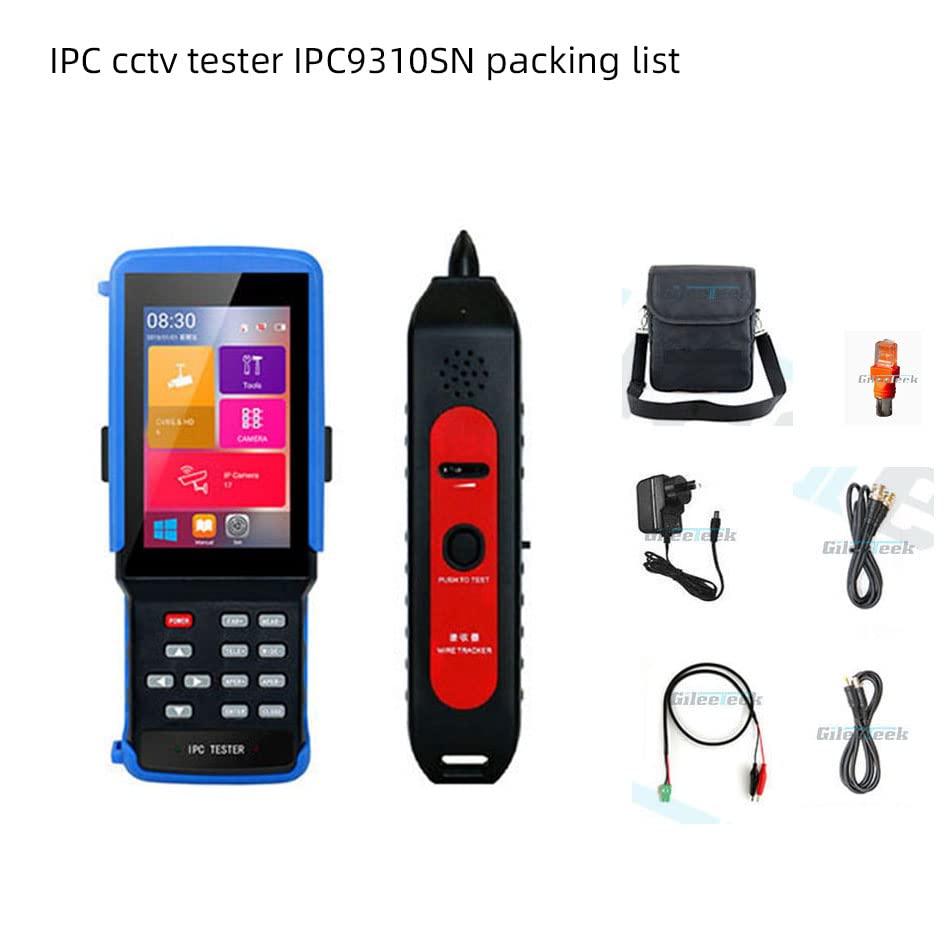
Figure 2.1: Contents of the IPC9310SN package, including the tester, wire tracker, power adapter, and various cables.
2.2 ഉപകരണം ചാർജ് ചെയ്യുന്നു
The IPC9310SN is equipped with a Lithium Ion battery. Before first use, fully charge the device using the provided power adapter. Connect the adapter to the power input port on the tester and plug it into a standard electrical outlet. The charging indicator will show the charging status.
2.3 ഉപകരണം കഴിഞ്ഞുview തുറമുഖങ്ങളും
Familiarize yourself with the various ports and interfaces on the IPC9310SN tester.
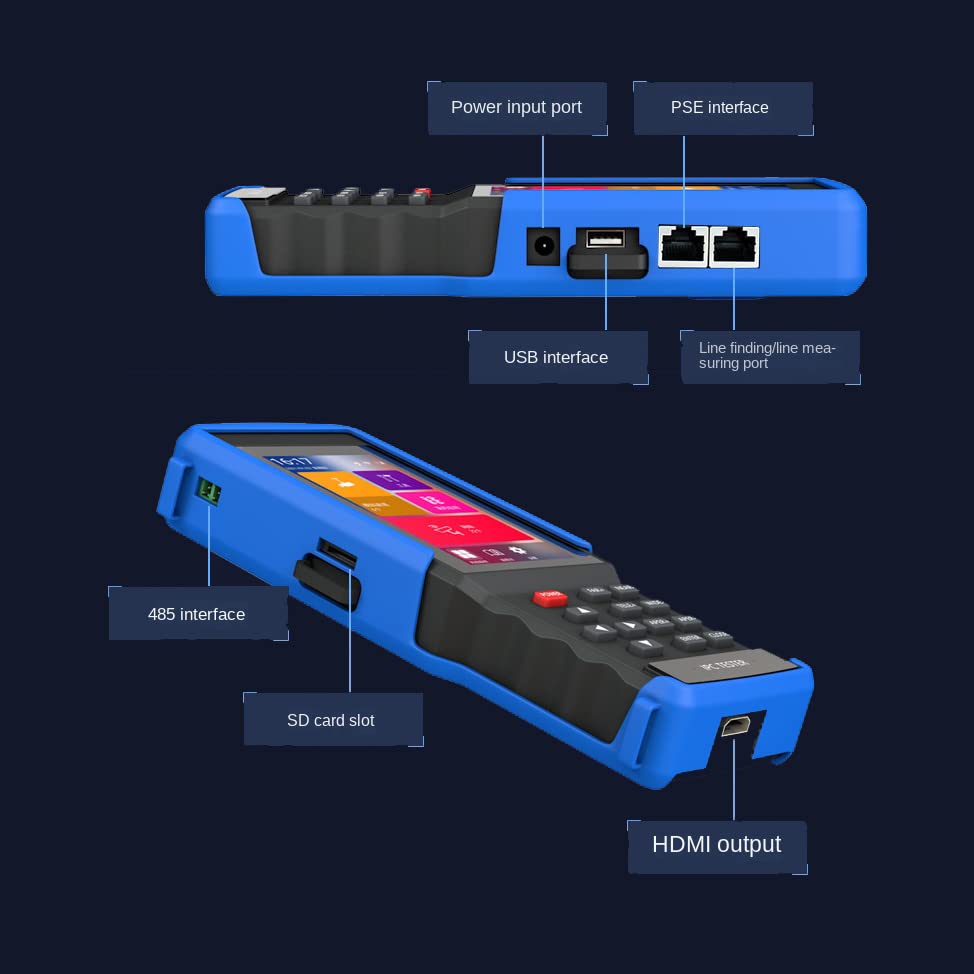
ചിത്രം 2.2: വശം view of the IPC9310SN showing the 485 interface, SD card slot, HDMI output, power input port, PSE interface, USB interface, and line finding/line measuring port.
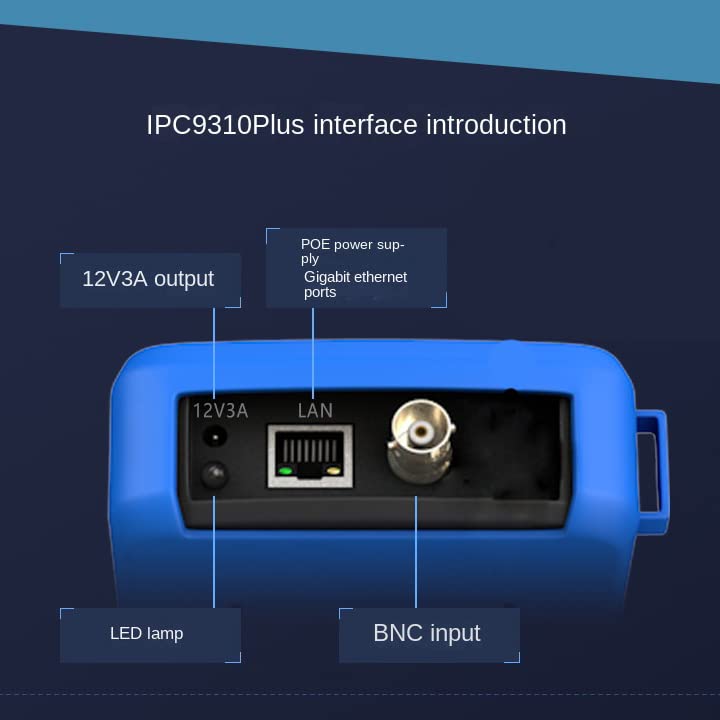
ചിത്രം 2.3: മുകളിൽ view of the IPC9310SN highlighting the 12V3A output, Gigabit Ethernet ports (PoE power supply), LED lamp, and BNC input.
3. പ്രവർത്തന നിർദ്ദേശങ്ങൾ
The IPC9310SN features a 4.5-inch IPS full HD screen with a resolution of 960x540, supporting both touch and button control for navigation. It can be used in both horizontal and vertical screen orientations.
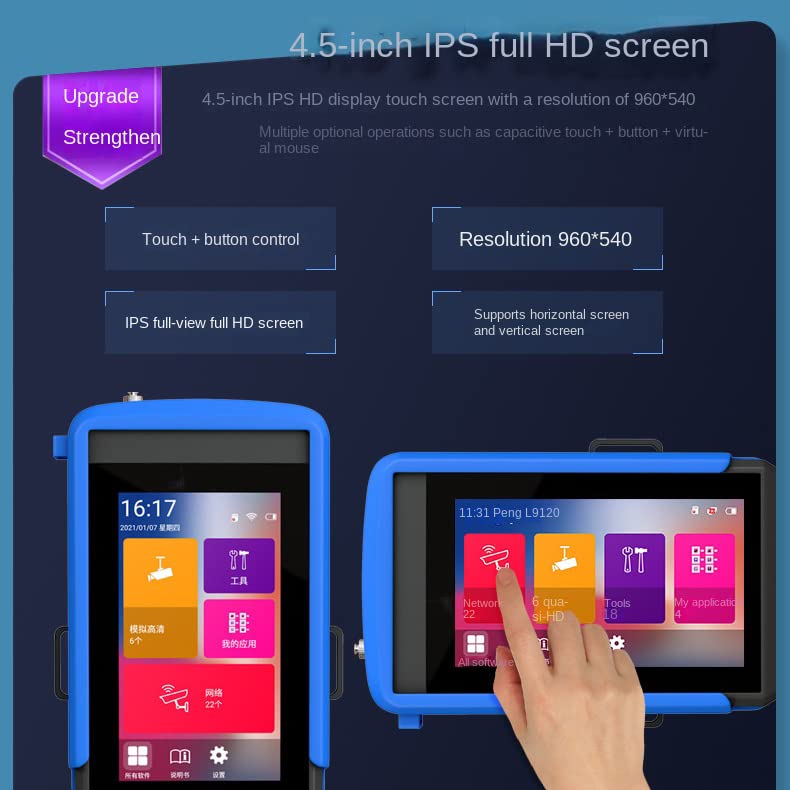
Figure 3.1: The 4.5-inch IPS full HD screen with touch and button control, 960x540 resolution, and support for both horizontal and vertical display modes.
3.1 IPC Camera Testing
The tester supports IP camera testing, including PTZ operations and customization for major camera brands using private protocols. It can discover camera IP addresses across full network segments.
Use the IP/AHD TVI SADP tool for batch activation, IP modification, and modifying username and password for IP cameras.
3.2 CVBS Analog Camera Testing
Perform CVBS Analog Camera tests and focus information tests.
3.3 Coax HD Camera Testing
The device supports HD TVI 8MP (3840 x 2156 15P), HD CVI 8MP (3840 x 2156 15P), and HD AHD 5MP (2560 x 1920 15P) resolutions.
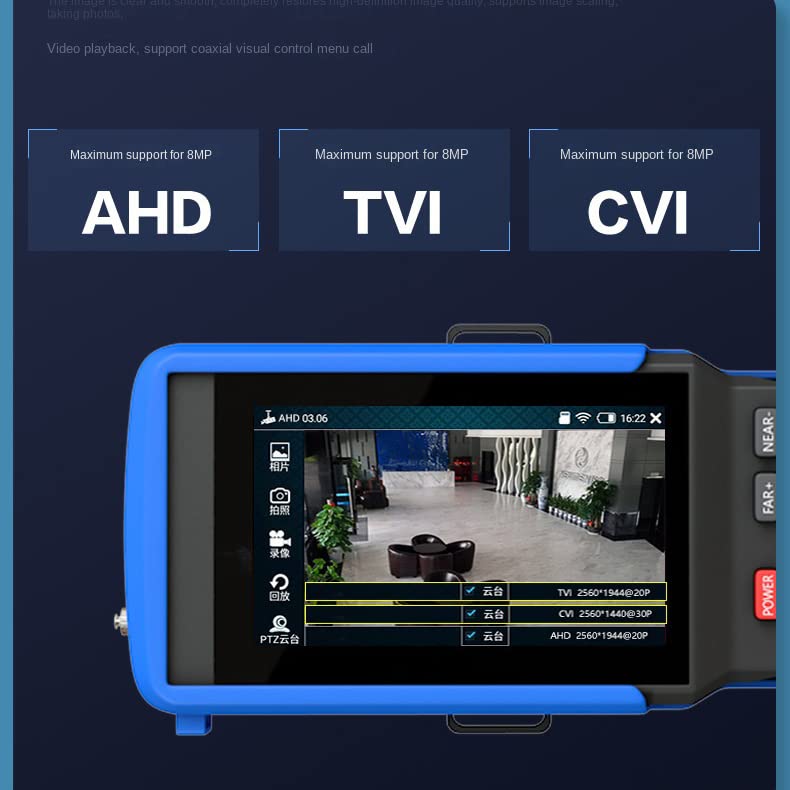
Figure 3.2: The tester's interface showing support for AHD, TVI, and CVI camera types, each supporting up to 8MP resolution.
3.4 Power Output Functions
The tester provides various power output options:
- PoE പവർ ഔട്ട്പുട്ട്: 48V standard PoE output, with a maximum of 25.5W.
- DC12V Power Output: Maximum current of 3A, suitable for providing temporary power to cameras.
- PSE Voltagഇ ടെസ്റ്റ്: Displays PoE power supply device voltage and circuit conditions.
- USB 5V2A Power Supply: Can be used as a power bank to charge mobile phones or connect USB devices like mice, U disks, and mobile hard drives for data reading.
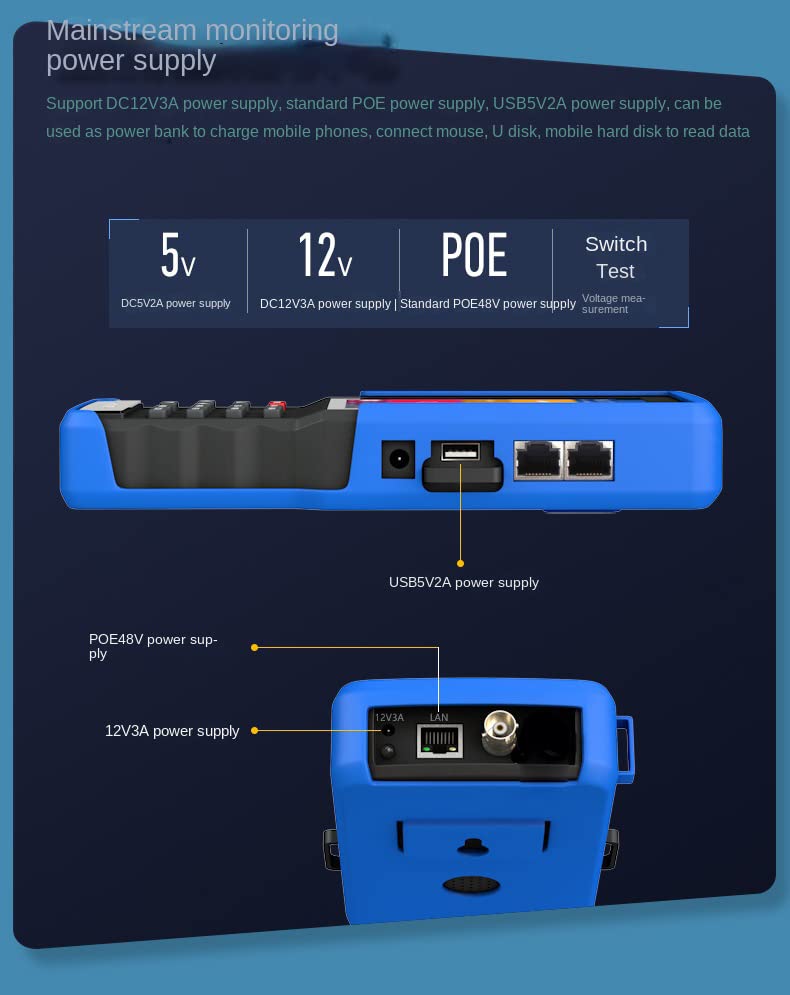
ചിത്രം 3.3: ഓവർview of the power supply capabilities, including 5V, 12V, PoE, and Switch Test functions.
3.5 Photo, Video, and Playback
The device supports photo taking and video recording of all camera videos, which are stored in H.264 format. Playback functionality is also available.
3.6 UTP Cable Testing
Test network cable pair connection status, length, attenuation, quality, impedance, and delay deviation parameters. It can also test the connection sequence and on-off status of any 2 cable cores.
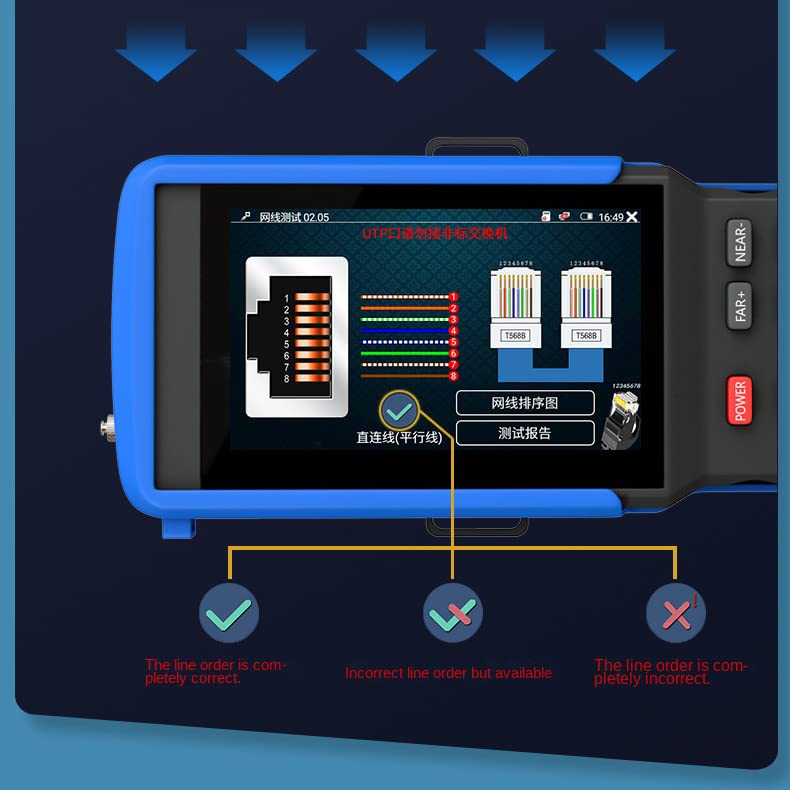
Figure 3.4: The UTP cable test interface displaying line order verification, indicating correct, incorrect but available, and completely incorrect line orders.
3.7 PTZ Control and RS485 Serial Port
The tester supports PTZ control for over 30 protocols, including Pelco-D/P, Samsung, and Panasonic. The RS485 serial port tool allows sending or receiving any data and hex data.
4. പരിപാലനം
4.1 പൊതു പരിചരണം
Keep the device clean and free from dust and moisture. Use a soft, dry cloth for cleaning. Avoid using abrasive cleaners or solvents. Store the device in a cool, dry place when not in use.
4.2 ബാറ്ററി കെയർ
To prolong battery life, avoid fully discharging the battery frequently. Charge the device regularly, even if not in constant use. If storing for an extended period, charge the battery to approximately 50% before storage.
5. പ്രശ്നപരിഹാരം
5.1 പൊതുവായ പ്രശ്നങ്ങളും പരിഹാരങ്ങളും
| ഇഷ്യൂ | സാധ്യമായ കാരണം | പരിഹാരം |
|---|---|---|
| "No video signal input" message | Incorrect camera connection, incompatible video format, or camera not powered. | Verify cable connections. Ensure camera is powered on. Check if the camera's video format (e.g., AHD, TVI, CVI, CVBS) is correctly selected on the tester. |
| Cable test shows "Too short" or "Open circuit" | Damaged cable, incorrect wiring, or poor connection. | Inspect the cable for physical damage. Re-terminate connectors if necessary. Ensure proper connection to the tester's UTP port. |
| ഉപകരണം ഓണാക്കുന്നില്ല | Battery depleted or power adapter issue. | Connect the device to the power adapter and allow it to charge for at least 30 minutes before attempting to power on again. Verify the power adapter is working. |
| IP camera not discovered | Incorrect network settings, camera not on the same subnet, or firewall issues. | Ensure the tester and IP camera are on the same network segment. Check network cable connection. Use the IP Discovery tool to scan for devices. |
6 സ്പെസിഫിക്കേഷനുകൾ
| ഫീച്ചർ | വിശദാംശങ്ങൾ |
|---|---|
| ഉൽപ്പന്ന അളവുകൾ | 9.06 x 3.62 x 1.61 ഇഞ്ച്; 2.81 പൗണ്ട് |
| ഇനം മോഡൽ നമ്പർ | IPC9310SN |
| ബാറ്ററികൾ | 1 ലിഥിയം അയോൺ ബാറ്ററി (ഉൾപ്പെടുത്തിയിരിക്കുന്നു) |
| നിർമ്മാതാവ് | Autopvision |
| ബ്രാൻഡ് | പോമിയാകാം |
| പവർ ഉറവിടം | കോർഡഡ് ഇലക്ട്രിക് |
| നിറം | with Cable tracker |
| മിനി. പ്രവർത്തന വോളിയംtage | 12 വോൾട്ട് (DC) |
| ഡിസ്പ്ലേ വലിപ്പം | 4.5-inch IPS Full HD |
| ഡിസ്പ്ലേ റെസല്യൂഷൻ | 960 x 540 |
| Video Input Support | IP (4K H.265), 8MP CVI, 8MP TVI, 5MP AHD, CVBS |
| PoE put ട്ട്പുട്ട് | 48V standard, max 25.5W |
| ഡിസി പവർ ഔട്ട്പുട്ട് | 12V, പരമാവധി 3A |
| USB പവർ putട്ട്പുട്ട് | 5V, 2A |
| PTZ പ്രോട്ടോക്കോളുകൾ | Pelco-D/P, Samsung, Panasonic, and more (30+) |
7. ഔദ്യോഗിക ഉൽപ്പന്ന വീഡിയോ
Watch the official product video for a visual guide on the IPC Camera Tester's features and operation.
വീഡിയോ 7.1: ഒരു ഓവർview of the CCTV tester monitor, demonstrating its interface and various testing functionalities including cable testing and IP camera discovery.
8. വാറൻ്റിയും പിന്തുണയും
This product is manufactured by Autopvision under the POMIACAM brand. For support inquiries, please refer to the contact information provided with your purchase or visit the official POMIACAM store on Amazon: POMIACAM Store.
Extended protection plans may be available for purchase. Please check the product listing for details.
- 3 വർഷത്തെ സംരക്ഷണ പദ്ധതി: View വിശദാംശങ്ങൾ
- 4 വർഷത്തെ സംരക്ഷണ പദ്ധതി: View വിശദാംശങ്ങൾ
- Complete Protect (Monthly): View വിശദാംശങ്ങൾ