1. ആമുഖം
This manual provides detailed instructions for the installation, operation, and maintenance of your YESKAMO Wireless Security Camera System. This system includes 3MP wireless cameras and an 8-channel NVR with a pre-installed 1TB HDD, designed for reliable outdoor and indoor surveillance.

ചിത്രം: കഴിഞ്ഞുview of the YESKAMO Wireless Security Camera System, showing two cameras, the NVR, and a 1TB hard drive.
2. പാക്കേജ് ഉള്ളടക്കം
താഴെ ലിസ്റ്റ് ചെയ്തിരിക്കുന്ന എല്ലാ ഇനങ്ങളും നിങ്ങളുടെ പാക്കേജിൽ ഉൾപ്പെടുത്തിയിട്ടുണ്ടെന്ന് ദയവായി പരിശോധിക്കുക:
- 2 x Wireless Security Cameras (3MP)
- 1 x Wireless NVR (8-channel, 5MP compatible) with 1TB HDD pre-installed
- 2 x 12V1A Power Adapters for Cameras
- 1 x 12V2A Power Adapter for NVR
- 1 x യുഎസ്ബി മൗസ്
- 1 x 1m LAN Cable
- 2 x Security Stickers
- 1 x Quick Start Guide (Japanese)
- 1 x Detailed User Manual (Japanese)
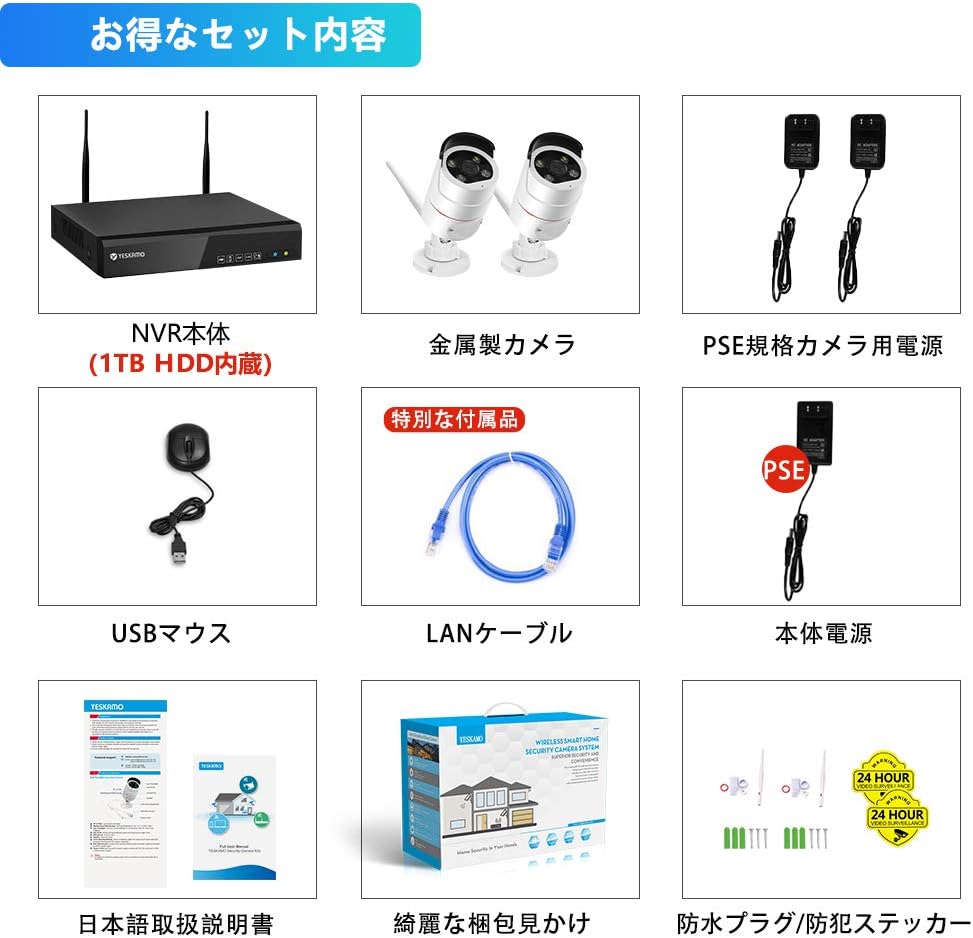
Image: Illustration of the complete package contents, including NVR, cameras, power adapters, mouse, LAN cable, and manuals.
3. ഉൽപ്പന്നം കഴിഞ്ഞുview
3.1 ക്യാമറ സവിശേഷതകൾ
- 3MP High-Resolution Sensor with HISILICON chip
- 100° Wide-Angle Lens
- IP66 Waterproof and Dustproof Metal Casing
- Built-in Microphone and Speaker for Two-Way Audio
- AI Human Detection with Sensor Light and Siren Alarm
- നൈറ്റ് വിഷനുവേണ്ടി ഇൻഫ്രാറെഡ് എൽ.ഇ.ഡി
- Adjustable 3DB Antennas
3.2 NVR സവിശേഷതകൾ
- 8-Channel Recorder, compatible with up to 5MP cameras
- Pre-installed 1TB HDD for continuous recording
- H.265 Video Compression for efficient storage
- VGA and HDMI outputs for monitor connection
- LAN port for network connection and remote access
- USB ports for mouse and backup
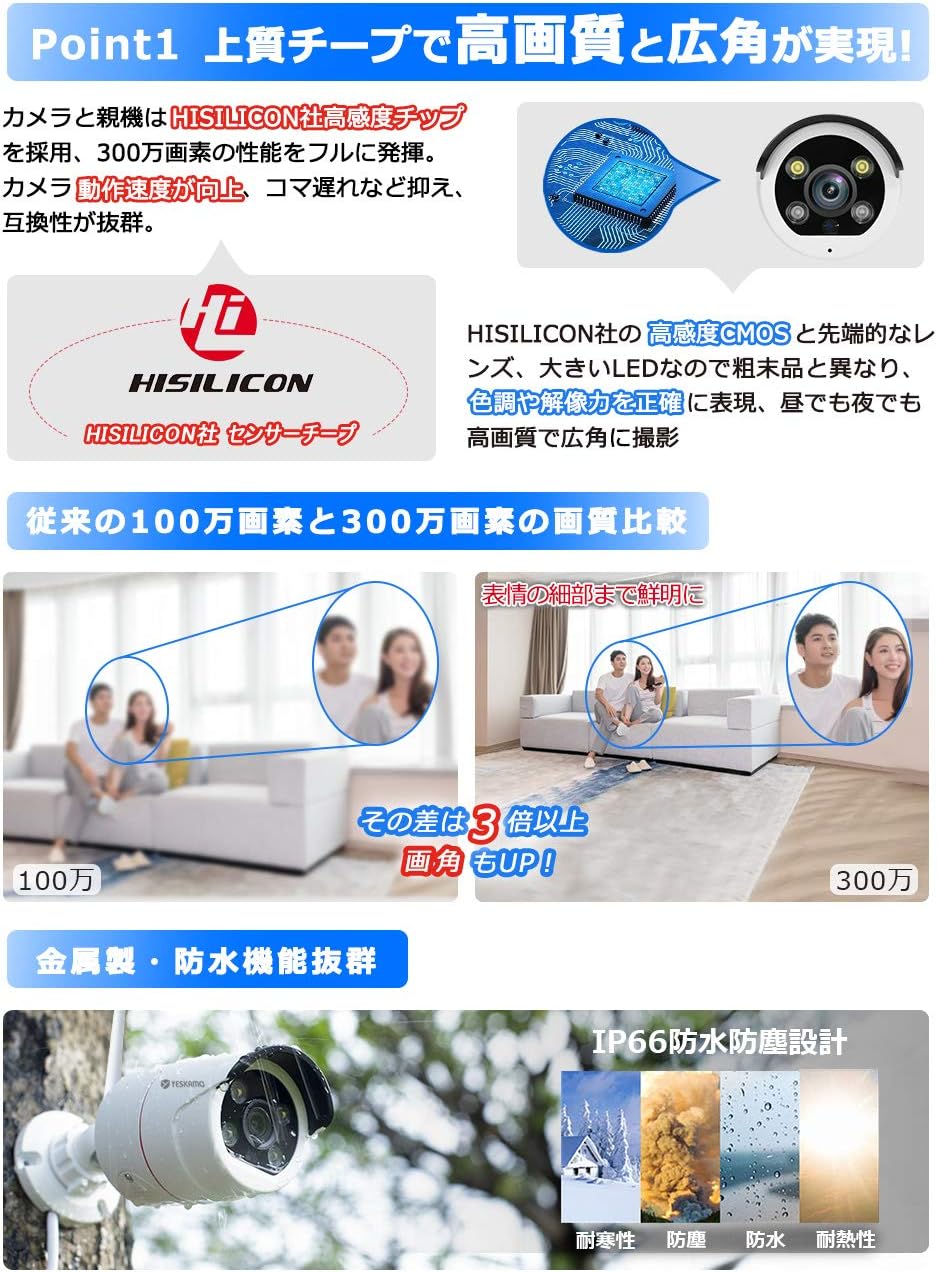
ചിത്രം: വിശദമായത് view of the camera's high-sensitivity chip and lens, alongside a comparison demonstrating the superior clarity of 3MP resolution over 1MP.
4. സജ്ജീകരണ ഗൈഡ്
Follow these steps for initial system setup:
- ക്യാമറകൾ ബന്ധിപ്പിക്കുക: Plug the 12V1A power adapters into each camera and then into a power outlet. The cameras will power on.
- NVR ബന്ധിപ്പിക്കുക:
- Connect the NVR to a monitor (VGA or HDMI) with a resolution of 1024x1280 or higher.
- NVR-ന്റെ USB പോർട്ടിലേക്ക് USB മൗസ് ബന്ധിപ്പിക്കുക.
- Plug the 12V2A power adapter into the NVR and then into a power outlet. The NVR will power on and automatically detect the cameras within seconds.
- പ്രാദേശിക Viewing: Once powered on, the system will automatically begin recording. You can view തത്സമയംtage and playback recordings directly on the connected monitor without an internet connection.
- റിമോട്ട് Viewing (Optional): റിമോട്ടിന് viewing via mobile app or PC, connect the NVR to your home router using the provided LAN cable. Ensure your router has an active internet connection.
Image: Visual guide for connecting the camera power, NVR power, and NVR to a monitor.
5. പ്രവർത്തന നിർദ്ദേശങ്ങൾ
5.1 റെക്കോർഡിംഗ് മോഡുകൾ
സിസ്റ്റം വിവിധ റെക്കോർഡിംഗ് മോഡുകളെ പിന്തുണയ്ക്കുന്നു:
- തുടർച്ചയായ റെക്കോർഡിംഗ്: Records 24/7. The 1TB HDD allows for extended recording periods. Older files are automatically overwritten when the disk is full.
- ഷെഡ്യൂൾഡ് റെക്കോർഡിംഗ്: Set specific times for recording, such as during weekdays, nights, or holidays.
- മോഷൻ ഡിറ്റക്ഷൻ റെക്കോർഡിംഗ്: Records only when motion is detected. This conserves storage space and makes reviewഇവന്റുകൾ എളുപ്പമാക്കുന്നു.
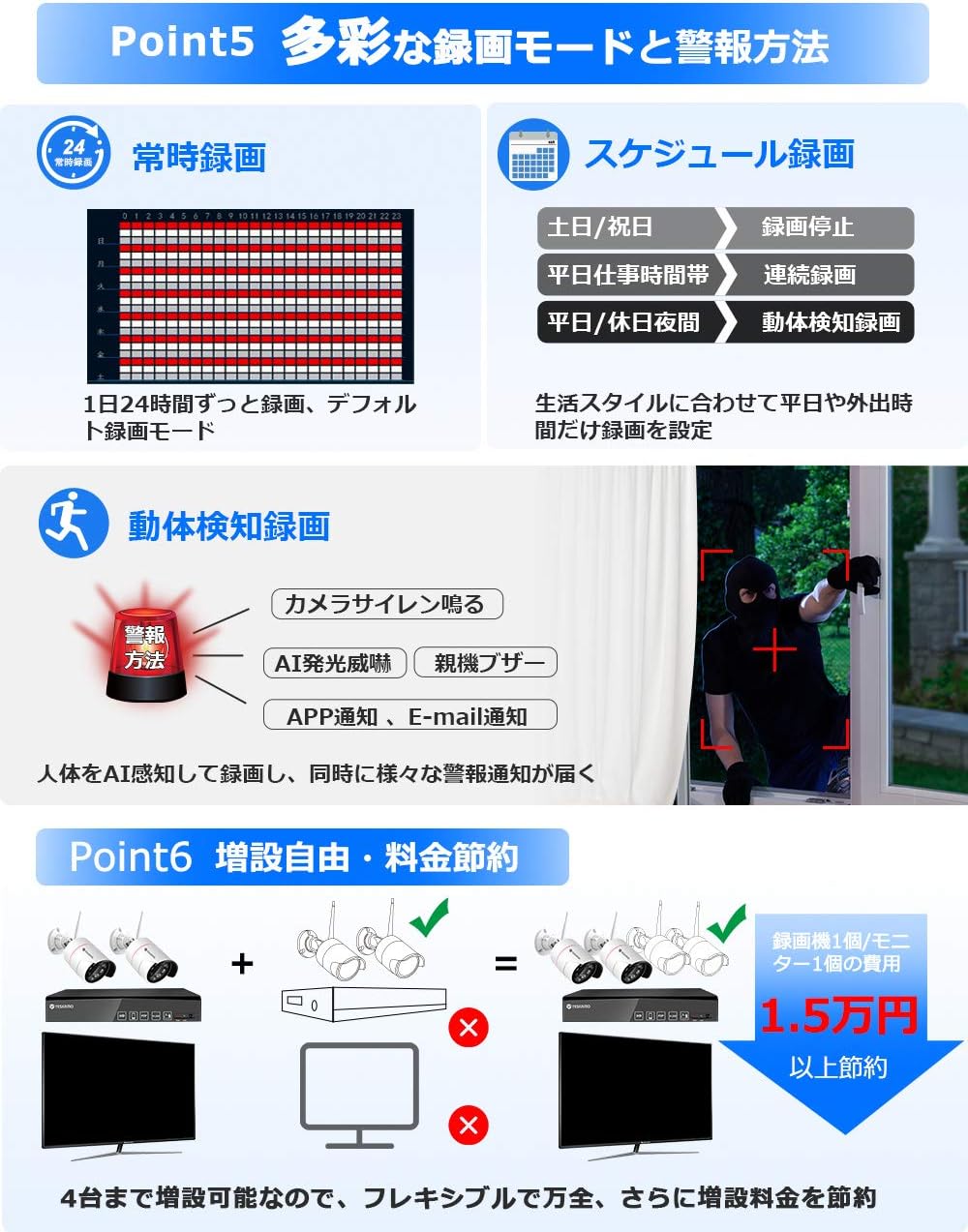
Image: Visual representation of different recording options including continuous, scheduled, and motion detection, along with various alarm methods.
5.2 AI Human Detection and Alarms
The system features advanced AI human detection to minimize false alarms caused by light changes or heat. When a human is detected:
- സൈറൺ അലാറം: The camera can emit a siren sound to deter intruders.
- സെൻസർ ലൈറ്റ്: In dark conditions, the camera's sensor lights will illuminate, providing a color image and acting as a deterrent. This feature can be enabled/disabled.
- Mobile Notifications: Receive instant alerts on your smartphone.
- ഇമെയിൽ അറിയിപ്പുകൾ: Get email alerts with snapshots of the event.
- NVR Buzzer: The NVR can emit an audible alarm.

Image: Illustration of AI human detection triggering a siren and sensor light, showing color night vision capabilities and different night vision modes.
5.3 ടു-വേ ഓഡിയോ
Equipped with a high-sensitivity microphone and speaker, the cameras support two-way audio communication. You can:
- Listen to audio from the camera's location (up to 8m range).
- Speak through the camera to communicate with visitors or deter intruders.

Image: Depiction of two-way audio functionality, showing a user speaking through a smartphone to someone at the camera's location, and audio recording exampലെസ്.
5.4 റിമോട്ട് ആക്സസ്
Access your camera system remotely using the YESKAMO app on your smartphone or client software on your PC. Ensure the NVR is connected to your router via LAN cable for this functionality.

Image: Steps for connecting the NVR to a router and accessing the system via the YESKAMO app on a smartphone or PC, illustrating live view പ്ലേബാക്കും.
6. പരിപാലനം
- വൃത്തിയാക്കൽ: Regularly wipe the camera lenses with a soft, dry cloth to ensure clear image quality. Do not use harsh chemicals.
- കാലാവസ്ഥ സംരക്ഷണം: The cameras are IP66 rated for outdoor use, providing protection against dust and strong jets of water. However, avoid submerging them in water.
- കേബിൾ മാനേജുമെന്റ്: Ensure all cables are securely connected and protected from environmental damage. Use waterproof plugs for exposed connections.
- ഫേംവെയർ അപ്ഡേറ്റുകൾ: Check the official YESKAMO webഒപ്റ്റിമൽ പ്രകടനവും സുരക്ഷയും ഉറപ്പാക്കാൻ ഫേംവെയർ അപ്ഡേറ്റുകൾക്കായി ഇടയ്ക്കിടെ സൈറ്റ് സന്ദർശിക്കുക.
7. പ്രശ്നപരിഹാരം
7.1 No Image Display
- Check if the NVR and cameras are properly powered on.
- Ensure the monitor is correctly connected to the NVR via VGA or HDMI.
- Verify that the monitor input source is set correctly.
7.2 Unstable Wi-Fi Signal
If the wireless signal between the cameras and NVR is unstable, consider the following solutions:
- റിപ്പീറ്റർ പ്രവർത്തനം: Utilize the NVR's repeater function to extend the Wi-Fi range.
- വയർഡ് കണക്ഷൻ: Connect cameras to the NVR directly via an Ethernet cable for a more stable connection.
- External Repeater: Use a separate Wi-Fi repeater or range extender (sold separately).
- Extended Antenna: Connect an external Wi-Fi extension antenna (sold separately) to the cameras.
7.3 റെക്കോർഡിംഗ് പ്രശ്നങ്ങൾ
- Ensure the 1TB HDD is properly installed and recognized by the NVR.
- Check recording settings (continuous, scheduled, motion detection) to ensure they are configured as desired.
- If the HDD is full, the system will automatically overwrite the oldest files. To retain more footage, consider upgrading the HDD to a maximum of 6TB.
8 സ്പെസിഫിക്കേഷനുകൾ
| ഫീച്ചർ | സ്പെസിഫിക്കേഷൻ |
|---|---|
| ബ്രാൻഡ് | യെസ്കാമോ |
| മോഡൽ നമ്പർ | B08PP2CFBP |
| വയർലെസ് കമ്മ്യൂണിക്കേഷൻ ടെക്നോളജി | വൈഫൈ |
| മെറ്റീരിയൽ | Metal (Camera Body) |
| ഉൽപ്പന്ന അളവുകൾ (LxWxH) | 31.5 x 15.5 x 28.5 സെ.മീ |
| ജല പ്രതിരോധ നില | IP66 വാട്ടർപ്രൂഫ് |
| ഉൽപ്പന്ന ഭാരം | 3.1 കിലോഗ്രാം |
| പ്രത്യേക സവിശേഷതകൾ | AI Human Detection, Human Sensor Light, Night Vision, Recording, Two-Way Talk |
| വീഡിയോ ക്യാപ്ചർ റെസല്യൂഷൻ | 1296പി (3എംപി) |
| പവർ ഉറവിടം | ഡിസി അഡാപ്റ്റർ |
| മൗണ്ടിംഗ് തരം | സീലിംഗ് മൗണ്ട് |
| ഉൾപ്പെടുത്തിയ ഘടകങ്ങൾ | 2 Wireless Cameras, Wireless NVR, 2 Camera Power Adapters, 1 NVR Power Adapter, Mouse, 1m LAN Cable, 2 Security Stickers, Manuals |
| HDD ശേഷി | 1TB (expandable up to 6TB) |
9. വാറൻ്റിയും പിന്തുണയും
YESKAMO provides comprehensive support for its products:
- വാറൻ്റി: ഈ ഉൽപ്പന്നം 3 വർഷത്തെ വാറന്റിയോടെയാണ് വരുന്നത്.
- തിരികെ നൽകൽ നയം: 60 ദിവസത്തെ പണം തിരികെ നൽകാനുള്ള ഗ്യാരണ്ടി.
- വിനിമയ നയം: Free exchange within 1 year.
- സാങ്കേതിക സഹായം:
- Telephone support available during business hours.
- Email inquiries are responded to promptly, typically within 24 hours.
- For any questions or assistance, please contact YESKAMO customer support.


