1. ആമുഖം
This manual provides detailed instructions for the safe and efficient operation of the Komshine GX39 Fiber Fusion Splicer. The GX39 is designed for precise fiber optic splicing with features such as fast splicing and heating times, low splice loss, and a versatile 3-in-1 fiber holder. Please read this manual thoroughly before using the device.

കഴിഞ്ഞുview of the Komshine GX39 Fiber Fusion Splicer highlighting its core features.
2 സുരക്ഷാ വിവരങ്ങൾ
ഉപകരണങ്ങൾക്ക് പരിക്കേൽക്കുന്നതും കേടുപാടുകൾ സംഭവിക്കുന്നതും തടയാൻ ഇനിപ്പറയുന്ന സുരക്ഷാ മുൻകരുതലുകൾ എപ്പോഴും പാലിക്കുക:
- Do not look directly into the fiber end when the splicer is operating, as invisible laser light may be present.
- ജോലിസ്ഥലം വൃത്തിയുള്ളതും നല്ല വെളിച്ചമുള്ളതുമാണെന്ന് ഉറപ്പാക്കുക.
- Handle optical fibers with care; they are fragile and can cause splinters.
- ഉപകരണം വെള്ളത്തിൽ നിന്നും അമിതമായ ഈർപ്പത്തിൽ നിന്നും അകറ്റി നിർത്തുക.
- Use only the provided power adapter and battery.
- ഉപകരണം സ്വയം വേർപെടുത്താനോ നന്നാക്കാനോ ശ്രമിക്കരുത്. യോഗ്യതയുള്ള സേവന ഉദ്യോഗസ്ഥരെ ബന്ധപ്പെടുക.
3. പാക്കേജ് ഉള്ളടക്കം
Verify that all items are present in your Komshine GX39 package:
- Komshine GX39 Fiber Fusion Splicer
- ഫൈബർ സ്ട്രിപ്പർ
- ഒപ്റ്റിക്കൽ ഫൈബർ ക്ലീവർ
- എസി അഡാപ്റ്റർ
- ലിഥിയം ബാറ്ററി (5200mAh)
- സ്പെയർ ഇലക്ട്രോഡുകൾ
- ചാർജർ
- കൂളിംഗ് ട്രേ
- Operation Manual CD
- ചുമക്കുന്ന കേസ്
- ക്ലീനിംഗ് വൈപ്പുകൾ

Complete Komshine GX39 Fiber Fusion Splicer kit.
4. സജ്ജീകരണവും പ്രവർത്തനവും
Follow these steps for proper setup and operation of the GX39 Fusion Splicer.
4.1 ബാറ്ററി ചാർജ് ചെയ്യുന്നു
The GX39 is equipped with a 5200mAh lithium battery. Connect the AC adapter to the splicer and a power outlet to charge the battery. A full charge allows for approximately 320 splicing and heating cycles.
4.2. Fiber Preparation
Proper fiber preparation is crucial for successful splicing.
- Strip the Fiber: Use the fiber stripper to remove the outer coating of the optical fiber to the required length.
- Clean the Fiber: After stripping, use cleaning wipes moistened with alcohol to thoroughly clean the bare fiber. This removes any residue that could affect splice quality.
- Cleave the Fiber: Place the cleaned fiber into the optical fiber cleaver. Ensure the fiber is positioned correctly for a precise, perpendicular cut. The cleaver features a tungsten steel blade for a smooth cut surface and has a blade life of up to 48,000 times with a cleaving angle of less than 0.5 degrees.

Optical fiber cleaver with tungsten steel blade for precise cuts.
4.3. Fiber Placement and Splicing
The GX39 features a 3-in-1 fiber holder compatible with various fiber types.
- Place the Fiber: Open the splicer's cover and carefully place the prepared fibers into the 3-in-1 fiber holders on both sides. Ensure the fiber ends are aligned in the V-grooves. The holder supports 3.0mm jumper, 0.9mm pigtail, FTTH fiber, and bare fiber.
- Initiate Splicing: Close the cover. The splicer will automatically detect the fibers and begin the alignment process. The 3.5-inch 800*480 HD LCD screen will display the fiber alignment.
- Splicing Cycle: The GX39 performs fast splicing in approximately 9 seconds. The screen will show the estimated splice loss, typically around 0.01dB for SM fiber.

The 3-in-1 fiber holder accommodates various fiber types.
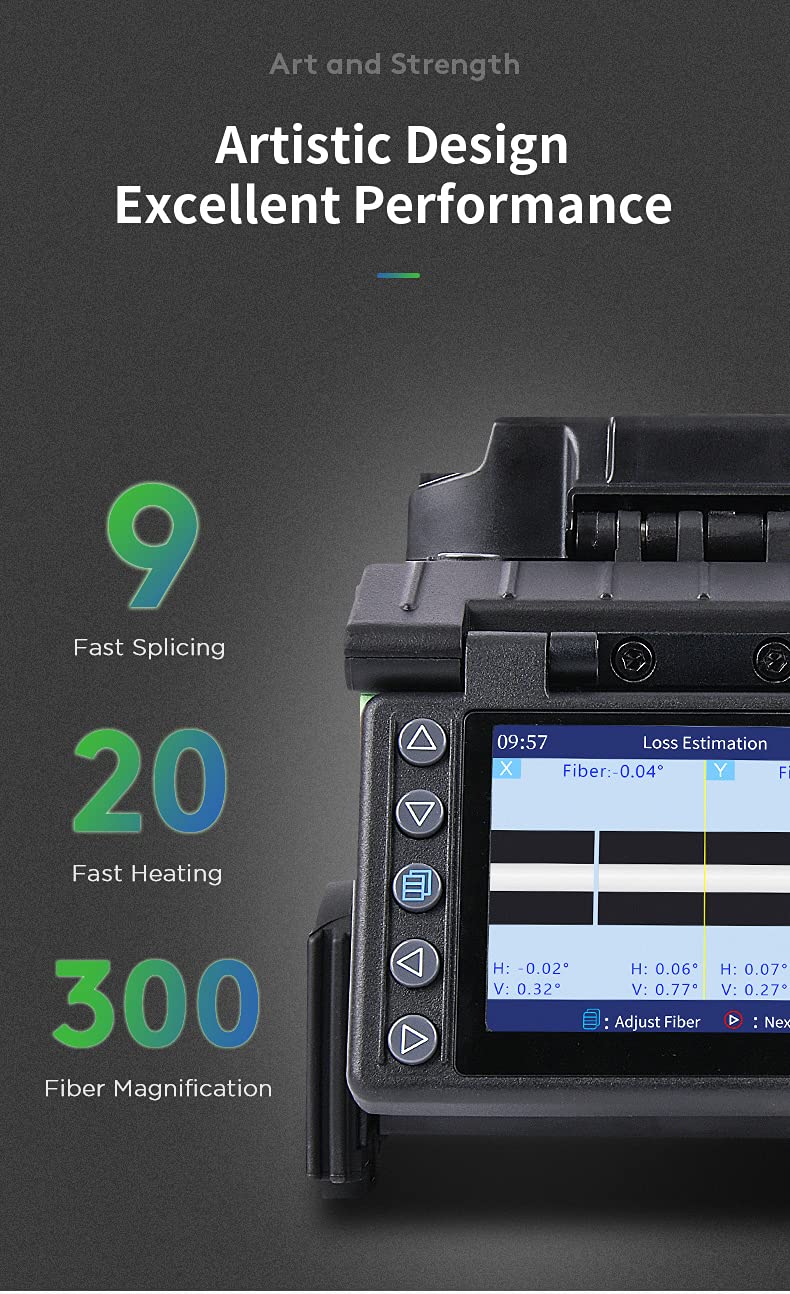
Splicer display showing fiber alignment and estimated loss.
4.4. Heat Shrinking
After successful splicing, the splice point needs protection.
- Position Heat Shrink Tube: Move the heat shrink tube over the welded fiber joint.
- Place in Heater: Carefully place the fiber with the heat shrink tube into the heating oven.
- ചൂടാക്കൽ ചക്രം: Close the heater cover. The GX39 performs fast heating in approximately 20 seconds.
- തണുപ്പിക്കൽ: Once heating is complete, remove the fiber and place it in the integrated cooling tray to cool down before handling.

Heat shrinking process for protecting the fiber splice.
4.5. Operational Video Guide
This video demonstrates the complete fiber optic fusion splicing process using the Komshine GX39, including fiber preparation, splicing, and heat shrinking.
5. പരിപാലനം
Regular maintenance ensures the longevity and performance of your GX39 Fusion Splicer.
5.1. ഇലക്ട്രോഡ് മാറ്റിസ്ഥാപിക്കൽ
The electrodes have a life of approximately 4000 splices. When the splicer indicates electrode wear or splice quality degrades, replace them. The GX39 features an innovative tool-free electrode replacement design.

Tool-free electrode replacement for convenience.
5.2. വൃത്തിയാക്കൽ
Regularly clean the V-grooves, objective lenses, and other optical components with a soft, lint-free cloth and appropriate cleaning solution. Keep the entire device free from dust and debris.
5.3. Durability and Storage
The GX39 is designed with enhanced toughness and features a silicone protective case, making it water-resistant, dust-resistant, and shock-resistant. Store the splicer in its carrying case in a dry, cool environment when not in use to protect it from environmental factors and physical damage.

Silicone protective case for enhanced durability.
6. പ്രശ്നപരിഹാരം
If you encounter issues with your Komshine GX39, refer to the following common troubleshooting tips:
- Poor Splice Quality: Check fiber cleave quality, clean V-grooves and electrodes, and ensure electrodes are not worn out.
- ബാറ്ററി ചാർജുചെയ്യുന്നില്ല: Verify the AC adapter connection and ensure the power outlet is functional.
- ഡിസ്പ്ലേ പ്രശ്നങ്ങൾ: Restart the device. If the problem persists, contact support.
- Fiber Not Detected: Ensure fibers are correctly placed in the V-grooves and the fiber holders are properly closed.
For more complex issues, consult the detailed troubleshooting section on the provided Operation Manual CD or contact Komshine customer support.
7 സ്പെസിഫിക്കേഷനുകൾ
| ഫീച്ചർ | സ്പെസിഫിക്കേഷൻ |
|---|---|
| സ്പ്ലൈസിംഗ് സമയം | 9 seconds (fast splicing) |
| ചൂടാക്കൽ സമയം | 20 seconds (fast heating) |
| ഇലക്ട്രോഡ് ലൈഫ് | 4000 തവണ |
| Average Splice Loss | SM: 0.02dB; MM: 0.01dB; DS: 0.04dB; NZDS: 0.04dB |
| ബാറ്ററി ശേഷി | 5200mAh (approx. 320 circular welds) |
| പ്രദർശിപ്പിക്കുക | 3.5 inch 800*480 HD LCD Screen |
| Fiber Magnification | 300X (X-axis or Y-axis); 150X (X-axis or Y-axis) |
| ഫൈബർ ഹോൾഡർ | 3-in-1 (SM, MM, bare fiber, pigtail, rubber-insulated, multi fiber cable) |
| ഡാറ്റ സംഭരണം | 10000 groups splicing results; 100 sets of images |
| കണക്റ്റിവിറ്റി | USB interface for data download and software updates |
| അളവുകൾ | 122mm (W) × 148mm (H) × 130mm (D) |
| ഭാരം | Min. 1.44kg (without battery) |
| പരിസ്ഥിതി പ്രതിരോധം | Water-resistant, dust-resistant, shock-resistant, high-temp-resistant |

Key specifications and features of the Komshine GX39.
8. വാറൻ്റിയും പിന്തുണയും
The Komshine GX39 Fiber Fusion Splicer comes with a manufacturer's warranty. For detailed warranty terms and conditions, please refer to the documentation included with your product or visit the official Komshine website. For technical support, service, or spare parts, please contact Komshine customer service through their official channels.


