1. ആമുഖം
The AOPUTTRIVER AP-770HC is a 6000-count True RMS digital multimeter designed for accurate and reliable electrical measurements. It features auto-ranging capabilities and a variety of functions including voltage, current, resistance, capacitance, frequency, temperature, and Non-Contact Voltage (NCV) detection. This manual provides essential information for the safe and proper use of your multimeter.
2 സുരക്ഷാ വിവരങ്ങൾ
Please read all safety warnings and operating instructions carefully before using this instrument. Failure to comply with safety precautions may result in electric shock, fire, or damage to the meter.
- Always ensure the test leads are properly connected and the function switch is set to the correct range before making any measurements.
- വോളിയം അളക്കരുത്tage 1000V DC അല്ലെങ്കിൽ 750V AC-യിൽ കൂടുതലാണ്.
- Exercise extreme caution when working with live circuits. Avoid contact with bare wires or terminals.
- Never measure current on a circuit with voltage present without first disconnecting power and inserting the meter in series.
- മീറ്റർ കേടായതായി തോന്നുകയോ ടെസ്റ്റ് ലീഡുകൾ തകരാറിലാവുകയോ ചെയ്താൽ അത് ഉപയോഗിക്കരുത്.
- കൃത്യമായ റീഡിംഗുകൾ ഉറപ്പാക്കാൻ ബാറ്ററി കുറവാണെന്ന് സൂചകം ദൃശ്യമാകുമ്പോൾ ബാറ്ററി മാറ്റിസ്ഥാപിക്കുക.
- പ്രാദേശികവും ദേശീയവുമായ സുരക്ഷാ കോഡുകൾ പാലിക്കുക.
3. പാക്കേജ് ഉള്ളടക്കം
താഴെ കൊടുത്തിരിക്കുന്ന എല്ലാ ഇനങ്ങളും നിങ്ങളുടെ പാക്കേജിൽ ഉണ്ടെന്ന് ഉറപ്പാക്കുക:
- 1 x AOPUTTRIVER AP-770HC Multimeter
- 2 x ടെസ്റ്റ് ലീഡുകൾ (ചുവപ്പും കറുപ്പും)
- 1 x ചുമക്കുന്ന ബാഗ്
- 1 x 9V (6F22) ബാറ്ററി
- 1 x Small Screwdriver
- 1 x താപനില പരിശോധന
- 1 x യൂസർ മാനുവൽ (ഇംഗ്ലീഷ്)

Image: The package contents, including the multimeter, test leads, carrying bag, battery, screwdriver, temperature probe, and user manual.
4. ഉൽപ്പന്നം കഴിഞ്ഞുview
4.1 ഫ്രണ്ട് പാനൽ ലേഔട്ട്
Familiarize yourself with the various components of the multimeter's front panel:
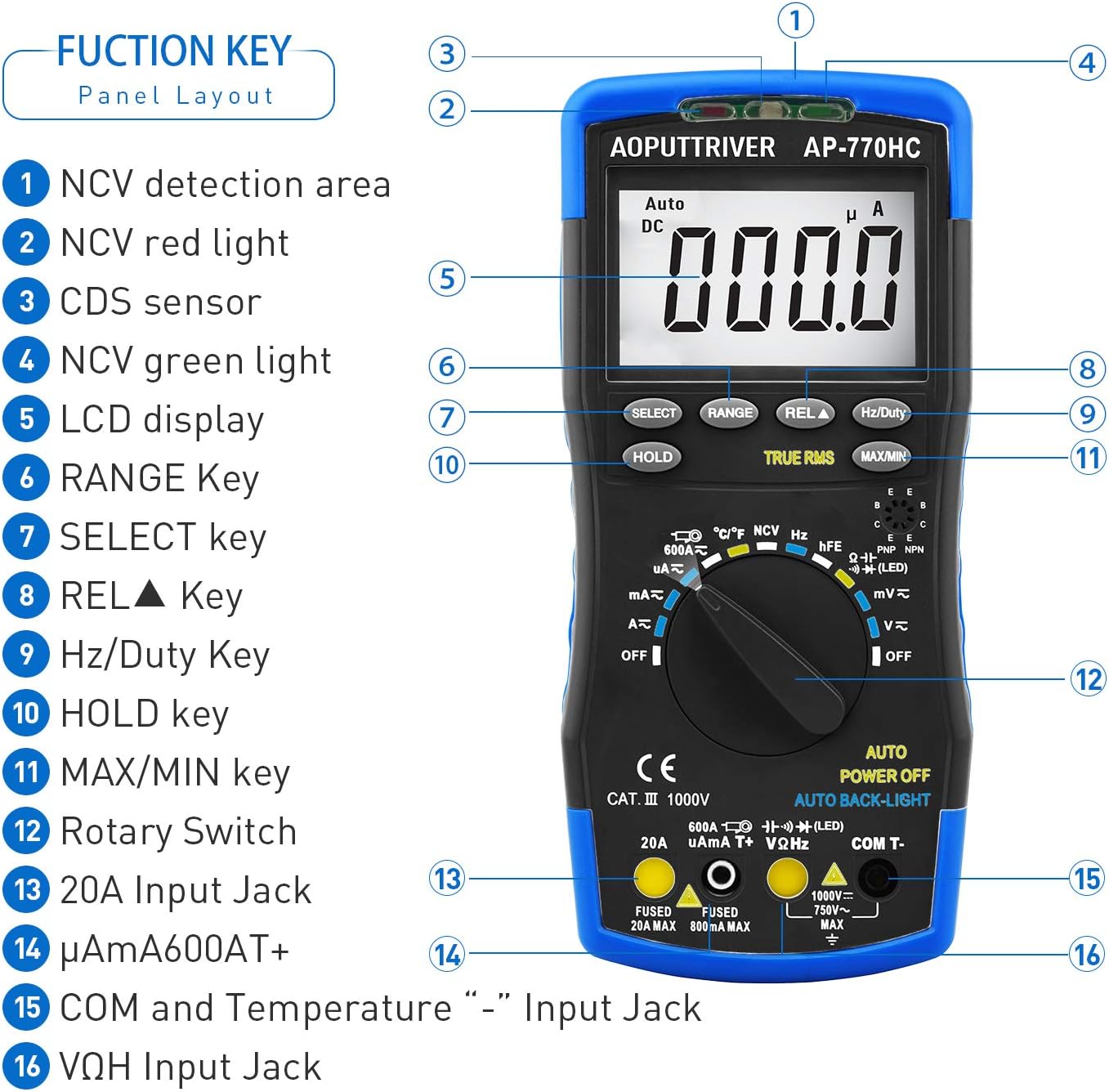
ചിത്രം: വിശദമായ ഒരു ചിത്രം view of the multimeter's front panel, highlighting key functional areas and buttons.
- NCV Detection Area
- NCV Red Light Indicator
- CDS Sensor (for Auto Backlight)
- NCV Green Light Indicator
- എൽസിഡി ഡിസ്പ്ലേ
- റേഞ്ച് കീ
- കീ തിരഞ്ഞെടുക്കുക
- REL▲ Key (Relative Value)
- Hz/ഡ്യൂട്ടി കീ
- ഹോൾഡ് കീ
- പരമാവധി/മിനിറ്റ് കീ
- റോട്ടറി സ്വിച്ച്
- 20A ഇൻപുട്ട് ജാക്ക്
- μA/mA/600AT+ Input Jack
- COM and Temperature "-" Input Jack
- VΩHz Input Jack
4.2 ശാരീരിക സവിശേഷതകൾ
The AP-770HC is designed for durability and ease of use:
- ഇരട്ട സംരക്ഷണം: The meter is encased in a protective rubber boot for enhanced durability against drops and impacts.
- സംയോജിത കിക്ക്സ്റ്റാൻഡ്: A built-in stand allows the meter to be propped up for hands-free viewing, rotating 180 degrees for optimal angle.
- Mechanical Blocking System: This safety feature prevents incorrect lead insertion by physically blocking unused input jacks based on the rotary switch position.
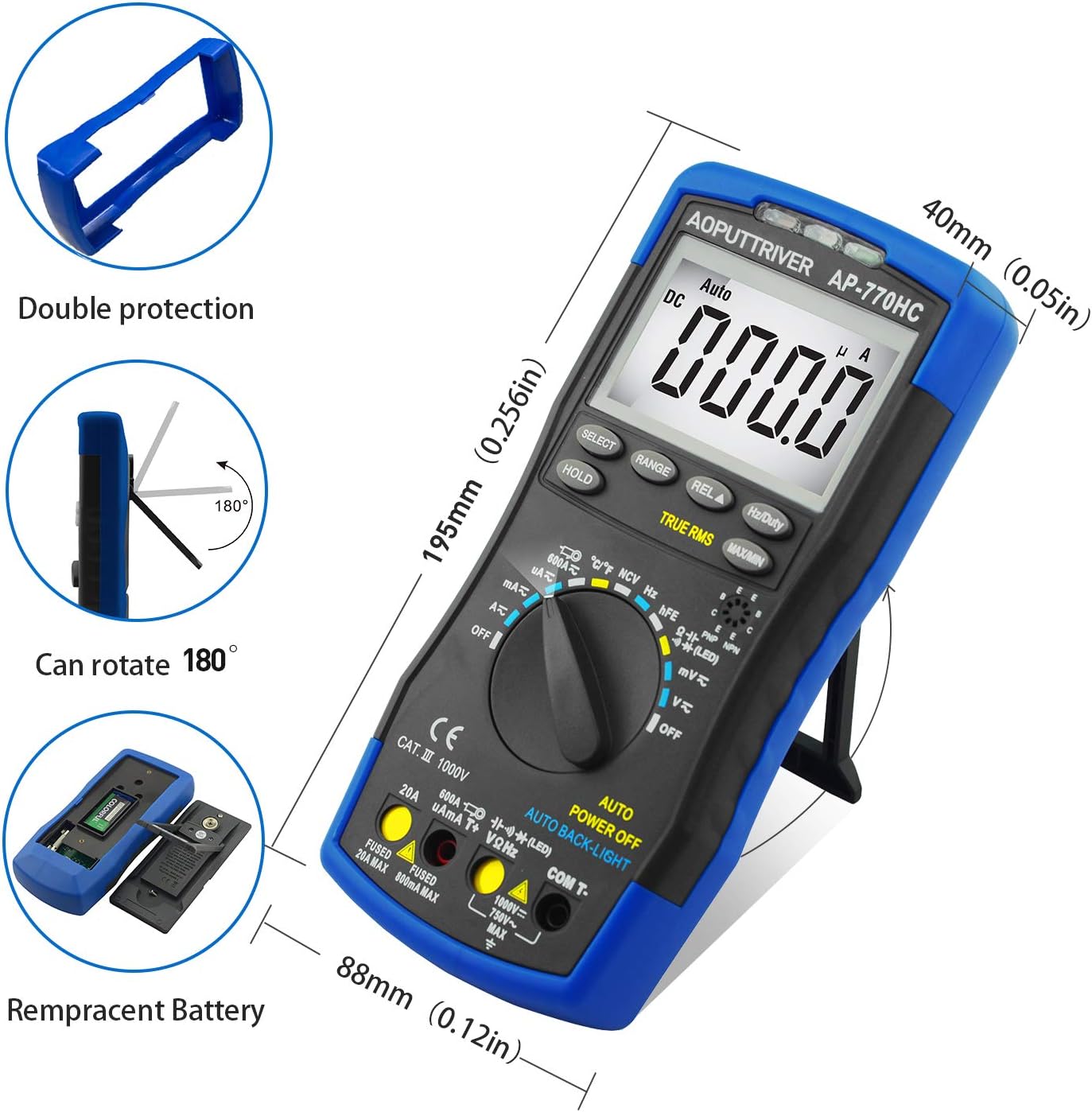
Image: Illustrations of the multimeter's physical attributes, including its dimensions, protective casing, and battery access.
5. സജ്ജീകരണം
5.1 ബാറ്ററി ഇൻസ്റ്റാളേഷൻ
The AP-770HC requires one 9V (6F22) battery for operation. To install or replace the battery:
- മൾട്ടിമീറ്റർ ഓഫാക്കിയിട്ടുണ്ടെന്ന് ഉറപ്പാക്കുക.
- മീറ്ററിന്റെ പിൻഭാഗത്ത് ബാറ്ററി കമ്പാർട്ട്മെന്റ് കവർ കണ്ടെത്തുക.
- Use the provided small screwdriver to loosen the screw securing the battery cover.
- Remove the cover and connect the 9V battery to the battery clip, observing correct polarity.
- Place the battery into the compartment and replace the cover, securing it with the screw.
6. പ്രവർത്തന നിർദ്ദേശങ്ങൾ
6.1 പൊതു പ്രവർത്തനം
To begin using the multimeter:
- Insert the test leads into the appropriate input jacks. The black lead typically connects to the COM jack. The red lead connects to the VΩHz jack for voltage, resistance, and other measurements, or to the μA/mA or 20A jack for current measurements.
- Rotate the function switch to the desired measurement mode. The mechanical blocking system will guide you to the correct input jacks for the selected function.
- The meter will automatically select the appropriate range (auto-ranging). For some functions, you can press the റേഞ്ച് button to manually select a range.
6.2 അളക്കൽ പ്രവർത്തനങ്ങൾ
Below are instructions for common measurement types:
ഡിസി വോളിയംtage Measurement (V∓)
- Set the rotary switch to the V∓ position.
- Connect the red test lead to the VΩHz jack and the black test lead to the COM jack.
- Connect the test leads in parallel across the DC voltage source or component to be measured.
- വാല്യം വായിക്കുകtagഎൽസിഡി ഡിസ്പ്ലേയിലെ ഇ മൂല്യം.
എസി വോളിയംtage അളവ് (V∼)
- Set the rotary switch to the V∼ position.
- Connect the red test lead to the VΩHz jack and the black test lead to the COM jack.
- Connect the test leads in parallel across the AC voltage source or component.
- വാല്യം വായിക്കുകtagഎൽസിഡി ഡിസ്പ്ലേയിലെ ഇ മൂല്യം.
DC/AC Current Measurement (μA, mA, A)
- പ്രധാനപ്പെട്ടത്: Disconnect power to the circuit before measuring current.
- Set the rotary switch to the appropriate current range (μA, mA, or A). Use the തിരഞ്ഞെടുക്കുക button to switch between AC and DC current.
- Connect the red test lead to the μA/mA or 20A jack, and the black test lead to the COM jack.
- Insert the multimeter in series with the circuit where current is to be measured.
- Apply power to the circuit and read the current value.
പ്രതിരോധ അളവ് (Ω)
- റോട്ടറി സ്വിച്ച് Ω സ്ഥാനത്തേക്ക് സജ്ജമാക്കുക.
- Connect the red test lead to the VΩHz jack and the black test lead to the COM jack.
- Ensure the component to be measured is de-energized.
- ഘടകത്തിലുടനീളം ടെസ്റ്റ് ലീഡുകൾ ബന്ധിപ്പിക്കുക.
- Read the resistance value.
തുടർച്ചയായ പരിശോധന
- Set the rotary switch to the continuity/diode position. Press തിരഞ്ഞെടുക്കുക until the continuity symbol (🔊) is displayed.
- Connect the red test lead to the VΩHz jack and the black test lead to the COM jack.
- സർക്യൂട്ടിലോ ഘടകത്തിലോ ഉടനീളം ടെസ്റ്റ് ലീഡുകൾ ബന്ധിപ്പിക്കുക.
- If resistance is below approximately 50Ω, the buzzer will sound, indicating continuity.
ഡയോഡ് ടെസ്റ്റ്
- Set the rotary switch to the continuity/diode position. Press തിരഞ്ഞെടുക്കുക until the diode symbol (→|∣) is displayed.
- Connect the red test lead to the VΩHz jack and the black test lead to the COM jack.
- Connect the red lead to the anode and the black lead to the cathode of the diode.
- The display will show the forward voltage drop. Reverse the leads; an open circuit (OL) indicates a good diode.
കപ്പാസിറ്റൻസ് അളക്കൽ
- Set the rotary switch to the capacitance position.
- Connect the red test lead to the VΩHz jack and the black test lead to the COM jack.
- Ensure the capacitor is fully discharged before measurement.
- കപ്പാസിറ്ററിന് കുറുകെ ടെസ്റ്റ് ലീഡുകൾ ബന്ധിപ്പിക്കുക.
- ഡിസ്പ്ലേയിലെ കപ്പാസിറ്റൻസ് മൂല്യം വായിക്കുക.
Frequency/Duty Cycle Measurement (Hz/%)
- Set the rotary switch to the Hz/Duty position.
- Connect the red test lead to the VΩHz jack and the black test lead to the COM jack.
- സിഗ്നൽ സ്രോതസ്സിലുടനീളം ടെസ്റ്റ് ലീഡുകൾ ബന്ധിപ്പിക്കുക.
- അമർത്തുക Hz/ഡ്യൂട്ടി button to toggle between frequency and duty cycle measurements.
Temperature Measurement (℃/℉)
- Set the rotary switch to the temperature position.
- Connect the temperature probe to the VΩHz and COM jacks, observing polarity.
- Place the tip of the temperature probe on or near the object whose temperature is to be measured.
- Read the temperature on the display. Press the തിരഞ്ഞെടുക്കുക button to switch between Celsius (℃) and Fahrenheit (℉).

Image: The multimeter connected to a temperature probe, demonstrating its use to measure the temperature of a liquid.
നോൺ-കോൺടാക്റ്റ് വോളിയംtagഇ (NCV) കണ്ടെത്തൽ
- Set the rotary switch to the NCV position.
- Move the NCV detection area (top of the meter) close to a live conductor.
- എങ്കിൽ വോള്യംtage greater than 90V (RMS) is detected, the NCV red light will illuminate, and the meter will emit an audible beep.
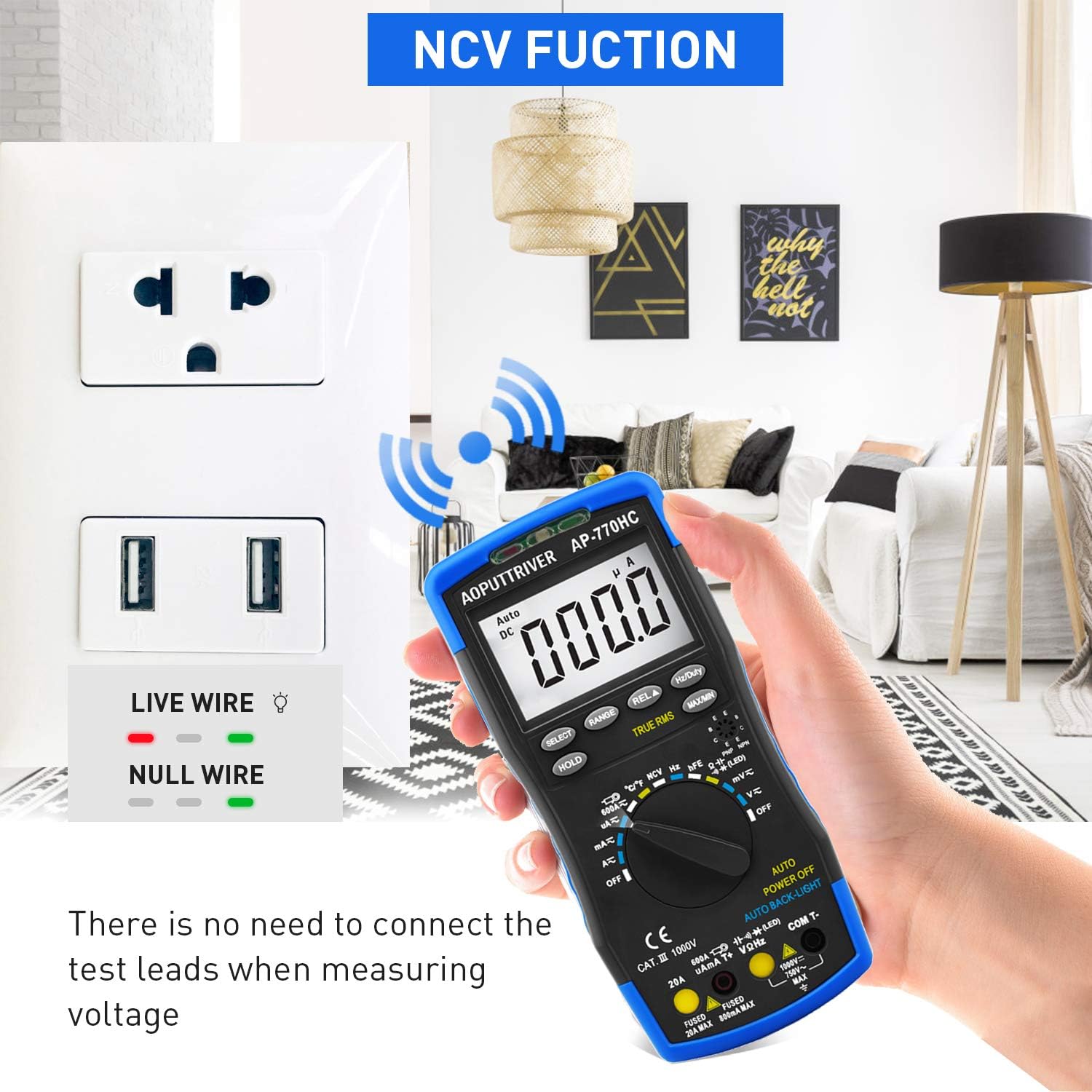
Image: The multimeter's NCV function in use, detecting voltage near an electrical outlet without physical contact.
6.3 പ്രത്യേക പ്രവർത്തനങ്ങൾ
- ഡാറ്റ ഹോൾഡ് (HOLD): അമർത്തുക പിടിക്കുക ഡിസ്പ്ലേയിൽ നിലവിലെ റീഡിംഗ് ഫ്രീസ് ചെയ്യാൻ ബട്ടൺ അമർത്തുക. റിലീസ് ചെയ്യാൻ വീണ്ടും അമർത്തുക.
- പരമാവധി/മിനിറ്റ്: അമർത്തുക പരമാവധി/മിനിറ്റ് button to record the maximum and minimum values during a measurement session. Press again to cycle through MAX, MIN, and current readings.
- യഥാർത്ഥ RMS: The AP-770HC features True RMS measurement for accurate readings of non-sinusoidal AC waveforms.
- ഓട്ടോ പവർ ഓഫ്: The meter will automatically power off after approximately 15 minutes of inactivity to conserve battery life.
- ബാക്ക്ലൈറ്റ്: The display backlight automatically activates in low-light conditions via the CDS sensor.
7. പരിപാലനം
7.1 വൃത്തിയാക്കൽ
മൾട്ടിമീറ്റർ വൃത്തിയാക്കാൻ, പരസ്യം ഉപയോഗിച്ച് കേസ് തുടയ്ക്കുക.amp തുണിയും നേരിയ ഡിറ്റർജന്റും ഉപയോഗിക്കുക. അബ്രാസീവ് വസ്തുക്കളോ ലായകങ്ങളോ ഉപയോഗിക്കരുത്. ഉപയോഗിക്കുന്നതിന് മുമ്പ് മീറ്റർ പൂർണ്ണമായും ഉണങ്ങിയെന്ന് ഉറപ്പാക്കുക.
7.2 ബാറ്ററി മാറ്റിസ്ഥാപിക്കൽ
When the low battery indicator appears on the display, replace the 9V battery as described in Section 5.1. Always use a fresh 9V (6F22) battery.
8. പ്രശ്നപരിഹാരം
If you encounter issues with your AP-770HC multimeter, refer to the following common problems and solutions:
| പ്രശ്നം | സാധ്യമായ കാരണം | പരിഹാരം |
|---|---|---|
| ഡിസ്പ്ലേ ഇല്ല അല്ലെങ്കിൽ മങ്ങിയ ഡിസ്പ്ലേ | Dead or low battery; Incorrect battery installation | Replace the 9V battery; Ensure correct polarity during installation. |
| "OL" (ഓവർലോഡ്) പ്രദർശിപ്പിച്ചിരിക്കുന്നു | Measurement exceeds the selected range; Open circuit | Switch to a higher range (if not in auto-ranging); Check for breaks in the circuit or faulty component. |
| കൃത്യമല്ലാത്ത വായനകൾ | Low battery; Incorrect function/range selection; Damaged test leads; External interference | Replace battery; Verify function and range; Inspect and replace test leads if damaged; Move away from strong electromagnetic fields. |
| കണ്ടിന്യുറ്റി ബീപ്പ് ഇല്ല | Open circuit; Resistance too high | Check the circuit for breaks; Ensure resistance is below the continuity threshold. |
9 സ്പെസിഫിക്കേഷനുകൾ
Technical specifications for the AOPUTTRIVER AP-770HC Digital Multimeter:
| പരാമീറ്റർ | സ്പെസിഫിക്കേഷൻ |
|---|---|
| പ്രദർശിപ്പിക്കുക | 6000 എണ്ണം |
| ശ്രേണി തിരഞ്ഞെടുക്കൽ | യാന്ത്രിക ശ്രേണി |
| ഡിസി വോളിയംtage | 60mV/600mV/6V/60V/600V ±(0.5%+2dgt) / 1000V ±(0.8%+2dgt) |
| എസി വോളിയംtage | 60mV/600mV/6V/60V/600V ±(1.0%+10dgt) / 750V ±(1.5%+3dgt) |
| ഡിസി കറൻ്റ് | 600μA/6000μA/60mA/600mA ±(1.5%+2dgt); 6A/20A ±(2.5%+5dgt) |
| എസി കറന്റ് | 600μA/6000μA/60mA/600mA ±(1.5%+3dgt); 6A/20A ±(2.5%+5dgt) |
| പ്രതിരോധം | 600Ω~60MΩ |
| കപ്പാസിറ്റൻസ് | 9.999nF~99.99mF |
| ആവൃത്തി | 5.12Hz~5.12MHz (0.1%+5dgt) |
| ഡ്യൂട്ടി സൈക്കിൾ | 0.1%~99.9% |
| താപനില | -20℃~1000℃ (-4℉~1832℉) |
| യഥാർത്ഥ RMS | അതെ |
| NCV പ്രവർത്തനം | അതെ |
| ഡാറ്റ ഹോൾഡ് | അതെ |
| MAX/MIN Value | അതെ |
| ഓട്ടോ പവർ ഓഫ് | അതെ |
| ബാക്ക്ലൈറ്റ് ഡിസ്പ്ലേ | അതെ |
| പവർ ഉറവിടം | 9V (6F22) Battery |
| മെറ്റീരിയൽ | എബിഎസ് |
| ഇനത്തിൻ്റെ ഭാരം | 1.3 പൗണ്ട് |
| അളവുകൾ | 9 x 5.2 x 2.4 ഇഞ്ച് (പാക്കേജ്) |
10. വാറൻ്റിയും പിന്തുണയും
AOPUTTRIVER provides a 2 വർഷത്തെ വാറൻ്റി for the AP-770HC Digital Multimeter, along with lifetime technical support.
If you encounter any issues or have questions regarding your product, please do not hesitate to contact AOPUTTRIVER customer support. We are committed to resolving any problems within 24 hours.
For support, please refer to the contact information provided with your purchase or visit the official AOPUTTRIVER webസൈറ്റ്.


