ആമുഖം
വാങ്ങിയതിന് നന്ദി.asing the Armor 3 NuChamp Wireless Gaming Controller. This manual provides detailed instructions on how to set up, operate, and maintain your new controller, ensuring an optimal gaming experience on your Nintendo Switch® or Nintendo Switch® Lite console.
പാക്കേജ് ഉള്ളടക്കം
- 1 x Armor 3 NuChamp Wireless Gaming Controller (White)
- 1 x USB ചാർജിംഗ് കേബിൾ
- 1 x ഉപയോക്തൃ മാനുവൽ
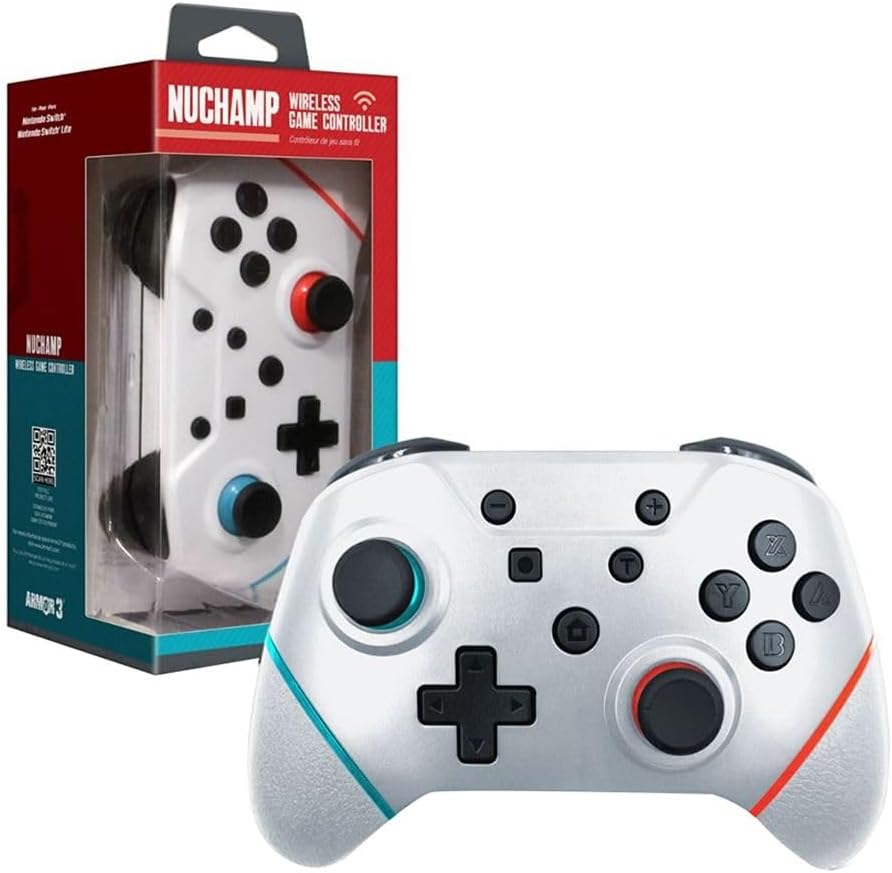
Image: The Armor 3 NuChamp Wireless Gaming Controller displayed next to its retail box, showcasinഉൽപ്പന്നവും അതിന്റെ പാക്കേജിംഗും.
ഉൽപ്പന്നം കഴിഞ്ഞുview
Familiarize yourself with the various components of your NuChamp Wireless Gaming Controller.
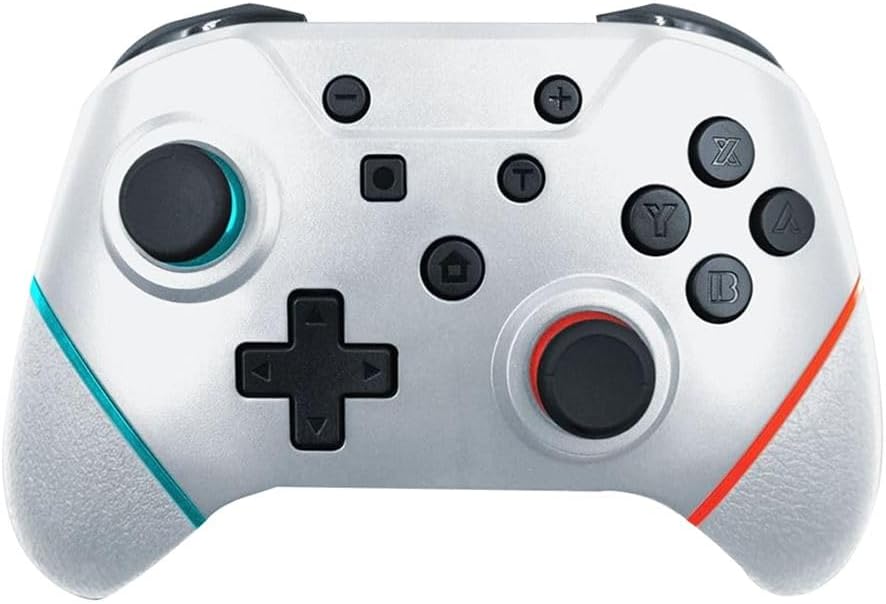
ചിത്രം: ഒരു നേർരേഖ view of the Armor 3 NuChamp Wireless Gaming Controller, highlighting its buttons, joysticks, and ergonomic design.
- ഇടത് അനലോഗ് സ്റ്റിക്ക്: ചലനത്തിനും ക്യാമറ നിയന്ത്രണത്തിനും.
- ഡി-പാഡ്: ദിശാ ഇൻപുട്ട്.
- മൈനസ് (-) ബട്ടൺ: System menu access.
- സ്ക്രീൻഷോട്ട് ബട്ടൺ: Capture in-game screenshots.
- ഹോം ബട്ടണ്: Return to the console's home screen.
- വലത് അനലോഗ് സ്റ്റിക്ക്: For camera control and aiming.
- A/B/X/Y ബട്ടണുകൾ: ആക്ഷൻ ബട്ടണുകൾ.
- പ്ലസ് (+) ബട്ടൺ: System menu access.
- എൽ/ആർ ബട്ടണുകൾ: തോളിലെ ബട്ടണുകൾ.
- ZL/ZR ബട്ടണുകൾ: ട്രിഗർ ബട്ടണുകൾ.
- Pro Paddle Buttons: Reassignable buttons on the back of the controller.
- യുഎസ്ബി-സി പോർട്ട്: ചാർജിംഗിനും വയർ കണക്ഷനും.

ചിത്രം: ഒരു ആംഗിൾ view of the Armor 3 NuChamp Wireless Gaming Controller, showing its ergonomic grips and the placement of the shoulder buttons and triggers.
സജ്ജമാക്കുക
1. കൺട്രോളർ ചാർജ് ചെയ്യുന്നു
Before first use, fully charge the controller. The built-in rechargeable battery lasts approximately 8 to 10 hours on a full charge.
- Connect the supplied USB charging cable to the USB-C port on the controller.
- Connect the other end of the cable to a USB power source (e.g., Nintendo Switch dock, USB wall adapter, computer USB port).
- The indicator lights on the controller will show charging status. They will typically stop blinking or turn solid when fully charged.
2. Pairing with Nintendo Switch® / Switch® Lite
The NuChamp controller uses Bluetooth for wireless connection.
- നിങ്ങളുടെ Nintendo Switch കൺസോളിൽ, ഹോം മെനുവിലേക്ക് പോകുക.
- തിരഞ്ഞെടുക്കുക "കൺട്രോളറുകൾ", പിന്നെ "ഗ്രിപ്പ്/ക്രമം മാറ്റുക".
- On the NuChamp controller, press and hold the ഹോം ബട്ടൺ for a few seconds until the indicator lights begin to flash rapidly. This indicates the controller is in pairing mode.
- Once the controller appears on the Switch screen, release the Home button. The indicator lights will become solid, confirming successful pairing.
- If pairing fails, ensure the controller is charged and try again. You may need to restart your Switch console.
പ്രവർത്തന നിർദ്ദേശങ്ങൾ
അടിസ്ഥാന നിയന്ത്രണങ്ങൾ
The NuChamp controller functions similarly to official Nintendo Switch Pro Controllers. All standard buttons (A/B/X/Y, D-Pad, Analog Sticks, L/R, ZL/ZR, Plus/Minus, Home, Screenshot) operate as expected in compatible games.
ടർബോ പ്രവർത്തനം
The controller features a turbo function for rapid firing of buttons.
- ടർബോ സജീവമാക്കാൻ: Press and hold the button you wish to set to turbo (e.g., A button), then press the ടർബോ ബട്ടൺ (usually a dedicated button or a combination, refer to specific controller markings if available). The button will now rapidly input when held down.
- To deactivate Turbo: Repeat the process: press and hold the turbo-enabled button, then press the ടർബോ ബട്ടൺ വീണ്ടും.
Reassignable Pro Paddle Buttons
The controller includes reassignable paddle buttons on the back for advanced customization.
- To assign a paddle button:
- അമർത്തിപ്പിടിക്കുക പ്രോഗ്രാം ബട്ടൺ (often a small button on the back or bottom of the controller) until an indicator light flashes.
- Press the paddle button you wish to assign (e.g., P1).
- Press the button you want to map to the paddle (e.g., A, B, X, Y, L, R, ZL, ZR, D-Pad directions).
- അമർത്തുക പ്രോഗ്രാം ബട്ടൺ again to save the assignment. The indicator light will stop flashing.
- To clear a paddle assignment: Repeat the assignment process, but instead of pressing a button to map, press the പ്രോഗ്രാം ബട്ടൺ twice after selecting the paddle.
Motion Controls and Force Feedback (Vibration)
The controller supports motion controls for games that utilize them and provides force feedback (vibration) for immersive gameplay. These features are automatically enabled when connected to the Nintendo Switch.
മെയിൻ്റനൻസ്
- വൃത്തിയാക്കൽ: കൺട്രോളർ വൃത്തിയാക്കാൻ മൃദുവായതും ഉണങ്ങിയതുമായ തുണി ഉപയോഗിക്കുക. കഠിനമായ രാസവസ്തുക്കളോ ഉരച്ചിലുകളോ ഉള്ള വസ്തുക്കളോ ഉപയോഗിക്കരുത്.
- സംഭരണം: കൺട്രോളർ നേരിട്ട് സൂര്യപ്രകാശം ഏൽക്കാത്തതും തീവ്രമായ താപനില ഏൽക്കാത്തതുമായ ഒരു തണുത്ത വരണ്ട സ്ഥലത്ത് സൂക്ഷിക്കുക.
- ബാറ്ററി കെയർ: To prolong battery life, avoid fully discharging the battery frequently. Charge the controller regularly, even if not in use for extended periods.
ട്രബിൾഷൂട്ടിംഗ്
| പ്രശ്നം | സാധ്യമായ കാരണം / പരിഹാരം |
|---|---|
| കൺട്രോളർ ഓണാക്കുന്നില്ല. | Battery may be depleted. Connect the controller to a power source using the USB cable and allow it to charge. |
| കൺട്രോളർ സ്വിച്ചുമായി ജോടിയാക്കുന്നില്ല. |
|
| ബട്ടണുകളോ സ്റ്റിക്കുകളോ പ്രതികരിക്കുന്നില്ല. |
|
| Vibration (Force Feedback) is not working. |
|
സ്പെസിഫിക്കേഷനുകൾ
- മോഡൽ നമ്പർ: M07467-WH
- കണക്റ്റിവിറ്റി: വയർലെസ് ബ്ലൂടൂത്ത്
- ബാറ്ററി: 1 ലിഥിയം അയോൺ (ഉൾപ്പെടുത്തിയിരിക്കുന്നു)
- ബാറ്ററി ലൈഫ്: ഏകദേശം 8-10 മണിക്കൂർ
- അളവുകൾ: 17.81 x 11.71 x 9.09 സെ.മീ (7.01 x 4.61 x 3.58 ഇഞ്ച്)
- ഭാരം: 317.51 ഗ്രാം (0.7 പൗണ്ട്)
- ഭാഷ: ഇംഗ്ലീഷ്
- മാതൃരാജ്യം: ചൈന
- റിലീസ് തീയതി: 1 ജനുവരി 2023
വാറൻ്റിയും പിന്തുണയും
For warranty information and technical support, please visit the official Armor3 webസൈറ്റിൽ ബന്ധപ്പെടുക അല്ലെങ്കിൽ അവരുടെ ഉപഭോക്തൃ സേവനവുമായി ബന്ധപ്പെടുക. വാങ്ങിയതിന്റെ തെളിവായി നിങ്ങളുടെ വാങ്ങൽ രസീത് സൂക്ഷിക്കുക.
ഉദ്യോഗസ്ഥൻ Webസൈറ്റ്: www.armor3.com


