ആമുഖം
This manual provides instructions for the Y&H ezcap215 Portable Bluetooth Cassette Player. This device allows you to enjoy your cassette tape collection by playing music directly through wired headphones or by transmitting the audio wirelessly to Bluetooth-enabled headphones or speakers. It features a compact design and auto-reverse functionality for continuous playback.

ചിത്രം: മുൻഭാഗം view of the Y&H ezcap215 Portable Bluetooth Cassette Player, showing the "ezcap Bluetooth Cassette Player" label and control buttons.
പാക്കേജ് ഉള്ളടക്കം
എല്ലാ ഇനങ്ങളും നിലവിലുണ്ടോ എന്ന് ദയവായി പരിശോധിക്കുക:
- Y&H ezcap215 Portable Bluetooth Cassette Player
- യുഎസ്ബി പവർ കേബിൾ
- Wired Headphones (3.5mm jack)
- ഉപയോക്തൃ മാനുവൽ (ഈ പ്രമാണം)
സജ്ജമാക്കുക
വൈദ്യുതി വിതരണം
The ezcap215 can be powered in two ways:
- യുഎസ്ബി പവർ: Connect the provided USB cable to the DC 5V port on the player and to a USB power adapter (not included) or a computer USB port.
- ബാറ്ററി പവർ: Insert two AA batteries (not included) into the battery compartment.
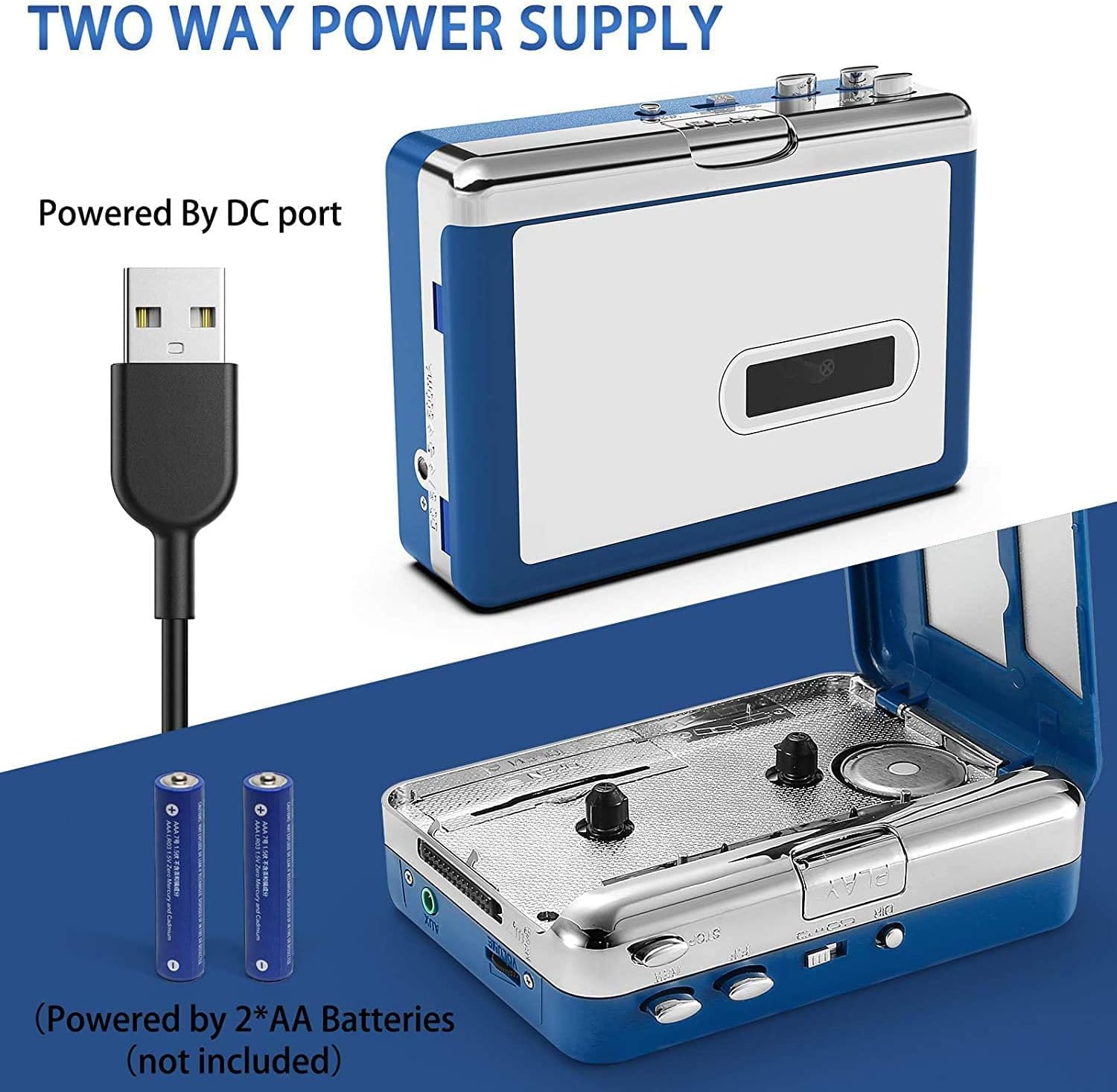
Image: The cassette player showing two power supply methods: via USB cable and via two AA batteries (not included).
Bluetooth Connection (Transmitter Mode)
To transmit audio to Bluetooth headphones or speakers:
- Insert a cassette tape into the player.
- Connect the USB cable for power. The blue LED indicator will blink rapidly, indicating the device is searching for Bluetooth receivers.
- Turn on your Bluetooth headphones or speaker and ensure they are in pairing mode.
- The ezcap215 will automatically pair with your Bluetooth device within a few seconds. Once paired, the blue LED will blink slowly.
- Press the "PLAY" button on the cassette player to start listening to music through your Bluetooth device.
പ്രധാന കുറിപ്പ്:
- Do not turn on more than one Bluetooth receiving device simultaneously to avoid pairing conflicts. Only keep the intended Bluetooth headphones or speaker powered on during pairing.
- If you need to restart the Bluetooth search, disconnect the USB power cable and then reconnect it.
- This device supports Bluetooth 4.2. It does not support Bluetooth 5.0.

Image: The cassette player wirelessly transmitting audio to a pair of Bluetooth headphones.

Image: The cassette player wirelessly transmitting audio to a portable Bluetooth speaker.
Wired Headphone Connection
To listen using wired headphones:
- Insert a cassette tape into the player.
- Connect your 3.5mm wired headphones to the headphone jack on the side of the player.
- Press the "PLAY" button to start listening.

Image: The cassette player with wired headphones plugged into the 3.5mm jack, alongside a cassette tape.
പ്രവർത്തന നിർദ്ദേശങ്ങൾ
നിയന്ത്രിക്കുന്നുview

Image: A diagram illustrating the various controls and ports on the cassette player, including Play, Stop, Rewind, Fast Forward, Auto Reverse switch, Direction switch, DC 5V port, Aux port, and Volume control.
- പ്ലേ: Press to start tape playback.
- നിർത്തുക: Press to stop tape playback.
- REW (റിവൈൻഡ്): ടേപ്പ് റിവൈൻഡ് ചെയ്യാൻ അമർത്തുക.
- FF (ഫാസ്റ്റ് ഫോർവേഡ്): ടേപ്പ് വേഗത്തിൽ ഫോർവേഡ് ചെയ്യാൻ അമർത്തുക.
- ഓട്ടോ റിവേഴ്സ് സ്വിച്ച്: Slide to enable or disable auto-reverse function. When enabled, the tape will automatically play the other side after one side finishes.
- ഡിഐആർ (ദിശ): Press to change the playback direction of the tape.
- ഡിസി 5 വി: Power input port for USB cable.
- ഓക്സ്: 3.5mm audio output jack for wired headphones.
- വോളിയം +/-: Adjusts the audio output volume for wired headphones. For Bluetooth output, volume is controlled by the connected Bluetooth device.
ഒരു കാസറ്റ് ടേപ്പ് പ്ലേ ചെയ്യുന്നു
- Open the cassette compartment cover by sliding the "OPEN" switch.
- Insert a cassette tape with the open edge facing the player's head.
- Close the cassette compartment cover firmly.
- Ensure the player is powered (via USB or batteries).
- അമർത്തുക കളിക്കുക പ്ലേബാക്ക് ആരംഭിക്കുന്നതിനുള്ള ബട്ടൺ.
- ഉപയോഗിച്ച് വോളിയം ക്രമീകരിക്കുക വോളിയം +/- control for wired headphones, or on your Bluetooth device for wireless listening.
- പ്ലേബാക്ക് നിർത്താൻ, അമർത്തുക നിർത്തുക ബട്ടൺ.
- ഉപയോഗിക്കുക REW or എഫ്എഫ് ടേപ്പ് നാവിഗേറ്റ് ചെയ്യാനുള്ള ബട്ടണുകൾ.
- ഉപയോഗിക്കുക ഡിഐആർ button to change playback direction or the Auto Reverse Switch for continuous playback.
മെയിൻ്റനൻസ്
To ensure optimal performance and longevity of your cassette player, follow these maintenance guidelines:
- വൃത്തിയാക്കൽ: Regularly clean the tape head, pinch roller, and capstan using a cotton swab lightly dampened with isopropyl alcohol. Do this after every 10-20 hours of playback or if you notice sound quality degradation.
- പൊടി സംരക്ഷണം: Keep the cassette player in a clean, dust-free environment. When not in use, store it in a protective case or cover.
- ബാറ്ററി കെയർ: If using batteries, remove them if the device will not be used for an extended period to prevent leakage.
- തീവ്രമായ അവസ്ഥകൾ ഒഴിവാക്കുക: Do not expose the player to extreme temperatures, humidity, or direct sunlight.
- ശ്രദ്ധയോടെ കൈകാര്യം ചെയ്യുക: Avoid dropping or subjecting the player to strong impacts.
ട്രബിൾഷൂട്ടിംഗ്
| പ്രശ്നം | സാധ്യമായ കാരണം | പരിഹാരം |
|---|---|---|
| പവർ ഇല്ല / ഉപകരണം ഓണാകുന്നില്ല. |
|
|
| No sound from wired headphones. |
|
|
| ബ്ലൂടൂത്ത് ഉപകരണത്തിലേക്ക് കണക്റ്റുചെയ്യാൻ കഴിയുന്നില്ല. |
|
|
| Low volume from Bluetooth device. |
|
|
| Poor sound quality / Noise during playback. |
|
|
| Tape mechanism issues (e.g., tape not moving, chewing tape). |
|
|
സ്പെസിഫിക്കേഷനുകൾ
- മോഡൽ: ezcap215
- ബ്രാൻഡ്: വൈ&എച്ച്
- കണക്റ്റിവിറ്റി: Bluetooth (4.2), 3.5mm AUX
- വൈദ്യുതി വിതരണം: DC 5V (USB), 2 x AA Batteries
- Supported Audio Formats (Output): MP3, AAC, FLAC, WAV, WMA, OGG (via Bluetooth/AUX from tape playback)
- നിറം: നീല
- അളവുകൾ: Approximately 4.45 inches (length) x 3.35 inches (width) x 1.26 inches (height)
- ഫീച്ചറുകൾ: Auto Reverse, Stereo Playback
വാറൻ്റിയും പിന്തുണയും
For warranty information or technical support, please refer to the documentation provided with your purchase or contact the seller directly. Keep your proof of purchase for warranty claims.
Manufacturer Reference: ezcap215


