1. ആമുഖവും അവസാനവുംview
The Malarpon HDMI EDID Emulator Passthrough 1080-4P is designed to resolve common display issues encountered in various computing environments. This device ensures that your computer or source device always detects a connected display, even when the actual monitor is turned off, disconnected, or when using KVM switches or remote desktop applications. By maintaining the Extended Display Identification Data (EDID), it prevents desktop icons from rearranging, windows from resizing, and ensures stable video output.

Image 1: Malarpon HDMI EDID Emulator Passthrough 1080-4P (4-pack)
2 പ്രധാന സവിശേഷതകൾ
- Bi-directional EDID Passthrough: The emulator supports both source and sink connections, automatically detecting the direction of the HDMI signal.
- Stable EDID Emulation: Ensures your system consistently recognizes a display, preventing display blackouts or resolution changes when monitors are turned off or disconnected.
- പ്ലഗ് ആൻഡ് പ്ലേ: No drivers or additional software installation required for operation.
- Prevents Desktop Rearrangement: Maintains the arrangement of desktop icons and open windows, especially useful in multi-monitor setups or with KVM switches.
- Accelerates Display Negotiation: Reduces the time taken for display detection when a monitor is frequently switched on/off or reconnected.
- Gold-Plated HDMI Connectors: Designed for stable signal transmission and durability.
- വിശാലമായ അനുയോജ്യത: Supports various devices including laptops, PCs, KVM switches, HDMI splitters, and is suitable for headless server setups.

Image 2: Features of the Malarpon HDMI EDID Emulator
3. സജ്ജീകരണവും ഇൻസ്റ്റാളേഷനും
- Identify the HDMI output port on your source device (e.g., PC, laptop, server).
- Plug the Malarpon HDMI EDID Emulator directly into the HDMI output port of your source device.
- If you are connecting to a monitor, connect your HDMI cable from the monitor to the other end of the EDID emulator.
- The device is plug-and-play; your system should automatically detect the emulated display.

Image 3: Plugging in the HDMI EDID Emulator
4. പ്രവർത്തന നിർദ്ദേശങ്ങൾ
Once installed, the Malarpon HDMI EDID Emulator will continuously provide EDID information to your source device. This ensures that your operating system (e.g., Windows, macOS, Linux) perceives a display as constantly connected, even if the physical monitor is powered off or removed. This functionality is crucial for:
- Headless Servers: Allows remote access to servers without a physical monitor, maintaining desired resolutions.
- കെവിഎം സ്വിച്ചുകൾ: Prevents display issues and desktop rearrangement when switching between computers.
- റിമോട്ട് ഡെസ്ക്ടോപ്പ്: Ensures stable resolution and display settings during remote sessions.
- മൾട്ടി-മോണിറ്റർ സജ്ജീകരണങ്ങൾ: Maintains window positions and desktop layout when one or more monitors are temporarily unavailable.
The emulator supports a default resolution of 1920x1080 at 60Hz. Your system's display settings should reflect this or allow selection of other supported resolutions as detailed in the specifications.

Image 4: Home and Office Scenarios with EDID Emulator
5. പ്രശ്നപരിഹാരം
- Desktop Rearrangement or Black Screen: This emulator is specifically designed to prevent these issues. Ensure the emulator is securely plugged into the HDMI output of your source device. If using a KVM switch, ensure the emulator is between the computer and the KVM.
- No Video Signal or Incorrect Resolution:
- Verify that the emulator is fully inserted into the HDMI port.
- Check your operating system's display settings to confirm the detected resolution. The emulator supports 1920x1080@60Hz by default, and other resolutions listed in the specifications.
- If using a KVM or switch, ensure it supports the desired resolution and refresh rate.
- Audio Issues (e.g., capped at 48KHz): While primarily a video emulator, some users report audio limitations with specific setups. If audio quality is critical, verify your system's audio output settings and consider if your setup requires a different type of EDID management for audio.
- Color Distortion (e.g., missing color channels): This can occur with certain specific hardware or operating system configurations (e.g., some M1 Mac setups). Ensure your graphics drivers are up to date. If the issue persists, it may indicate a compatibility challenge with your specific hardware.
Video 1: Demonstration of EDID emulator preventing display issues when a monitor is unplugged and replugged, maintaining display order and resolution.
6 സ്പെസിഫിക്കേഷനുകൾ
| ഉൽപ്പന്ന അളവുകൾ | 1.6 x 0.5 x 0.8 ഇഞ്ച് |
| ഇനത്തിൻ്റെ ഭാരം | 2.11 ഔൺസ് |
| മോഡൽ നമ്പർ | HDMI pass thought-20 |
| കണക്റ്റർ തരം | HDMI |
| ഡിഫോൾട്ട് റെസല്യൂഷൻ | 1920x1080 @ 60Hz |
| പിന്തുണയ്ക്കുന്ന പ്രമേയങ്ങൾ | 1920x1080 (50/60Hz), 1680x1050 (60Hz), 1600x900 (60Hz), 1366x768 (60Hz), 1280x1024 (60Hz), 1280x800 (60Hz), 1024x768 (60Hz), 800x600 (60Hz) |
| അനുയോജ്യമായ ഉപകരണങ്ങൾ | Laptop, Monitor, PC |
| നിർമ്മാതാവ് | മലർപൊൻ |
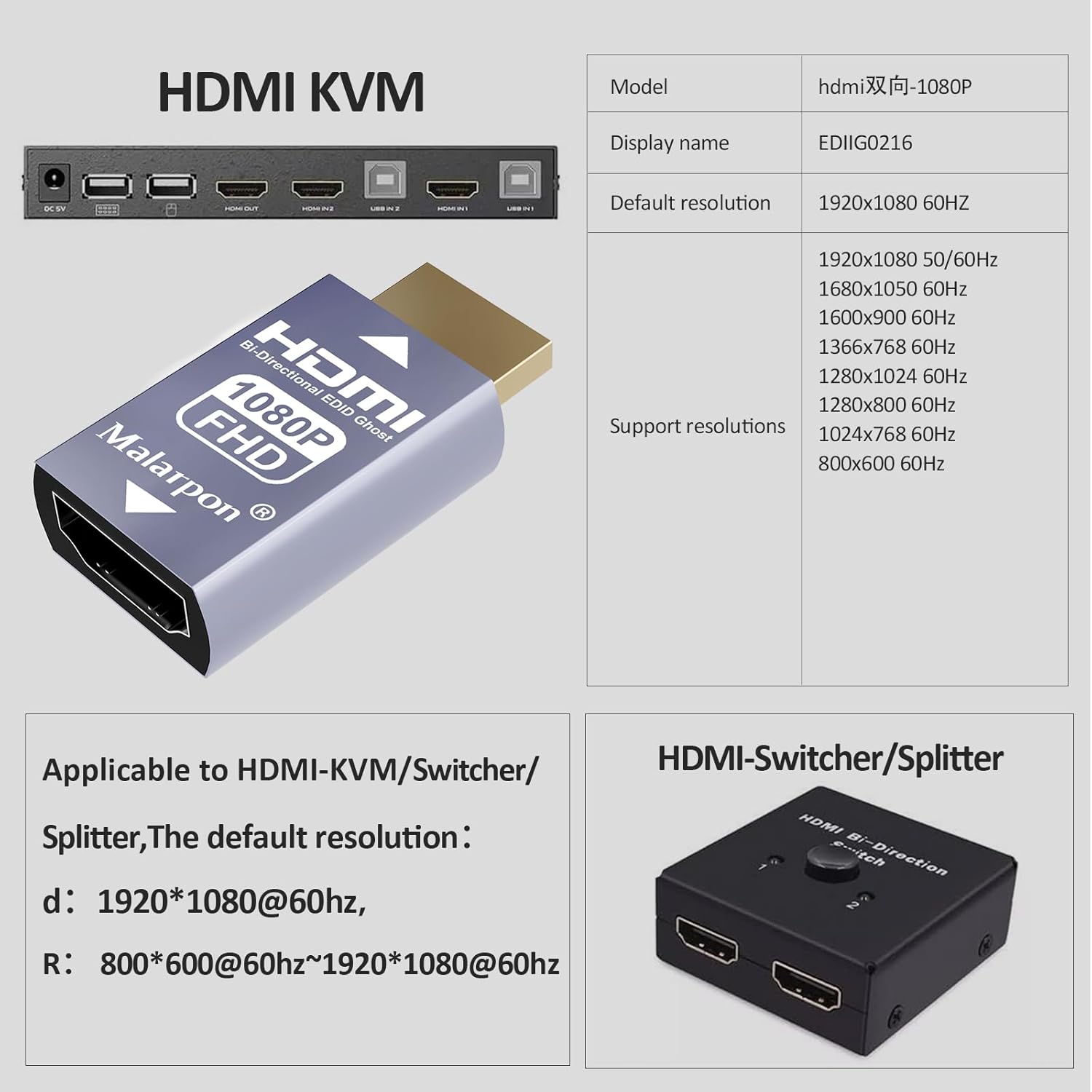
Image 5: Supported Resolutions and KVM Compatibility
7. വാറൻ്റിയും പിന്തുണയും
For any inquiries or support needs regarding your Malarpon HDMI EDID Emulator, please contact Malarpon customer service. The manufacturer aims to provide assistance within 24 hours and offers a satisfaction guarantee for 34 days from the date of purchase.
Manufacturer: Malarpon


