ആമുഖം
This manual provides detailed instructions for the proper use and maintenance of your Conambo Trucker Bluetooth Headset 5.0. Please read this manual thoroughly before using the device to ensure optimal performance and longevity.
പാക്കേജ് ഉള്ളടക്കം
പാക്കേജ് തുറക്കുമ്പോൾ, ഇനിപ്പറയുന്ന എല്ലാ ഇനങ്ങളും ഉൾപ്പെടുത്തിയിട്ടുണ്ടെന്ന് ദയവായി ഉറപ്പാക്കുക:
- Conambo Trucker Bluetooth Headset (Model DE-JBT9)
- USB-C ചാർജിംഗ് കേബിൾ
- ഉപയോക്തൃ മാനുവൽ

Image: The Conambo Trucker Bluetooth Headset, a USB-C charging cable, and the user manual are neatly arranged in the product packaging.
ഉൽപ്പന്നം കഴിഞ്ഞുview
നിങ്ങളുടെ ഹെഡ്സെറ്റിന്റെ വിവിധ ഘടകങ്ങളും നിയന്ത്രണങ്ങളും പരിചയപ്പെടുക.
- ക്രമീകരിക്കാവുന്ന ഹെഡ്ബാൻഡ്: Allows for a customized and comfortable fit for various head sizes.
- Soft Protein Memory-Foam Earpad: ദീർഘനേരം ധരിക്കുമ്പോൾ സുഖം നൽകുന്നു.
- Flexible Gooseneck Microphone: Can be rotated 270 degrees for use on either the left or right ear, and adjusted for optimal voice pickup. Features a wind cover for clear audio.
- നിയന്ത്രണ ബട്ടണുകൾ: Located on the earpiece for easy access to power, volume, call management, and mute functions.
- USB-C ചാർജിംഗ് പോർട്ട്: For recharging the headset battery.

Image: A user demonstrates the adjustable headband, soft ear pad, and anti-slip pad for comfortable wear on either ear.
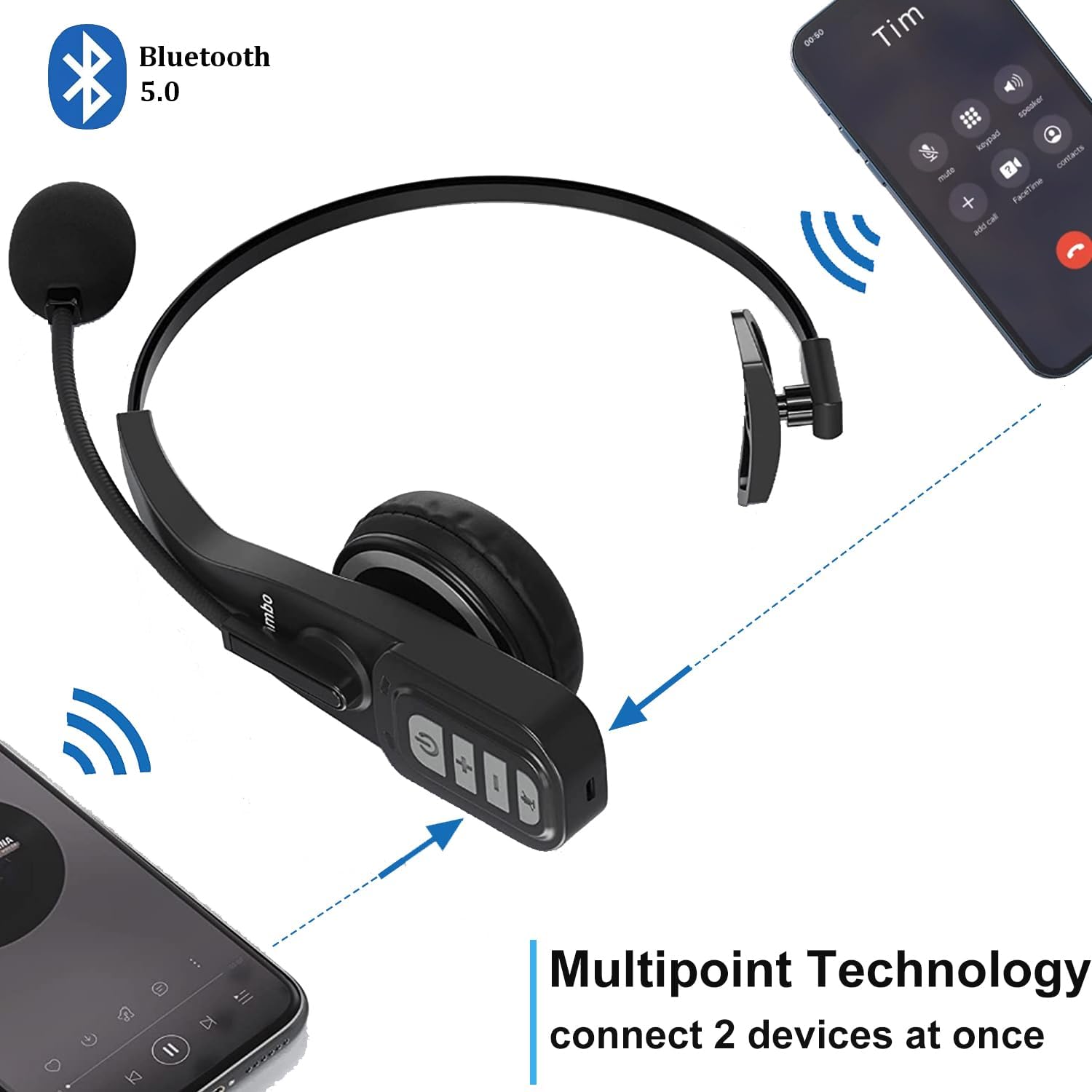
Image: Close-up of the headset's control panel, highlighting the volume up/down, power/call, and mute buttons.
സജ്ജമാക്കുക
1. ഹെഡ്സെറ്റ് ചാർജ് ചെയ്യുന്നു
Before initial use, fully charge your headset. A full charge takes approximately 4 hours.
- Connect the provided USB-C charging cable to the charging port on the headset.
- USB-C കേബിളിന്റെ മറ്റേ അറ്റം അനുയോജ്യമായ ഒരു USB പവർ സ്രോതസ്സുമായി ബന്ധിപ്പിക്കുക (ഉദാ: കമ്പ്യൂട്ടർ USB പോർട്ട്, വാൾ അഡാപ്റ്റർ).
- The LED indicator on the headset will show charging status (refer to the LED indicator section for details).
2. ബ്ലൂടൂത്ത് ഉപകരണവുമായി ജോടിയാക്കുന്നു
The headset uses Bluetooth 5.0 technology for stable and fast connections. It supports multipoint connection, allowing simultaneous connection to two Bluetooth devices.
- ഹെഡ്സെറ്റ് ചാർജ്ജ് ചെയ്തിട്ടുണ്ടെന്ന് ഉറപ്പാക്കുക.
- Slide the power switch to the "ON" position. The headset will automatically enter pairing mode, indicated by a flashing LED light.
- On your device (e.g., smartphone, laptop, PC), enable Bluetooth and search for available devices.
- Select "A19" or "Conambo JBT900" (or similar model name) from the list of found devices to connect.
- Once connected, the LED indicator will become solid, confirming successful pairing.

Image: The headset is shown connected to two different smartphones, illustrating its multipoint technology feature.
Video: A demonstration of the Conambo JBT900 Bluetooth 5.0 Headset, showcasing അതിന്റെ സവിശേഷതകളും ഉപയോഗ എളുപ്പവും.
പ്രവർത്തന നിർദ്ദേശങ്ങൾ
കോൾ മാനേജുമെന്റ്
- ഉത്തരം/അവസാന കോൾ: Press the Phone Call button once.
- കോൾ നിരസിക്കുക: Press and hold the Phone Call button for 2 seconds.
- മൈക്രോഫോൺ നിശബ്ദമാക്കുക/അൺമ്യൂട്ടുചെയ്യുക: During a call, press the Mute button (often the same as the Phone Call button or a dedicated button) once.
- അവസാന നമ്പർ വീണ്ടും ഡയൽ ചെയ്യുക: Double-press the Phone Call button.

Image: A woman wearing the headset, demonstrating the mute function during a call.
സംഗീത നിയന്ത്രണം
- പ്ലേ/താൽക്കാലികമായി നിർത്തുക: Press the Phone Call button once.
- വോളിയം കൂട്ടുക/താഴ്ത്തുക: പ്രത്യേകം രൂപകൽപ്പന ചെയ്തിരിക്കുന്ന വോളിയം +, വോളിയം - ബട്ടണുകൾ ഉപയോഗിക്കുക.
- അടുത്ത ട്രാക്ക്: വോളിയം + ബട്ടൺ അമർത്തിപ്പിടിക്കുക.
- മുമ്പത്തെ ട്രാക്ക്: വോളിയം ബട്ടൺ അമർത്തിപ്പിടിക്കുക.
വോയ്സ് അസിസ്റ്റന്റ് (സിരി/ഗൂഗിൾ അസിസ്റ്റന്റ്)
Press and hold the Mute button to activate your device's voice assistant for hands-free commands.
സുഖവും ക്രമീകരിക്കാവുന്നതും
The Conambo headset is designed for comfort during prolonged use.
- The headband is stretchable and can be adjusted to fit various head sizes.
- The soft protein memory-foam earpad ensures a comfortable fit on your ear.
- The microphone boom can be rotated 270 degrees, allowing you to wear the earpiece on either your left or right ear.

Image: A man wearing the headset, demonstrating the flexible microphone positioned for clear communication, highlighting its noise-cancelling capabilities.
മെയിൻ്റനൻസ്
നിങ്ങളുടെ ഹെഡ്സെറ്റിന്റെ ദീർഘായുസ്സും ഒപ്റ്റിമൽ പ്രകടനവും ഉറപ്പാക്കാൻ, ഈ പരിപാലന മാർഗ്ഗനിർദ്ദേശങ്ങൾ പാലിക്കുക:
- Clean the earpad and microphone foam regularly with a soft, dry cloth.
- ഹെഡ്സെറ്റ് തീവ്രമായ താപനിലയിലോ, ഈർപ്പത്തിലോ, നേരിട്ടുള്ള സൂര്യപ്രകാശത്തിലോ ഏൽക്കുന്നത് ഒഴിവാക്കുക.
- ഉപയോഗത്തിലില്ലാത്തപ്പോൾ ഹെഡ്സെറ്റ് തണുത്തതും വരണ്ടതുമായ സ്ഥലത്ത് സൂക്ഷിക്കുക.
- Do not attempt to disassemble or repair the headset yourself. Contact customer support for assistance.
ട്രബിൾഷൂട്ടിംഗ്
If you encounter any issues with your headset, please refer to the following common solutions:
- Headset not turning on: ഹെഡ്സെറ്റ് പൂർണ്ണമായി ചാർജ്ജ് ചെയ്തിട്ടുണ്ടെന്ന് ഉറപ്പാക്കുക.
- ജോടിയാക്കാനായില്ല: Make sure the headset is in pairing mode (flashing LED) and your device's Bluetooth is enabled and searching. Try restarting both the headset and your device.
- No audio/poor audio quality: Check the volume levels on both the headset and your connected device. Ensure the headset is within the 33ft wireless range of your device.
- മൈക്രോഫോൺ പ്രവർത്തിക്കുന്നില്ല: Ensure the microphone is not muted. Adjust the microphone's position closer to your mouth.
സ്പെസിഫിക്കേഷനുകൾ
| മോഡൽ നമ്പർ | DE-JBT9 |
| ബ്ലൂടൂത്ത് പതിപ്പ് | 5.0 |
| കണക്റ്റിവിറ്റി ടെക്നോളജി | ബ്ലൂടൂത്ത് 5.0, വയർലെസ് |
| വയർലെസ് ശ്രേണി | 33 അടി വരെ (10 മീറ്റർ) |
| സംസാര സമയം | 22 മണിക്കൂർ വരെ |
| ചാർജിംഗ് സമയം | ഏകദേശം 4 മണിക്കൂർ |
| സ്റ്റാൻഡ്ബൈ സമയം | Up to 360 hours (implied from images) |
| ശബ്ദ നിയന്ത്രണം | Active Noise Cancellation (for microphone) |
| ഇനത്തിൻ്റെ ഭാരം | 0.17 കിലോഗ്രാം (5.9 ഔൺസ്) |
| മെറ്റീരിയൽ | Leather, Soft protein memory-foam, Stretchable headband |
| അനുയോജ്യമായ ഉപകരണങ്ങൾ | Cellphones, Laptops, PC Call Center Equipment |
വാറൻ്റിയും പിന്തുണയും
For warranty information or technical support, please refer to the contact details provided in the included user manual or visit the official Conambo webസൈറ്റ്.


