1. ആമുഖം
This manual provides comprehensive instructions for the setup, operation, and maintenance of your seenda Backlit Wireless Keyboard. Designed for comfort and efficiency, this ultra-slim, rechargeable keyboard offers a seamless 2.4GHz wireless connection and illuminated keys for enhanced visibility in various lighting conditions. Please read this manual thoroughly before using the product to ensure optimal performance and longevity.
2. പാക്കേജ് ഉള്ളടക്കം
- 1 x seenda Backlit Wireless Keyboard
- 1 x യുഎസ്ബി-സി ചാർജിംഗ് കേബിൾ
- 1 x 2.4G USB Receiver (typically stored in the keyboard's battery compartment or a dedicated slot)
- 1 x ഉപയോക്തൃ മാനുവൽ (ഈ പ്രമാണം)
3. ഉൽപ്പന്നം കഴിഞ്ഞുview

ഫ്രണ്ട് view of the seenda Backlit Wireless Keyboard in Rose Gold, showcasing its full layout including the numeric keypad and function keys. The compact USB receiver is visible in the foreground, ready for connection.

The seenda Backlit Wireless Keyboard in Rose Gold positioned on a desk next to a computer monitor, illustrating its slim profile and how it integrates into a typical workspace setup.

Detail of the keyboard's LED indicators located above the numeric keypad. These indicators provide visual cues for charging status, low power warnings, Caps Lock activation, and Num Lock activation.

ക്ലോസ് അപ്പ് view of a keycap, revealing the underlying scissor switch mechanism. This design feature contributes to a smooth, quiet, and responsive typing experience.
4. സജ്ജീകരണ നിർദ്ദേശങ്ങൾ
- കീബോർഡ് ചാർജ് ചെയ്യുക: Before first use, fully charge the keyboard using the provided USB-C cable. Connect the USB-C end to the keyboard's charging port (located on the top edge) and the USB-A end to a computer's USB port or a USB wall adapter. The charging indicator LED will illuminate during charging and turn off when fully charged. A full charge takes approximately 2 hours.
- യുഎസ്ബി റിസീവർ കണ്ടെത്തുക: The 2.4G USB receiver is typically stored in a dedicated slot on the keyboard itself for safekeeping during transport. Carefully remove it.
- റിസീവർ ബന്ധിപ്പിക്കുക: Plug the 2.4G USB receiver into an available USB port on your computer, laptop, Smart TV, or other compatible device.
- കീബോർഡ് ഓൺ ചെയ്യുക: Locate the power switch on the keyboard (usually on the top edge, near the charging port) and slide it to the "ON" position.
- യാന്ത്രിക കണക്ഷൻ: The keyboard should automatically connect to your device within a few seconds. No additional drivers are typically required for most operating systems (Windows 10/8/7, PC, Mac, Surface, Smart TV).

Image illustrating the compact 2.4G USB receiver and the wireless connection range of up to 10 meters, emphasizing the easy plug-and-play setup for the keyboard.
5. പ്രവർത്തന നിർദ്ദേശങ്ങൾ
5.1 പവർ മാനേജ്മെൻ്റ്
- പവർ ഓൺ/ഓഫ്: Use the power switch located on the top edge of the keyboard to turn it on or off. Turning off the keyboard when not in use helps conserve battery life.
- ചാർജിംഗ്: When the low power indicator LED flashes, it's time to recharge the keyboard. Connect the USB-C cable as described in the Setup section. The keyboard features a 1600 mAh battery, providing up to 800 hours of continuous work without the backlight.
5.2 ബാക്ക്ലൈറ്റ് നിയന്ത്രണം
The keyboard features a white LED backlight for improved visibility in low-light environments.
- ബാക്ക്ലൈറ്റ് ഓൺ/ഓഫ് ചെയ്യുക: അമർത്തുക Fn കീ ഒരേസമയം light icon key (usually F10 or a dedicated key with a light bulb symbol) to toggle the backlight on or off.
- ബാക്ക്ലൈറ്റിൻ്റെ തെളിച്ചം ക്രമീകരിക്കുക: അമർത്തുക Fn കീ ഒരേസമയം +/- keys (often F11/F12 or dedicated brightness keys) to cycle through different brightness levels or turn the backlight off.
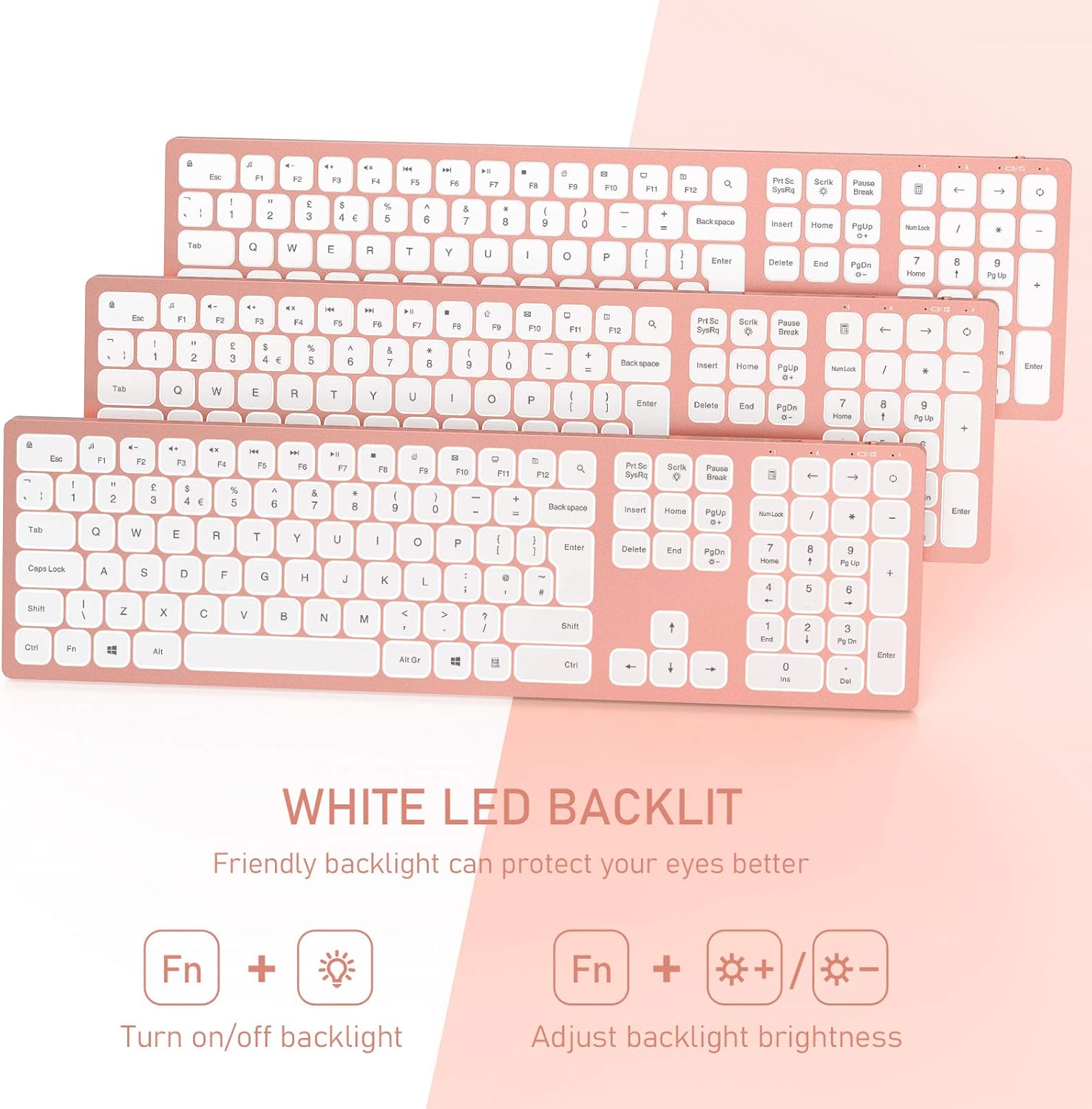
Illustration demonstrating the backlight functionality of the seenda keyboard. It highlights the 'Fn + light icon' combination to turn the backlight on/off and 'Fn + +/-' to adjust brightness, indicating a friendly white LED backlight designed to protect your eyes.

ക്ലോസ് അപ്പ് view of the keyboard's USB-C charging port and power switch. Text overlays indicate a 2-hour charge time, 1600 mAh battery capacity, and up to 800 hours of continuous use without backlight, highlighting its rechargeable nature.
5.3 ഇൻഡിക്കേറ്റർ ലൈറ്റുകൾ
- ചാർജിംഗ് സൂചകം: Illuminates when charging, turns off when fully charged.
- ലോ പവർ സൂചകം: Flashes when the battery is low, indicating a need for recharging.
- ക്യാപ്സ് ലോക്ക് സൂചകം: ക്യാപ്സ് ലോക്ക് സജീവമാകുമ്പോൾ പ്രകാശിക്കുന്നു.
- നമ്പർ ലോക്ക് സൂചകം: നം ലോക്ക് സജീവമാകുമ്പോൾ പ്രകാശിക്കുന്നു.
6. പരിപാലനം
- വൃത്തിയാക്കൽ: കീബോർഡ് വൃത്തിയാക്കാൻ മൃദുവായതും ഉണങ്ങിയതും ലിന്റ് രഹിതവുമായ ഒരു തുണി ഉപയോഗിക്കുക. കഠിനമായ അഴുക്കിന്, ചെറുതായി ഡി.ampവെള്ളം അല്ലെങ്കിൽ നേരിയ ക്ലീനിംഗ് ലായനി ഉപയോഗിച്ച് തുണി തുടയ്ക്കുക. കഠിനമായ രാസവസ്തുക്കളോ ഉരച്ചിലുകളോ ഉള്ള വസ്തുക്കൾ ഉപയോഗിക്കുന്നത് ഒഴിവാക്കുക.
- സംഭരണം: ദീർഘനേരം ഉപയോഗിക്കാത്തപ്പോൾ, ബാറ്ററി ലൈഫ് ലാഭിക്കാൻ കീബോർഡ് ഓഫ് ചെയ്യുക. നേരിട്ടുള്ള സൂര്യപ്രകാശവും ഉയർന്ന താപനിലയും ഏൽക്കാത്ത തണുത്തതും വരണ്ടതുമായ സ്ഥലത്ത് ഇത് സൂക്ഷിക്കുക.
- ബാറ്ററി കെയർ: To prolong battery life, avoid fully discharging the keyboard frequently. Recharge it when the low power indicator appears.
- USB റിസീവർ: Keep the USB receiver in a safe place, preferably in its designated slot on the keyboard, to prevent loss.
7. പ്രശ്നപരിഹാരം
| പ്രശ്നം | സാധ്യമായ കാരണം | പരിഹാരം |
|---|---|---|
| കീബോർഡ് പ്രതികരിക്കുന്നില്ല | കീബോർഡ് ഓഫാണ് കുറഞ്ഞ ബാറ്ററി USB receiver not connected or loose ഇടപെടൽ | Ensure keyboard is ON. കീബോർഡ് പൂർണ്ണമായും ചാർജ് ചെയ്യുക. പ്രവർത്തിക്കുന്ന ഒരു USB പോർട്ടിലേക്ക് USB റിസീവർ ദൃഢമായി പ്ലഗ് ചെയ്തിട്ടുണ്ടെന്ന് ഉറപ്പാക്കുക. മറ്റൊരു USB പോർട്ട് പരീക്ഷിക്കുക. Move keyboard closer to the receiver. Avoid placing metal objects between keyboard and receiver. |
| ബാക്ക്ലൈറ്റ് പ്രവർത്തിക്കുന്നില്ല | ബാക്ക്ലൈറ്റ് ഓഫാണ് കുറഞ്ഞ ബാറ്ററി | Press Fn + light icon key to turn on/off. Charge the keyboard. Backlight may be disabled when battery is critically low. |
| കീകൾ ഒട്ടിപ്പിടിക്കുന്നു അല്ലെങ്കിൽ പ്രതികരിക്കുന്നില്ല. | കീകൾക്കടിയിൽ അഴുക്ക് അല്ലെങ്കിൽ അവശിഷ്ടങ്ങൾ ശാരീരിക ക്ഷതം | Clean the keyboard as per maintenance instructions. If physical damage is suspected, contact customer support. |
| കണക്ഷൻ ഇടയ്ക്കിടെ കുറയുന്നു | റിസീവറിൽ നിന്നുള്ള ദൂരം ഇടപെടൽ | Ensure keyboard is within 10 meters of the receiver. സമീപത്തുള്ള മറ്റ് 2.4GHz വയർലെസ് ഉപകരണങ്ങൾ കുറയ്ക്കുക. |
8 സ്പെസിഫിക്കേഷനുകൾ
| ഫീച്ചർ | വിശദാംശങ്ങൾ |
|---|---|
| മോഡൽ നമ്പർ | B08S2T99GY |
| കണക്റ്റിവിറ്റി ടെക്നോളജി | 2.4GHz വയർലെസ് |
| വയർലെസ് ശ്രേണി | 10 മീറ്റർ വരെ (33 അടി) |
| അനുയോജ്യമായ ഉപകരണങ്ങൾ | Laptop, Smart TV, Desktop PC, Surface (Windows 10/8/7) |
| കീബോർഡ് വിവരണം | Ergonomic, Full-size with Numeric Keypad |
| പ്രത്യേക സവിശേഷതകൾ | Backlighting (White LED), Rechargeable, Ultra-Slim |
| ബാറ്ററി ശേഷി | 1600 mAh |
| ചാർജിംഗ് സമയം | ഏകദേശം 2 മണിക്കൂർ |
| Continuous Work Time (No Backlight) | 800 മണിക്കൂർ വരെ |
| പവർ ഉറവിടം | USB Powered (via USB-C cable) |
| ഉൽപ്പന്ന അളവുകൾ | 16.82 x 4.84 x 0.48 ഇഞ്ച് |
| ഇനത്തിൻ്റെ ഭാരം | 1.65 പൗണ്ട് |
| നിറം | റോസ് ഗോൾഡ് |
| നിർമ്മാതാവ് | സീൻഡ |
9. വാറൻ്റിയും പിന്തുണയും
seenda products are designed and manufactured to the highest quality standards. For specific warranty information, please refer to the warranty card included with your product or visit the official seenda website. If you encounter any issues or have questions regarding your seenda Backlit Wireless Keyboard, please contact seenda customer support through their official channels for assistance.
നിർമ്മാതാവ്: സീൻഡ
Webസൈറ്റ്: ആമസോണിലെ സീൻഡ സ്റ്റോർ സന്ദർശിക്കുക


