1. ആമുഖം
This manual provides essential instructions for the safe and efficient use of your Ulefone Armor X7 Pro Dual SIM smartphone. The Armor X7 Pro is designed for durability, featuring IP68/69K water, dust, and drop resistance, making it suitable for challenging environments. Please read this manual thoroughly before operating your device.

Figure 1: Ulefone Armor X7 Pro, showing the front display and the textured back panel with camera module.
2. ഉൽപ്പന്നം കഴിഞ്ഞുview
2.1 ഉപകരണ ഘടകങ്ങൾ
Familiarize yourself with the key components of your Ulefone Armor X7 Pro.

ചിത്രം 2: മുൻഭാഗം view of the Ulefone Armor X7 Pro, highlighting the display, front camera, and earpiece.
- മുൻ ക്യാമറ: സെൽഫികൾക്കും വീഡിയോ കോളുകൾക്കും.
- ഇയർപീസ്: For audio during calls.
- ഡിസ്പ്ലേ: 5-inch screen for interaction.
- മൈക്രോഫോൺ: വോയിസ് ഇൻപുട്ടിനായി.

ചിത്രം 3: പിന്നിലേക്ക് view of the Ulefone Armor X7 Pro, showing the main camera, flash, and fingerprint sensor.
- പ്രധാന ക്യാമറ: ഫോട്ടോകളും വീഡിയോകളും എടുക്കുന്നതിന്.
- എൽഇഡി ഫ്ലാഷ്: Provides illumination for photos and can serve as a flashlight.
- ഫിംഗർപ്രിന്റ് സെൻസർ: For secure device unlocking and authentication.
- സ്പീക്കർ: ഓഡിയോ ഔട്ട്പുട്ടിനായി.
2.2 പരുക്കൻ ഡിസൈൻ
The Armor X7 Pro features a robust construction designed to withstand harsh conditions. Its reinforced corners and durable casing provide protection against drops, dust, and water ingress.
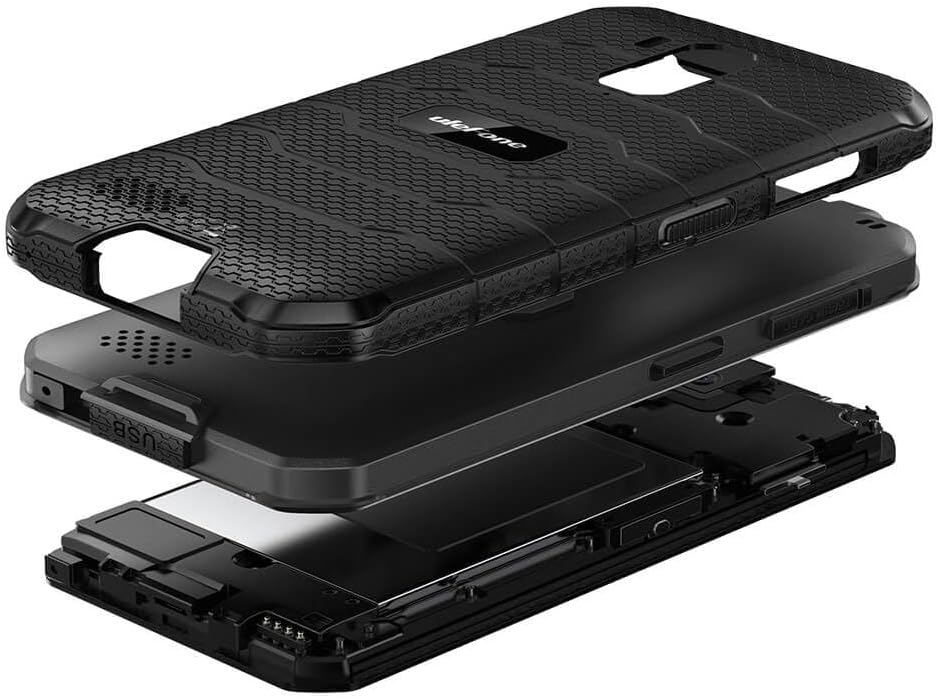
ചിത്രം 4: പൊട്ടിത്തെറിച്ചു view illustrating the multi-layered rugged construction of the Ulefone Armor X7 Pro.
3. സജ്ജീകരണം
3.1 സിം കാർഡും മൈക്രോ എസ്ഡി കാർഡും ഇൻസ്റ്റാൾ ചെയ്യൽ
- ഉപകരണത്തിന്റെ വശത്ത് സിം കാർഡ് ട്രേ കണ്ടെത്തുക.
- ട്രേ തുറക്കാൻ നൽകിയിരിക്കുന്ന സിം എജക്റ്റർ ഉപകരണം ഉപയോഗിക്കുക.
- Carefully place your Nano-SIM cards and/or a MicroSD card into the designated slots. Ensure the gold contacts face downwards.
- Gently push the tray back into the device until it clicks into place. Ensure the tray is fully sealed to maintain water and dust resistance.
3.2 ഉപകരണം ചാർജ് ചെയ്യുന്നു
Before first use, fully charge your Ulefone Armor X7 Pro.
- നിങ്ങളുടെ ഫോണിലെ ചാർജിംഗ് പോർട്ടിലേക്ക് USB കേബിൾ ബന്ധിപ്പിക്കുക.
- Connect the other end of the USB cable to a power adapter, then plug the adapter into a power outlet.
- ചാർജിംഗ് ഇൻഡിക്കേറ്റർ സ്ക്രീനിൽ ദൃശ്യമാകും.
3.3 പവർ ഓൺ/ഓഫ്
- പവർ ഓണാക്കാൻ: Ulefone ലോഗോ ദൃശ്യമാകുന്നതുവരെ പവർ ബട്ടൺ അമർത്തിപ്പിടിക്കുക.
- പവർ ഓഫ് ചെയ്യാൻ: Press and hold the Power button until the power options appear on the screen, then select 'Power off'.
4. പ്രവർത്തന നിർദ്ദേശങ്ങൾ
4.1 അടിസ്ഥാന നാവിഗേഷൻ
Use touch gestures such as tap, swipe, pinch, and spread to navigate the interface.
4.2 കോളുകൾ വിളിക്കുകയും സന്ദേശങ്ങൾ അയയ്ക്കുകയും ചെയ്യുന്നു
- കോളുകൾ: Open the 'Phone' app, enter the number, and tap the call icon.
- സന്ദേശങ്ങൾ: Open the 'Messages' app, tap 'Start chat', enter the recipient and your message.
4.3 ക്യാമറ ഉപയോഗിക്കുന്നത്
Open the 'Camera' app. Tap the shutter button to take a photo or the video icon to record a video. Swipe left or right to switch between modes.
4.4 ഫിംഗർപ്രിന്റ് അൺലോക്ക്
To set up fingerprint unlock:
- Go to 'Settings' > 'Security & location' > 'Fingerprint'.
- നിങ്ങളുടെ വിരലടയാളം രജിസ്റ്റർ ചെയ്യുന്നതിന് ഓൺ-സ്ക്രീൻ നിർദ്ദേശങ്ങൾ പാലിക്കുക.
- Once registered, you can unlock your device by placing your finger on the sensor.
4.5 നെറ്റ്വർക്ക് കണക്റ്റിവിറ്റി
- വൈഫൈ: Go to 'Settings' > 'Network & internet' > 'Wi-Fi'. Turn Wi-Fi on and select a network to connect.
- മൊബൈൽ ഡാറ്റ: Go to 'Settings' > 'Network & internet' > 'Mobile network'. Ensure 'Mobile data' is enabled.
5. പരിപാലനം
5.1 നിങ്ങളുടെ ഉപകരണം വൃത്തിയാക്കൽ
ഫോണിന്റെ സ്ക്രീനും ബോഡിയും വൃത്തിയാക്കാൻ മൃദുവായ, ലിന്റ് രഹിത തുണി ഉപയോഗിക്കുക. കഠിനമായ രാസവസ്തുക്കളോ ഉരച്ചിലുകളോ ഉള്ള വസ്തുക്കൾ ഉപയോഗിക്കുന്നത് ഒഴിവാക്കുക.
5.2 Water and Dust Resistance (IP68/IP69K)
The Ulefone Armor X7 Pro is rated IP68/IP69K, meaning it is resistant to dust and can withstand water immersion up to 1.5 meters for 30 minutes. It can also handle high-pressure, high-temperature water jets. To maintain this resistance:
- Ensure all port covers (USB, SIM tray) are securely closed.
- Do not expose the device to water if any port covers are open or damaged.
- If the device gets wet, dry it thoroughly before charging or opening any ports.
- Avoid exposing the device to saltwater or other liquids that may corrode components.
5.3 ബാറ്ററി കെയർ
- ബാറ്ററിയുടെ ആയുസ്സ് കുറയ്ക്കുന്ന, ഉയർന്ന താപനില ഒഴിവാക്കുക.
- Ulefone അംഗീകൃത ചാർജറുകളും കേബിളുകളും മാത്രം ഉപയോഗിക്കുക.
- ബാറ്ററി പഞ്ചർ ചെയ്യുകയോ കേടുവരുത്തുകയോ ചെയ്യരുത്.
6. പ്രശ്നപരിഹാരം
നിങ്ങളുടെ ഉപകരണത്തിൽ പ്രശ്നങ്ങൾ നേരിടുകയാണെങ്കിൽ, ഇനിപ്പറയുന്ന പരിഹാരങ്ങൾ പരീക്ഷിക്കുക:
| പ്രശ്നം | പരിഹാരം |
|---|---|
| ഉപകരണം ഓണാക്കുന്നില്ല | ബാറ്ററി ചാർജ്ജ് ചെയ്തിട്ടുണ്ടെന്ന് ഉറപ്പാക്കുക. റീസ്റ്റാർട്ട് ചെയ്യാൻ പവർ ബട്ടൺ കുറഞ്ഞത് 10 സെക്കൻഡ് അമർത്തിപ്പിടിക്കുക. |
| മോശം നെറ്റ്വർക്ക് സിഗ്നൽ | Check SIM card installation. Move to an area with better network coverage. Restart the device. |
| ബാറ്ററി പെട്ടെന്ന് തീരുന്നു | Close unused apps. Reduce screen brightness. Disable Wi-Fi/Bluetooth when not in use. |
| ആപ്പുകൾ ക്രാഷാകുന്നു അല്ലെങ്കിൽ മരവിക്കുന്നു | Clear app cache/data in Settings. Update apps. If persistent, consider a factory reset (back up data first). |
If problems persist, contact Ulefone customer support.
7 സ്പെസിഫിക്കേഷനുകൾ
Key technical specifications for the Ulefone Armor X7 Pro:
- മോഡൽ: UF-AX7P/BK
- അളവുകൾ: 0.57 x 3.11 x 5.91 ഇഞ്ച്
- ഭാരം: 8.3 ഔൺസ് (234 ഗ്രാം)
- സ്ക്രീൻ വലിപ്പം: 5 ഇഞ്ച്
- റാം: 4 ജിബി
- മെമ്മറി സ്റ്റോറേജ് കപ്പാസിറ്റി: 32 ജിബി
- സെല്ലുലാർ ടെക്നോളജി: 4G
- വയർലെസ് നെറ്റ്വർക്ക് സാങ്കേതികവിദ്യ: ജി.എസ്.എം
- SIM Card Slot Count: ഡ്യുവൽ സിം
- Biometric Security Feature: വിരലടയാള തിരിച്ചറിയൽ
- വെള്ളം/പൊടി പ്രതിരോധം: IP68/69K
- നിർമ്മാതാവ്: യുലെഫോൺ
8. വാറൻ്റിയും പിന്തുണയും
8.1 വാറൻ്റി വിവരങ്ങൾ
Your Ulefone Armor X7 Pro comes with a two-year warranty against factory defects. This warranty covers manufacturing faults and material defects under normal use. It does not cover damage caused by misuse, accidents, unauthorized modifications, or normal wear and tear.
8.2 ഉപഭോക്തൃ പിന്തുണ
For technical assistance, warranty claims, or further inquiries, please visit the official Ulefone webസൈറ്റിൽ ബന്ധപ്പെടുക അല്ലെങ്കിൽ അവരുടെ ഉപഭോക്തൃ സേവന വിഭാഗവുമായി ബന്ധപ്പെടുക. നിർദ്ദിഷ്ട കോൺടാക്റ്റ് വിശദാംശങ്ങൾക്ക് നിങ്ങളുടെ വാങ്ങൽ ഡോക്യുമെന്റേഷൻ പരിശോധിക്കുക.


