ആമുഖം
This manual provides detailed instructions for the safe and efficient operation, installation, and maintenance of your Brio 520 Series No Line Bottom-Loading Water-Cooler with Built-in 2 Stage Water-Filter. Please read this manual thoroughly before use and retain it for future reference.

Image: Brio 520 Series Water Cooler, illustrating its bottom-loading design with a water bottle visible inside.
സുരക്ഷാ വിവരങ്ങൾ
തീപിടുത്തം, വൈദ്യുതാഘാതം, വ്യക്തികൾക്ക് പരിക്കേൽക്കൽ എന്നിവ കുറയ്ക്കുന്നതിന് വൈദ്യുത ഉപകരണങ്ങൾ ഉപയോഗിക്കുമ്പോൾ എല്ലായ്പ്പോഴും അടിസ്ഥാന സുരക്ഷാ മുൻകരുതലുകൾ പാലിക്കുക.
- യൂണിറ്റ് പരന്നതും സുസ്ഥിരവുമായ പ്രതലത്തിൽ സ്ഥാപിച്ചിട്ടുണ്ടെന്ന് ഉറപ്പാക്കുക.
- കേടായ ചരടോ പ്ലഗോ ഉപയോഗിച്ച് ഡിസ്പെൻസർ പ്രവർത്തിപ്പിക്കരുത്.
- ഡിസ്പെൻസറിനെ നേരിട്ടുള്ള സൂര്യപ്രകാശത്തിൽ നിന്നും താപ സ്രോതസ്സുകളിൽ നിന്നും അകറ്റി നിർത്തുക.
- വൃത്തിയാക്കുന്നതിനോ അറ്റകുറ്റപ്പണികൾ നടത്തുന്നതിനോ മുമ്പ് യൂണിറ്റ് അൺപ്ലഗ് ചെയ്യുക.
- The hot water button features a child safety switch to prevent accidental dispensing of hot water. Always engage this lock when not in use, especially in households with children.
ബോക്സിൽ എന്താണുള്ളത്
Your Brio 520 Series Water Cooler package includes the following components:
- Brio 520 Series No-Line Bottom Load 2-Stage Water Cooler Dispenser
- 2 Water Filters (Sediment and Activated Carbon)
- Installation Kit (includes drain tube, funnel, bottle adapter)

Image: Contents of the Brio 520 Series Water Cooler package, including the dispenser, filters, and installation accessories.
സജ്ജീകരണ നിർദ്ദേശങ്ങൾ
Follow these steps for the initial setup of your water cooler:
- അൺപാക്കിംഗും പ്ലേസ്മെൻ്റും: Carefully remove the dispenser from its packaging. Place the unit on a level, sturdy surface, ensuring adequate ventilation around the back and sides.
- ഇൻസ്റ്റാളേഷൻ ഫിൽട്ടർ ചെയ്യുക:

Image: Step-by-step guide for installing filters, filling the water bottle, and preparing the dispenser for use.
Locate the filter compartment, typically behind the bottom door. Twist in both the Sediment filter (Stage 1) and the Activated Carbon filter (Stage 2) into their designated slots until secure. These filters are designed to remove sediment, chlorine taste, and other contaminants.

ചിത്രം: വിശദമായത് view of the two-stage filtration system, highlighting the sediment and activated carbon filters and their purification capabilities.
- Prepare Water Bottle: Fill a standard 3 or 5-gallon water bottle with tap water. Use the provided funnel if necessary to prevent spills.
- Install Bottle Adapter: Insert the bottle adapter into the filled water bottle.
- Load Water Bottle: Open the bottom compartment of the dispenser. Slide the prepared water bottle into the cabinet. The bottom-loading design eliminates the need for heavy lifting.
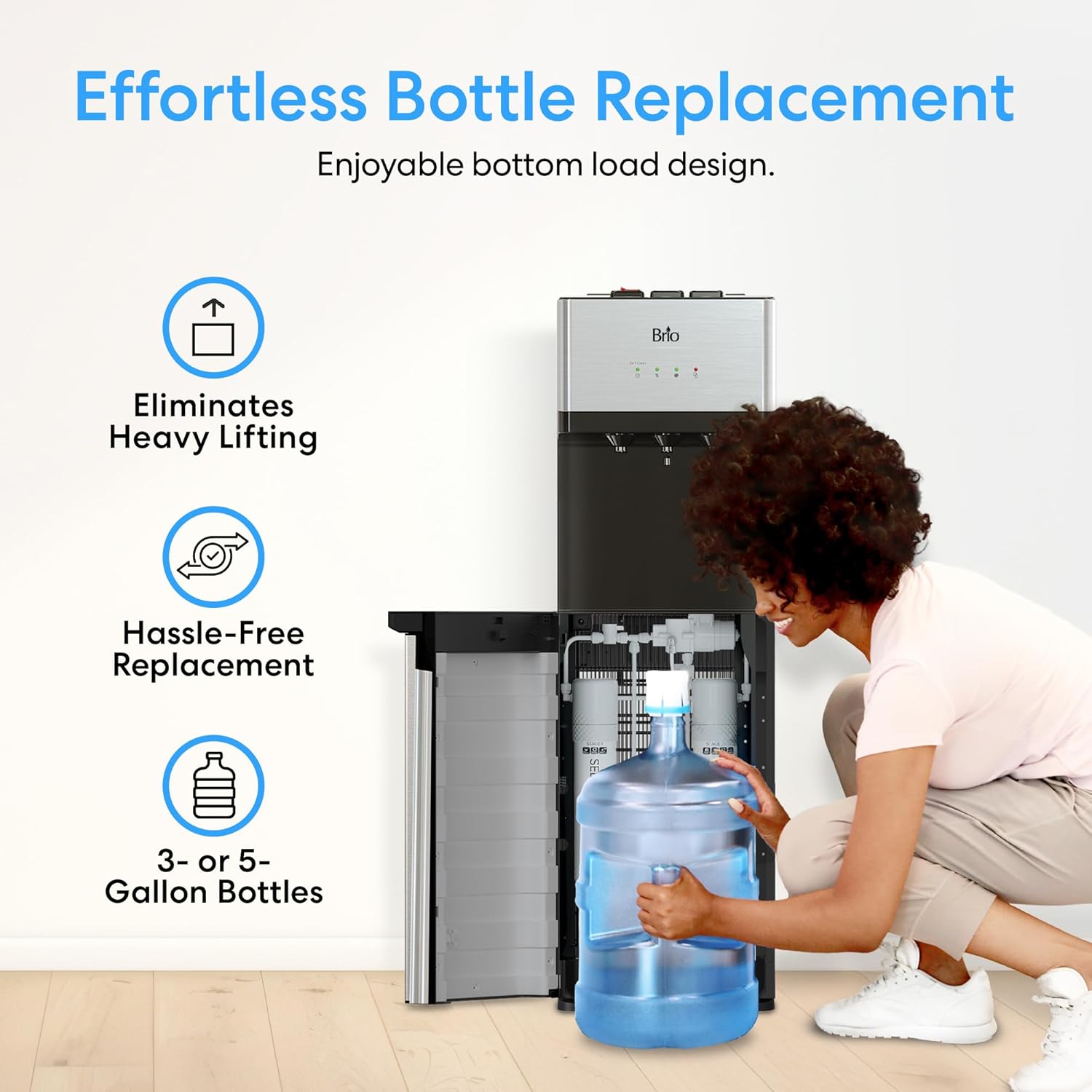
Image: Demonstrating the ease of replacing water bottles with the bottom-loading feature of the dispenser.
- ഫ്ലഷ് ഫിൽട്ടറുകൾ: Before first use, flush the filters by dispensing several cups of water from both the cold and hot spouts until the water runs clear and tastes normal. This removes any carbon fines or air from the system.
- പ്ലഗ് ഇൻ: Once the bottle is loaded and filters are flushed, plug the dispenser into a grounded electrical outlet. Allow approximately 15-30 minutes for the water to reach desired temperatures.
പ്രവർത്തന നിർദ്ദേശങ്ങൾ
Your Brio 520 Series Water Cooler offers three temperature options and convenient indicators.
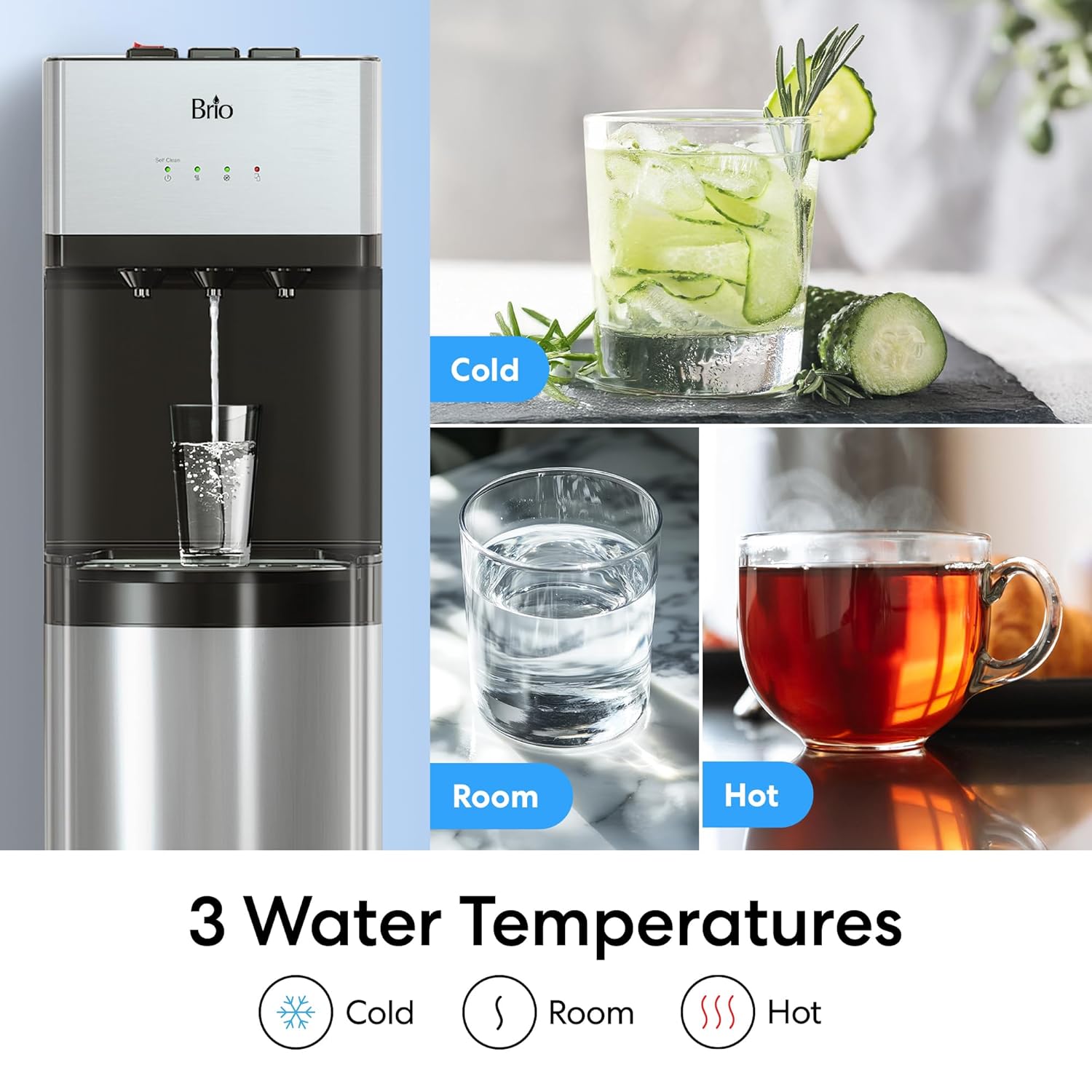
Image: Visual representation of the three water temperature options: cold, room temperature, and hot.
- ജലവിതരണം:
- തണുത്ത വെള്ളം: Press the cold water button/lever.
- മുറിയിലെ താപനില വെള്ളം: Press the room temperature water button/lever.
- ചൂടുവെള്ളം: To dispense hot water, first engage the child safety lock (usually a red switch or button) and then press the hot water button/lever. This two-step process prevents accidental burns.
- ഇൻഡിക്കേറ്റർ ലൈറ്റുകൾ: The control panel features LED indicators to show the status of the dispenser.
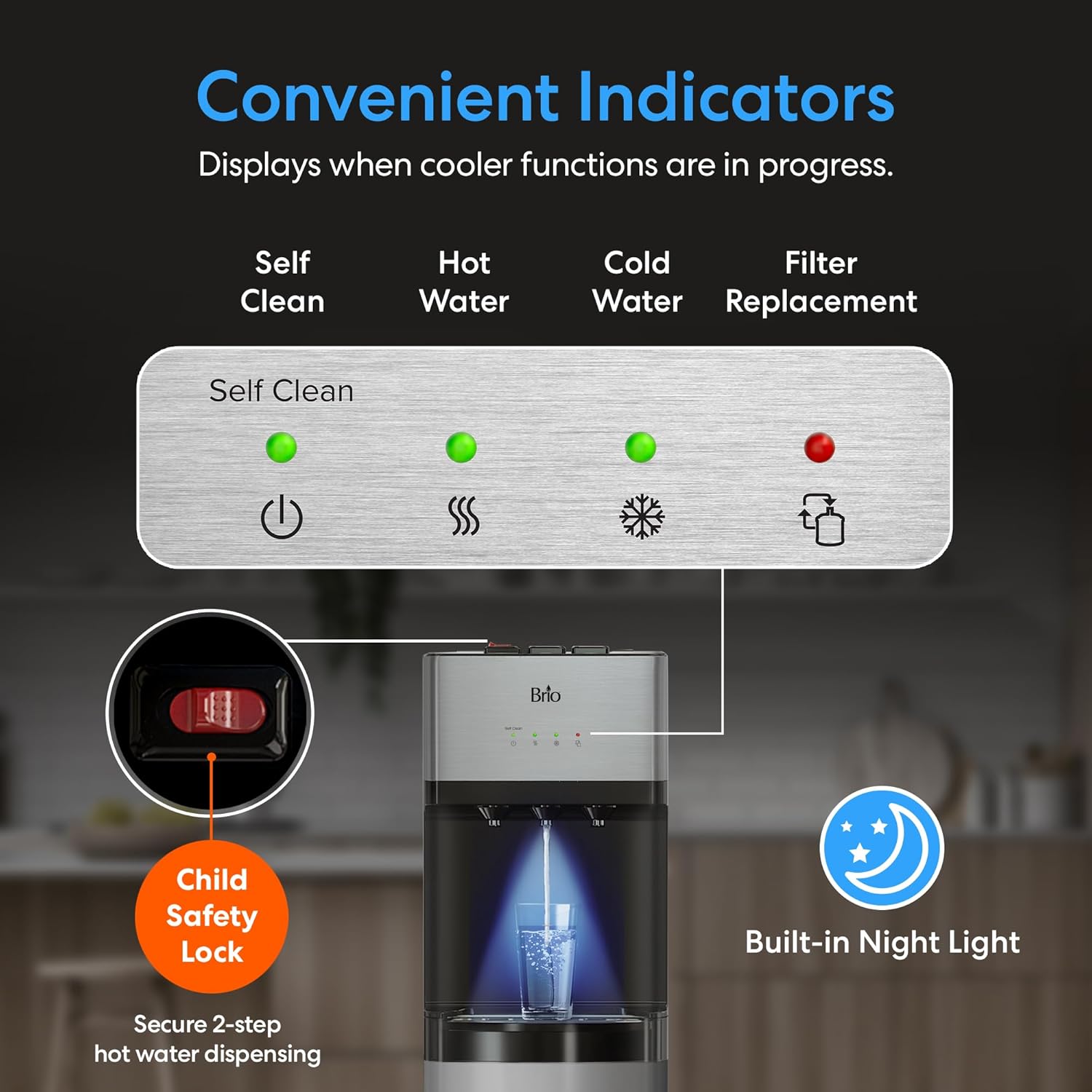
ചിത്രം: കഴിഞ്ഞുview of the dispenser's control panel, highlighting the various indicator lights and safety features.
- സ്വയം ശുദ്ധി: Indicates when the self-cleaning cycle is active.
- ചൂടുവെള്ളം: Illuminates when the hot water is heating or at optimal temperature.
- തണുത്ത വെള്ളം: Illuminates when the cold water is cooling or at optimal temperature.
- ഫിൽട്ടർ മാറ്റിസ്ഥാപിക്കൽ: A red light indicates that the filters need to be replaced.
- Bottle Refill: An indicator will light up when the water bottle needs to be refilled.
- ബിൽറ്റ്-ഇൻ നൈറ്റ് ലൈറ്റ്: The dispenser includes a built-in night light for convenience in low-light conditions. This feature can typically be toggled on/off via a switch on the back of the unit.
മെയിൻ്റനൻസ്
പതിവ് അറ്റകുറ്റപ്പണികൾ മികച്ച പ്രകടനവും ജലത്തിന്റെ ഗുണനിലവാരവും ഉറപ്പാക്കുന്നു.
- ഫിൽട്ടർ മാറ്റിസ്ഥാപിക്കൽ:
The filter replacement indicator light will turn red when it's time to change the filters. For replacement filters, search for "Brio MIB200PKF" 2-Stage Filter Replacement Kit. Refer to the "Setup Instructions" for filter installation steps.
- സ്വയം വൃത്തിയാക്കൽ പ്രവർത്തനം:
The dispenser features an effortless ozone self-cleaning process. To activate, press the designated self-clean button. The self-clean indicator light will illuminate during the cycle. This process sanitizes the entire unit.
- ബാഹ്യ ശുചീകരണം:
ഡിസ്പെൻസറിന്റെ പുറംഭാഗം മൃദുവായ, ഡി-ടച്ച് ഉപയോഗിച്ച് തുടയ്ക്കുക.amp തുണി. ഫിനിഷിന് കേടുവരുത്തുന്ന ഉരച്ചിലുകളുള്ള ക്ലീനറുകളോ ലായകങ്ങളോ ഒഴിവാക്കുക.
- റിസർവോയർ വറ്റിക്കൽ:
Periodically, or before moving the unit, drain the internal reservoirs using the drain plug located at the back of the unit. Use the provided drain tube to direct water into a bucket.
ട്രബിൾഷൂട്ടിംഗ്
If you encounter issues with your Brio 520 Series Water Cooler, refer to the following common problems and solutions:
| പ്രശ്നം | സാധ്യമായ കാരണം | പരിഹാരം |
|---|---|---|
| വെള്ളം വിതരണം ഇല്ല | Empty water bottle; airlock in system; clogged filters. | Replace water bottle; dispense water until flow is consistent; replace filters. |
| വെള്ളം ആവശ്യത്തിന് തണുത്തതല്ല/ചൂടുള്ളതല്ല. | Unit recently plugged in; temperature settings not active; insufficient time for cooling/heating. | Allow 15-30 minutes for temperatures to stabilize; ensure unit is plugged in and power is on. |
| ഫിൽട്ടർ മാറ്റിസ്ഥാപിക്കൽ ലൈറ്റ് ഓണാണ് | Filters are at end of life. | Replace both sediment and activated carbon filters. |
| അസാധാരണമായ ശബ്ദം | Compressor cycling; unit not level; air in system. | Normal operation; ensure unit is on a level surface; dispense water to remove air. |
സ്പെസിഫിക്കേഷനുകൾ
| ഫീച്ചർ | വിശദാംശങ്ങൾ |
|---|---|
| മോഡൽ നമ്പർ | CLNLPOU520SCF2 |
| ഉൽപ്പന്ന അളവുകൾ (D x W x H) | 14.3" x 12.2" x 40.5" |
| ഭാരം | 45 പൗണ്ട് |
| മെറ്റീരിയൽ | പ്ലാസ്റ്റിക്, സ്റ്റെയിൻലെസ്സ് സ്റ്റീൽ |
| ശേഷി | 5 Gallons (compatible with 3 or 5-gallon bottles) |
| ഫിൽട്ടറേഷൻ സിസ്റ്റം | 2-എസ്tage (Sediment, Activated Carbon) |
| ജലത്തിൻ്റെ താപനില | ചൂട്, തണുപ്പ്, മുറിയിലെ താപനില |
| സുരക്ഷാ സവിശേഷതകൾ | ചൂടുവെള്ളത്തിനായുള്ള ചൈൽഡ് സേഫ്റ്റി ലോക്ക് |
| അധിക സവിശേഷതകൾ | Self-Cleaning Ozone Feature, Built-in Night Light, Bottom-Loading |
വാറൻ്റിയും പിന്തുണയും
For warranty information, product support, or to purchase replacement parts and filters, please visit the official Brio store or contact customer service.
Official Brio Store: Visit Brio Store on Amazon
മാറ്റിസ്ഥാപിക്കൽ ഫിൽട്ടറുകൾ: ഇതിനായി തിരയുക "Brio MIB200PKF" 2-Stage Filter Replacement Kit.


